
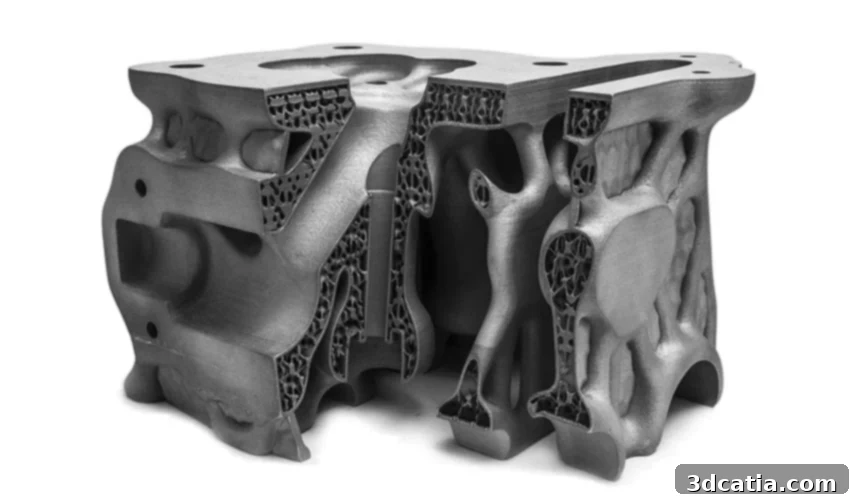
Autodesk Netfabb: Advanced Software for Optimized Additive Manufacturing Workflows
Autodesk, a global leader in design and manufacturing software, offers a comprehensive suite of solutions tailored for various engineering and creative disciplines. Among its most recognized tools is AutoCAD, a foundational design software extensively used by architects, engineers, and construction professionals. While AutoCAD excels in its robust 2D drafting capabilities, providing precision and detailed design functionality, it also supports 3D modeling through solids, surfaces, and mesh objects. However, for highly specialized three-dimensional applications, particularly within the dynamic realm of additive manufacturing, Autodesk provides dedicated solutions designed to tackle the unique demands of 3D production.
Beyond AutoCAD’s broad utility, Autodesk’s portfolio includes other powerful tools fully dedicated to 3D applications, such as Netfabb, Fusion 360, and TinkerCAD. Fusion 360, for instance, is a complete cloud-based platform integrating CAD (Computer-Aided Design), CAM (Computer-Aided Manufacturing), and CAE (Computer-Aided Engineering) tools, offering an end-to-end solution for product design, engineering, and manufacturing. TinkerCAD, on the other hand, provides an accessible, web-based 3D design and modeling environment, making it ideal for beginners and educational purposes.
Netfabb distinguishes itself as Autodesk’s premier software specifically developed for additive manufacturing, encompassing design, simulation, and manufacturing preparation. Originally developed by the German company netfabb GmbH, Autodesk acquired this specialized software in 2015, integrating its advanced capabilities into its ecosystem. Netfabb’s core mission is to streamline complex workflows, optimize designs for AM processes, and significantly reduce build errors before any physical fabrication begins, making it an indispensable tool for advanced 3D printing applications.
Netfabb’s main features are designed to facilitate every step of the additive manufacturing journey. These include the ability to seamlessly convert and import models from various CAD applications, create models specifically optimized to take full advantage of additive manufacturing’s unique capabilities, and maximize the number of parts that can be efficiently nested within each build volume. Consequently, Netfabb serves as a holistic 3D printing software that enables users to move effortlessly from intricate design stages to robust manufacturing execution. We can broadly categorize most of its powerful features into four key areas: **build preparation**, **design optimization for additive manufacturing**, **machine integration**, and **simulation**.

Netfabb is a 3D printing software to move seamlessly from design to manufacturing, minimizing errors and maximizing efficiency.
Netfabb: Advanced Build Preparation for Additive Manufacturing Success
The process of transforming a digital 3D model into a physical 3D printed part involves a multitude of steps, often varying in complexity and demanding meticulous attention to detail. This intricate workflow is precisely why Netfabb software has been meticulously engineered. To empower professional users and prepare their designs for optimal printing, Netfabb integrates a wealth of specialized functions within its build preparation suite. The simplest yet fundamental functions involve the initial stages of preparing a build, such as importing various CAD models into the software, conducting thorough analysis to identify potential issues, and performing automated or manual repairs to ensure model integrity before printing. This critical analysis and repair phase addresses common issues like non-manifold edges, gaps, or inverted normals, which could otherwise lead to print failures.
Beyond foundational repairs, Netfabb offers advanced tools to modify models specifically for additive production. Users can adjust crucial parameters like wall thickness to ensure structural soundness and reduce material usage, smooth rough areas to enhance surface quality and functionality, and leverage semi-automatic tools that intelligently identify and highlight areas requiring support structures. This intelligent support generation helps prevent deformation for overhanging features and complex geometries, ensuring successful part fabrication. Furthermore, Netfabb provides sophisticated part packing and nesting algorithms, allowing users to efficiently position multiple parts within the printer’s build volume to maximize material utilization and accelerate production throughput.
Moreover, Netfabb empowers users to generate customizable reports, which can include vital information for manufacturing documentation, quality control, and quotation purposes. This ensures transparency and traceability throughout the production process. The software also offers a range of advanced toolpath strategies that can be employed to achieve optimum surface quality, maximum part density, and accelerated print speeds, depending on the desired outcome for each specific application. Algorithms within Netfabb are designed to efficiently position and orient parts within the print volume, taking into account factors like thermal distortion, support requirements, and build time. Finally, a robust automation feature significantly simplifies common preparation tasks. This allows users to create scripts for repetitive actions such as importing models, performing analysis, executing repairs, compacting parts, creating precise sections, and generating tool paths, thereby drastically reducing manual effort and potential human error.
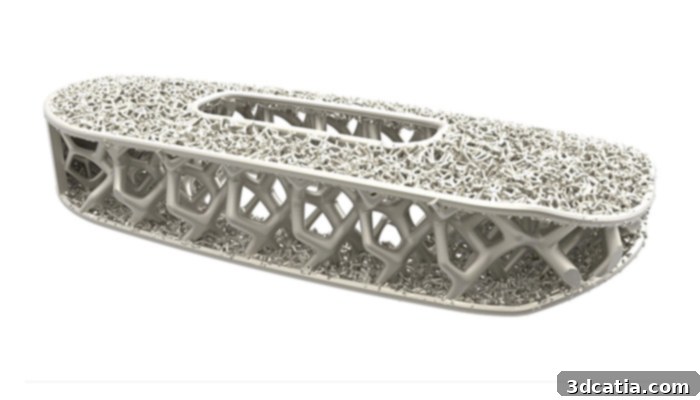
Netfabb provides powerful design optimization tools that can be applied to your 3D models to enhance performance and efficiency.
Given the unparalleled design freedom inherently enabled by additive manufacturing technologies, it is logical that Netfabb provides an extensive suite of design optimization tools that users can apply directly to their 3D models. These powerful tools constitute the second core family of Netfabb’s features: design optimization specifically tailored for additive manufacturing. This suite includes the generation of complex internal lattice structures, which can significantly reduce part weight while maintaining or even improving mechanical performance. Users can fill volumes with a variety of standard or custom lattice patterns, creating unique material properties and tailored functionalities for their parts. Additionally, Netfabb integrates advanced topological optimization capabilities, an algorithmic process that optimizes material distribution within a defined design space based on specific load requirements and constraints. This results in lighter, stronger, and more efficient parts, often yielding organic, bionic-like forms that are impractical or impossible to achieve with traditional manufacturing methods. An integrated performance analysis engine further ensures that these optimized designs meet rigorous engineering standards and functional requirements.
Machine integration, another critical aspect of Netfabb, ensures seamless connectivity and optimized communication with a wide array of additive manufacturing systems. By offering specific machine profiles and direct communication protocols, Netfabb bridges the gap between digital design and physical production, guaranteeing that print jobs are precisely executed according to machine specifications and material properties. This integration minimizes setup times, reduces errors, and maximizes the efficiency and reliability of various 3D printing platforms.
Finally, simulation stands out as an exceptionally important and advanced feature within Netfabb. The software’s powerful simulation capabilities are designed to predict the thermomechanical response of additive parts during the most sensitive manufacturing processes, such as metal powder bed fusion (PBF) and directed energy deposition (DED). The primary aim of these simulations is to drastically reduce build failures and costly rework by accurately predicting how parts might be affected by thermal stresses, distortion, warping, and residual stress build-up during the additive process. By virtually running these complex manufacturing scenarios, engineers can proactively identify potential issues, optimize part orientation, refine support structures, and adjust process parameters before committing to a physical print. This predictive insight saves significant time, material, and valuable machine resources, leading to higher first-time-right print success rates and improved part quality.

The simulation features are quite advanced on Netfabb, providing crucial insights into build processes.
Autodesk Netfabb is available in several versions: Premium, Ultimate, and Simulation, each designed to cater to different levels of user needs and project complexity. The Ultimate and Premium versions now include seamless access to Fusion 360, Fusion Team, and a range of additional features through Fusion 360 Extensions, fostering a truly integrated design-to-manufacturing ecosystem. For professionals who are already designing 3D parts on Fusion 360, leveraging Netfabb’s specialized additive manufacturing features is made incredibly easy due to the direct connection between the two platforms. Users can conveniently download the Netfabb add-in directly from the Fusion 360 menu, integrating these powerful tools into their existing workflow without interruption.
The pricing structure for Netfabb varies depending on the specific version chosen and the subscription term. To provide an indication, the Premium version is currently priced at approximately $5,300 for a one-year subscription. However, prices for the more advanced Ultimate and specialized Simulation versions are not publicly announced on the Autodesk website. For these versions, interested parties are advised to contact Autodesk directly to obtain customized quotations, as pricing often reflects the specific enterprise-level features, extended support, and advanced capabilities required for highly demanding industrial applications. You can find more comprehensive information on the full features and capabilities of each version by visiting the official Autodesk Netfabb overview HERE.
What are your thoughts on Autodesk Netfabb? Have you ever had the opportunity to use this powerful software for your additive manufacturing projects? We invite you to share your experiences and insights in a comment below or engage with us on our Facebook and Twitter pages! Don’t forget to sign up for our free weekly Newsletter, ensuring you receive all the latest news, updates, and innovations in the world of 3D printing delivered straight to your inbox!
*All Photo Credits: AutoDesk