
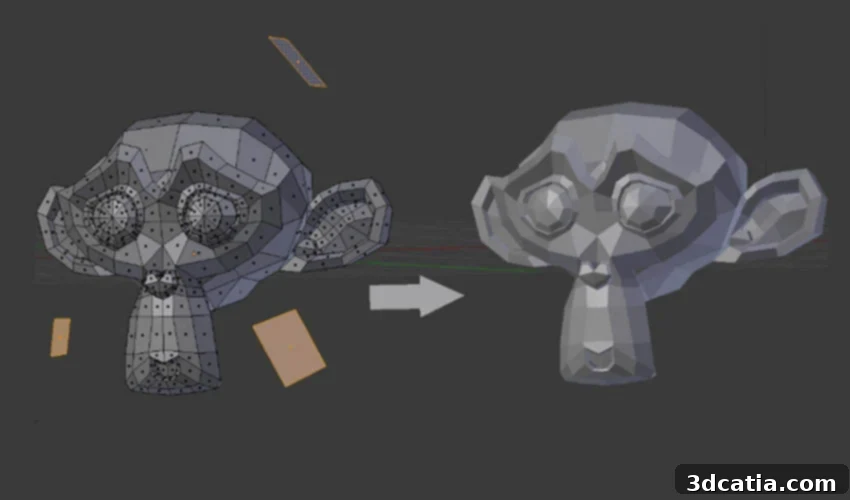
Blender: The Free and Open-Source Powerhouse for 3D Modeling, Animation, and 3D Printing
Since its inception in 1995, Blender has evolved into a comprehensive and incredibly versatile 3D modeling software suite. Its rich array of features has made it exceptionally popular in the demanding worlds of animation, video production, and visual effects, drawing in a global community of artists and developers. What truly sets Blender apart is its unique status as 100% free and open-source software. This fundamental principle means it benefits from continuous improvement and innovation driven by its passionate and extensive community, which regularly collaborates worldwide to share best practices, tackle user challenges, and push the boundaries of 3D creation.
While Blender’s core strength lies in polygonal modeling, a technique highly favored in organic and artistic design, it’s not always the first choice for industrial applications within the additive manufacturing sector. However, its robust capabilities allow users to expertly craft intricate 3D models and, crucially, export them in formats perfectly adapted for 3D printing. This makes Blender a surprisingly capable tool for designers looking to bring their digital creations into the physical world. Let’s delve deeper into the main features and functionalities that make Blender a compelling option for both seasoned professionals and aspiring creators, exploring its versatility from breathtaking animations to tangible 3D prints.
Blender’s Expansive Feature Set: Beyond Basic Modeling
Blender is far more than just a modeling tool; it’s an integrated 3D creation pipeline, consolidating a vast array of functions into a single, cohesive application. These functions are logically grouped into various families, including but not limited to, comprehensive modeling tools for creating any shape imaginable, advanced animation capabilities for bringing characters and scenes to life, powerful simulation engines for realistic physics and fluid dynamics, non-linear video editing for post-production, stunning 3D rendering engines (Cycles and Eevee) for photorealistic visuals, and compositing features for integrating different visual elements. This extensive toolkit makes Blender an indispensable asset for animation studios, independent artists, and small teams working across diverse media like video games, feature films, and broadcast productions. Indeed, numerous “Open Movies” – professionally produced animated films – have been entirely created using Blender, showcasing its professional-grade capabilities.
Blender excels in polygonal modeling, allowing for highly detailed and organic shapes.
Mastering 3D Shapes: The Power of Polygonal Modeling in Blender
Understanding the fundamental modeling methods is key to appreciating any 3D software. While some solutions specialize in surface modeling (for precise, engineering-focused designs) or solid modeling (for robust, CAD-like construction), Blender primarily champions polygonal modeling. This method involves constructing three-dimensional shapes from a multitude of small, flat surfaces known as polygons. These polygons, typically triangles or quadrilaterals, are meticulously arranged to form the external shell of a model, collectively known as the “mesh.” This mesh serves as the foundational structure upon which all subsequent design and detailing are built.
Each polygon itself is defined by three fundamental components: vertices, edges, and faces. Vertices are the points in 3D space, edges connect two vertices, and faces are enclosed by three or more edges. By manipulating these basic elements, users can construct simple geometric primitives. For instance, interlocking six square polygons precisely will form a perfect cube. The true power of polygonal modeling, however, emerges as users begin to deform these basic shapes, stretching, extruding, and combining them to design increasingly complex objects. Imagine starting with a few deformed cubes, meticulously manipulating their vertices and edges, and gradually transforming them into the elegant curves and precise angles of a chair or an intricate character model. Blender provides an intuitive toolkit that empowers users to sculpt, refine, and add progressive complexity to their models, giving them unparalleled control over artistic expression and detailed surface creation.
Blender and Additive Manufacturing: A Niche but Powerful Tool for 3D Printing
Although Blender’s roots are firmly planted in animation and visual effects, its capabilities for 3D printing have been steadily growing and improving. While it supported basic 3D printing modeling since as early as 2002, a significant leap occurred with version 2.67, which specifically enhanced functionalities crucial for additive manufacturing. This continuous development showcases Blender’s commitment to adapting to diverse user needs. One of the most notable additions for 3D printing enthusiasts is the “3D Printing ToolBox,” an invaluable suite of tools designed to streamline the preparation of models for physical production.
Essential Tools for 3D Printing: The 3D Printing ToolBox Explained
The 3D Printing ToolBox within Blender is a critical feature that empowers users to proactively identify and rectify potential errors in their mesh geometry that could otherwise lead to failed 3D prints. Additive manufacturing requires watertight, manifold models with specific structural integrity, and the ToolBox provides robust analytical capabilities to ensure these criteria are met. For example, it can meticulously check for non-manifold geometry, which occurs when a mesh has holes or internal faces, preventing a 3D printer from correctly interpreting the object’s solid form. It also offers powerful analyses for minimum wall thickness, ensuring that no part of the model is too thin to be successfully printed and maintain its structural integrity. Furthermore, the ToolBox can evaluate the geometry of overhangs, a common challenge in FDM printing, helping designers adjust their models to minimize the need for support structures or prevent material sag, thereby optimizing printability and surface quality. By providing these detailed checks, the ToolBox helps users create robust, print-ready models, saving time, material, and frustration.
Exporting Your Creations: Compatible Formats for 3D Printing
Another crucial aspect of Blender’s utility for additive manufacturing lies in its comprehensive support for various export formats. The software seamlessly offers widely accepted file types essential for 3D printing, most notably STL (STereoLithography) and OBJ (Object) files. STL is the industry standard for transferring 3D mesh data to slicing software, representing the surface geometry of a 3D object as a collection of interconnected triangles. OBJ files, while also containing geometric data, can additionally store information about color, texture, and material properties, making them suitable for multi-color or textured 3D printing processes. Despite some initial perceptions that Blender might not be the most intuitive solution specifically for 3D printing compared to dedicated CAD software, its capabilities and the flexibility it offers in creative design make it highly appreciated by a growing number of artists and designers. For instance, renowned Dutch artist Dolf Veenvliet has publicly championed Blender, using it extensively to conceptualize and design his intricate and highly artistic 3D-printed sculptures, proving its viability for professional artistic applications in additive manufacturing.
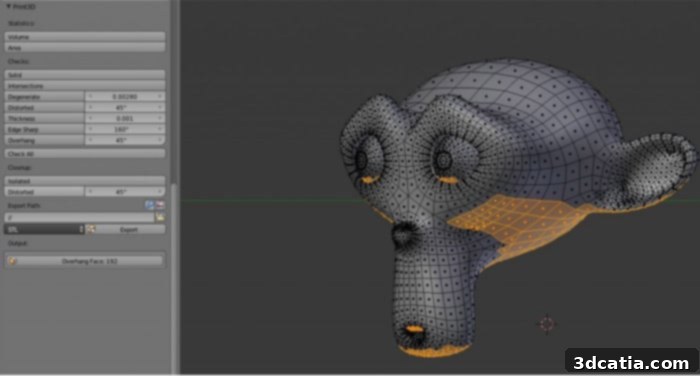
The ‘3D Printing ToolBox’ provides essential checks to ensure your model is ready for 3D printing.
Staying Current: What’s New in Blender 4.0?
The Blender community continuously strives for innovation, and this commitment is reflected in its regular updates. The latest stable version, Blender 4.0, was officially released on November 14, 2023, bringing a host of exciting new features and performance enhancements. While many of these updates offer significant improvements across the board, it’s worth noting that their primary focus tends to lean towards refining workflows for animation, rendering, and visual effects, rather than introducing features specifically tailored for modeling for 3D printing. One of the highly anticipated additions in Blender 4.0, for example, is the implementation of light linking. This advanced function grants artists unprecedented control over their scene lighting, allowing specific lights to affect only certain objects or elements, thereby achieving more precise and nuanced illumination without impacting the entire scene. This is a game-changer for cinematic rendering and complex visual compositions.
On the whole, the new features introduced in Blender 4.0 certainly bring valuable improvements to the software’s overall performance, stability, and creative potential. However, their benefits are generally more pronounced and immediately impactful within the realms of video production, animation, and high-fidelity rendering. While these enhancements indirectly contribute to a more powerful and efficient creative environment, they do not fundamentally alter Blender’s existing workflow for preparing models for 3D printing, which remains robust and reliable. Regardless of the version, Blender continues to boast excellent compatibility, running smoothly across all major operating systems, including Mac, Windows, and Linux. The software’s accessibility is further enhanced by its free availability, allowing anyone to download it HERE and embark on their 3D creative journey without any financial barrier.
Navigating the 3D Software Landscape: Blender’s Place Among Alternatives
While Blender offers an incredibly powerful and feature-rich environment, it’s important to consider its position within the broader ecosystem of 3D software, especially when evaluating options for various skill levels and specific applications. For complete beginners stepping into the world of 3D modeling, Blender’s vast array of tools and complex interface can present a steeper learning curve. In such cases, more accessible and user-friendly software like TinkerCAD often comes highly recommended. TinkerCAD provides a simplified, block-based modeling approach that is perfect for learning fundamental 3D concepts and quickly creating basic designs, particularly for educational purposes or simple 3D prints.
On the other hand, for more experienced users or those with specific engineering and product design needs, software like Autodesk Fusion 360 stands out. Fusion 360 offers a comprehensive suite of CAD/CAM tools, including robust solid and surface modeling capabilities, simulation, and manufacturing features, making it a professional standard for industrial design and functional part creation. Compared to these specialized tools, Blender occupies a unique niche. It’s not the most popular dedicated 3D software for casual 3D printing enthusiasts primarily due to its artistic focus and polygonal modeling workflow, which can sometimes require more manual cleanup for print readiness. However, its immense value lies in being free, open-source, and continuously improved by its dedicated global community, offering unparalleled creative freedom. For artists, sculptors, and designers who prioritize organic shapes, character creation, and artistic expression, and who are willing to invest time in mastering its powerful features, Blender remains an exceptionally rewarding tool for bringing complex digital models to life through additive manufacturing.
Blender stands as a testament to the power of open-source development, offering a complete, continuously evolving 3D creation suite that rivals commercial alternatives. Its strengths in animation, rendering, and artistic modeling are undeniable, and its capabilities for 3D printing, especially with tools like the 3D Printing ToolBox, make it a viable and attractive option for those looking to combine artistic freedom with tangible results. Whether you’re crafting a complex character, designing a custom part, or bringing a sculptural vision to life, Blender provides the tools, the community, and the flexibility to achieve your creative goals without any financial barrier. We encourage you to explore its vast potential and join its vibrant community!
Do you currently use Blender for your 3D projects or for 3D printing? We’d love to hear about your experiences and insights! Share your thoughts and creations in a comment below or connect with us on our Facebook and Twitter pages. For all the latest news, updates, and innovations in the world of 3D printing, make sure to sign up for our free weekly Newsletter, delivered straight to your inbox!