
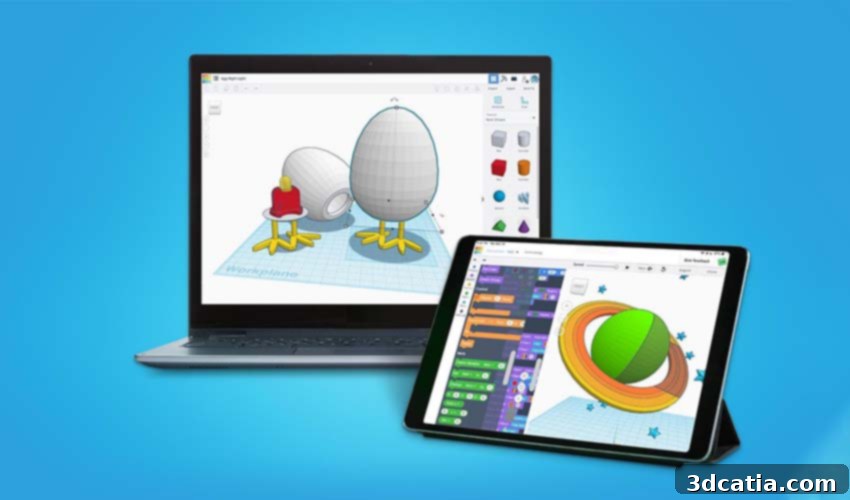
Tinkercad: Your Free Gateway to Intuitive 3D Design and Additive Manufacturing
In the exciting realm of additive manufacturing, the initial and arguably most critical stage is design. It’s here that ideas take shape, transforming from abstract concepts into tangible models. Reflecting this fundamental importance, the market today boasts an extensive array of software tools tailored for creating intricate 3D models. Among these, one solution has consistently risen to prominence, particularly within the 3D printing community, due to its accessibility and user-friendly interface: Tinkercad. This innovative online platform, part of Autodesk’s comprehensive suite of tools, empowers even complete beginners to confidently craft sophisticated 3D models. Its foundation lies in Constructive Solid Geometry (CSG), a powerful yet intuitive modeling technique that allows users to construct complex designs by combining, adding, and subtracting simpler, predefined geometric objects. This approach makes Tinkercad an exceptionally user-friendly CAD software, widely embraced by a diverse audience including educators, students, hobbyists, and aspiring designers. Its widespread appeal is further amplified by its key advantage: it’s entirely free and requires nothing more than an internet connection. By enabling users to create models seamlessly compatible with 3D printing, Tinkercad serves as an ideal entry point for anyone venturing into the fascinating world of additive manufacturing.
For individuals who don’t require the advanced, professional-grade functionalities offered by more complex solutions like SketchUp or Fusion 360, Tinkercad presents an excellent and highly capable alternative. Interestingly, Autodesk, the powerhouse behind Fusion 360 and a leader in design software, recognized Tinkercad’s immense potential and acquired it in 2013. This acquisition came just two years after Tinkercad’s initial launch by its visionary founders, former Google engineer Kai Backman and co-founder Mikko Mononen. Tinkercad’s most compelling differentiator against many other CAD programs is not just its zero-cost entry but also the surprising depth of modeling freedom it provides, far exceeding initial expectations. To truly understand its capabilities, we delve deeper into what makes Tinkercad an indispensable tool for so many creative minds.
Unpacking the Core Features of Tinkercad: More Than Just Simple Shapes
While Tinkercad is widely celebrated as the perfect starting point for beginners in 3D modeling, its utility extends far beyond novice users. Experienced designers also frequently find themselves returning to Tinkercad for rapid prototyping, quick concept visualization, or even for teaching fundamental design principles. Its foundation in Constructive Solid Geometry (CSG) is key to this versatility. CSG allows users to build complex solid models by intuitively adding or removing predefined geometric shapes from a workspace. This means that even with its simplified interface, there’s virtually no limit to the complexity you can achieve by combining an increasing number of basic shapes.
In practical terms, the process is straightforward and highly visual. Users simply select from an extensive library of fundamental shapes – cylinders, cubes, spheres, pyramids, cones, and more – and drag them onto the workplane. From there, these shapes can be easily manipulated: moved, resized, rotated, and duplicated. The true power emerges when these shapes are combined. You can select multiple shapes and group them to form a single, more elaborate object. Crucially, Tinkercad also offers “hole” versions of every basic shape. By overlapping a “hole” shape with a “solid” shape and then grouping them, users can effectively subtract material, carving out intricate details or creating hollow structures. For instance, you could begin with a simple cylinder, then add various triangles, circles, or cones to its surface, or subtract sections to create grooves and openings. Each shape can be precisely positioned and rotated, allowing for a comprehensive view and refinement from every conceivable angle.
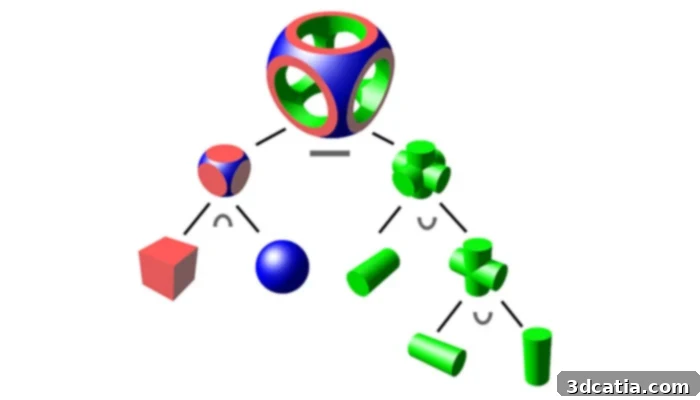
Tinkercad relies on solid construction geometry, simplifying complex designs.
Beyond Basic Forms: Electronic Circuits, Codeblocks, and More
Tinkercad’s feature set extends well beyond mere geometric modeling. One of its most innovative capabilities is the integration of electronic circuits directly into 3D models. This allows users to design objects that incorporate light, movement, and interactivity. The platform provides a virtual breadboard and a wide range of electronic components—from LEDs and resistors to Arduino microcontrollers and motors. Users can wire these components together, write simple code (often with block-based programming), and even simulate the circuit’s behavior within the software. This simulation feature is invaluable, enabling designers to test how their electronic components will respond in a real-world scenario before committing to physical construction, making it an excellent tool for learning about electronics and developing Internet of Things (IoT) prototypes.
Another unique and engaging feature is Tinkercad’s ability to transform 3D designs into buildable brick models, reminiscent of creating designs with LEGO bricks. This functionality is powered by ‘Codeblocks,’ a block-based code system similar to Scratch. Codeblocks makes parametric and adaptive design accessible to a younger audience and those new to coding. By snapping together code blocks, users can generate dynamic models, create patterns, and understand computational design principles without delving into complex programming languages. This not only fosters creativity but also introduces fundamental concepts of computational thinking. Furthermore, for the millions of Minecraft enthusiasts, Tinkercad offers a direct pathway to design objects compatible with the popular game, allowing users to import their creations into the Minecraft world, blending 3D modeling with digital gaming in an exciting way.
Preparing Your Designs for the Real World: Export and Slicing
Tinkercad’s versatility means it’s suitable for a broad spectrum of applications, with 3D printing being one of the most prominent. Once a design is complete, Tinkercad provides multiple options for exporting 3D models. The most commonly used formats for additive manufacturing are STL (Stereolithography), OBJ (Object file), and SVG (Scalable Vector Graphics). The STL format is the de facto standard for 3D printing, representing the surface geometry of a 3D object as a collection of interconnected triangles. Once you have an STL file of your model, the next crucial step for 3D printing is utilizing slicer software.
Slicing software plays a pivotal role in the 3D printing workflow. It takes your digital 3D model (in STL or OBJ format) and meticulously converts it into a series of incredibly thin, horizontal layers. During this process, the slicer generates a G-code file. G-code is a specialized programming language containing precise instructions tailored to a specific type of 3D printer. These instructions dictate every movement of the 3D printer’s extruder, including its path, speed, temperature, and when to deposit material. In essence, the slicer digitally “slices” your object into a stack of flat layers and translates these layers into a sequence of linear movements and actions that the 3D printer can understand and execute. OBJ files, while also supporting geometry, have the added advantage of being able to store color and texture information, making them ideal for more visually rich applications. SVG files, on the other hand, are 2D vector graphics, often used for laser cutting, vinyl cutting, or other two-dimensional fabrication methods.
The Tinkercad Ecosystem: Community, Resources, and Future Pathways
Beyond its powerful features, Tinkercad is celebrated for its incredibly intuitive user experience. The learning curve for fundamental operations such as transforming, duplicating, and modifying shapes is remarkably gentle, making it accessible to individuals with no prior CAD experience. This ease of use is frequently highlighted by Tinkercad’s vast user base. Moreover, Autodesk has invested significantly in building a robust support ecosystem for its community. This includes an extensive library of tutorials, lesson plans, a vibrant user forum, and a dedicated blog offering tips and tricks to help users, particularly educators and beginners, get started and progress rapidly.
One of the strategic advantages of Tinkercad being an Autodesk product is its integration within the broader Autodesk ecosystem. For users who master the basics in Tinkercad and wish to advance to more complex design challenges, there’s a seamless pathway to transfer their initially simple models directly into Fusion 360. This integration allows aspiring designers to leverage Tinkercad as a foundational learning tool before transitioning to Fusion 360’s professional-grade tools for advanced features like parametric modeling, simulations, and CAM (Computer-Aided Manufacturing) capabilities. This thoughtful progression ensures that users can grow their skills within a consistent and supportive software environment.
Designing On-the-Go: Tinkercad’s iPad App and Augmented Reality
Recognizing the increasing demand for mobile accessibility, Autodesk has extended Tinkercad’s reach beyond desktop computers with the launch of a dedicated version for iPad. This application is readily available for download through the Apple App Store, bringing the full power and simplicity of Tinkercad to a portable format. The iPad app brilliantly capitalizes on the device’s high-resolution screen and integrated camera to introduce an exciting new capability: augmented reality (AR). With AR integration, users can design their 3D models and then instantly project them into the real world through the iPad’s camera, visualizing how their creations would look and fit in a physical space. This immersive experience is not just a novelty; it’s a powerful tool for ideation, allowing designers to experiment with scale, context, and aesthetics in real-time environments. Whether in a classroom, at a workshop, or simply on the move, the iPad app empowers users to design from anywhere and bring their imaginative ideas to life with the added dimension of augmented reality.

Getting Started and Joining the Tinkercad Community
If you’re eager to embark on your 3D design journey, or if you’re an educator looking for an engaging tool for your students, Tinkercad is an unparalleled resource. We highly recommend visiting the official Tinkercad website. There, you’ll discover a wealth of inspiration, carefully crafted teaching units, invaluable tips and tricks on the company blog, and a comprehensive library of video tutorials to guide you through every step of the design process. The website serves as a central hub for everything Tinkercad, supporting both new and seasoned users alike. You can explore further information and begin your creative endeavors by visiting the Tinkercad website HERE.
Conclusion: Tinkercad’s Enduring Impact on 3D Design
In conclusion, Tinkercad stands as a testament to how powerful and accessible 3D design software can be. It masterfully lowers the barrier to entry for creative expression in three dimensions, making it an indispensable tool for education, personal projects, and rapid prototyping in additive manufacturing. Its intuitive CSG-based modeling, innovative features like integrated electronics and Codeblocks, and strong community support ensure that users, regardless of their experience level, can bring their ideas to life with ease. Whether you’re a student designing your first object, a hobbyist prototyping an invention, or an educator inspiring the next generation of engineers, Tinkercad provides the perfect platform to explore, create, and innovate. Its consistent evolution, including mobile accessibility and AR capabilities, reinforces its position as a leading force in democratizing 3D design for everyone.
For those looking to explore other beginner-friendly 3D modeling software, our comprehensive listing offers additional options. We’d love to hear about your experiences! Have you used Tinkercad to create 3D models or introduce someone to the world of 3D design? Share your thoughts and projects in a comment below, or connect with us on our LinkedIn, Facebook, and Twitter pages! Don’t miss out on the latest advancements and news in the 3D printing industry; remember to sign up for our free weekly Newsletter here, delivered straight to your inbox. You can also find all our engaging videos and tutorials on our YouTube channel.