
Simplify3D Review: Why This Premium Slicer Dominates Professional 3D Printing
Simplify3D stands as a premier slicer software, meticulously engineered to bridge the gap between digital 3D models and physical objects. Its core function involves importing models from various online platforms, allowing users to make intricate modifications, and then translating these designs into machine-readable G-code for 3D printers. While alternative programs like Cura offer a gentler learning curve, making them more accessible to beginners, Simplify3D is distinctly tailored for professional applications and advanced educational environments. This distinction stems from its sophisticated design, unparalleled complexity, and extensive compatibility with a vast array of 3D printer manufacturers.
The software’s positioning towards professionals is further underscored by its pricing model. A license for its latest iteration, Version 5 (currently v5.1 as of May), commands a price of $199 USD per user annually. This contrasts sharply with numerous other slicer solutions available for free download. Despite this investment, Simplify3D maintains widespread usage across the industry. This prompts an important question: what unique attributes contribute to its enduring popularity and perceived value within the 3D printing community?
Accessibility is a key strength for Simplify3D, as it supports six different languages and is compatible with major operating systems including Windows, macOS, and Linux. It also boasts broad file format support, accepting STL, OBJ, and 3MF formats, which are industry standards for 3D models. Users can effortlessly import models downloaded from popular online filesharing platforms, streamlining the workflow. One of Simplify3D’s most compelling features is its exceptional compatibility, supporting an impressive 95% of 3D printer models currently available on the market. While the developers consistently expand this compatibility list, prospective users are strongly advised to verify their specific printer model’s support before purchasing the software to ensure seamless integration. As previously noted, Simplify3D is ideally suited for users who possess prior experience with 3D printing and aspire to delve deeper into model customization and advanced printing techniques. Its comprehensive feature set also makes it an invaluable tool for educational purposes, providing a robust platform to demonstrate the intricate capabilities and complexities inherent in modern slicer software.

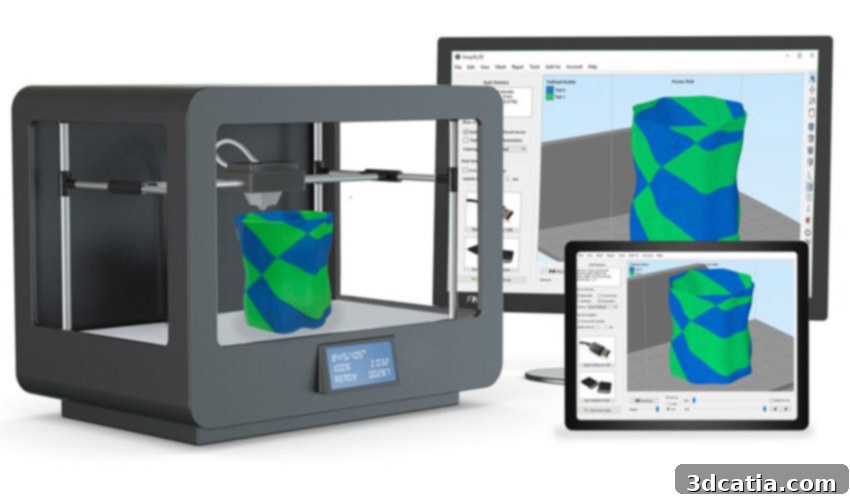
Simplify3D allows users to modify highly complex models with precision and control.
Advanced Functionalities and Efficiency of Simplify3D
According to its developers, Simplify3D can significantly reduce 3D print times—potentially by as much as half—when compared to other leading slicers. This remarkable efficiency is attributed to its innovative algorithms, which have been meticulously designed for maximum speed and optimization. These algorithms intelligently process models, generating highly efficient toolpaths and strategic infill patterns that minimize extruder travel and non-printing movements without compromising print quality. This focus on efficiency translates directly into tangible benefits for users, including reduced operational costs and faster production cycles.
Another significant time-saving advantage is the software’s unparalleled compatibility. As mentioned, Simplify3D works seamlessly with over 600 different 3D printer models, representing approximately 95% of the market. This broad support eliminates the common headache of needing multiple slicer programs for different machines or the cumbersome process of file transfers between software. For workshops or professionals operating two or more diverse machines, Simplify3D offers a singular, unified platform, greatly simplifying workflow management and increasing overall productivity. This centralized control reduces potential errors and accelerates the transition between different printing tasks.
Precision Model Modification and Enhanced Print Quality
Simplify3D empowers users with an extensive suite of tools for modifying models directly within the software before printing. These tools facilitate a wide range of improvements and optimizations. A standout feature is the **variable settings wizard**, which allows users to segment their 3D model into distinct parts and apply unique print settings to each section independently. This granular control is incredibly valuable for complex geometries, enabling adjustments to parameters such as thickness, infill density, and surface structure precisely where needed. For instance, a user might apply a denser infill to the base of a model for structural integrity while using a lighter infill for upper, less stressed sections. Furthermore, specific print speeds, temperatures, and even cooling settings can be customized for individual areas, leading to optimized results across the entire print. The latest versions also introduce advanced features like **enhanced top-layer finishing**, often referred to as ‘ironing,’ which smooths the uppermost surfaces of a print to achieve a glass-like finish, significantly improving aesthetic quality and detail.
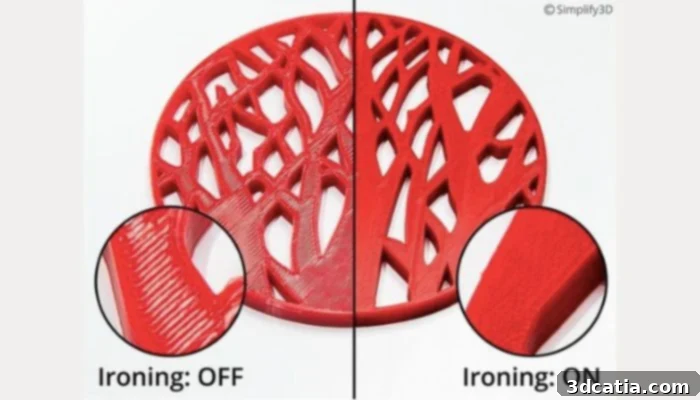
Ironing is one example of the advanced surface finishing features Simplify3D provides, resulting in exceptionally smooth top layers.
Beyond surface aesthetics, Simplify3D also excels in optimizing material usage and structural integrity. Its **dynamic infill density feature** intelligently adjusts the infill percentage based on the model’s geometry and stress points. This ensures maximum strength and thickness for exterior structures and crucial support elements, while simultaneously reducing the overall amount of material consumed for internal, non-critical sections. This intelligent approach minimizes material waste and can significantly lighten the final part without compromising its mechanical properties. Concurrently, the software offers the robust capability to independently generate **optimal support structures**. These supports are not only efficient in material use but are also designed for easy removal post-printing, leaving minimal marks on the model’s surface. To further enhance user efficiency, Simplify3D enables the creation and saving of custom print profiles, allowing users to quickly access predefined settings tailored for specific materials, printers, or project requirements, thus saving valuable setup time.
Handling Complex Geometries and Error Prevention
For handling highly intricate and geometrically complex models, Simplify3D offers superior capabilities compared to many other software solutions. This is largely attributed to its **dynamic extrusion sizing** feature, which grants users precise control over the amount of filament extruded for each distinct section of the print. This level of control is crucial for maintaining accuracy and detail in challenging areas, such as fine features or delicate overhangs. To ensure optimal print outcomes and prevent common printing errors, the software includes advanced functionalities such as **automatic reinforcement of small, exposed pieces**. This prevents delicate parts from breaking during the printing process or post-processing. Additionally, its **automatic mesh repair** system detects and corrects common mesh issues in imported models, such as non-manifold edges or holes, which can often lead to print failures if unaddressed. These proactive error prevention measures lead to considerable savings in both time and material, as the risk of defective prints is significantly mitigated.
A cornerstone of Simplify3D’s error prevention strategy is its highly detailed and precise **preview mode**. This feature allows users to meticulously review the entire print process in real-time, layer by layer, before committing to a physical print. Users can easily navigate through different sequences of the print, inspecting toolpaths, infill patterns, and support placements with exceptional clarity. This granular preview enables users to identify potential issues, such as unsupported overhangs, weak points, or collisions, and make necessary adjustments to their settings, thereby drastically reducing the likelihood of wasted filament and failed prints. The visual feedback provided by the preview mode is invaluable for experienced users seeking to fine-tune every aspect of their prints.
Conclusion: Is Simplify3D the Right Choice for You?
The advantages offered by Simplify3D are indeed manifold, spanning across significant reductions in print time and material costs, alongside a notable improvement in overall print quality and reliability. The sophisticated preview mode, in particular, empowers users to pre-emptively identify and rectify potential print errors, minimizing waste and optimizing resource utilization. However, it is crucial to reiterate that Simplify3D is a powerful tool designed for experienced users. If you are new to 3D printing or lack prior experience with advanced slicer software, you may find the learning curve steep and might not be able to unlock its full potential immediately. For professionals, educators, and serious hobbyists who demand precision, efficiency, and advanced control over their 3D prints, the investment in Simplify3D is often justified by the unparalleled capabilities and superior results it delivers.
To delve deeper into Simplify3D’s features, explore its latest version updates, and understand its comprehensive capabilities, we highly recommend visiting their official website HERE. This platform provides detailed documentation, tutorials, and community resources to help users maximize their experience with the software.
Have you had the opportunity to use Simplify3D, or are you contemplating trying this robust slicer for your 3D printing projects? We encourage you to share your thoughts and experiences in the comments section below! You can also engage with us and other 3D printing enthusiasts on our social media channels: LinkedIn, Facebook, and Twitter. Don’t miss out on the latest advancements and news in the additive manufacturing world – sign up for our free weekly Newsletter here to receive direct updates to your inbox! Additionally, explore a wealth of informative videos on our dedicated YouTube channel.
*All image credits: Simplify3D