
Mastering OpenSCAD: A Deep Dive into Script-Based Parametric 3D Modeling for Technical Design
OpenSCAD stands as a truly unique and powerful entry in the realm of CAD software, offering a distinct approach to creating solid 3D models. Unlike many mainstream CAD applications that rely heavily on graphical user interfaces (GUIs) and direct manipulation, OpenSCAD embraces a script-only paradigm. This free, open-source software is specifically tailored for users who possess a comfort level with programming and a desire for precise, reproducible, and parametrically controlled designs. Instead of interactively pushing and pulling surfaces as you might in programs like SOLIDWORKS or AutoCAD, OpenSCAD requires you to define your models using its dedicated description language. This text-based method means that parts are generated and can only be previewed once their code has been written, offering an unparalleled level of control and exactness over the design process. It’s important to note that OpenSCAD is not designed for artistic or organic modeling, a task better suited for tools like Blender or even Fusion 360’s sculpting environments. Instead, its strength lies in technical precision and mathematical definitions.
The core philosophy of OpenSCAD revolves around **parametric design**, where models are defined by customizable parameters rather than fixed dimensions. This capability is incredibly advantageous when designing parts that need to be easily adapted or iterated upon. Imagine creating a gear with a specific number of teeth, a bolt with an adjustable diameter, or an enclosure whose dimensions can be altered by simply changing a variable in the script. This programmatic approach ensures that designers retain complete control over every aspect of their model, from initial concept to final modification, facilitating rapid prototyping and highly efficient design workflows. Moreover, when it comes to 3D printing, ensuring compatibility between the 3D model and the printer is absolutely imperative. OpenSCAD streamlines this essential task by allowing models to be easily exported in appropriate formats, making it a favorite among hobbyists, engineers, and researchers for modeling various machine and mechanical components, as well as complex scientific tools for research and education.
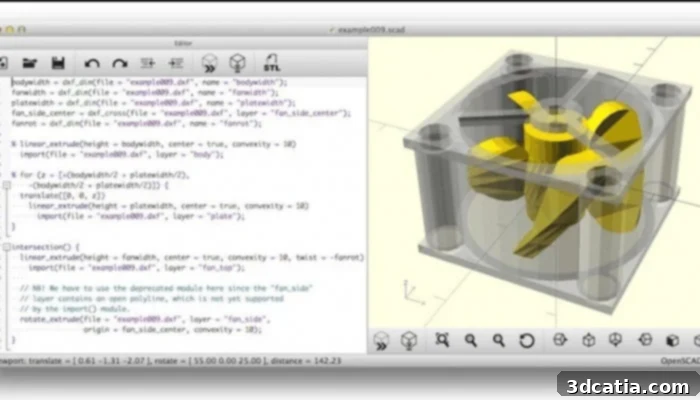
The OpenSCAD interface.
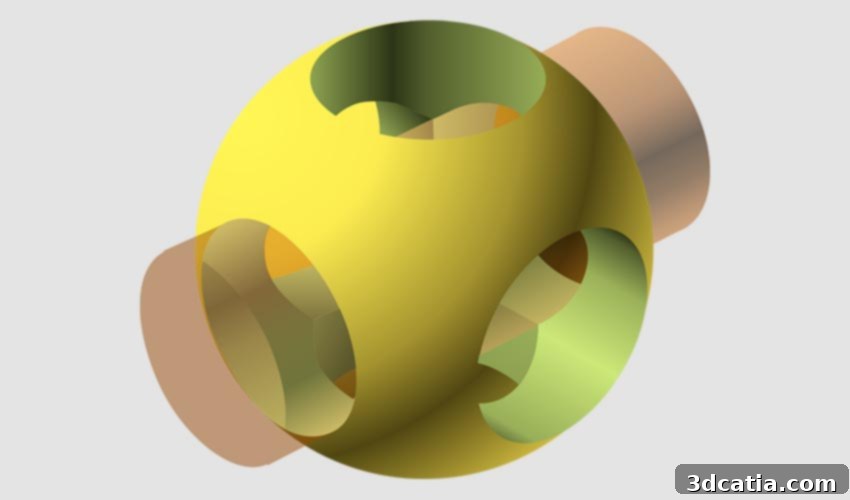
OpenSCAD’s broad accessibility is a significant advantage; being free, open-source, and cross-platform, it is readily available for Linux/UNIX, Windows, and Mac OS X operating systems. The software fundamentally offers two primary modeling techniques to construct 3D objects. The first is **Constructive Solid Geometry (CSG)**, a method where complex models are built by combining simpler geometric primitives—such as spheres, cubes, cylinders, and prisms—using Boolean operations like union, difference, and intersection. This allows for incredibly precise control over the shape and form of the object. The second technique involves the **extrusion of 2D outlines**. For users familiar with 2D drafting, OpenSCAD allows the import of AutoCAD DXF files, which can serve as the data exchange format for these 2D outlines. Beyond simple extrusion, design parameters can also be extracted directly from DXF files, enabling a seamless transition from 2D technical drawings to 3D models. Critical for additive manufacturing, OpenSCAD can read and create 3D models in widely used file formats such as STL (Stereolithography) and OFF (Object File Format), with STL being the predominant format for exporting designs intended for 3D printing.
While OpenSCAD excels in technical design, it also offers some additional capabilities that enhance its utility. For instance, basic animation is possible, generating a few images per second for simpler models, which can be useful for demonstrating mechanical movements or design iterations. The official OpenSCAD website serves as a central hub for essential resources, including the latest software releases, comprehensive documentation, and up-to-date news. However, it’s worth noting that the user community sometimes points out certain challenges. Some users feel there could be more built-in tools or more robust community-supported packages to streamline certain workflows. Furthermore, introductory tutorials and error messages could be more verbose and informative, especially for those who are new to programming or script-based modeling. Consequently, many users report that the learning curve for OpenSCAD remains quite steep, requiring a dedicated effort to master its unique approach to 3D design.
Despite the initial challenges, the long-term benefits of embracing OpenSCAD’s parametric methodology are substantial. The precision, repeatability, and version control inherent in text-based modeling can dramatically improve complex design projects. Moreover, OpenSCAD fosters a vibrant and supportive community. Its website hosts a dedicated forum and chat channels where users can discuss projects, ask questions, share insights, and provide feedback to one another. This collaborative environment is invaluable for both beginners seeking assistance and experienced users looking to push the boundaries of what’s possible with the software. Additionally, users can find helpful resources such as cheat sheets, which provide quick references for commands and syntax, and a list of recommended books that delve deeper into OpenSCAD’s functionalities and best practices, further aiding in the learning process.
For those looking to embark on their OpenSCAD journey, a valuable piece of advice is to first familiarize yourself with BlocksCAD. BlocksCAD operates on the same underlying principles of script-based modeling but uses a visual, block-based programming interface, similar to Scratch. This makes it an ideal stepping stone for beginners, allowing them to grasp the logic of parametric design and CSG operations without getting bogged down by syntax. It’s an excellent tool for designing and creating simple 3D models before transitioning to the more professional, text-based environment of OpenSCAD. To stay updated with the latest advancements and delve deeper into its capabilities, you can find more information on the most recent version of OpenSCAD (v.2021.01) HERE. For those interested in exploring a wider array of 3D modeling software suitable for 3D printing, our dedicated page offers comprehensive details and comparisons, helping you choose the best tool for your specific needs.
In conclusion, OpenSCAD carves out a unique and indispensable niche in the landscape of 3D modeling software. Its programmatic, script-based approach offers unparalleled precision, parametric control, and reproducibility, making it an ideal choice for engineers, open-source hardware developers, and anyone who appreciates the power of defining designs through code. While it presents a steeper learning curve compared to traditional GUI-driven CAD tools, the mastery of OpenSCAD unlocks a powerful workflow for creating complex, customizable, and highly accurate 3D models. Its open-source nature, cross-platform compatibility, and robust community support further solidify its position as a go-to solution for technical and mechanical design in the era of 3D printing. Embrace the challenge, and you’ll discover a world of precise and adaptable design at your fingertips.
We’re always eager to hear about your experiences and preferences. Let us know what 3D modeling software you’d like us to cover next! Don’t hesitate to share your thoughts in the comments below or reach out to us on our Facebook and Twitter pages! For all the latest news and updates in the exciting world of 3D printing, remember to sign up for our free weekly Newsletter, delivered straight to your inbox!