

Understanding Polygons: The Fundamental Building Blocks of 3D Models for 3D Printing
Polygons are the indispensable foundation of modern 3D modeling, enabling designers and engineers to craft intricate and precise three-dimensional objects. These fundamental geometric shapes, when skillfully assembled, form the basis for virtually all digital models used across various industries, especially for 3D printing. From architectural visualizations to complex industrial prototypes and stunning visual effects, the principles of polygonal modeling underpin the entire creation process. This guide delves into the intricate world of polygons, exploring their structure, functionality, application in 3D modeling workflows, and their significant impact on the efficiency and quality of the additive manufacturing process. By understanding how polygons work, how they are utilized, and their influence on 3D printing, you can gain a deeper appreciation for the digital craftsmanship that brings virtual designs into physical reality.
At their core, polygons are two-dimensional planar surfaces that serve as the building blocks for constructing 3D meshes, often visualized as lattice structures. Each polygon is meticulously defined by a series of points, known as vertices, which are precisely positioned in three-dimensional space. These vertices are interconnected by lines called edges, which together delineate the boundary and shape of the polygon. The simplest and most widely used polygon is the triangle, formed when three vertices are connected. While triangles offer unparalleled stability and predictable behavior in rendering and simulation, other shapes, such as quadrilaterals (quads), are also commonly employed. Quads consist of four vertices and offer greater flexibility during modeling operations. Polygons with more than four sides, often referred to as n-gons, are generally avoided in professional 3D modeling pipelines due to potential compatibility issues, rendering artifacts, and complications in mesh deformation and subdivision. By thoughtfully assembling numerous these interconnected polygons, we construct a complex three-dimensional object, whose surface integrity and appearance are dictated by the underlying mesh structure created from the intricate interlacing of vertices and edges. Each polygon, therefore, forms a closed surface, fundamentally composed of at least three vertices, meticulously working together to define the object’s form.
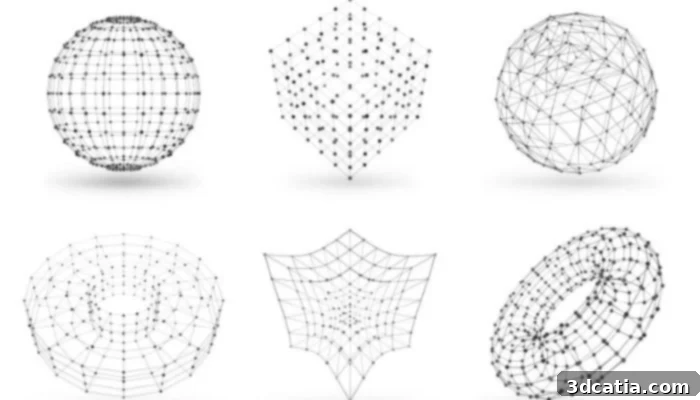
Photo Credits: CGI Furniture.
The Integral Components of a Polygon: Vertices, Edges, and Faces
To truly grasp polygonal modeling, it’s essential to understand the specific role each component plays within a polygon’s structure. These interconnected elements – vertices, edges, and faces – are not merely distinct parts but form a cohesive system where a change to one inevitably affects the others. Vertices, for example, are the absolute cornerstones; they are the fundamental points in 3D space where two or more edges converge. In most 3D modeling software, manipulating a vertex directly alters the position and angle of all edges connected to it, which in turn reshapes the polygons they form. This direct relationship means precise vertex placement is critical for defining the fine details and overall curvature of a 3D model. Edges, on the other hand, act as the linear connections between two vertices. They define the boundaries of polygons and contribute significantly to the perceived smoothness or sharpness of an object’s contours. As the lines that link vertices, edges are instrumental in outlining the geometry of the polygon and the broader mesh. Any modification to an edge, such as moving it, scaling it, or rotating it, will inherently influence the vertices it connects and the faces it borders, thus altering the entire local structure of the mesh.
Surfaces, commonly referred to as faces, represent the closed, planar areas created when several edges enclose a region. These faces are the visible parts of the 3D model, the elements that light interacts with and that are rendered on screen or ultimately printed. Just as vertices and edges influence faces, moving or deforming a face directly impacts the positions of its constituent vertices and the lengths and orientations of its edges. This interdependence is a core principle of polygonal modeling: changing any single element—be it a vertex, an edge, or a face—will propagate through the connected components, having a direct and measurable impact on the entire geometry of the 3D model. Mastering this hierarchical relationship is key to effective and efficient 3D modeling, allowing artists and designers to sculpt complex forms by manipulating these fundamental components with precision and control.
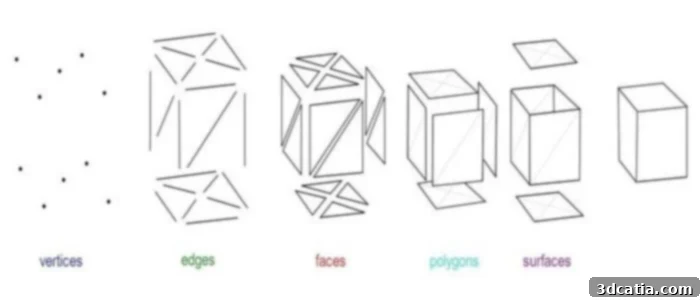
Photo Credits: Université de Colonia.
Essential Polygonal Modeling Techniques for 3D Design
Polygonal modeling offers a versatile toolkit for 3D artists, with several core techniques used to sculpt and refine objects. Among the most fundamental are extrusion, subdivision, and beveling, each playing a critical role in adding volume, detail, and aesthetic appeal to a model. Extrusion is a foundational operation that involves selecting a portion of a mesh—typically a face, an edge, or even a vertex—and then extending it along a specified direction, either outward to add volume or inward to create an indentation. This action effectively duplicates the selected component and connects the duplicate to the original with new faces, thereby extending the initial shape while maintaining a topological connection to the existing structure. Extrusion is indispensable for building complex shapes from simpler forms, such as pulling walls from a floor plan or creating handles from a flat surface. It’s a powerful method for rapidly adding depth and dimension to a model.
Subdivision, also known as subdivision surface modeling, is a technique used to refine and smooth a model by dividing its existing faces into smaller, more numerous parts. This process algorithmically adds new vertices, edges, and faces, significantly increasing the mesh density. The primary benefit of subdivision is that it transforms angular, blocky surfaces into smoother, more organic forms, greatly enhancing the realism and visual fidelity of a 3D model. It is commonly employed after an initial low-polygon model (base mesh) has been created, allowing designers to achieve high levels of detail without having to manually model every single small feature. This iterative refinement is a cornerstone of professional character and organic modeling.
Finally, beveling is a technique specifically designed to soften the sharp edges and corners of an object. In the real world, perfectly sharp edges are rare; most objects have a slight rounding or chamfer. 3D models with unnaturally sharp corners can appear artificial or digitized. Beveling addresses this by replacing a single sharp edge with a series of new faces and edges, effectively rounding off the corner and creating smoother, more natural transitions. This technique adds subtle detail that can dramatically improve the perceived quality and realism of a model, especially when light interacts with the surfaces. However, beveling must be applied judiciously; an improperly managed or excessive bevel can introduce unwanted geometric complexity, alter the model’s topology, and potentially cause problems in the mesh structure, leading to rendering errors or difficulties during 3D printing. Understanding when and how to apply these techniques is crucial for effective polygonal modeling.
The Impact of Polygonal Densities: High-Poly vs. Low-Poly Models
The density of polygons within a 3D model — meaning the total number of polygons used to define its surface — is a critical factor that dictates its level of detail, computational requirements, and suitability for various applications. In 3D modeling, two primary categories based on polygonal density are generally distinguished: high-poly and low-poly models. A high-poly model is characterized by an exceptionally high number of polygons, often ranging from hundreds of thousands to several millions. This extensive polygon count allows for an incredible level of geometric detail, capturing intricate curves, minute surface imperfections, and highly realistic forms. These models are not always created using traditional manual polygonal modeling from scratch; they are frequently generated using advanced techniques like digital sculpting (e.g., in ZBrush) or voxel-based technologies. Voxels, which are the three-dimensional equivalent of pixels in 2D images, are volumetric units that store essential information about shape, material properties, and color within a spatial grid. Voxel-based software allows for the organic creation of 3D objects in a fluid, sculpting-like manner, which can then be converted into polygonal meshes through automated algorithms. While these processes result in extraordinarily detailed models ideal for cinematic rendering, high-resolution visualizations, and manufacturing prototypes, they typically demand significant storage capacity and computational power due to their inherent geometric complexity.
Conversely, low-poly models are defined by a significantly reduced number of polygons. These models prioritize efficiency and performance over raw geometric detail, making them ubiquitous in real-time applications such as video games, virtual reality (VR), augmented reality (AR), and interactive simulations, where display speed and fluid interaction are paramount. Low-poly models are meticulously designed to preserve the overall silhouette and structural integrity of the object while minimizing its geometric complexity as much as possible. In this context, the concept of retopology becomes particularly relevant and indispensable. Retopology is a specialized process that involves transforming a high-poly model into a cleaner, more efficient low-poly model, typically using dedicated tools and manual refinement. The primary goal of retopology is to simplify the mesh topology—creating a clean, quad-based surface with optimal edge flow—while meticulously preserving the visual appearance and form of the original high-detail object. Complex surface details that are lost in the simplification of geometry are then meticulously re-introduced not through additional polygons, but through the ingenious use of textures, such as normal maps and bump maps. These textures simulate high-frequency details by manipulating how light interacts with the surface, creating an illusion of depth and detail without burdening the system with additional geometry. This intelligent workflow allows for realistic rendering while dramatically reducing computational overhead and ensuring excellent performance across various platforms.
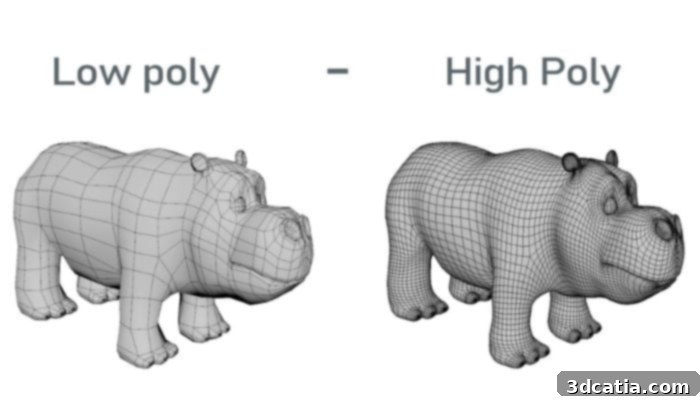
Photo Credit: 3DCoat
Advantages and Disadvantages of Polygonal Modeling
Understanding the intricacies of polygonal modeling significantly streamlines the 3D design process. One of the most compelling advantages of polygons is their inherent simplicity and universality. Their straightforward, discrete structure makes them exceptionally easy to manipulate, assemble, and modify in virtually any 3D software. This ease of manipulation drastically speeds up the initial creation and iterative refinement stages of modeling. Another significant benefit is their exceptional compatibility with texture mapping. Textures, which are 2D images applied to the surface of a 3D model, allow designers to drastically alter the visual appearance, material properties, and intricate details of surfaces without necessitating any alteration to the underlying geometry. This flexibility is crucial for achieving photorealistic results efficiently. Furthermore, polygons can often be modeled individually, face by face, or in small groups, which provides modelers with granular control and simplifies the process of building complex forms from simple primitives. Technically, because polygons are formed from straight segments, they offer remarkable versatility, enabling the design of surfaces of varying sizes and the creation of highly flexible and intricate shapes, from sharp industrial components to fluid organic forms.
However, this widely adopted method also comes with certain inherent limitations that designers must consider. A major challenge arises when aiming for highly detailed or organically curved models. Achieving smooth, continuous curves using polygons requires an exponential increase in polygon count. Thousands, or even millions, of polygons become necessary to simulate subtle curves and fine details, which dramatically inflates file sizes and places significant strain on computational resources during editing, rendering, and particularly during 3D printing preparation. This can lead to longer load times, slower viewport performance, and more demanding hardware requirements. Moreover, specific advanced modeling techniques or artistic styles, such as highly procedural volumetric effects or certain brush-based sculpting tools, may not be inherently compatible with the discrete nature of polygonal meshes, as they often require levels of detail and geometric fluidity that polygons alone cannot natively provide without excessive subdivision. Additionally, while polygons can approximate organic shapes, their inherent straight edges can limit the true smoothness of very complex curves or highly organic forms. To accurately simulate a smooth curve, one must multiply the number of small straight edges, which, while increasing accuracy, simultaneously increases the file size and geometric complexity, making the model heavier and potentially harder to manage. Balancing detail with file size and computational efficiency is a constant challenge in polygonal modeling.
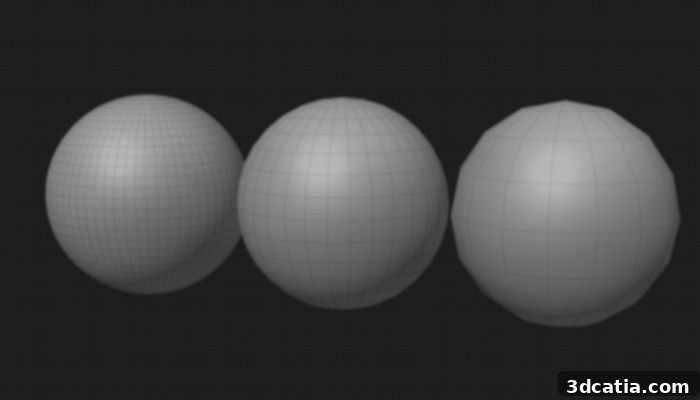
These spheres show how the level of detail affects a model: with 2048, 512, and 128 polygons, the model becomes smoother and more detailed as the number of polygons increases, while fewer polygons result in a less accurate model. (Image credit: University of Cologne).
The Critical Importance of Polygonal Modeling for 3D Printing Success
For anyone involved in additive manufacturing, understanding the role of polygons is paramount, as the number and precise arrangement of polygons in a 3D model directly dictate print quality, structural integrity, and overall processing time. Models with an excessively high polygon density, while rich in visual detail, can be cumbersome to manage. They demand significantly more computing power for tasks such as slicing and toolpath generation, which can substantially lengthen preparation times before printing. Such large files are also more prone to errors and can overwhelm less powerful slicing software. Conversely, an overly simplified model, one with an insufficient number of polygons, risks lacking crucial detail. This can result in a print that appears blocky, faceted, or fails to meet critical aesthetic or functional requirements, ultimately diminishing the value of the 3D printed part. Therefore, it is absolutely essential to optimize the mesh by judiciously reducing the polygon count while meticulously preserving all essential elements and critical features of the model. This strategic optimization helps strike the perfect balance between achieving desirable visual accuracy and ensuring efficient processing throughout the 3D printing workflow. A well-balanced model not only guarantees high-quality printing, but also allows for processing within a reasonable timeframe, saving both time and resources.
Beyond the sheer number of polygons, their orientation and overall mesh integrity play an equally crucial role in the success of 3D printing. Each polygon fundamentally possesses two faces: an inner face and an outer face, often referred to as “normals.” Incorrect or inconsistent alignment of these normals (e.g., some faces pointing inward, others outward) can lead to serious errors during the slicing process, as the software struggles to determine what constitutes the solid volume of the object. This can result in voids, non-manifold geometry, or parts of the model being ignored entirely, leading to print failures. Similarly, issues like “non-manifold edges” (where more than two faces share an edge), self-intersecting polygons, or open meshes (holes in the surface) can render a model unprintable. To mitigate these pervasive problems, a thorough and meticulous verification of polygon orientation, mesh consistency, and overall model data integrity is not just recommended, but strongly advised before initiating any production release. Utilizing mesh repair tools and carefully inspecting the model in a dedicated 3D printing preparation software can identify and rectify these issues, ensuring a robust and printable file.
Available Software for Polygonal Modeling and 3D Printing Preparation
While polygonal modeling can sometimes be a labor-intensive endeavor, the good news is that numerous sophisticated software programs are specifically designed to simplify and accelerate the process, catering to various skill levels and project requirements. Among these, Adobe’s Substance 3D Modeler stands out for its innovative approach, often based on voxel technology, which grants it remarkable power and fluidity in creating highly detailed 3D models. It also thoughtfully integrates functions geared towards traditional polygonal modeling, offering a hybrid workflow that combines the best of both worlds. For industrial applications and complex mesh optimization, Polygonica is another leading solution; this powerful software toolbox specializes in advanced processing of polygonal meshes, excelling at optimizing, repairing, and managing intricate 3D models to ensure manufacturability. Figuro, on the other hand, provides an effective and streamlined tool for modeling and optimizing meshes primarily intended for 3D printing, helping users to quickly prepare their files for additive manufacturing by cleaning and refining geometry. More general-purpose 3D modeling software packages, such as the industry-standard Maya, the incredibly versatile open-source Blender, and the robust 3ds Max, all offer extremely powerful and comprehensive polygonal modeling features. Maya, in particular, is frequently recommended as an excellent entry point for learning this technique due to its extensive toolset and widespread adoption in professional studios. Beyond these, software like ZBrush excels in high-poly sculpting, while Fusion 360 and SketchUp provide more accessible approaches to creating polygonal geometry. To further deepen your knowledge and see polygonal modeling in action, check out the following insightful video:
What are your thoughts on polygon modeling and its critical role in the world of 3D printing? Share your experiences, tips, or questions in a comment below or join the conversation on our LinkedIn or Facebook pages! And don’t forget to sign up for our free weekly Newsletter to receive the very latest 3D printing news directly to your inbox. You can also explore all our in-depth video content on our dedicated YouTube channel.
*Cover Photo Credit: Ebal Studios