
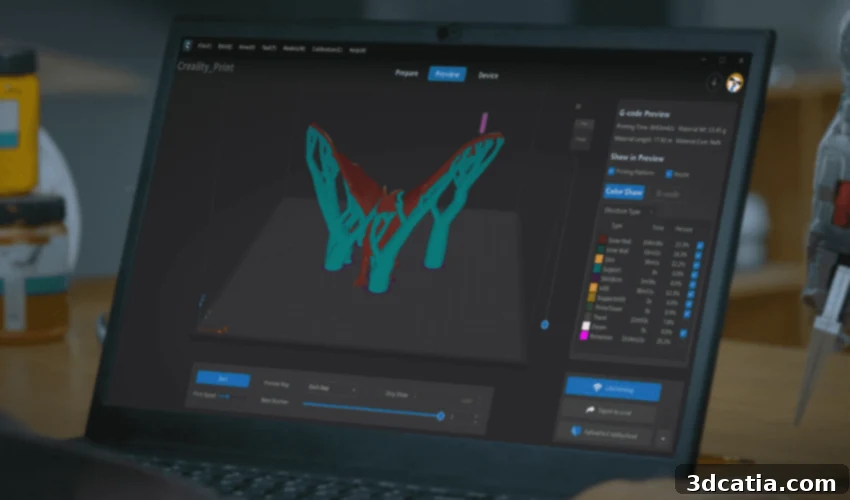
Master Your FDM 3D Prints with Creality Print: The Ultimate Slicing Software
In the dynamic and rapidly evolving world of additive manufacturing, the journey from a digital 3D model to a tangible physical object hinges on one critical piece of software: the slicing software. This essential tool translates intricate designs into a language that a 3D printer can understand, making it the linchpin of any successful print. Leading the charge in simplifying and enhancing this process is Creality Print, an advanced slicing application meticulously developed by the renowned 3D printer manufacturer, Creality. Launched with much anticipation in January 2022, Creality Print has swiftly emerged as an indispensable utility for users striving to unlock the full potential of their Creality printer, as well as a wide array of other FDM 3D printing devices. This innovative slicer represents a significant evolution from its predecessor, Creality Slicer, building upon a strong foundation to deliver enhanced features and a superior user experience.
Creality, a company founded in China in 2014, has consistently demonstrated an unwavering commitment to making 3D printing accessible to a global audience. Through years of relentless innovation and a focus on quality, the company has ascended to become one of the undisputed leaders in the FDM 3D printing market, celebrated for its diverse portfolio of reliable 3D printers offered at highly competitive prices. Creality Print stands as a testament to this foundational commitment. It is freely available for download directly from Creality’s official website, meticulously crafted to cater to the needs of both eager novices taking their first steps in 3D printing and seasoned experts seeking advanced control and efficiency. But what exactly are the features that make Creality Print such a compelling choice for optimizing your 3D printing workflow?
The fundamental role of any 3D slicing software is to take a complex 3D model and convert it into a series of thin, discrete layers. This process culminates in the generation of G-code – a specific set of commands that dictates every movement of the 3D printer’s print head, the precise extrusion of filament, and critical temperature settings. Without a sophisticated and intelligent slicer like Creality Print, even the most advanced 3D printer would be unable to produce desired results. It acts as the crucial intermediary, bridging the gap between digital design and the physical manifestation of an object. Creality Print empowers users with granular control over this entire transformation, ensuring that every detail of the print job is meticulously managed. Its ongoing development, driven by user feedback and a vision for continuous improvement, solidifies its position as an essential slicing software for the expansive Creality community and the wider 3D printing world.
Unveiling Creality Print’s Core Functionalities and Streamlined User Experience
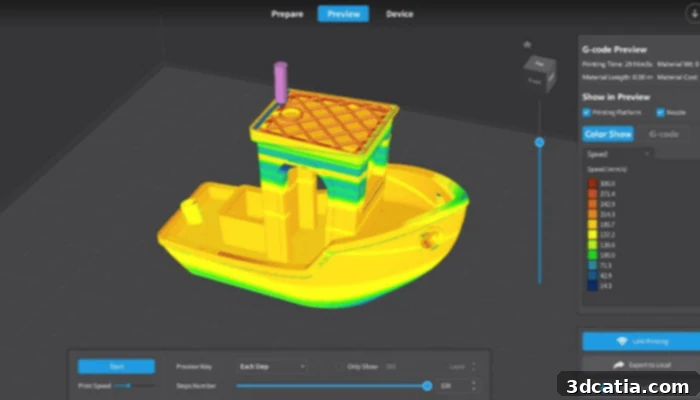
One of the immediate standout qualities of Creality Print is its exceptionally sleek and intuitive user interface. This modern aesthetic is defined by a simplified layout that eschews clutter in favor of clarity and direct functionality. The thoughtful design ensures that even individuals with minimal prior experience in 3D printing can navigate the software confidently, while seasoned users will undoubtedly appreciate the efficient and straightforward access to both basic and advanced settings. Beyond the standard features expected of any high-performance slicing software, Creality Print differentiates itself with distinctive offerings such as an integrated 3D model library and a robust media customization tool, collectively enriching the overall user experience and broadening the horizons of creative possibilities for every project.
Creality Print masterfully simplifies the often-complex process of preparing 3D models for printing, conceptualizing it as a logical, easy-to-follow three-step workflow: Preparation, Preview, and Device Configuration. This sequential guidance ensures efficiency and minimizes potential errors throughout the printing pipeline. In the initial Preparation phase, users can effortlessly import their chosen 3D model. This stage is pivotal for defining critical print parameters that directly impact the final output, including the specific type of filament being utilized (such as PLA, ABS, PETG, or specialty materials) and the desired print quality, ranging from standard drafts to ultra-fine, highly detailed finishes. Precision in these settings is paramount for achieving the intended aesthetic and structural integrity of your printed object.
Following meticulous preparation, the Preview stage offers an invaluable pre-flight check, providing unparalleled insight into your forthcoming print job before any filament is extruded. Creality Print excels here by delivering effortless slicing capabilities paired with an extensive array of preview options, enabling users to visualize every single layer and toolpath that the printer will follow. This comprehensive visualization is instrumental for proactively identifying and addressing potential challenges, such as problematic overhangs, the necessity for support structures, or the nuances of infill patterns. The ability to rotate, zoom, and even simulate the printing process layer-by-layer empowers users with precise control and instills confidence in their chosen settings. This proactive diagnostic approach significantly mitigates material waste and conserves invaluable time by pinpointing and correcting errors well before the print commences.
The culminating step, Device Configuration, streamlines the critical process of connecting to your 3D printer. Creality Print offers a variety of convenient and user-friendly connection methods, including a quick-scan QR code setup for swift pairing or the option to manually enter your printer’s IP address for seamless network integration. This exceptional ease of integration ensures that once your 3D model has been expertly sliced and is ready for production, the transfer of the generated G-code to your machine is a frictionless experience, allowing you to commence printing without unnecessary delays. This end-to-end streamlined workflow, from initial design concept to the final printed object, perfectly encapsulates the user-centric design philosophy inherent in Creality Print.
Enhanced Print Quality Features for Superior FDM 3D Printing Results
Beyond its intuitive core slicing capabilities, Creality Print is extensively equipped with advanced features meticulously engineered to significantly elevate your print quality and simplify the execution of complex 3D printing tasks. A particularly compelling functionality is its direct and seamless integration with the Creality Cloud ecosystem. This connection unlocks access to a vast and dynamic online repository, boasting an astonishing selection of over 500,000 pre-designed 3D models. These models, contributed and shared by a vibrant and collaborative community of users, provide limitless inspiration and practical solutions. Whether you’re looking to instantly find and print an object or share your own innovative creations with a global audience, the Creality Cloud integration fosters unparalleled creativity and collaboration, transforming the slicing experience into a truly interconnected one.
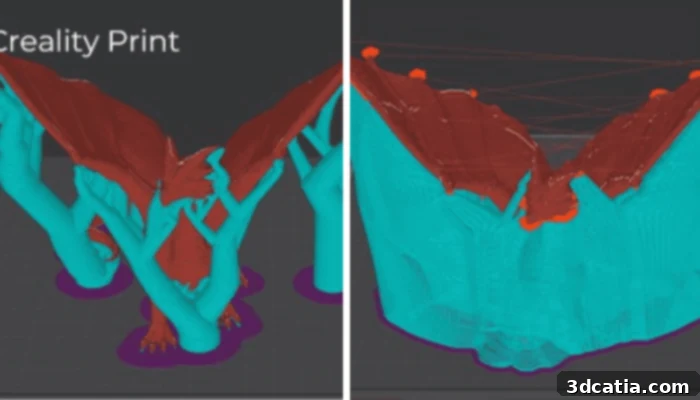
To ensure the highest possible print quality, especially for intricate and challenging designs, Creality Print offers highly customizable and intelligent support structures. Users have the specific option to utilize “slim, tree-like supports,” an ingenious design that mimics the organic branching patterns of natural trees. These supports are strategically generated to make minimal contact with the actual 3D model, which translates into significantly easier removal during post-processing. Crucially, unlike conventional, bulky support structures, tree supports leave behind considerably fewer marks on the final printed part, ensuring pristine, intact prints and dramatically reducing the need for extensive cleanup and finishing work. This feature is nothing short of a game-changer for complex 3D models characterized by significant overhangs or delicate geometric intricacies, improving both efficiency and aesthetic outcome.
Another absolutely critical feature for achieving consistently clean, professional-looking prints, free from defects, is Creality Print’s sophisticated “refined retraction” system. Retraction is a vital process where the 3D printer’s extruder momentarily pulls back the filament whenever it needs to move between different sections of a print without extruding. This action is essential for preventing undesirable material oozing or “stringing,” which can mar the surface of a print. Creality Print’s system refines this process by intelligently combining precise print head adjustment, an optimal retraction distance, Z-hop functionality (where the nozzle slightly lifts off the print surface to avoid dragging), and finely tunable speed settings. This meticulous, multi-faceted control ensures that any material dripping during extruder travel movements is virtually eliminated, thereby preventing unsightly blemishes on the surface of your printed part and drastically reducing the risk of stringing. The net result is consistently smoother, cleaner, and more aesthetically pleasing finished products, reflecting superior additive manufacturing quality.
Advanced Model Management and Comprehensive Pre-Print Analysis
Creality Print further empowers its users with an array of intelligent model management tools, specifically designed to optimize printing efficiency and expand the scope of possible printing projects. The “automatic layout tool” is an exceptionally valuable asset, particularly when there is a need to print multiple distinct objects concurrently. This intelligent feature expertly arranges your models across the print bed, strategically maximizing the utilization of available space and, consequently, reducing the overall print time. It liberates users from the often-tedious and time-consuming task of manually positioning each model, guaranteeing an efficient and systematically organized print queue for batch production or multi-part projects.
For ambitious projects involving 3D models that exceed the physical confines of your printer’s build volume, Creality Print offers an ingenious and highly practical solution: the capability to seamlessly divide a large model into several smaller, more manageable segments. This functionality proves invaluable, enabling users to undertake grand designs that would otherwise be impossible to print in a single piece. Once these smaller segments are individually printed, they can then be meticulously assembled to form the complete, large-scale object, effectively opening up new horizons for expansive additive manufacturing projects and allowing for the creation of truly impressive pieces.
Personalization stands as another key aspect that Creality Print champions, allowing users to customize each model directly within the software’s intuitive interface. You can effortlessly embed a name, a distinctive mark, or even specific letters into your designs, aligning perfectly with your preferences and project requirements. This feature is exceptionally useful for branding purposes, adding serial numbers for inventory tracking, personalizing gifts to make them truly unique, or simply marking prototypes for easy identification, thereby adding an extra layer of utility, professionalism, and creative flair to your prints well before the actual printing process begins.
Crucially, after your 3D model has been meticulously prepared and all printing settings are expertly configured, Creality Print provides a comprehensive and detailed review of the automatically generated G-code file. This pre-print analysis serves as an incredibly powerful diagnostic tool. Within this review, you can scrupulously examine and verify a wide array of critical attributes, including print speed, infill structure, layer thickness, fan speed, and many other parameters that directly influence print quality and performance. The software facilitates an astonishingly precise inspection of each individual layer, granting you the ability to meticulously scrutinize every minute detail of the print path. This granular level of control and visualization is paramount, as it enables you to identify and rectify any potential issues or inconsistencies *before* committing to a print, thereby significantly minimizing failed prints, conserving valuable filament, and ensuring a consistently higher success rate for all your FDM 3D printing endeavors.
Creality Print’s Extensive Compatibilities and Global Accessibility
The first interaction with Creality Print is designed to be as user-friendly as possible. Upon its initial launch, users are seamlessly guided through a structured printer configuration process. This essential preliminary step is paramount for ensuring that the slicing software is perfectly harmonized and optimally calibrated with your specific 3D printing equipment, thereby guaranteeing a smooth, efficient, and error-free printing experience. While Creality Print is inherently optimized for Creality FDM 3D printers – boasting pre-loaded profiles and specific performance optimizations tailored to their hardware – its versatile utility extends far beyond the confines of the Creality ecosystem. Users who operate 3D printers from other reputable brands are not excluded; the software provides the robust flexibility to manually input and configure their printer’s specific details, including precise build volume dimensions, nozzle diameter, and distinct G-code flavors, thus enabling extensive compatibility across a broad spectrum of FDM 3DM machines.
Creality’s overarching vision for unparalleled global accessibility is vividly reflected in Creality Print’s impressive linguistic support. The software is thoughtfully provided in over 18 different languages, unequivocally positioning it as a truly international tool designed to serve the incredibly diverse and expansive 3D printing community worldwide. This extensive multilingual support effectively lowers the barrier to entry for non-English speakers, empowering a significantly broader user base to fully leverage its powerful features without the hindrance of language constraints. Such a profound commitment to global reach and inclusivity emphatically underscores Creality’s unwavering dedication to supporting and nurturing 3D printing enthusiasts and professionals across every continent.
Furthermore, Creality Print proudly supports and boasts seamless compatibility with a comprehensive range of industry-standard 3D model file formats. These include the ubiquitous STL, OBJ, DEA, and 3DS formats. These particular formats are universally recognized and widely employed across the spectrum of 3D modeling and design software, guaranteeing that users can effortlessly import models from virtually any Computer-Aided Design (CAD) application or online repository without encountering cumbersome conversion issues. This expansive file format support efficiently eliminates potential workflow bottlenecks, allowing designers, engineers, and makers alike to fully concentrate on their creative endeavors rather than being bogged down by frustrating compatibility concerns, ensuring a fluid and productive design-to-print process.
The broad availability of Creality Print across major operating systems further cements its position as an exceptionally accessible and versatile slicing solution. Regardless of whether you are a dedicated Windows user, prefer the intuitive environment of macOS, or operate on a robust Linux distribution, Creality Print offers dedicated and fully compatible versions for your chosen system. This crucial cross-platform support guarantees that virtually any 3D printer owner can integrate Creality Print into their existing computer setup with utmost ease and minimal effort. This adaptability firmly solidifies its status as a highly versatile and universally adoptable slicing software solution in the competitive landscape of 3D printing. To delve deeper into its extensive feature set, download the very latest version of Creality Print, or simply learn more about its transformative capabilities, please click HERE.
Creality Print unequivocally represents a significant leap forward in the realm of 3D slicing technology, expertly combining Creality’s deep-rooted expertise in hardware manufacturing with intelligent, user-friendly, and powerful software design. Its robust and comprehensive feature set, intuitive and streamlined interface, extensive printer and file format compatibility, and seamless community integration via Creality Cloud collectively position it as an invaluable and indispensable tool for anyone actively engaged in FDM 3D printing. Whether you are cautiously taking your very first steps into the fascinating world of 3D printing, or you are a seasoned professional relentlessly seeking to optimize your workflow and achieve unparalleled results, Creality Print provides the precise power, accuracy, and confidence needed to effortlessly transform your intricate digital designs into flawless, high-quality physical objects. It truly embodies Creality’s enduring commitment to making 3D printing an accessible, efficient, and genuinely enjoyable experience for everyone, fostering innovation and creativity across the globe.
What are your valued thoughts and experiences with Creality Print? We would be delighted to hear your insightful feedback in a comment below, or feel free to connect with us and share your opinions on our LinkedIn or Facebook pages! Furthermore, ensure you don’t miss out on the very latest breaking 3D printing news – subscribe to our completely free weekly Newsletter, delivered straight to your inbox, keeping you perfectly informed. You can also explore all our engaging and informative videos on our dedicated YouTube channel for even more profound insights into the ever-evolving world of additive manufacturing.
*All Photo Credits: Creality