

Mastering 3D Printing Ghosting: Causes, Prevention, and Solutions for Flawless Prints
3D printing, while revolutionary, is not without its challenges. Just like common issues such as stringing – where unwanted thin threads of filament are stretched between printed areas – another prevalent and frustrating phenomenon that can plague your prints is known as ghosting. This issue goes by various names, including ringing, echoing, or even rippling, but all these terms describe the same undesirable effect. The name “ghosting” is particularly apt, as it manifests as weakened, phantom repetitions of lines, edges, or even entire design features on the surface of your 3D-printed part. Imagine printing a sharp, angular logo; with ghosting, you might see fainter, blurry duplicates of that logo appearing slightly offset from the original design. Visually, it’s akin to the subtle, diminishing ripples that spread outwards after a stone is thrown into calm water, becoming progressively fainter the further they are from the point of impact. This effect can significantly degrade the aesthetic quality and precision of your finished prints, turning what should be a crisp, clean object into something marred by blurry imperfections.
These elusive duplicates of previous print head movements often only become truly visible when the printed surface is caught by light at a specific angle, highlighting the subtle texture differences. Ghosting is particularly common in FDM (Fused Deposition Modeling) printing, especially when using standard filaments like PLA or ABS. It doesn’t always affect the entire part uniformly; instead, it typically appears as a wavy pattern or a series of concentric lines caused by vibrations during the printing process. Even a subtle ghosting effect can render an otherwise perfect 3D-printed part unusable for its intended purpose, whether aesthetic or functional. Understanding the root causes of these pressure vibrations is the first step towards eradicating them. In the following sections, we will delve into the various factors that trigger ghosting and provide detailed explanations on how to adjust your printer settings and hardware configuration to achieve consistently smooth and ghost-free prints.
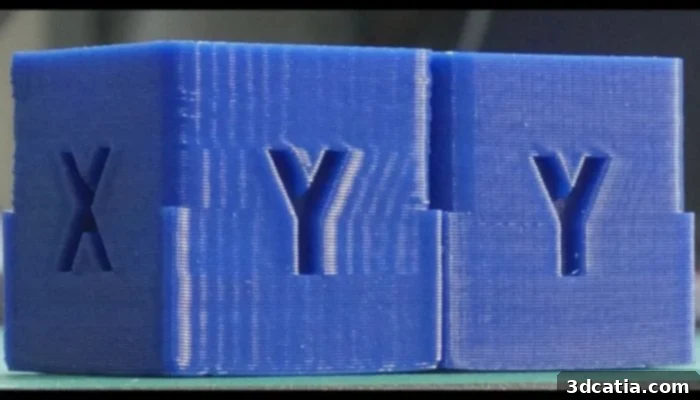
The ghosting effect can destroy entire 3D-printed components by introducing unwanted patterns (Image: Tech2C)
Understanding Ghosting: Common Triggers and Effective Solutions
Print Speed: A Double-Edged Sword
When tackling ghosting in 3D printing, the first culprit that often comes to mind for many users is an excessively fast print speed – and for good reason! While increasing print speed offers the undeniable benefit of reducing overall print time, it simultaneously escalates the chances of encountering ghosting. This is primarily due to the increased moment of inertia. When the print head moves at very high speeds, it accumulates significant momentum. This momentum requires a greater opposing force to bring the print head to a precise stop, especially before it changes direction to continue printing a new section or a sharp corner. If the printer’s mechanical system isn’t robust enough to handle these forces smoothly, the sudden stops and changes in direction can cause residual vibrations to ripple through the printer’s frame and subsequently transfer to the print nozzle. This leads to the characteristic “ghost” lines appearing adjacent to sharp features or changes in direction.
For common filaments such as PLA or ABS, an average print speed typically falls within the range of 50 to 60 mm/s. Exceeding this range significantly, for example, by pushing speeds up to 80 mm/s or even 100 mm/s without careful calibration and hardware optimization, dramatically increases the risk of ghosting. Beyond the actual print speed (when the nozzle is extruding material), it’s also crucial to consider the travel speed. Travel speed refers to the speed at which the nozzle moves when it is not extruding, typically repositioning between different sections of the print. High travel speeds can also induce vibrations that influence ghosting, as sudden stops and starts are still required, albeit without material deposition. Experimenting with slightly lower print and travel speeds in your slicer settings is often the simplest and most effective initial step to mitigate ghosting.
Acceleration and Jerk Control: Smoothing Out Movements
The print head in a 3D printer rarely moves at a constant velocity throughout an entire print. Instead, it frequently accelerates, decelerates, and changes direction, particularly when navigating corners, curves, or intricate geometries. These transitions are governed by two critical parameters: acceleration and jerk. Acceleration dictates how quickly the print head reaches a desired speed or slows down, measured in millimeters per second squared (mm/s²). Jerk, on the other hand, defines the maximum instantaneous change in speed that the print head can undergo, typically measured in millimeters per second (mm/s). If these values are set too high, the print head will attempt to achieve extremely rapid changes in motion, leading to abrupt starts and stops. This abruptness generates significant mechanical stress and vibrations throughout the entire printer frame and moving parts. These vibrations are the direct precursors to ghosting on your printed objects.
To combat ghosting, it is essential to optimize your acceleration and jerk settings in your slicer or printer firmware. Lowering the acceleration value will result in smoother, more gradual changes in speed, reducing the G-forces exerted on the print head and the printer’s structure. Similarly, reducing the jerk setting will ensure that speed changes are less abrupt, preventing sudden jolts that can introduce ringing artifacts. Many modern 3D printers and firmware, such as Marlin, Klipper, or RepRapFirmware, offer advanced jerk control options that allow for fine-tuning. While there’s a trade-off between speed and print quality, finding the right balance for your specific printer and print material is key. A good starting point is to gradually reduce these values from their defaults until ghosting is minimized or eliminated. Always make changes incrementally and test the results, as excessively low values can significantly extend print times or even cause other print quality issues. The goal is to minimize the violent oscillations caused by rapid movements, ensuring a more stable printing platform.
Printer Stability: The Foundation of Quality
While vibrations originating from the print head are the direct cause of ghosting, the severity of these vibrations can be significantly amplified by an unstable printer setup. This might seem like a straightforward tip, but its importance in preventing ghosting during 3D printing cannot be overstated: ensuring your 3D printer is absolutely stable and rigidly mounted. Imagine a perfectly engineered print head making optimal movements, but if the entire printer structure is resting on a wobbly table or an uneven surface, those minute vibrations from the print head will be exaggerated and propagated throughout the machine. This instability provides a loose foundation that allows even small forces to cause larger, uncontrolled movements, directly contributing to ghosting artifacts on your prints.
Therefore, it is paramount to place your 3D printer on a flat, sturdy, and heavy surface. A robust workbench, a dedicated printer enclosure, or even a heavy concrete paver placed beneath the printer can drastically improve stability. Avoid lightweight or flimsy tables that can easily resonate with the printer’s movements. Furthermore, consider investing in or fabricating anti-vibration solutions. Specialized anti-vibration pads made from dense rubber or foam can be placed under the printer’s feet to absorb mechanical oscillations before they transfer to the surrounding environment or amplify within the printer’s frame. These pads act as dampeners, effectively isolating the printer from its support surface and minimizing the transmission of resonance. For more advanced setups, building a dedicated enclosure with mass-dampening materials can further enhance stability and provide a controlled printing environment, leading to a noticeable reduction in ghosting and an overall improvement in print quality.
Beyond Speed: Advanced Stability and Hardware Considerations
The Crucial Role of Belt Tension
Continuing our discussion on stability and its impact on ghosting, another critical factor often overlooked is the tension of your printer’s belts. The stepper motors move the print head and bed along the X, Y, and Z axes via Toothed belts. These belts must be tensioned correctly for precise and consistent movement. Both excessively tight and overly loose belts can introduce problems, but when it comes to ghosting, loose belts are the more common culprit. If the belts are too slack, there can be a small amount of play or “backlash” in the system. When the print head abruptly changes direction, the loose belt might not transmit the motor’s movement immediately or precisely. Instead, it can slightly slip or stretch, causing a delayed or inconsistent response. This momentary slack and subsequent snapping into place can induce vibrations that manifest as ghosting, especially around sharp corners or features where direction changes are frequent. The print head essentially “overshoots” or “undershoots” its intended position slightly, then corrects, creating the ripple effect.
To rectify this, regularly inspect and adjust the tension of your X and Y axis belts. They should be taut enough to prevent any noticeable slack but not so tight that they strain the motor bearings or cause excessive friction. A good rule of thumb is that they should produce a low twang when plucked, similar to a guitar string, but without feeling overly stressed. Many printers include tensioning mechanisms, while others might require manual adjustment of idlers or motor mounts. For added rigidity and to further minimize frame flex, some users consider adding clamps or bracing elements to the printer’s frame. These modifications can significantly enhance the overall stiffness of the structure, reducing the amplitude of any vibrations and thereby decreasing the likelihood of ghosting. Ensuring proper belt tension is a fundamental maintenance step that directly impacts the precision and quality of every print.
Print Head Weight: A Balance of Force and Precision
The weight of your print head assembly is another significant factor that directly influences the potential for ghosting, particularly due to its impact on inertia and vibration. A heavier print head requires more force to accelerate, decelerate, and change direction. Specifically, the more mass that needs to be moved, the greater the kinetic energy it carries, and thus, the larger the forces generated when it suddenly stops or changes vector. This increased momentum means that when the extruder rapidly halts at the end of a line or a corner, the residual forces can cause the print head (and potentially the entire gantry system) to ‘post-slide’ or oscillate slightly before settling. These micro-movements, even if imperceptible to the naked eye, are precisely what cause the faded duplicate lines characteristic of ghosting.
While reducing print head weight might not always be a straightforward solution for every printer, it’s an important consideration, especially for those pursuing extreme print quality or speed. Direct drive extruders, while beneficial for flexible filaments and reducing retraction, often add more weight to the print head compared to Bowden setups, where the motor is mounted on the frame. If ghosting remains a persistent issue despite optimizing other settings, evaluating the weight of your print head might be necessary. This could involve exploring lightweight extruder designs, opting for smaller stepper motors if feasible, or even selecting lighter hotend components. However, such modifications are often more advanced and should only be considered after exhausting all other, simpler troubleshooting steps. They typically involve a more significant hardware overhaul and careful calibration to ensure overall printer functionality is not compromised. Always remember that any change to the moving mass of your printer will require re-calibration of acceleration and jerk settings to achieve optimal performance.
In summary, ghosting in 3D printing is a multifaceted problem stemming from various mechanical and software-related issues. From excessive print and travel speeds to misconfigured acceleration and jerk settings, unstable printer foundations, loose belts, and even the sheer mass of the print head, multiple factors contribute to this unwanted phenomenon. While ghosting is a common challenge, especially with FDM technology, the good news is that each of these contributing factors has a corresponding solution. By systematically addressing print speeds, fine-tuning motion control parameters, ensuring rigorous printer stability, maintaining proper belt tension, and considering the mass of moving components, you can significantly reduce or entirely eliminate ghosting from your 3D prints. A meticulous approach to printer setup and maintenance will not only resolve ghosting but also lead to a dramatic improvement in the overall quality, precision, and aesthetic appeal of all your 3D-printed creations. Embrace these adjustments, and you’ll be well on your way to achieving consistently flawless results.
What did you think of this comprehensive guide to ghosting in 3D printing? Do you have any additional tips or experiences to share? Let us know in a comment below or connect with us on our Linkedin, Facebook, and Twitter pages! Don’t forget to sign up for our free weekly Newsletter here, bringing the latest 3D printing news straight to your inbox! You can also find all our insightful videos on our YouTube channel.
*Cover photo credits: Prusa3D Forum