

Autodesk Fusion 360: The Ultimate Cloud-Based Platform for Integrated Product Development and 3D Printing
In the dynamic world of product design and manufacturing, Autodesk stands as a titan, offering a comprehensive suite of software solutions tailored for architects, engineers, and designers. While its flagship product, AutoCAD, remains unparalleled for 2D drafting and is capable of basic 3D modeling using solids, surfaces, and mesh objects, the demands of modern engineering often require more specialized and advanced three-dimensional capabilities. Recognizing this, Autodesk has innovated beyond AutoCAD, developing powerful software like Autodesk Inventor and the increasingly popular Fusion 360, specifically engineered for cutting-edge 3D modeling and product lifecycle management.
Fusion 360 distinguishes itself as a groundbreaking, cloud-optimized application that redefines the concept of an all-in-one solution. It seamlessly integrates Computer-Aided Design (CAD), Computer-Aided Manufacturing (CAM), and Computer-Aided Engineering (CAE) tools into a single, cohesive platform. This powerful convergence empowers users to streamline their entire product development and optimization process, from initial concept to final production. Crucially, Fusion 360 is exceptionally well-suited for applications involving additive manufacturing, making it an indispensable tool for designers and engineers leveraging the full potential of 3D printing. But what exactly makes Fusion 360 such a robust and versatile solution, and what are its core features that drive innovation?
The Integrated Power of Fusion 360: CAD, CAM, and CAE in the Cloud
As highlighted, Fusion 360’s most significant strength lies in its cloud-based architecture and its unparalleled integration of CAD, CAM, and CAE functionalities. This means that unlike traditional workflows that often necessitate switching between disparate software packages for different stages of development, Fusion 360 allows users to conceptualize, engineer, and prepare for manufacturing all within a unified design environment. This holistic approach significantly reduces data transfer errors, improves workflow efficiency, and fosters a more collaborative design process.
The cloud-native aspect of Fusion 360 offers numerous advantages. It ensures that projects are accessible from virtually anywhere, on any device, promoting flexibility and remote collaboration. All design data, revisions, and project activities are centrally stored and managed in the cloud, guaranteeing that everyone involved always works with the most up-to-date version. This real-time synchronization and data management capability is a game-changer for distributed teams and complex projects.
From a modeling perspective, Fusion 360 excels at creating intricate mechanical and technical 3D models. Its robust toolset supports precise engineering design, enabling the creation of complex assemblies, detailed components, and functional prototypes. However, it’s worth noting that Fusion 360’s primary focus leans towards mechanical and industrial design, and as such, it may not offer the extensive organic sculpting capabilities found in specialized software like Blender or Rhino. These alternative solutions are often preferred for highly artistic, freeform, or sculptural designs due to their dedicated mesh sculpting and polygon modeling tools. While Fusion 360 does offer some freeform and mesh modeling functionalities, its strength truly lies in its parametric, solid, and surface modeling approaches, which are fundamental for engineering-driven product development.

An illustrative view of Fusion 360’s intuitive and feature-rich design interface.
Exploring the Core Capabilities of Fusion 360 for Modern Product Design
One of Fusion 360’s standout attributes is its unparalleled suitability for additive manufacturing. When preparing a 3D model for production on a 3D printer, a specific file format is required to convey the geometric data to the machine. Fusion 360 offers seamless export capabilities for a variety of widely accepted formats, including STL and OBJ, which are standard for almost all 3D printers. Beyond just file export, Fusion 360 integrates tools for mesh repair, slicing preparation, and even support structure generation, further cementing its role as a vital link in the 3D printing workflow.
The comprehensive suite of 3D modeling tools within Fusion 360 addresses virtually every need an industrial designer or engineer might encounter during product development. These include:
- Sketching: Foundation for 2D geometry, allowing precise definition of profiles that can be extruded, revolved, or swept into 3D forms.
- Parametric Modeling: Enables design changes by modifying parameters and features, automatically updating the model. This is crucial for iterative design and variations.
- Direct Modeling: Offers intuitive push-pull manipulation of existing geometry, ideal for quick edits or working with imported non-parametric models.
- Freeform Modeling: Utilizes T-splines for creating organic, aesthetically pleasing shapes, bridging the gap between mechanical and artistic design.
- Surface Modeling: Essential for complex, aerodynamic, or ergonomic shapes where precise control over curvature and tangency is required.
- Sheet Metal: Dedicated tools for designing parts that will be fabricated from sheet metal, including flange, bend, and flat pattern generation.
- Mesh Modeling: Allows for direct manipulation and repair of mesh data, often originating from 3D scans or generative design outcomes.
- Assemblies: Facilitates the creation and management of complex products composed of multiple interconnected components, including motion studies and interference checks.
- PCB Design Integrations: A unique feature that allows seamless integration of electronic component design, ensuring mechanical and electrical elements fit together perfectly.
This diverse toolkit ensures that industrial designers can combine both aesthetics and function, developing products that are not only visually appealing but also structurally sound and manufacturable.
Fostering Collaboration and Innovation with Cloud-Based Workflows
The cloud-based nature of Fusion 360 extends its benefits far beyond individual design capabilities, transforming the entire product development ecosystem into a highly collaborative and efficient process. In an era where teams are often geographically dispersed and projects involve numerous stakeholders, Fusion 360 acts as a central hub, unifying development efforts between different designers, engineers, and even external partners.
Real-time communication and centralized project activity are hallmarks of this collaborative platform. Team members can provide feedback directly on designs, track changes, manage versions, and assign tasks, all within the same environment. This eliminates the need for cumbersome email chains or conflicting file versions, ensuring that everyone is always working with the latest data. Project managers can gain a comprehensive overview of progress, and external stakeholders, such as clients or suppliers, can be granted controlled access to review designs and provide input, fostering transparency and reducing communication bottlenecks. This seamless flow of information and synchronized workflow accelerates decision-making and significantly shortens the design cycle.
Revolutionizing Design with Generative AI and Advanced Simulation
One of Fusion 360’s most innovative and forward-thinking features is its integration of generative design tools. Given that 3D printing offers an unprecedented amount of design freedom, allowing for complex geometries and optimized structures that are impossible with traditional manufacturing methods, it’s crucial for design software to leverage this capability. Generative design in Fusion 360 does exactly that. Instead of a designer creating a single design, generative design uses artificial intelligence and cloud computing to explore thousands of potential design solutions based on defined parameters and performance criteria. Users specify the functional requirements, materials, manufacturing methods (including 3D printing), and other constraints, and the software algorithmically generates optimal designs.
This approach can lead to revolutionary outcomes, such as significantly reducing material weight without compromising structural integrity, enhancing product performance (e.g., improved airflow, better stress distribution), and consolidating multiple parts into a single, optimized component. For example, a bracket that traditionally required multiple pieces and fasteners can be generatively designed as a single, lightweight, and incredibly strong part, perfect for additive manufacturing. This not only saves material and assembly time but also pushes the boundaries of innovation.
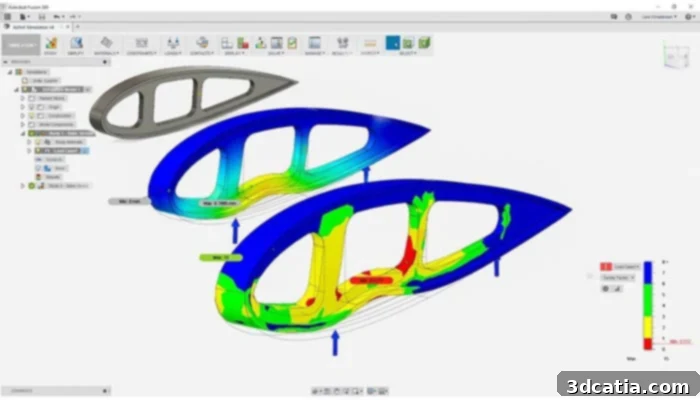
Furthermore, a truly comprehensive solution for product development would be incomplete without robust simulation tools. Fusion 360 incorporates advanced Computer-Aided Engineering (CAE) capabilities, allowing designers and engineers to virtually test their models under real-world conditions. This includes various types of analyses such as Finite Element Analysis (FEA) for stress, strain, and displacement, thermal analysis, and modal analysis. By simulating how a design will perform under different loads, temperatures, or environmental factors, potential flaws and weaknesses can be identified and rectified early in the design phase. This virtual testing process is paramount in reducing the need for costly and time-consuming physical prototypes, especially when considering the expenses associated with 3D printing multiple iterations. Simulation is a key aspect of validating any prototype and optimizing designs for manufacturability and performance, enabling companies to bring better products to market faster and more efficiently.
User Experience and Community Support
Despite being a relatively newer entrant into the integrated design software market compared to some established giants, Fusion 360 has quickly garnered a strong following. Opinions on its user-friendliness can vary, reflecting its broad range of functionalities. While some advanced functions might require a learning curve, especially for users accustomed to more specialized, single-purpose software, Fusion 360’s basic functions for mechanical component design are generally considered intuitive and relatively easy for beginners to grasp. Autodesk has invested heavily in creating a streamlined user interface that simplifies the development process for core tasks.
Autodesk also recognizes the importance of community and support. Both Autodesk and a thriving global user base actively maintain a vibrant online platform. This platform serves as a comprehensive resource, offering extensive help documentation, a vast library of tutorials (from beginner to advanced), and active forums where users can ask questions, share insights, and troubleshoot problems. This strong community support network, coupled with regular software updates and enhancements from Autodesk, ensures that users have access to continuous learning and assistance, making Fusion 360 an accessible and continuously evolving tool for designers and engineers at all skill levels.
Costs and Licensing for Autodesk Fusion 360
For those interested in exploring the capabilities of Fusion 360, Autodesk offers a convenient 30-day trial version, allowing users to experience the full suite of features without initial commitment. This trial period is an excellent opportunity to evaluate how the software fits into existing workflows and meets specific design needs. Following the trial period, a commercial license for Autodesk Fusion 360 is available for purchase. The standard annual subscription costs $545 per year, or users can opt for a monthly plan at $70 per month. It’s also worth noting that Autodesk frequently offers various licensing options, including educational licenses for students and educators, and often provides special terms for startups, making the powerful capabilities of Fusion 360 accessible to a broader audience. For the most up-to-date and detailed information regarding specific functions, licensing options, and pricing, users are encouraged to visit the official Autodesk website directly HERE.
Connect With Us!
Do you have more questions about Autodesk Fusion 360, its features, or how it can enhance your product development and 3D printing workflows? We invite you to share your thoughts and inquiries in a comment below, or reach out to us on our Facebook and Twitter pages! We love engaging with our community and discussing the latest advancements in design and manufacturing technology. Additionally, to stay at the forefront of the additive manufacturing industry, remember to sign up for our free weekly Newsletter, delivering all the essential news and updates in 3D printing straight to your inbox!