
Elegoo SatelLite: A Comprehensive Guide to the Free 3D Slicer for LCD Printers
The slicer is a vital component in the 3D printing workflow, and numerous companies have developed their own software solutions to streamline this essential process. Elegoo, established in 2015, is one such company that continues to expand its presence in the global additive manufacturing market. At Formnext 2024, Elegoo introduced its first free slicer, Elegoo SatelLite, specifically designed for LCD printers.
This software is designed with beginners in mind and aims to simplify complex steps while increasing efficiency. According to Chris Hong, CEO of Elegoo, “Elegoo SatelLite is the perfect starting point for newcomers to resin printing, especially those familiar with FDM printers who are looking to explore new possibilities.” Released in late 2024 for Windows, a Mac version is anticipated in the first quarter of 2025. This guide provides a detailed look at the features and functionalities offered by the SatelLite slicer.
Key Features of Elegoo SatelLite
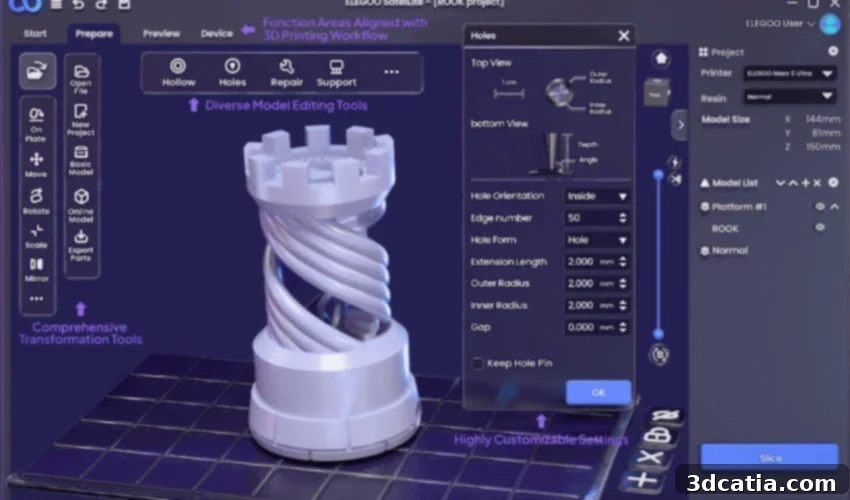
Elegoo SatelLite is a comprehensive 3D slicer that empowers users to edit models, generate slice files, and manage their 3D printing devices. While optimized for Elegoo printers, it maintains compatibility with models from other brands, providing significant flexibility. The software is characterized by its clean and intuitive interface, along with a customizable toolbar and step-by-step guides that enhance the user experience. New users can quickly become proficient, while experienced users will appreciate the streamlined workflow for more complex projects.
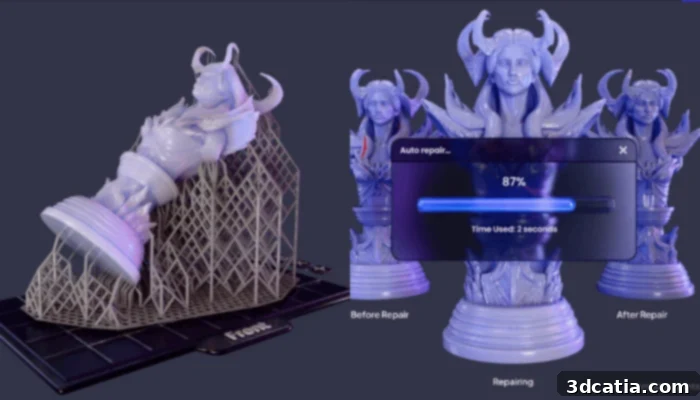
A central feature of Elegoo SatelLite is its advanced EVO support system, engineered to optimize every print. EVO, inspired by the concept of “evolution,” represents a technology that is continuously being refined. The system automatically analyzes 3D models and generates customized support structures, enhancing the likelihood of successful prints. Offering multiple adjustment options, it caters to both beginners and experts seeking granular control over their prints. Whether the priority is speed or intricate detail, EVO is designed to deliver results that meet professional standards.
Elegoo SatelLite also integrates advanced algorithms that automatically identify and resolve issues within 3D models. This leads to more reliable prints and reduces the necessity for manual corrections, allowing users to concentrate on their designs. Furthermore, the slicer incorporates a comprehensive material library, simplifying resin selection and parameter configuration. Users can efficiently configure their printers for peak performance. The clear interface facilitates easy material selection, and cloud-based features such as ratings and favorites contribute to a more streamlined workflow. You can download the software for free by clicking HERE.
What are your thoughts on Elegoo’s SatelLite slicer? Share your opinions in the comments below or connect with us on LinkedIn and Facebook. Subscribe to our free weekly Newsletter for the latest 3D printing news delivered directly to your inbox. You can also explore our video content on our YouTube channel.
*All photo credits: Elegoo
Diving Deeper into Elegoo SatelLite: Features and Benefits for 3D Printing Enthusiasts
The world of 3D printing is constantly evolving, with new technologies and software emerging to enhance the user experience and improve print quality. Elegoo, a well-known name in the 3D printing community, has recently introduced its free slicer software, Elegoo SatelLite, designed to simplify the slicing process and make 3D printing more accessible to beginners. This comprehensive slicer offers a range of features and benefits that cater to both novice and experienced users, making it a valuable tool for anyone involved in LCD 3D printing.
User-Friendly Interface and Streamlined Workflow
One of the most significant advantages of Elegoo SatelLite is its user-friendly interface. The software is designed to be intuitive and easy to navigate, even for users who are new to 3D printing. The clean and uncluttered layout allows users to quickly access the tools and features they need, without being overwhelmed by unnecessary complexity. The customizable toolbar further enhances the user experience, allowing users to tailor the software to their specific needs and preferences. Step-by-step guides are also available to assist users through the slicing process, ensuring that even beginners can achieve successful prints.
The streamlined workflow of Elegoo SatelLite also contributes to its ease of use. The software guides users through each stage of the slicing process, from importing the 3D model to generating the final G-code file. The logical organization of the interface and the clear instructions provided by the software make it easy to follow the process and avoid errors. This streamlined workflow not only saves time but also reduces the frustration that can often be associated with 3D printing.
Advanced EVO Support System
The EVO support system is a key feature of Elegoo SatelLite, designed to optimize every print and ensure successful outcomes. EVO, which stands for “evolution,” represents a constantly improving technology that adapts to the specific requirements of each 3D model. The system automatically analyzes the model and generates tailored support structures that provide optimal support during the printing process. This automated support generation saves users time and effort, as they no longer need to manually create support structures.
The EVO support system also offers multiple adjustment options, allowing users to fine-tune the support structures to meet their specific needs. Users can adjust the density, thickness, and placement of the supports, ensuring that they provide adequate support without interfering with the final print. This level of control is particularly valuable for experienced users who want to optimize their prints for specific materials or applications. Whether you prioritize speed or intricate detail, EVO can be configured to deliver results that meet your expectations.
Automatic Issue Detection and Repair
Elegoo SatelLite incorporates advanced algorithms that automatically detect and repair issues within 3D models. These issues, such as non-manifold edges or intersecting faces, can cause problems during the printing process, leading to failed prints or poor quality results. By automatically identifying and repairing these issues, Elegoo SatelLite ensures that the 3D models are print-ready, reducing the need for manual corrections and improving the reliability of the printing process.
This feature is particularly valuable for users who are working with complex or intricate 3D models. These models often contain errors that are difficult to detect manually, and the automatic issue detection and repair capabilities of Elegoo SatelLite can save users a significant amount of time and effort. By ensuring that the 3D models are error-free, the software helps users to achieve more consistent and reliable print results.
Comprehensive Material Library
Elegoo SatelLite includes a comprehensive material library that simplifies the process of selecting the appropriate resin and configuring the printing parameters. The library contains information on a wide range of resins, including those manufactured by Elegoo and other brands. For each resin, the library provides recommended printing parameters, such as layer height, exposure time, and lift speed. This information helps users to configure their printers for optimal performance and achieve the best possible print results.
The material library also includes cloud-based features, such as ratings and favorites, which allow users to share their experiences and recommendations with other users. This collaborative aspect of the library helps to streamline the workflow and improve the overall user experience. By leveraging the knowledge and experience of the 3D printing community, users can quickly identify the best resins and printing parameters for their specific applications.
In conclusion, Elegoo SatelLite is a comprehensive and user-friendly 3D slicer that offers a range of features and benefits for both novice and experienced users. Its intuitive interface, advanced EVO support system, automatic issue detection and repair capabilities, and comprehensive material library make it a valuable tool for anyone involved in LCD 3D printing. Whether you are a beginner looking to get started with resin printing or an experienced user seeking to optimize your workflow, Elegoo SatelLite is worth considering.