

Artec Leo 3D Scanner Review: Unveiling the Next Generation of Autonomous Professional 3D Scanning
For years, Artec 3D has established itself as a leading innovator in the professional 3D scanning market, achieving widespread recognition with its highly successful portable models, the Eva and Spider. These devices carved out a niche for accessible, high-performance 3D data capture, becoming indispensable tools across numerous industries. Building on this legacy, Artec 3D has continuously evolved its product line, introducing advanced solutions like the Artec Leo, Micro, and Ray. This strategic expansion reflects the manufacturer’s ambition to cater to an even broader spectrum of applications and sectors, ensuring that businesses and professionals have access to the most appropriate and powerful 3D scanning solutions tailored to their specific needs.
First unveiled at the prestigious 2017 CES show in Las Vegas, the Artec Leo 3D scanner marked a significant leap forward, representing the cutting-edge of Artec 3D’s portable scanning technology. Beyond its advanced capabilities, the Leo distinguished itself as one of the very first truly wireless 3D scanners available on the market. Its revolutionary design integrates a powerful battery and an intuitive touch screen, granting users complete autonomy. This means operators can perform detailed 3D scans without the need for a tethered computer or tablet, offering unparalleled freedom of movement and flexibility in diverse environments. Positioned within the mid-range segment of professional portable 3D scanners, the Artec Leo is an investment in high-performance technology, with a base price of $29,800 (€26,700), reflecting its sophisticated features and superior scanning capabilities.
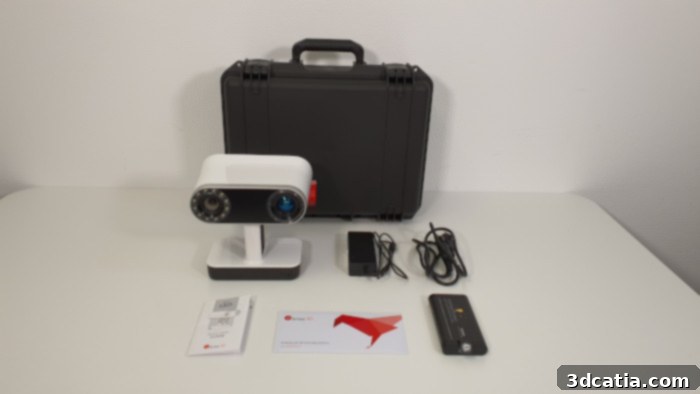
The Artec Leo arrives in a robust protective case, complete with essential accessories: power cables, a removable battery, and a comprehensive user manual, ensuring it’s ready for immediate deployment.
Having previously conducted an in-depth review of the Artec Micro a few months prior, the 3Dnatives Lab team recently had the exciting opportunity to rigorously test the Artec Leo 3D scanner. Our objective was to provide a comprehensive evaluation, uncovering the core strengths and potential weaknesses of this highly anticipated device. We aimed to determine the types of objects and applications for which the Leo truly excels, scrutinizing its performance across various scanning scenarios. Furthermore, a crucial aspect of our review involved assessing whether the scanner’s advanced capabilities and user experience genuinely justify its professional-grade price point. This detailed review below delves into every facet of the Artec Leo, from its physical design and technical specifications to its software integration and real-world scanning performance, offering valuable insights for potential users.
1. Unpacking the Artec Leo Scanner: First Impressions and Design Evolution
The unboxing experience of the Artec Leo is straightforward and professional. The scanner is securely housed in a robust, custom-designed protective case, which not only ensures its safety during transit but also provides convenient storage and portability. Inside, users will find the essential components: the scanner itself, its dedicated power cables, a removable battery, and a comprehensive user’s manual. The very first thing that captures attention upon removing the Leo from its packaging is its strikingly sleek and modernized design. Compared to many other models on the market, including its predecessors, the Leo represents a significant aesthetic and ergonomic overhaul. Its refined contours and contemporary finish immediately convey a sense of advanced engineering and user-focused design, clearly differentiating it from earlier, more utilitarian-looking 3D scanners.
While the Leo boasts larger dimensions at 231 × 162 × 230 mm (9.1” x 6.4” x 9.1”) compared to the more compact Eva and Spider models, this increase in size is accompanied by a nearly tripled weight of 2.6kg (5.7lbs), in contrast to the Eva’s 0.9kg (2lbs) and the Spider’s 0.8kg (1.8lbs). This weight increase is primarily attributable to the integrated, high-capacity battery, which is crucial for the Leo’s acclaimed wireless autonomy. Visually, the most prominent and impactful design enhancement is the addition of a large, vibrant 5.5-inch semi-HD touch screen on the front panel. This screen is ingeniously designed to be inclinable, offering exceptional flexibility and readability during the digitalization process. This ergonomic feature allows operators to adjust the screen for optimal viewing angles, even in unconventional scanning positions, such as when holding the scanner upside down, significantly enhancing user comfort and efficiency during long scanning sessions.
A closer inspection of the Artec Leo reveals its sophisticated optical architecture, central to its high-precision scanning capabilities. The front of the scanner features two distinct lens systems. The right lens is engineered to project an invisible laser grid onto the object, operating within an invisible light spectrum, much like a structured light scanner. This grid provides the geometric data essential for 3D reconstruction. Complementing this, the left lens assembly is equipped with 12 LEDs and houses two specialized cameras. One camera is dedicated to recovering the distortion patterns of the projected grid, meticulously capturing the object’s intricate geometry. The second camera is specifically designed to capture high-resolution color photographs, ensuring that the final 3D model accurately reflects the object’s texture and natural colors. Powering this advanced system is the robust NVIDIA Jetson TX1 platform, which integrates various essential sensors, including an accelerometer, gyroscope, and compass. These sensors work in concert to provide real-time spatial positioning, allowing the Leo to accurately track its movement and orientation in space, which is critical for seamless and precise 3D data acquisition.
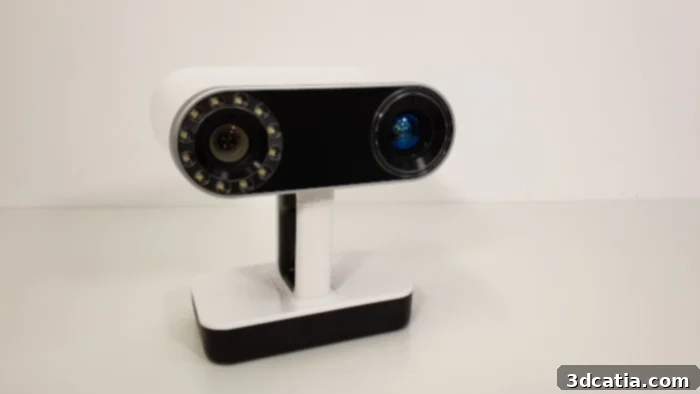
The Artec Leo 3D scanner integrates a sophisticated optical system, combining a dedicated 3D acquisition camera with a high-resolution camera for capturing detailed texture and color information.
Beyond its core scanning components, the Artec Leo is thoughtfully designed with several user-friendly features to enhance operational efficiency. An easily accessible ON/OFF button is conveniently located on the front panel, allowing for quick power control. For data storage and transfer, a microSD card slot is positioned above the handle, providing a simple method for expanding memory or offloading scan data. The scanning process itself is initiated and controlled by a tactile trigger, ergonomically placed on the scanner handle for comfortable, single-handed operation. The removable battery, a key component for the Leo’s wireless capabilities, is ingeniously integrated into the base of the device. This base also hosts a power socket for recharging the battery, along with an Ethernet port, offering alternative high-speed data transfer options for post-processing workflows.
In terms of raw performance, the Artec Leo unequivocally positions itself as the technological successor to the highly regarded Artec Eva. While maintaining equivalent, professional-grade accuracy and resolution at 0.1 mm and 0.2 mm respectively, the Leo introduces significant advancements that elevate its capabilities. It boasts a substantially wider field of view and an extended working distance, enabling it to capture larger objects and scenes more efficiently and from a greater range. Furthermore, the Leo delivers improved texture resolution, ensuring more lifelike and detailed color capture, alongside enhanced speed in both reconstruction and acquisition processes. With an impressive acquisition speed of 35 million points per second, the Leo nearly doubles the Eva’s 18 million points per second, allowing for faster and more comprehensive data collection. This efficiency translates into reduced scanning times and improved productivity for professionals.
Artec 3D recently pushed the boundaries of the Leo’s capabilities even further with a transformative software update. This update, powered by cutting-edge artificial intelligence algorithms, effectively doubles the resolution of the Leo (and also the Eva) to an astounding 0.2 mm when operating in its new HD mode. This AI-driven enhancement allows for the capture of incredibly fine details, previously unattainable at standard resolutions. Practically, the Leo’s versatile scanning range—from a close distance of 35 cm (13.8”) to an impressive 1.2 m (47″ or 3’11”)—enables it to capture a vast array of models. Its applications are incredibly diverse, spanning from intricate objects like a shoe, vehicle body panels, or complex interior spaces, to industrial components such as a boat propeller, full human bodies for medical or artistic purposes, and even larger items of furniture. The Leo’s innovative design and superior performance have not gone unnoticed; in 2020, it was deservingly honored with an prestigious Edison Award in the Applied Technology category, specifically recognized for its outstanding contributions to User Experience (UX) and Artificial Intelligence, cementing its status as a leader in the 3D scanning industry.
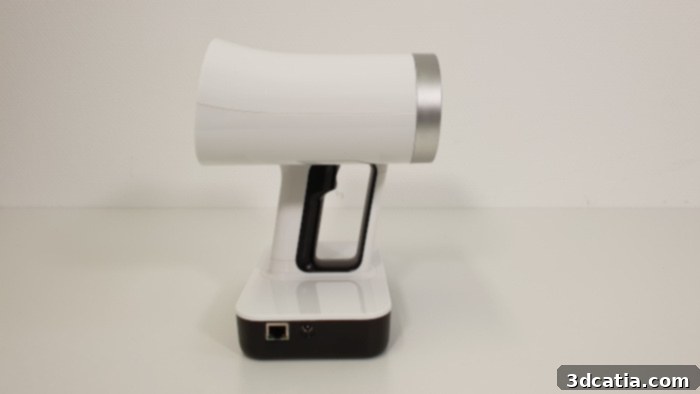
The Artec Leo 3D scanner showcases a remarkably sleek and modernized design, a stark contrast to the more traditional aesthetics of its predecessors, reflecting a commitment to both form and function.
2. Artec Leo 3D Scanner Set-Up: Seamless Integration and Object Preparation
One of the most appealing aspects of the Artec Leo is its remarkable ease of setup, making it an ideal tool for professionals seeking efficiency. The device is designed to be virtually ready to use straight out of its protective case. The initial activation process is streamlined and user-friendly, requiring only a few simple steps for the very first use. These include powering on the Leo via its dedicated ON/OFF button, connecting it to the internet for updates and activation, accepting the user license agreement, and finally, activating the product directly from its integrated touch screen. For added convenience and flexibility, these essential initial operations can also be seamlessly performed from a connected computer, providing options based on user preference and workflow. This minimal setup ensures that users can quickly transition from unboxing to scanning, maximizing productivity.
Once the initial activation is complete, the Artec Leo scanner is technically ready to begin its work. However, a critical preliminary step, common to the effective operation of all 3D scanners, is the careful preparation of the object to be scanned. This involves not only ensuring the object’s compatibility with the scanning technology but also optimizing its environment for the best possible results. For optimal 3D data acquisition, the object must be completely immobile during the scan. It should also possess a minimum level of inherent geometry or texture, as these features provide crucial tracking points for the scanner. Adequate and uniform lighting is essential to prevent shadows and highlight details, while the object should be situated in a sufficiently large space that allows the operator to move freely around it, capturing all necessary angles without obstruction.
As is often the case with optical 3D scanning technologies, certain object characteristics can present challenges. Materials such as dark, transparent, or highly shiny surfaces can significantly hinder the scanner’s ability to accurately capture data. Dark objects tend to absorb the structured light, while transparent materials allow it to pass through, and shiny surfaces reflect it erratically, leading to incomplete or noisy scans. To overcome these common hurdles, several effective solutions are available. For transparent or shiny parts, applying a thin, removable matte spray can temporarily alter the surface properties, allowing the scanner to capture the geometry more effectively. In instances where parts lack sufficient texture or geometric features for reliable tracking, the use of positioning targets (small, detectable markers) can provide the necessary reference points. For dark objects, operators can also fine-tune the scanner’s parameters, such as adjusting the texture brightness, to optimize light capture and improve data quality.
Artec 3D has proactively addressed these traditional scanning concerns by integrating innovative VCSEL (Vertical-Cavity Surface-Emitting Laser) technology into the Leo. This advanced laser technology plays a pivotal role in facilitating the seamless scanning of textures that have historically been difficult to capture with conventional structured light scanners. The VCSEL system enhances the scanner’s robustness and reliability, significantly improving its performance on challenging surfaces. Furthermore, a standout benefit of this technology is the Leo’s remarkable capability to perform accurate and high-quality scans even in direct sunlight during outdoor sessions. This feature greatly expands the scanner’s utility, making it an incredibly versatile tool for diverse professional environments where ambient light conditions cannot always be controlled, from industrial sites to archeological digs.
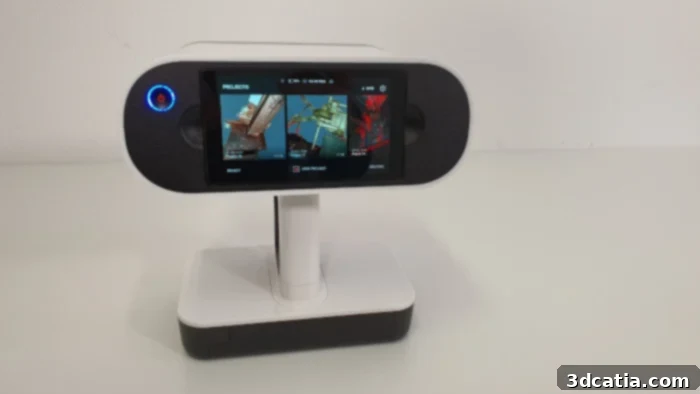
The Artec Leo comes equipped with a spacious 5.5-inch touch screen, featuring a highly practical tilting mechanism that significantly enhances user experience and viewing flexibility during scanning operations.
3. Artec Studio Software: Powering Post-Processing and Data Refinement
While the Artec Leo’s standout feature is its autonomy during the scanning phase, liberating users from constant tethering to a computer, the post-processing of the captured 3D data remains a crucial step. To achieve a clean, optimized, and finalized 3D model, the raw scan data must be transferred to a computer for further refinement and editing. Artec provides several convenient options for exporting the completed scan data from the Leo. Users can opt for a high-speed Ethernet connection, which offers the fastest data transfer rates, ideal for large datasets. Alternatively, WiFi connectivity is available, either through a standard network or via a direct hotspot-type connection for on-the-go flexibility. For situations where wireless connectivity is not feasible or preferred, the trusty microSD card slot provides a reliable and portable method for transferring files.
The primary software companion for processing 3D files captured with the Artec Leo is Artec Studio 15. This robust and comprehensive software suite is celebrated for its powerful algorithms and intuitive interface, making it a staple for professional 3D data manipulation. Artec Studio 15 is designed to cater to a global user base, supporting over 15 languages, which enhances its accessibility. For licensing, users have two flexible options: an annual subscription fee of $800, which includes ongoing updates and support, or a lifetime subscription fee of $2,000 for a one-time purchase. To allow prospective users to fully evaluate its capabilities before committing, a generous 30-day trial version is also readily available, enabling hands-on testing and exploration of its extensive features.
As with most advanced 3D processing software, Artec Studio 15 demands a relatively powerful computer to ensure smooth and efficient operation, especially when handling high-resolution scan data. Artec recommends running the software on a Windows 10 x64 operating system, ideally paired with an Intel i5 or i7 processor, and a minimum of 32GB of RAM. These specifications ensure that the software can adeptly manage complex point clouds and meshes without performance bottlenecks. Recognizing the diverse operating environments of its users, Artec has also considered Mac users. While Artec Studio 15 is primarily Windows-native, Mac users can leverage the dedicated ScanApp application for performing basic operations and file export. For those requiring the full functionality of Artec Studio 15 on a Mac, it is possible to run the software using Boot Camp, which allows Windows to be installed and run natively on Apple hardware, thus bridging the compatibility gap for professional workflows.
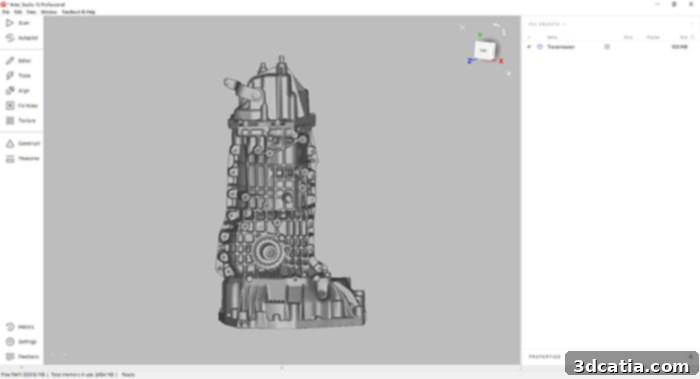
Artec Studio 15 software provides a comprehensive suite of tools for editing, optimizing, and finalizing 3D models captured with the Artec Leo, transforming raw scan data into high-quality digital assets.
A unique and particularly user-friendly feature within Artec Studio is the Autopilot mode, specifically engineered to simplify the complex post-processing workflow, making it highly accessible for beginners while still offering powerful capabilities for experienced users. Once a freshly scanned file is imported into Artec Studio, activating the Autopilot mode initiates a guided, semi-automated process. The software intelligently prompts the user with a series of questions concerning the scan, such as the desired scan quality, the approximate size of the object scanned, and other relevant parameters. In the subsequent step, the user is intuitively guided to clean the object, effectively removing any extraneous data or background noise that is not part of the intended final 3D model. The third crucial step involves aligning multiple scans of the same object, a common requirement when a single scan cannot capture all facets. Autopilot automatically identifies and stitches these scans together into a cohesive, single model. Finally, the last step automates various essential post-processing operations, including global registration, outlier removal, hole filling, and mesh generation, culminating in a refined 3D model. Critically, while Autopilot streamlines the process, all these individual steps are also available in a comprehensive manual mode, providing advanced users with granular control over every parameter for highly customized file processing and optimization.
4. First Scans: Mastering the Artec Leo’s Intuitive Workflow
Initiating a scan with the Artec Leo is designed for maximum flexibility and user comfort. Operators have multiple options to start the process: directly via the intuitive touch screen on the scanner itself, using the conveniently located trigger on the handle for single-handed control, or even remotely from a PC through Screen Mirroring. The Screen Mirroring feature is particularly useful, allowing a direct, real-time replication of the Leo’s display onto the computer screen, providing an alternative viewing experience for monitoring the scan. A single click on the trigger or touch screen activates the “Preview mode,” which immediately engages the “Distance color map” feature. This visual aid is invaluable for guiding the user to maintain the optimal distance between the scanner and the object. When the object appears green on the scanner’s screen, it signifies that it is within the ideal scanning range; conversely, red indicates it’s too close, and blue suggests it’s too far. This intuitive feedback system significantly reduces guesswork and improves scan consistency. Once the ideal distance is established, a second click on the trigger seamlessly transitions into “recording mode,” commencing the actual capture of high-resolution 3D data.
The “Distance color map” mode is a particularly ingenious feature that dramatically simplifies the scanning process, especially for new users. As mentioned, it provides real-time visual feedback on the screen, indicating whether the scanner is at the optimal working distance from the object. This mode is not only useful for initial positioning but can also be activated dynamically during the scanning process itself, allowing operators to continuously adjust their distance for consistent data quality. This visual guidance ensures that every part of the object is captured with the highest possible accuracy and resolution, preventing common scanning errors caused by improper distance. By making it easy to maintain the sweet spot, the Leo enhances both the efficiency and the quality of the scan, empowering users to achieve professional results with greater ease.
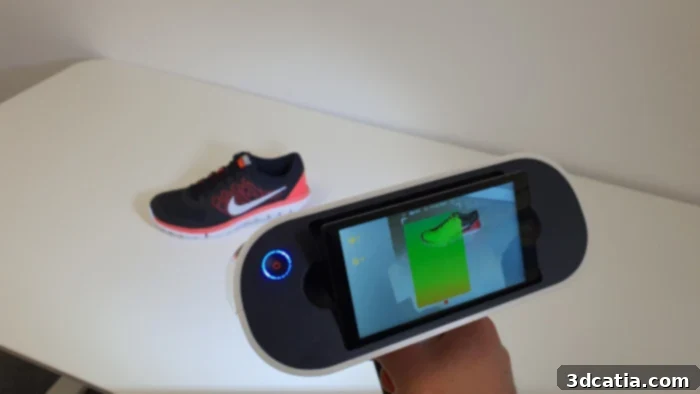
The “Distance color map” mode offers essential real-time visual feedback, ensuring the operator maintains the optimal scanning distance from the model for superior data capture.
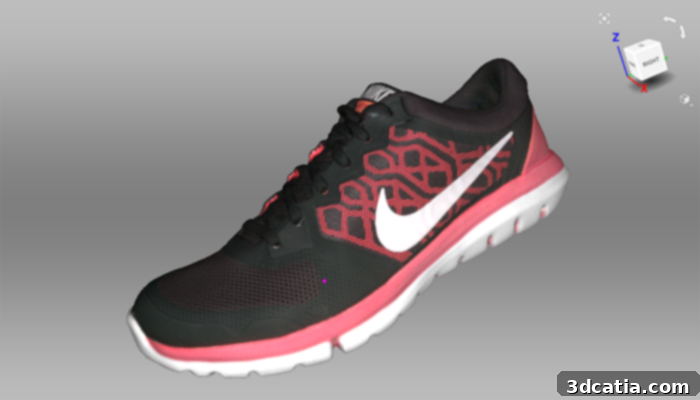
Our sneaker scanning test yielded impressive results, faithfully representing the intricate fabric mesh and vibrant colors, highlighting the Leo’s capability for detailed texture capture.
Before embarking on a scanning session, the Artec Leo offers a comprehensive suite of adjustable parameters directly accessible from its touch screen. These settings empower the user to fine-tune the scanning process for optimal quality or increased speed, depending on project requirements. Among the most impactful is the HD mode, an advanced setting leveraging artificial intelligence to generate exceptionally detailed models with an impressive resolution of up to 0.2mm. This mode is particularly advantageous for capturing intricate geometries or for effectively scanning challenging surfaces such as very dark or highly shiny objects, which typically pose difficulties for standard scanning. The texture mode allows operators to control whether color information (textures) of the object is actively displayed or recorded during the scan, offering flexibility for workflows focused purely on geometry. The base removal option is a practical feature that automatically filters out the horizontal or vertical plane on which the object rests, simplifying post-processing. To enhance detail capture on specific textures, operators can manually modify the texture brightness, adjusting the scene’s illumination for better data fidelity. While the Leo’s broad scan range spans from 0.35m to 1.2m, Artec identifies an optimal distance of 0.5m for achieving the best balance of detail and coverage. For projects requiring focused attention on a specific part of a larger scene, the Scanning Range option allows users to narrow the Leo’s field of view, concentrating its processing power and attention precisely where it’s needed most.
A critical consideration regarding the scanning distance directly impacts the achievable quality of the scan. It is a fundamental principle that the resolution of the captured data tends to decrease as the scanner moves further away from the object. Consequently, to maintain an optimal scan resolution, the manufacturer strongly advises scanning larger objects from a closer range. While this approach will naturally result in longer scanning times due to the need for more passes and greater detail capture, it is essential for projects demanding the highest level of geometric accuracy and surface fidelity. Conversely, for projects where overall shape and speed are more critical than minute details, it may be judicious to step back from the object slightly. This wider capture angle can significantly reduce the overall scanning time, making it a practical trade-off for applications that prioritize efficiency over extreme precision, such as preliminary CAD modeling or rapid prototyping where exact measurements are not the sole focus.
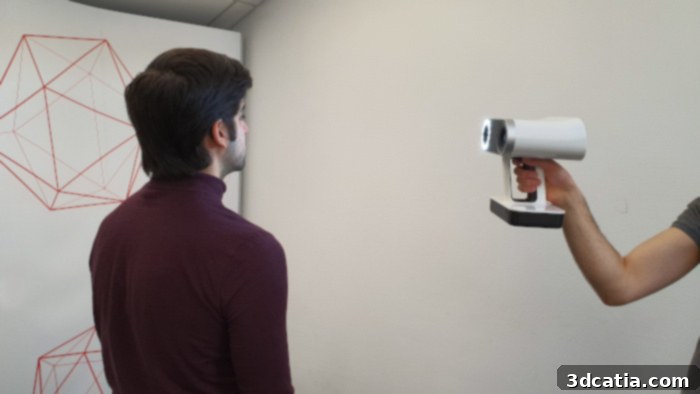
The Artec Leo’s wireless and hands-free operation dramatically simplifies the process of scanning large and complex models, offering unparalleled freedom of movement for the operator.
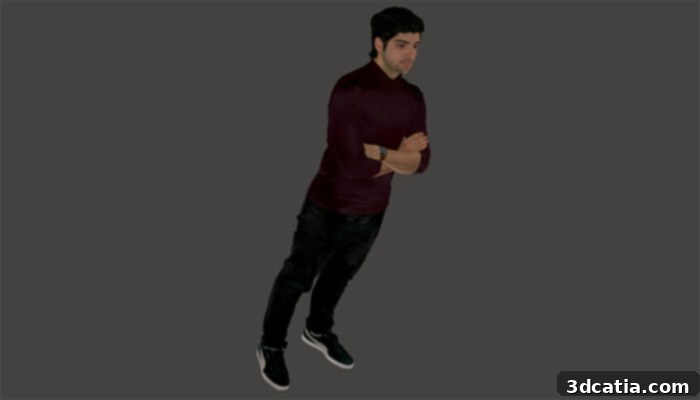
Our test scan of a person yielded very satisfactory results, effectively capturing details even on challenging dark textures like hair, pants, and shoes.
As is common with many handheld 3D scanners, there can be instances where the scanner temporarily loses sight or tracking of the object being scanned. This might occur if the operator moves too quickly, if the object presents particularly challenging geometries, or if lighting conditions suddenly change. However, resuming the capture with the Artec Leo is a remarkably intuitive process. To re-establish tracking, the operator simply needs to reposition the Leo over a section of the model that has already been successfully scanned. The scanner’s intelligent algorithms will automatically recognize the previously captured geometry, re-orient itself, and display the reassuring “ready to scan” message on the screen, allowing the operator to seamlessly resume the scanning process without significant interruption. While this issue did not frequently occur during our rigorous tests, it’s worth noting that for extensive, long-duration scanning projects, an additional battery would be a valuable asset to ensure uninterrupted workflow in the event the primary battery depletes. Spare batteries are available for purchase directly from the manufacturer upon request, providing a practical solution for prolonged use.
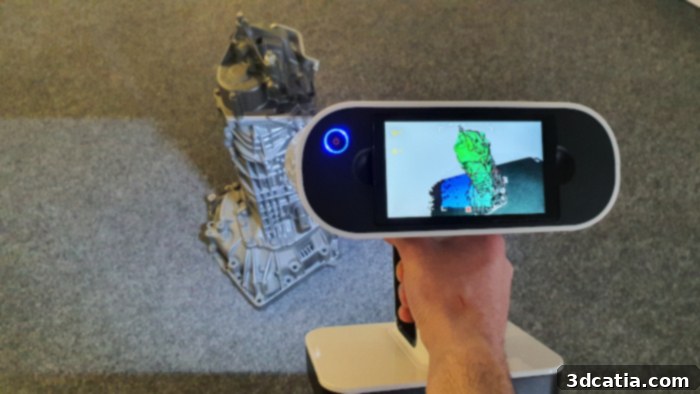
The Leo’s integrated screen offers live, real-time feedback on the scan quality, empowering operators to make immediate adjustments and ensure optimal data capture.
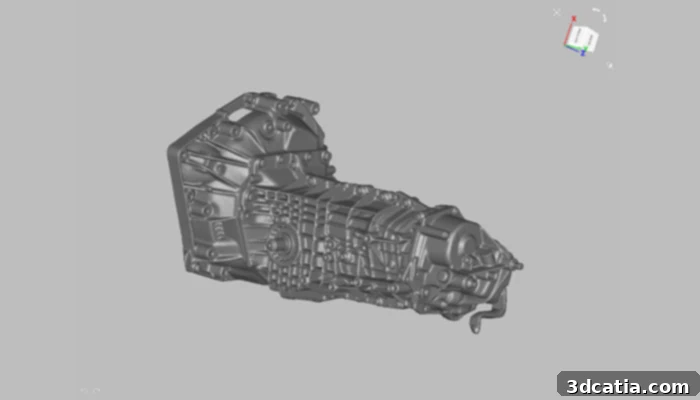
A challenging scan test of an engine crankcase successfully navigated the model’s numerous intricate cavities, showcasing the Leo’s precision in complex environments.
During the active scanning process, the “Quality Overlay” mode provides an indispensable visual aid to the scanner operator. This intelligent feature highlights parts of the object on the screen where it might be necessary to revisit, move closer, or dedicate more scanning time to ensure the highest possible quality of the final scan. By visually indicating areas that require additional attention, this mode significantly assists in guaranteeing comprehensive and robust data capture. While it can be deactivated if not desired, the Quality Overlay mode proves exceptionally useful, particularly for beginners in manual 3D scanning, helping them to instinctively develop better scanning techniques and minimize errors. This proactive feedback loop ensures that even complex objects with intricate details or challenging geometries are captured thoroughly and accurately from the outset.
In conclusion, the overall 3D scanning experience with the Artec Leo is profoundly enhanced and simplified by several key innovations. The prominently positioned front screen provides real-time visual feedback, allowing operators to remain fully concentrated on the model being scanned without constantly shifting their gaze to an external device. This direct interaction streamlines the workflow and improves accuracy. Furthermore, the complete absence of cables offers unparalleled freedom of movement, which is particularly beneficial during potentially long and intricate scanning phases, allowing for unhindered access to all angles of an object. The integrated visual software aids on the Leo’s screen further simplify this complex phase, actively guiding the user and minimizing the potential for common scanning errors. While the initial scan yields robust raw data, the results will still require further processing and refinement within the powerful Artec Studio software. In this crucial post-processing step, the intuitive Autopilot mode will prove to be an invaluable asset, especially for new users, by guiding them through the optimization process (as detailed in section 3, “Artec Studio Software”). The Artec Leo truly represents a significant advancement in autonomous, professional-grade 3D scanning, combining cutting-edge hardware with intelligent software to deliver an efficient and high-quality scanning solution. For more detailed information, users can explore Artec’s official website HERE.
Find all our 3Dnatives Lab Tests HERE