
TierTime UP Mini 2 Review: Unveiling a User-Friendly Desktop 3D Printer for Every Creator
TierTime has long been a notable player in the 3D printer market, consistently innovating with both industrial-grade and accessible desktop solutions since 2003. Their commitment to making additive manufacturing more approachable for a wider audience has been evident throughout their product lineage. A significant milestone in their journey was the introduction of the original UP Mini desktop printer in May 2012, a device that quickly garnered critical acclaim, notably being named the ‘Best Overall Experience 3D Printer’ by Make Magazine. This recognition cemented TierTime’s reputation for developing user-friendly and reliable machines.
Building on this legacy, TierTime has expanded its portfolio to include a total of five distinct 3D printers, each designed to meet varying user needs: the robust UP Box+, the versatile UP Box, the refined UP Plus 2, the original UP Mini, and the latest iteration, the UP Mini 2. In this comprehensive review, we delve into the capabilities and user experience of the newer UP Mini 2. Unlike its more industrial counterparts, the UP Mini 2 is positioned as a low-cost 3D printer, specifically tailored for consumers and educational environments rather than large-scale industrial businesses. This focus on accessibility and ease of use for the everyday hobbyist or professional makes it a compelling option in the bustling desktop 3D printing landscape.
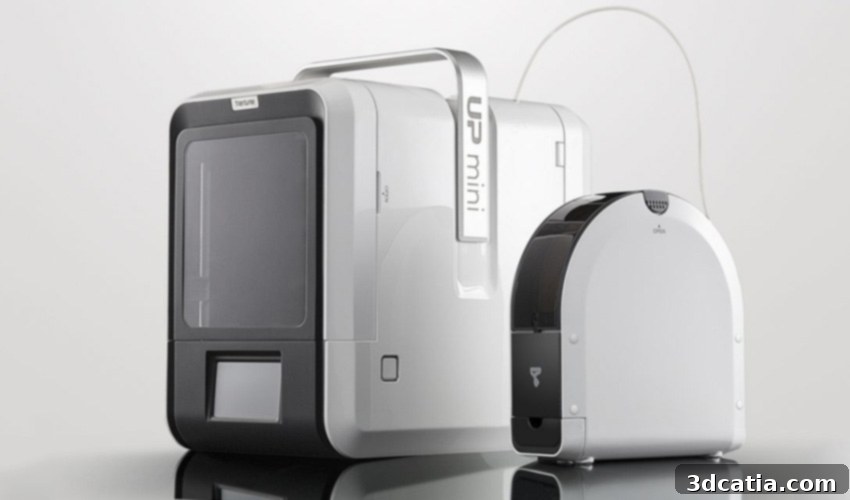
From an aesthetic standpoint, the UP Mini 2 immediately impresses with its sleek, minimalist design. Its all-white casing for both the printer and the accompanying filament box evokes the clean, premium feel often associated with high-end consumer electronics, particularly drawing comparisons to Apple products. This elegant exterior hints at a refined user experience within. However, our primary interest lies beyond superficial appearances; we are keen to thoroughly assess its technical performance, reliability, and overall value. For those interested in exploring more of our extensive 3D printer evaluations, a collection of our previous 3D printer tests is readily available.
Unpacking the UP Mini 2: A Thoughtful First Impression
The unboxing experience of the UP Mini 2 sets a positive tone, revealing a carefully curated package designed to get users printing quickly and smoothly. The printer arrived securely packed, a testament to TierTime’s attention to detail in protecting the delicate components during transit. Inside the main carton, we discovered a selection of three different filaments, providing immediate material options for initial tests: a rich burgundy PLA, a pristine white PLA, and a robust white ABS+. This inclusion is particularly beneficial for beginners, eliminating the immediate need to purchase additional materials. Beyond the consumables, the box thoughtfully contained two detailed instruction manuals, guiding users through the critical process of correctly installing the printhead. To further support new users, TierTime also provides access to free video training resources and dedicated technical assistance, ensuring a smooth onboarding process and ongoing support.

Dimensions and Thoughtful Accessories for an Enhanced User Experience
Beyond the primary filament, the unboxing continued to impress with a smaller accessory box, brimming with tools and components essential for a comprehensive 3D printing journey. This accessory kit included practical items such as protective gloves for safe handling, silk cutters for precise filament trimming, a sturdy spatula for effortless print removal, and an assortment of five different pressure plates designed for various adhesion requirements. Furthermore, spare nozzles were included, ensuring longevity and easy replacement, along with a filament guide tube, essential screws, a hex wrench for minor adjustments, and additional pressure plates tailored for different materials. This extensive collection of tools highlights TierTime’s commitment to providing everything a user might need from the get-go. Complementing the well-protected printer, the UP Mini 2’s dedicated filament storage container arrived pre-loaded with 500g of high-quality ABS filament, offering another material option for immediate printing.
The UP Mini 2 maintains a commendably compact footprint, measuring 255 x 365 x 385 mm. While still desk-friendly, it does represent a slight increase in size compared to its predecessor, the original UP Mini, which measured 240 x 340 x 355 mm. This subtle increase in dimensions contributes to an overall more spacious build volume and potentially improved internal component layout. A distinctive design feature of the UP Mini 2 is the inclusion of doors on both the front and back, which conveniently open to the sides. While the front door’s purpose for print access is clear, the presence of a back door initially seemed rather perplexing, offering no apparent additional role during the actual printing process. However, upon closer consideration, this rear access could prove invaluable for maintenance, troubleshooting, or potential repairs, providing technicians with easier access to internal mechanisms. The ability to fully close both doors is a significant functional advantage, especially when working with temperature-sensitive materials like ABS. An enclosed build chamber is crucial for maintaining a stable internal temperature, minimizing warping, and ensuring optimal print quality with such filaments.

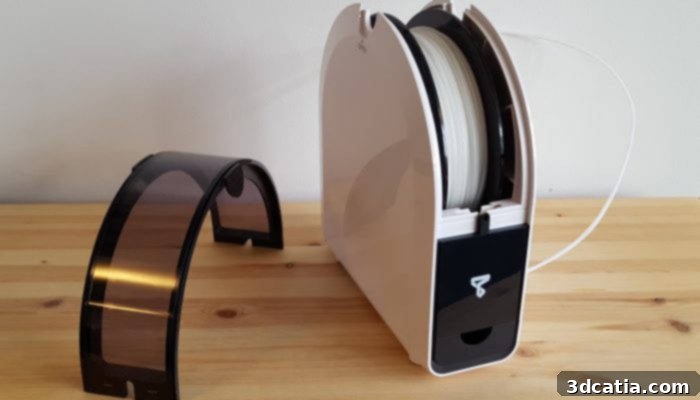
Further enhancing user convenience, the doors are ingeniously fitted with transparent windows, allowing for effortless monitoring of the ongoing print job without needing to open the enclosure and disturb the thermal environment. This visibility is significantly improved by an integrated LED light within the build chamber, which illuminates the print area, making it much easier to observe fine details and progress – a substantial upgrade from the previous model where internal visibility was often a challenge. After opening the doors of the UP Mini 2, two plated sections can be effortlessly lifted out. These print plates are equipped with magnets, simplifying their removal and replacement. This magnetic system ensures secure placement during printing and allows for quick swapping or cleaning. At the top of the printer, a practical carrying handle is integrated, greatly facilitating simple and secure transport of the machine. The thoughtfully designed filament storage container, separate from the main unit, provides crucial protection for the filament, shielding it from environmental factors such as dirt, dust, and detrimental temperature fluctuations, which can significantly impact print quality and material longevity.

A clear view from the top of the printhead of the UP Mini 2, highlighting its accessible design.
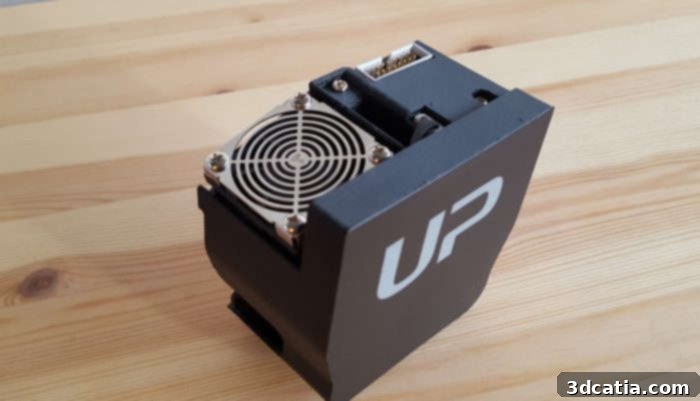
The precise printhead featuring a standard 0.35 mm nozzle, ready for detailed printing.
Effortless Setup and Intuitive Calibration of the UP Mini 2
One of the most appealing aspects of the UP Mini 2, particularly for those new to 3D printing, is its remarkably straightforward setup process. The printer arrives largely pre-assembled, significantly reducing the complexity often associated with initial installation. Following the clear guidance provided in the user manual, the only primary component requiring connection is the printhead. This minimalist approach ensures that users can transition from unboxing to printing in a very short amount of time. The only minor inconvenience encountered during this step was the integrated carrying handle, which, while highly practical for transport, can be slightly in the way when maneuvering the printhead into its designated slot. This is a small trade-off for enhanced portability.
Beyond the physical assembly, the initialisation and calibration of the UP Mini 2 are equally user-friendly. The entire process is simplified to a single touch on the responsive touchscreen interface. This ‘one-touch’ approach eliminates the need for manual adjustments and complex calibration routines, making the printer highly accessible even for absolute beginners. A standout feature is the automatic nozzle height detection, a critical element that ensures perfect first-layer adhesion and consistent print quality without user intervention. This automation greatly enhances the overall ease of handling and reduces common printing frustrations. Before commencing a print, the filament must be threaded through its guide tube and then carefully fed through the back of the UP Mini 2 into the printhead. Once loaded, the user simply selects the appropriate material function on the touchscreen, choosing the filament type that has been loaded, and the printer intelligently adjusts its settings accordingly, streamlining the workflow and setting the stage for successful prints.
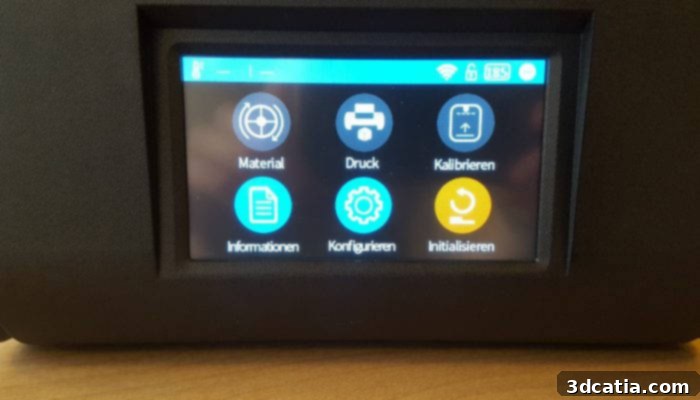
Navigating the printer’s functions on the clear 4-inch display with the responsive touch screen is exceptionally easy and intuitive.
The UPStudio Software: A Revitalized Slicing Experience
Historically, earlier UP printer models sometimes faced criticism for their software, which, while functional, wasn’t always celebrated for its user-friendliness. Recognizing this, TierTime has made significant strides with the latest version of UPStudio, which has been completely revised and vastly improved for the UP Mini 2. This updated software suite now offers a much more streamlined and intuitive experience, addressing previous feedback and enhancing the overall workflow. The UPStudio software is not physically included in the printer’s delivery package, but it can be conveniently and freely downloaded directly from the official TierTime website. Once installed, users can easily load their 3D models, typically as standard .stl files, ready for preparation and printing.
The software provides a versatile range of layer thickness options, allowing users to choose between 0.15 mm and 0.35 mm, catering to both fine detail and faster, coarser prints. A key feature is its automatic detection and display of the nozzle height, which, combined with the printer’s auto-calibration, simplifies preparation. UPStudio is also adept at quickly processing 3D models, splitting complex objects into individual printing layers within seconds. However, during our testing, we did observe that sending the processed files from the software to the 3D printer sometimes took a noticeable amount of time, depending on the file size and complexity. This is an area where potential optimization could further enhance the user experience. The UP Mini 2 offers multiple connectivity options, providing flexibility for different user setups: it can be controlled via a traditional USB cable, wirelessly through WiFi, or even remotely using the UP Studio Mobile App, which is currently available for iOS devices (a limitation for Android users). A practical feature that stands out is the printer’s internal memory, capable of storing the last 10 print files. This means that once a print job has been initiated and transferred, the USB cable can be safely removed, freeing up the computer and reducing clutter.
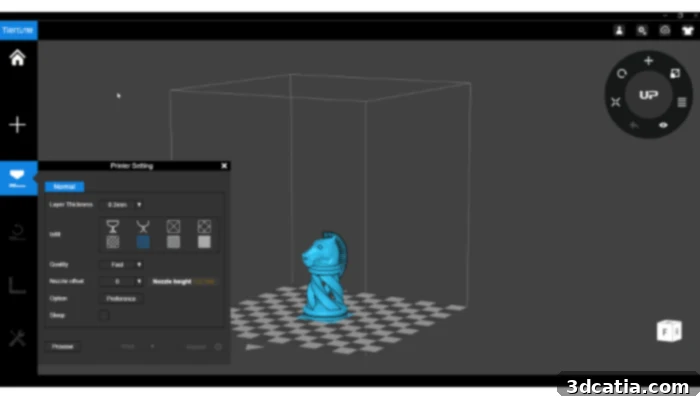
The UPStudio software impresses with its user-friendly interface and intuitive handling, simplifying the 3D printing process.
The First Print: Performance, Quality, and Environmental Considerations
Upon initiating the first print, one of the most striking characteristics of the UP Mini 2 is its exceptionally quiet operation. This is a significant advantage, making it suitable for environments where noise levels are a concern, such as home offices, classrooms, or shared workspaces. Beyond acoustic comfort, the printer is equipped with a high-efficiency HEPA air filter. This advanced filtration system is designed to minimize odors and capture ultrafine particles emitted during the printing process, contributing to a healthier and more pleasant printing environment. The inclusion of a HEPA filter is a premium feature not yet commonly found in many desktop 3D printers, underscoring TierTime’s focus on user safety and experience. The print results achieved with ABS, ABS+, and PLA filaments were consistently excellent, demonstrating the printer’s versatility and precision. The visual evidence of these high-quality outputs is showcased in the following pictures.
For PLA printing, the UP Mini 2 leverages TierTime’s proprietary Smart Support technology. This intelligent feature automatically generates support structures within the software that are not only robust enough to ensure successful prints but are also designed for exceptionally easy removal post-printing. This significantly reduces the time and effort typically spent on post-processing, making complex geometries more manageable. In our comprehensive review, we conducted rigorous tests using ABS, ABS+, and PLA filaments, achieving impressive results across the board. Furthermore, according to the manufacturer’s specifications, the UP Mini 2 is designed to process a wider array of advanced materials, including PETG, PA (Nylon), PC (Polycarbonate), PE, CPE, and PP (Polypropylene), expanding its potential applications for more experienced users. The print bed of the UP Mini 2 is both easily removable and heated, offering several advantages. The heated bed ensures optimal adhesion during printing, preventing warping, especially with materials like ABS. Its removability simplifies the process of detaching finished prints and makes cleaning the print surface much more convenient, further contributing to the excellent overall print results.
For our comprehensive evaluation, we selected and printed a variety of objects, each chosen for its unique geometric complexity and ability to test specific aspects of the printer’s performance:
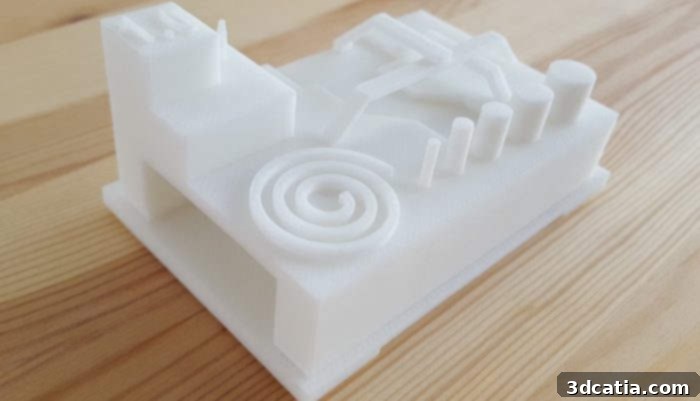
Makerbot’s classic ‘Torture Test’, meticulously crafted from ABS filament. This print assesses bridging, overhangs, and dimensional accuracy.
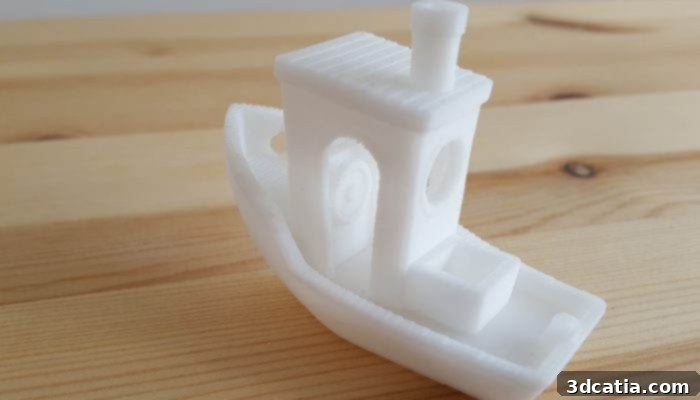
Creative Tools’ iconic ‘3DBenchy’ benchmark model, printed flawlessly in ABS, showcasing overall print quality and fine detail capabilities.
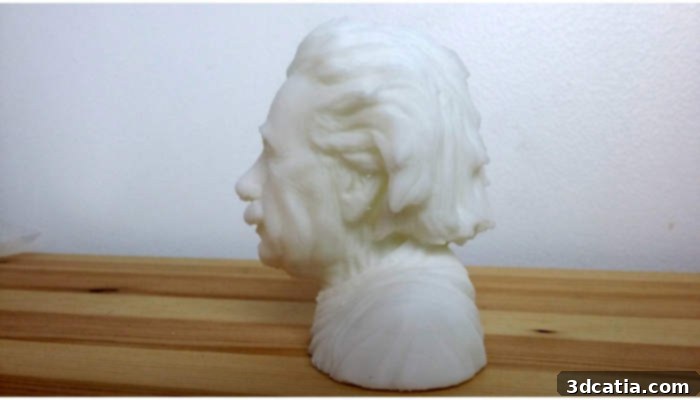
A detailed bust of Albert Einstein, printed with support in ABS, demonstrating the printer’s ability to handle intricate features with reliable support structures.
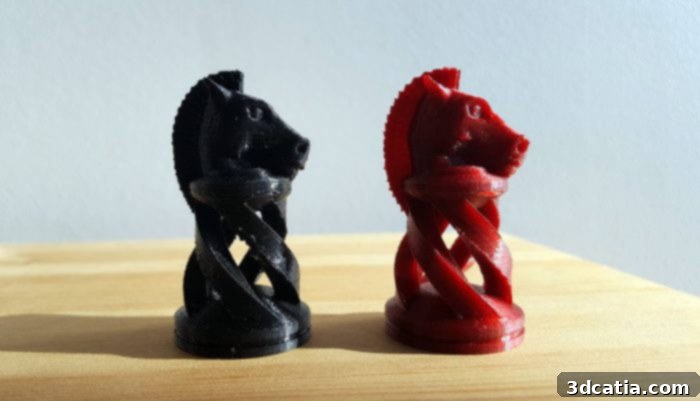
JaaYoo’s elegant Spiral Chess Piece, printed in PLA with no support, highlighting excellent overhang performance and smooth curves.
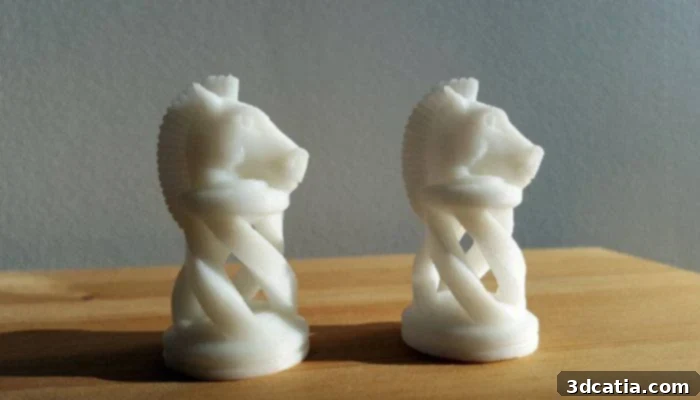
Two versions of JaaYoo’s Spiral Chess Piece, demonstrating the distinct properties and print quality achieved with ABS+ (left) and standard ABS (right).
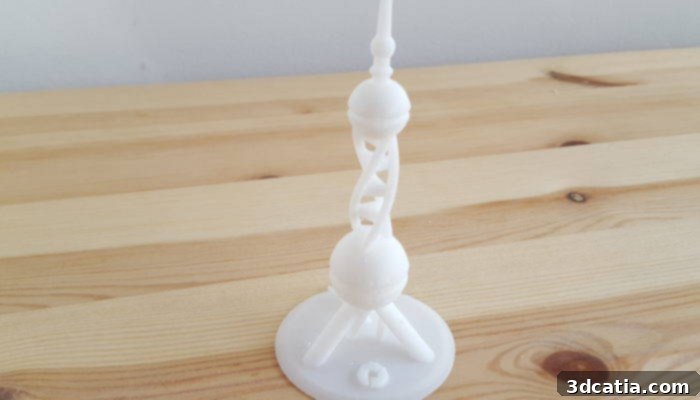
The challenging PolyPearl Tower Torture Test by Polymaker 3D, successfully printed in ABS, evaluating complex geometries and stringing performance.
In conclusion, the TierTime UP Mini 2 stands out as a formidable desktop 3D printer, particularly for consumers and educational users who prioritize ease of use, reliable performance, and safety features. Its sleek design, combined with thoughtful inclusions like the HEPA filter and automatic calibration, makes it an attractive and practical choice. While file transfer times could be faster and an Android app would expand accessibility, these minor points are overshadowed by its excellent print quality, quiet operation, and versatile material compatibility. The UP Mini 2 truly embodies a user-friendly approach to 3D printing, making advanced technology accessible to a broader audience.
What are your thoughts on the TierTime UP Mini 2? Have you had an experience with TierTime printers? We’d love to hear from you! Let us know in a comment below or join the conversation on our Facebook and Twitter pages! Don’t forget to sign up for our free Newsletter to get all the latest news in 3D printing delivered straight to your inbox!