

ChiTuBox: The Essential Slicer Software for Resin 3D Printing Success
In the dynamic world of additive manufacturing, 3D printing software plays an indispensable role, and among these, slicers stand out as truly critical. Slicer software acts as the crucial intermediary that transforms a complex 3D model into a series of thin, printable layers, ultimately generating the G-code file. This G-code is a meticulously detailed set of instructions that guides the 3D printer’s every movement, ensuring the accurate creation of the desired object. While prominent slicers like Cura, Slic3r, and SmartSlice have become household names within the 3D printing community, a significant limitation often goes unnoticed: many of these widely adopted solutions are exclusively designed for FDM (Fused Deposition Modeling) machines. This leaves a considerable gap for users of resin 3D printers, where dedicated slicing software is far less common. However, amidst this scarcity, one software has emerged as a beacon of reliability and popularity: ChiTuBox. Launched in 2017 by the Chinese company CBD-Tech, ChiTuBox quickly distinguished itself with its intuitive, easy-to-use interface and comprehensive control over a vast array of printing parameters, making it an indispensable tool for resin printing enthusiasts and professionals alike.
ChiTuBox’s broad compatibility is a major factor in its widespread adoption. It supports the most popular SLA (Stereolithography) printers on the market, as well as a range of other resin machines utilizing DLP (Digital Light Processing) and LCD (Liquid Crystal Display) technologies. This versatility ensures that a vast segment of the resin 3D printing community can leverage its powerful features, regardless of their specific hardware. Since its inception, ChiTuBox has captivated a growing legion of resin 3D printing enthusiasts, drawn to its robust capabilities and straightforward operation. The software is designed to process widely used 3D printing file formats, including STL and MJF files, ensuring seamless integration into existing workflows. Furthermore, its cross-platform availability, with compatibility for Windows, Mac, and Linux, means users can access its functionalities across various operating environments. While ChiTuBox initially garnered immense popularity for being entirely free, its evolution has led to the introduction of a sophisticated Pro version. This paid tier, available from $170 per year for a single device and $300 for up to five devices, unlocks a suite of advanced functionalities. These premium features include, but are not limited to, an intelligent automatic orientation tool designed to identify and apply the optimal print orientation, significantly enhancing print success rates and overall efficiency.
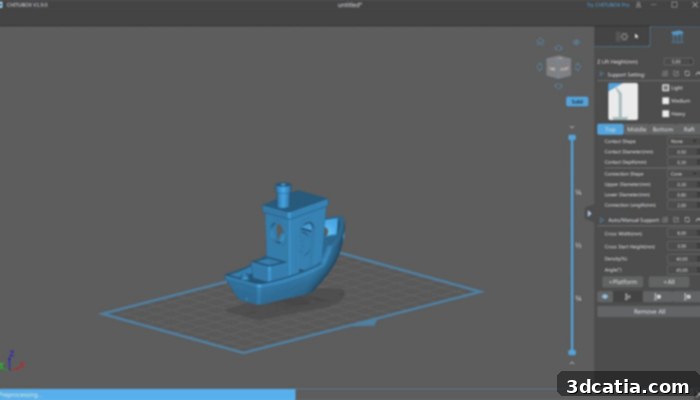
A look at the free version of ChiTuBox (photo credits: ChiTuBox)
How ChiTuBox Streamlines Your Resin 3D Printing Process
The meteoric rise of ChiTuBox is anything but accidental. Its success is rooted in a meticulously crafted balance of powerful functionality and user accessibility. Even for individuals new to resin 3D printing, the software’s intuitive design prevents it from feeling overwhelming, ensuring a smooth learning curve. ChiTuBox is packed with essential features that address the unique requirements of resin printing. A prime example is the innovative Hollow tool, which allows users to create hollowed-out sections within their models. This feature is not just about aesthetics; it’s a crucial step that significantly limits the amount of expensive resin material needed for each print, thereby reducing costs and print times. Furthermore, the Hollow tool works in conjunction with the ability to add drainage holes, which are vital for allowing uncured resin to escape from the internal cavities during printing and washing, preventing resin traps and ensuring proper curing. Beyond these specialized tools, ChiTuBox also provides all the traditional and expected functionalities of a high-quality slicer. Users have access to comprehensive support generation, with options for both manual and automatic placement of support structures. These supports are essential for anchoring the model to the build plate and preventing deformation during the printing process. Additionally, a robust set of editing functions allows for precise adjustments to the model’s scale, position, and orientation, giving users complete control over their print preparation.
The slicing workflow in ChiTuBox is designed for efficiency and clarity. Once all the necessary parameters, such as layer height, exposure time, and support settings, are meticulously configured to the user’s preference, the process is initiated with a simple click of the “Slice” button. The software then rapidly processes the 3D model, dissecting it into individual slices for each layer of the print. This digital breakdown is then presented to the user, offering a comprehensive preview of the printing process. This crucial preview function allows users to visually inspect each layer, identify potential issues with supports or hollowing, and make necessary adjustments before committing to a print. Furthermore, ChiTuBox provides valuable pre-print estimations, displaying the projected build time and the estimated amount of material that will be consumed. This foresight helps users plan their projects more effectively, manage resin inventory, and avoid unexpected delays. Due to its exceptional feature set, even in its free iteration, ChiTuBox is widely regarded by many in the 3D printing community as the premier slicer for resin 3D printers. The continuous commitment to improvement is evident in its regular updates; as of 2024, the most recent version, ChiTuBox Pro V1.4.1, has addressed and corrected various bugs and minor errors present in previous versions, further solidifying its reputation for reliability and performance.
Unlocking Advanced Capabilities: Benefits of the ChiTuBox Pro Version
While the foundational, free version of ChiTuBox already provides an impressive array of functions and options for designing, preparing, and slicing 3D models for resin printing, the ChiTuBox Pro version elevates this experience to a professional level. This advanced edition boasts a host of additional features and refinements that place it significantly ahead of its basic counterpart, making it an indispensable tool for experienced users, professionals, and anyone seeking to maximize the capabilities of their resin 3D printer. The Pro version empowers users to unlock their full potential and achieve unprecedented levels of precision, efficiency, and print success.
The distinctions between the ChiTuBox Pro and basic versions are numerous and impactful, particularly in key areas of the print preparation workflow. Firstly, the Pro version dramatically expands compatibility with file formats, offering the possibility of importing and working with a wider range of industry-standard files such as .3DS, .3MF, .3DM, and .STP. This extended format support is critical for users who integrate 3D printing into professional design and engineering pipelines, allowing seamless transitions from various CAD software. Furthermore, the Pro version boasts a total of six more advanced editing tools than the basic version. These include highly valuable features like the sophisticated automatic orientation tool, which intelligently analyzes the model to determine the optimal printing angle, minimizing support structures and improving surface quality. The ability to add customizable labels directly onto models is another exclusive Pro feature, invaluable for part identification, batch management, and quality control. Moreover, the well-known multiple selection tool in the Pro version significantly enhances workflow efficiency, allowing users to select and manipulate multiple objects or support structures simultaneously. A major area where the Pro version truly diverges from the free version is in its robust repair capabilities. While the free version offers two fundamental repair tools, the Pro version dramatically expands this to twelve specialized tools. These advanced repair functionalities are crucial for fixing complex mesh errors, non-manifold geometry, and ensuring watertight models – all critical for successful resin printing. Similarly, the overall suite of editing tools in the paid version far outstrips those in the basic version, offering finer control and more intricate manipulation options. Finally, a standout feature exclusive to the Pro version, and notably absent from the basic version, is its comprehensive suite of analysis and measurement tools. These tools provide critical insights into model dimensions, volume, surface area, and allow for pre-print diagnostics, helping users proactively identify and mitigate potential printing issues before any resin is consumed.
Irrespective of whether you opt for the feature-rich free version or the immensely powerful Pro version, it is unequivocally clear that ChiTuBox stands as an excellent, up-to-date, and continually evolving slicer solution for use with resin 3D printers. Its consistent performance, user-centric design, and powerful feature set make it a top choice for anyone serious about achieving high-quality resin 3D prints. For those eager to delve deeper into its functionalities and see ChiTuBox in action, you can explore more about the software in the informative video below or by visiting the official website HERE.
We’re keen to hear your thoughts! What do you think of the ChiTuBox slicer and how has it impacted your resin 3D printing projects? Let us know in a comment below or connect with us on our LinkedIn, Facebook, and Twitter pages! And for all the latest developments, innovations, and news in the world of 3D printing, don’t forget to sign up for our free weekly Newsletter here, delivered straight to your inbox! You can also find all our engaging videos and tutorials on our YouTube channel.
Cover Photo Credits: ChiTuBox