
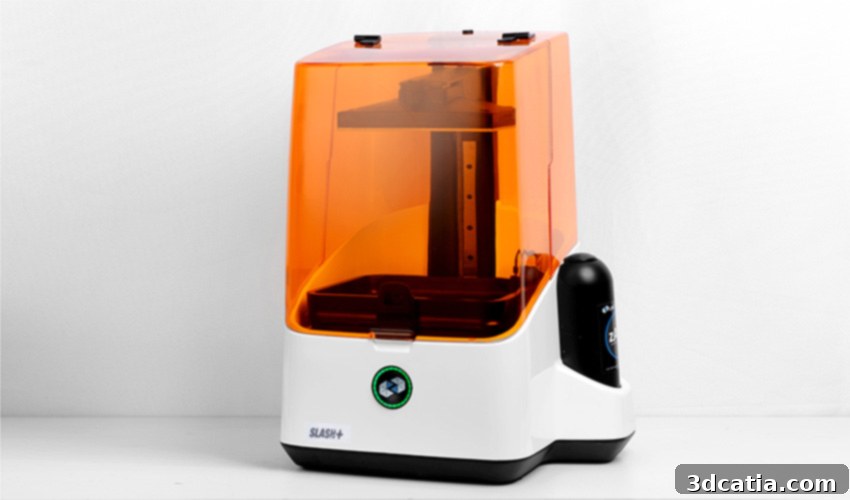
UNIZ3D Slash+ Review: Unlocking High-Speed Resin 3D Printing Performance
In the dynamic world of additive manufacturing, UNIZ3D made a significant splash in 2016 by successfully crowdfunding half a million dollars on Kickstarter for their innovative high-speed resin 3D printer, the original Slash. Their groundbreaking approach leveraged an LCD screen for light source rather than a traditional laser, combined with an optimized cooling system designed to enhance the printing process’s efficiency and reliability. All of this was offered at a competitive price point, staying comfortably below the €5,000 mark, which was a remarkable feat for its capabilities at the time.
Building on this initial success and the foundational technology of its predecessor, UNIZ3D recently introduced the Slash Plus (Slash+), an upgraded version of its acclaimed 3D printer. The Slash+ immediately set a new benchmark in the desktop resin 3D printing segment with an advertised print speed of an astonishing 200mm/h, positioning it as the fastest 3D desktop resin printer currently available on the market. Beyond raw speed, the UNIZ3D Slash+ maintains impressive precision, offering an XY resolution of 75 microns and supporting a minimum layer thickness of just 10 microns. This combination of speed and detail makes it a compelling option for professionals and enthusiasts alike who demand both rapid prototyping and high-fidelity output.
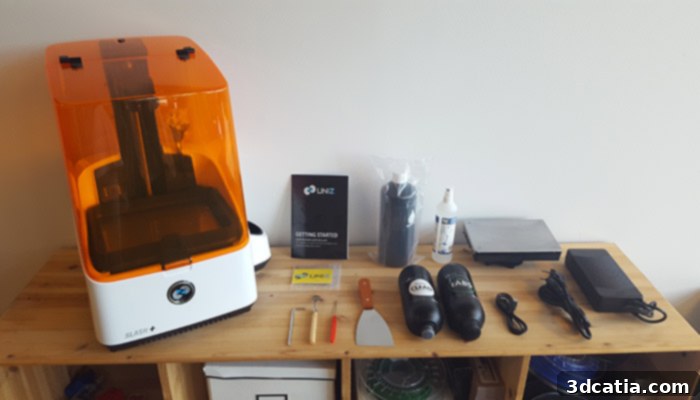
The Slash + 3D printer from UNIZ3D and its various accessories
To thoroughly evaluate whether the Slash+ lives up to its bold claims regarding price, performance, and speed, we at the 3Dnatives Lab had the distinct pleasure of conducting an in-depth review. This was made possible thanks to a loan of the machine from its French distributor, Atome 3D. Our comprehensive test aimed to uncover the true capabilities of the Slash+ 3D printer. Key questions guided our investigation: Is it genuinely as fast as UNIZ3D claims? Has this unprecedented production speed been achieved at the expense of crucial print quality? And on a broader scale, how does the Slash+ stand against other leading desktop SLA 3D printers in the competitive market? Join us as we delve into the details of our findings below.
1. Unpacking the UNIZ3D Slash+
The UNIZ3D Slash+ 3D printer arrives in a meticulously designed package, ensuring its safety during transit. However, potential buyers should be aware that due to its considerable size, external assistance might be required to carefully extract the printer from its boxing. Once unboxed, the Slash+ reveals substantial dimensions of 350 x 400 x 530 mm, which are quite comparable to other professional desktop resin printers like the Formlabs Form 2 (350 x 330 x 520 mm). Visually, the Slash+ makes a strong impression with its clean white frame, constructed from a robust combination of carbon fiber and reinforced steel. This choice of materials immediately conveys a sense of durability and a solid, industrial-grade build quality, hinting at the machine’s reliability and longevity.
One of the most immediate and notable observations upon first inspection is the deliberate absence of an integrated control screen on the printer itself. This design choice implies that all operational management and monitoring of the Slash+ will be handled directly through its dedicated computer software. While some users might prefer a standalone interface, this approach streamlines the hardware design and centralizes control through a more feature-rich software environment, allowing for greater complexity and functionality. The comprehensive set of accessories accompanying the machine includes all the essentials needed to start printing right away: the critical printing platform, the resin tank, necessary power cables, and a concise quick start guide to assist with initial setup. Furthermore, UNIZ3D thoughtfully provides a green zABS resin cartridge to get you started, along with an empty cartridge specifically for cleaning purposes. A variety of useful tools are also included, such as an Allen key for adjustments, two sizes of spatulas for part removal, a needle designed to open resin cartridges, and sandpaper for post-processing and finishing touches. For the purpose of our detailed review, the distributor Atome 3D generously supplied us with an additional 1-liter cartridge of Funtodo’s White Snow White resin (available for approximately €50 HT), along with an isopropyl alcohol spray—an absolutely essential item for effectively cleaning newly printed parts and removing uncured resin residue.
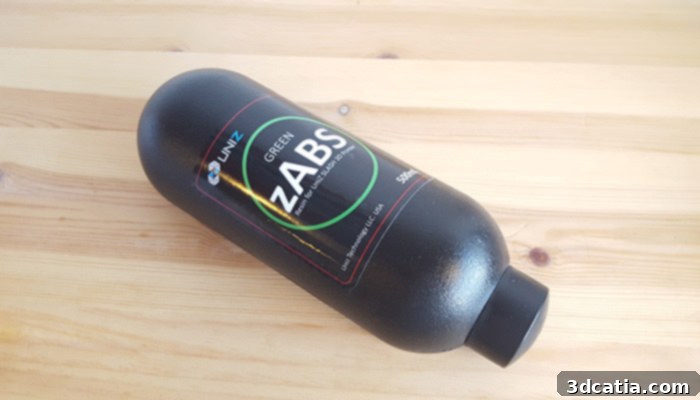
The green zABS resin cartridge supplied with the Slash + 3D printer. Sale price 69 € HT.
2. Installation and Initial Setup
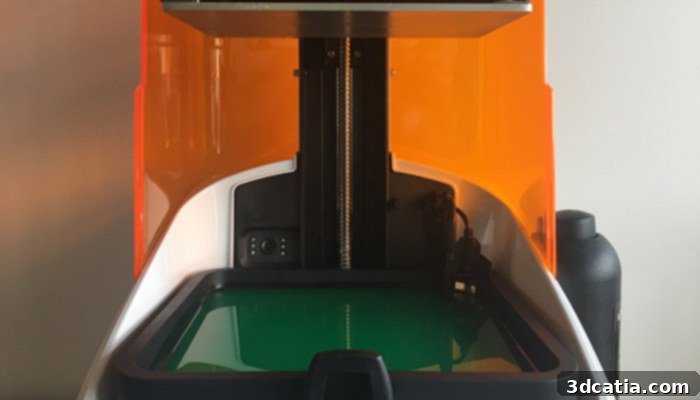
Initiating the UNIZ3D Slash+ is a relatively straightforward process, primarily guided by the provided quick start manual (which is in English). The initial steps involve connecting the power supply and subsequently linking the machine to your local WiFi network to facilitate product activation and software communication. However, our testing revealed two crucial actions that, while not explicitly detailed in the paper guide, are thoroughly explained in the helpful video tutorials available on UNIZ3D’s official YouTube channel. These essential steps include carefully removing the protective film positioned between the LCD screen and the resin tank, and correctly installing the resin level sensor. Overlooking these steps could lead to printing issues or inaccurate resin level readings, making these videos indispensable for a smooth setup.
Once these preliminary steps are complete, you can proceed with installing the resin supplied with your Slash+ 3D printer. This process is designed for ease of use: simply insert the resin cartridge into its designated slot (remembering to carefully remove its primary cap). Then, use the needle provided in the accessories kit to puncture the cartridge, and finally, refit the cap onto the opposite end of the bottle. For the resin to automatically dispense into the printing tray, it’s important to note that this functionality is managed through the printer’s software, which you will install shortly thereafter. This automated system minimizes mess and ensures a consistent resin supply during operation.
While the initial physical setup of the Slash+ is generally manageable, we must acknowledge that the provided paper documentation is relatively basic. Critical information that might seem obvious to experienced users but is essential for newcomers (neophytes) is notably absent. This includes detailed instructions on proper resin replacement procedures, routine machine maintenance, or comprehensive guidance on print support management. Recognizing this gap, a thriving community of Slash+ users has emerged online, generating various unofficial guides. A notable example is this community-driven guide on Facebook. We strongly recommend that new users consult these unofficial resources and, more importantly, explore the extensive collection of video tutorials on YouTube, particularly those found on the official UNIZ3D channel, to gain a deeper understanding of the printer’s operation and maintenance.
Regarding material flexibility, UNIZ3D has demonstrated a forward-thinking approach. While the brand certainly offers its own proprietary range of resins, they have commendably designed the Slash+ 3D printer with an open material system, allowing users the freedom to utilize third-party resins from various competitors. This openness is a significant advantage, providing users with more choices in terms of material properties, colors, and price points. During our evaluation, we successfully tested the White Snow White resin from Fun To Do. To use such external resins, users will need to manually pour the resin into the printer’s tank. More critically, they must manually select and configure the correct curing parameters within the software, such as the LED power and the light exposure time for each layer. These specific parameters are often shared and discussed within the vibrant online communities of Slash+ 3D printer users, making community engagement invaluable for optimizing results with non-UNIZ resins.
A final point concerning the installation and overall workflow is the noticeable absence of a dedicated post-processing station, a feature often included with premium machines like the Formlabs Form 2. Such a station typically aids in cleaning and curing printed parts. However, this accessory can be easily and affordably substituted by acquiring two hermetic containers (commonly known as Tupperware-type boxes). These simple containers can effectively serve the purpose of cleaning 3D printed parts from non-solidified resin using isopropyl alcohol, proving to be a highly practical and budget-friendly solution for post-processing needs.
3. UNIZ Software: User Interface and Capabilities
The software developed by UNIZ3D, simply named “Uniz,” is the central control hub for the Slash+ 3D printer. At the time of this review, it is compatible with Windows 7 SP1+ and Mac OS X 10.8+ operating systems and is available exclusively in English or Chinese. Despite this language limitation for some users, the software boasts an overall well-designed and ergonomic interface. It provides users with all the fundamental tools necessary for preparing 3D models for printing. This includes basic manipulation functionalities such as moving, rotating, and zooming 3D files to optimize their placement on the build plate. Crucially, the software can automatically generate print supports, with an advanced mode allowing users to manually add or delete specific support structures, offering fine-grained control over the printing process and ensuring print success for complex geometries. Once the model is positioned and supported, the software efficiently slices it into individual layers, ready for manufacturing.
Beyond model preparation, the Uniz software features a comprehensive printer control panel, providing direct command over the hardware. From this panel, various essential controls are accessible, including the option to automatically fill or empty the resin tank, a critical feature for managing materials efficiently. Users can also initiate a tank cleaning procedure by printing a thin sacrificial film of resin, which helps remove debris and uncured material from the tank’s bottom. Furthermore, Z-axis calibration is available, ensuring precise layer placement and overall print accuracy. The software also provides valuable real-time information and estimations, such as the predicted printing time, the estimated volume of resin that will be consumed, and the total number of layers required for the print. These details help users plan their projects more effectively and manage their resin supplies, making the Uniz software a powerful and indispensable tool for operating the Slash+.
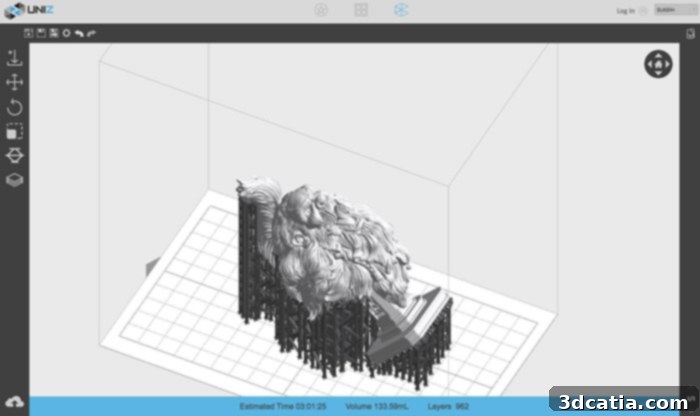
Preview of UNIZ software provided with Slash+
4. Printing Performance and Quality Assessment
Once the 3D model has been prepared, supports generated, and the model sliced using the Uniz software, initiating the print process is straightforward. A critical pre-print check involves ensuring that the resin level in the tank is adequate for the job. Should the level be insufficient, the printing can be paused mid-process to refill the tank, providing flexibility for longer prints. An option for automatic tank filling can also be selected prior to printing, further streamlining the workflow. Regarding operational noise, while the Slash+ is slightly louder than some competitors like the Formlabs Form 2, its noise level remains entirely acceptable and compatible with usage in an open office environment, without causing significant disruption.
The most striking aspect of the Slash+ 3D printer is undoubtedly its incredible printing speed, which decisively confirmed its status as an ultra-fast machine during our tests. To put this into perspective, consider a benchmark model like the 3D file of the bust “The Bearded Yell.” Using Formlabs’ Preform software for the Form 2, at 100 microns layer thickness (resulting in 953 layers and consuming 131.47 mL of resin), the estimated print time is 8 hours and 34 minutes. In stark contrast, when the same model with equivalent layer thickness and design inclination (962 printing layers and 133.59 mL) was prepared with the UNIZ software for the Slash+, the manufacturing time was reduced to a mere 3 hours and 1 minute. This significant difference underscores the Slash+ 3D printer’s exceptional speed and efficiency, making it a compelling choice for applications where rapid turnaround times are paramount.
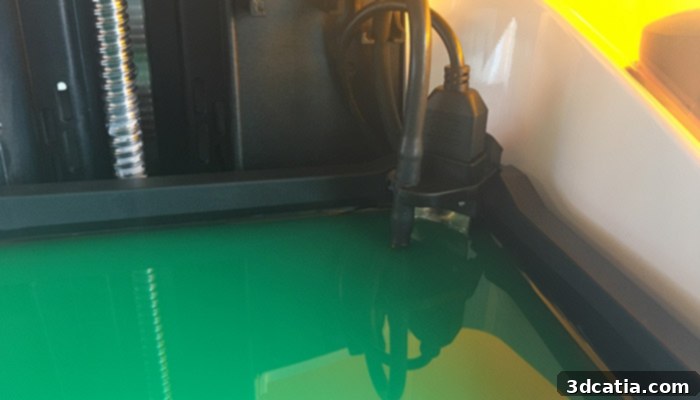
Zoom on the resin level sensor of the tank
It’s worth noting that, generally, Formlabs’ PreForm software tends to generate a more extensive network of print supports compared to UNIZ’s software. While this might slightly increase material usage and post-processing time for Formlabs, it can also enhance the success rate of complex prints by providing more robust adhesion and stability. The observed printing speeds are also intimately linked to the specific resin being used. UNIZ3D’s proprietary resins are formulated with properties that allow for relatively low exposure times per layer, contributing significantly to the printer’s overall speed. In contrast, other resins, such as the FunToDo resin we tested, may require longer exposure times of 5 to 7 seconds per layer, which will naturally extend the total printing duration. Users leveraging the open resin system should therefore be mindful of these parameter adjustments and their impact on print speed.
A profoundly advantageous characteristic of the Slash+ – and indeed, of LCD-based resin 3D printers in general – is that the printing time does not increase proportionally when multiple objects are added to the build platform, provided they fit within the exposure area. This is a fundamental difference from laser-based SLA printers, where a laser traces each part individually, increasing print time with each added object. For instance, printing a single dental model in approximately 30 minutes is impressively fast. However, with the Slash+, using its LCD technology, the time required to 3D print six or seven dental models simultaneously will remain exactly the same as printing just one. This parallel processing capability makes the Slash+ exceptionally efficient for batch production, dental practices, or any scenario requiring multiple identical or similarly sized parts.
However, it is crucial to maintain a balanced perspective when making direct comparisons between LCD-based resin printers like the Slash+ and traditional laser-based SLA technologies. While the speed advantage of LCD is clear, this comparison often doesn’t account for other vital parameters that define the overall quality and usability of a 3D printer. These include the ultimate surface quality of the final part, the consistent success rate of prints (especially for intricate designs), and the post-processing time required to finish the parts. While speed is a key metric, a truly comprehensive assessment must consider these factors to understand the full user experience and output quality.
We invite you to examine the print results from the Slash+ 3D printer showcased below and form your own opinion on their quality. The appearance of the printed models is consistently clean and generally comparable to what one would expect from other high-quality resin machines available on the market. For these examples, absolutely no post-processing steps were performed beyond the essential cleaning with isopropyl alcohol to remove uncured resin. This demonstrates the raw output capability of the Slash+. However, for enhanced material properties or improved aesthetics, users can further solidify the parts by placing them in a UV curing oven, or lightly sand them to achieve an even smoother surface finish, depending on the application’s requirements.
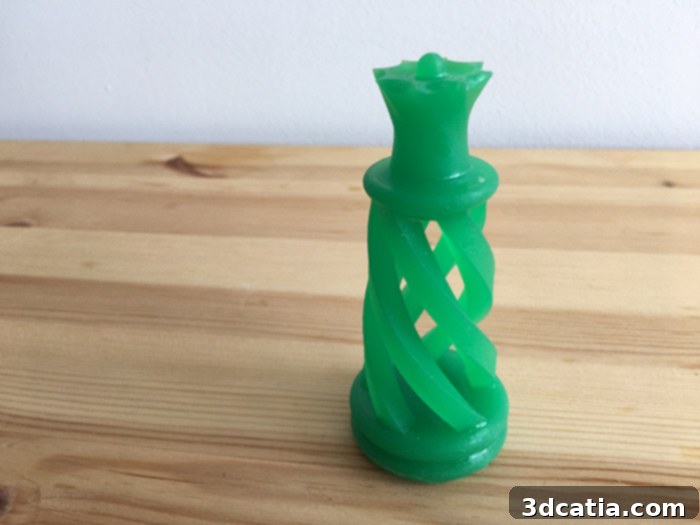
Queen model available in the UNIZ library
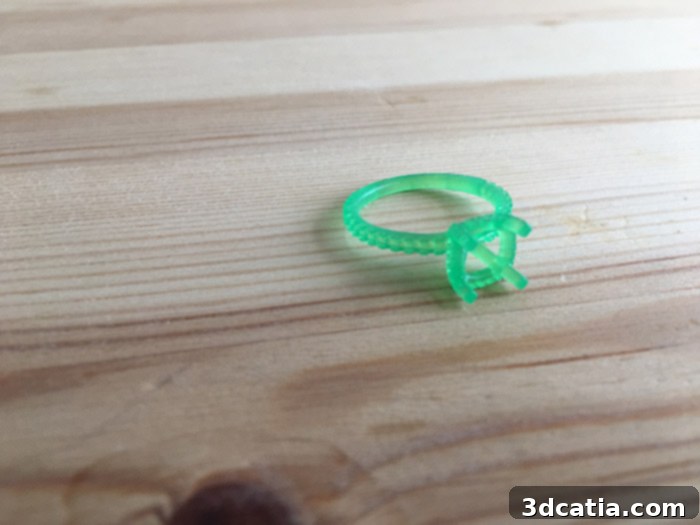
Ring model available on Thingiverse
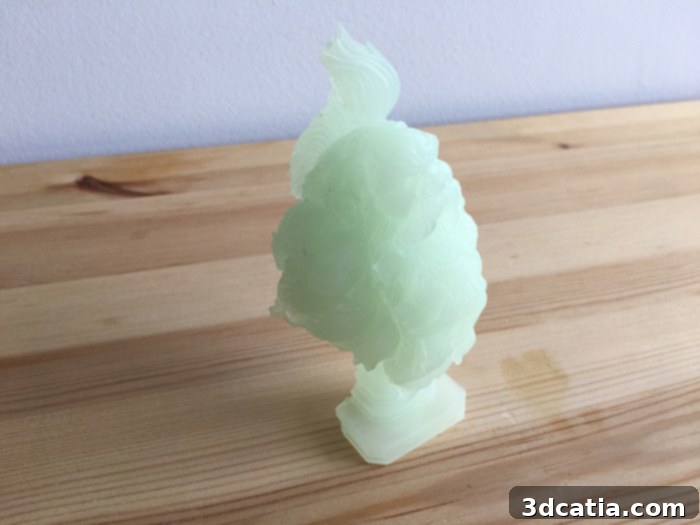
Model “The Bearded Yell” by bendansie, available on Thingiverse
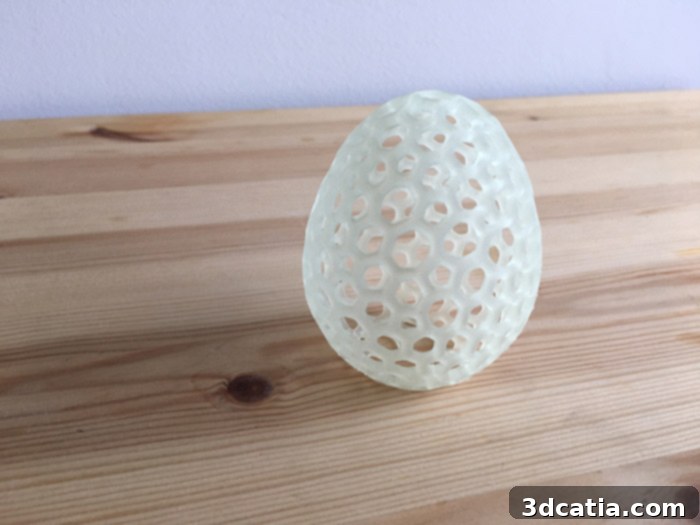
“Voronoï Loopy” model by Antonin Nosek available on Thingiverse
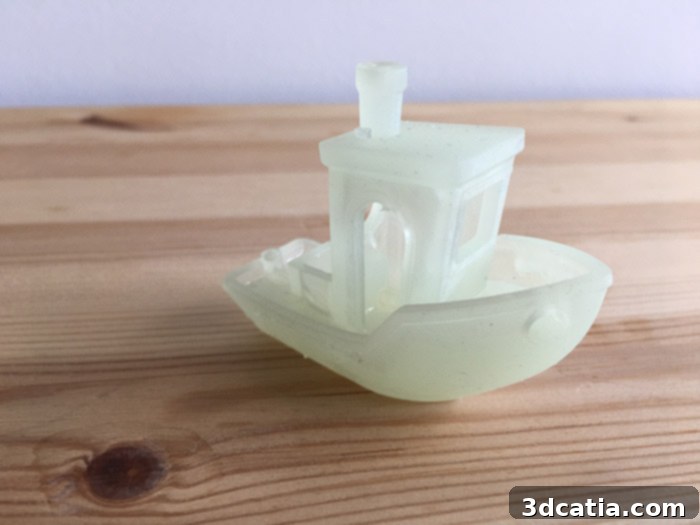
“3DBenchy” model by Creative Tools available on Thingiverse
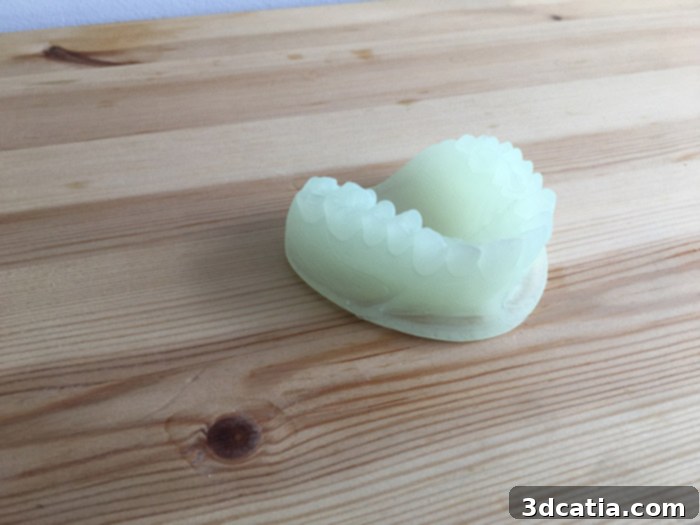
Dental model by kikique available on Thingiverse
Find all of our 3D printer tests in the 3Dnatives Lab
In conclusion, the UNIZ3D Slash+ 3D Printer stands out as a formidable contender in the high-speed resin 3D printing arena. Its core strength lies in its remarkable print speed, facilitated by its LCD-based light engine and optimized cooling system, which delivers rapid turnaround times without sacrificing precision. The ability to print multiple objects concurrently without increasing print duration is a game-changer for batch production and professional applications like dental modeling. While the documentation could be more comprehensive for newcomers, the vibrant online community and official video tutorials effectively bridge this gap. The open resin system further enhances its appeal, offering users flexibility and choice, though it requires manual parameter adjustments for third-party materials. The print quality achieved by the Slash+ is consistently high, producing clean and detailed models that are comparable to industry standards. For users prioritizing speed, efficiency, and batch production capabilities in a desktop resin 3D printer, the Slash+ presents an exceptionally compelling solution.
What are your thoughts on the UNIZ3D Slash+ 3D Printer after reading our comprehensive review? We welcome your comments and insights below or on our Facebook and Twitter pages! Don’t forget to sign up for our free weekly Newsletter to receive all the latest news and updates in the world of 3D printing directly in your inbox!