
Morphi: Your Gateway to Intuitive 3D Modeling and 3D Printing for Beginners
Venturing into the world of 3D modeling and 3D printing can seem daunting, especially for those without prior experience. However, innovative software solutions are constantly emerging to make this exciting field accessible to everyone. One such powerful yet user-friendly application is Morphi, developed by Inventery, a dynamic New York-based company. Designed from the ground up with beginners in mind, Morphi simplifies the complexities of 3D design, allowing users to transform their creative ideas into tangible 3D models with remarkable ease. This versatile application offers broad compatibility, running seamlessly on both Mac and Windows operating systems, and provides the flexibility of online or offline usage. While its robust desktop and web versions are fully functional, a mobile version is currently undergoing alpha testing, promising even greater accessibility in the near future. Understanding the unique features and capabilities of various 3D modeling software is essential for choosing the right tool for your projects. In this comprehensive guide, we will delve deep into Morphi software, providing you with all the essential information to unlock its full potential and maximize your 3D printing endeavors, alongside exploring its broader applications in animation, AR/VR, and game design.
What Is Morphi? A Comprehensive Overview
Morphi stands out as an exceptionally fast and efficient tool, empowering users to create a diverse range of 3D models for various modern applications. Its intuitive design ethos means that even complete novices can quickly grasp the fundamentals and begin designing with confidence. The software’s capabilities extend far beyond simple 3D printing, making it a valuable asset for:
- Additive Manufacturing (3D Printing): Morphi offers a streamlined workflow for creating models ready for additive manufacturing, ensuring designs are robust and printable.
- Augmented/Virtual Reality (AR/VR): Design compelling 3D assets that can be integrated into immersive AR and VR experiences.
- Animation: Bring your 3D creations to life with built-in animation tools, perfect for storytelling or visual demonstrations.
- Game Design: Craft basic 3D objects and environments suitable for entry-level game development projects.
Intuitive Interface and Core Design Features
At the heart of Morphi’s appeal is its intuitive and versatile interface. Unlike professional-grade software that can overwhelm new users with countless menus and complex tools, Morphi presents a clean, organized workspace that encourages exploration and creativity. Users can effortlessly design 3D models using a straightforward approach:
- Shape Manipulation: The software provides fundamental boolean operations, allowing users to easily “add” (union), “subtract” (difference), and “intersect” shapes. This foundation enables the creation of complex geometries from simple primitives.
- Extensive Library of Predefined Shapes: Morphi boasts a comprehensive library filled with a variety of basic geometric shapes such as cubes, spheres, cylinders, cones, pyramids, and tori. This library serves as an excellent starting point, enabling users to drag and drop elements onto their canvas and immediately begin customizing.
- Freehand Drawing and Editing: Beyond predefined shapes, Morphi empowers users to draw directly within the 3D environment using basic lines and splines. These 2D drawings can then be easily extruded or revolved to form 3D objects. The editing tools are equally accessible, allowing for precise adjustments to vertices, edges, and faces.
- Import Existing 3D Models: For those who wish to work with pre-existing designs or incorporate external assets, Morphi supports the import of standard 3D file formats like STL and OBJ. This feature allows users to modify, combine, or refine models sourced from other platforms or communities.
- Revolutionary 2D to 3D Conversion: One of Morphi’s most innovative and intriguing features is its ability to convert 2D drawings and images into 3D models with a single click. This includes transforming high-contrast line drawings or images in popular formats like JPG, PNG, or SVG into three-dimensional objects. Imagine scanning a handwritten sketch or importing a company logo and instantly having a 3D printable version! This capability significantly lowers the barrier to entry for creative individuals who may be more comfortable with 2D artistry.
- Symmetry and Rotation Transformations: To further enhance design efficiency and precision, Morphi offers powerful symmetry and rotation tools. Users can easily mirror designs across axes or rotate objects to specific angles, which is incredibly useful for creating intricate, symmetrical patterns or arranging multiple components with exact alignment.
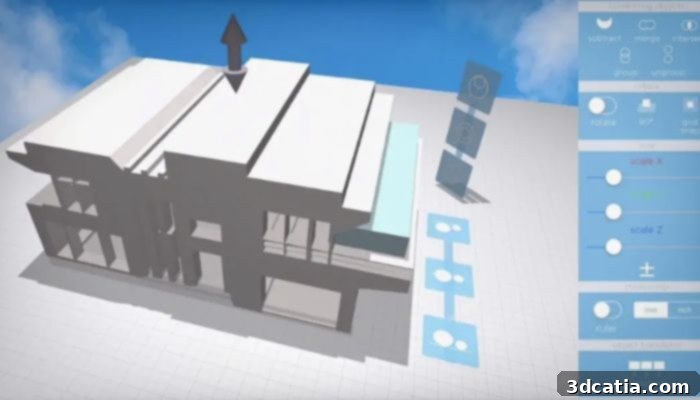
Photo credit: Morphi
Beyond Creation: Exporting and Sharing Your Morphi Projects
Seamless 3D Printing Integration
As mentioned earlier, a primary strength of Morphi lies in its direct compatibility with 3D printing. Once your design is complete, whether it’s a prototype, a decorative object, or a functional part, you can effortlessly export it in STL format. STL (stereolithography) is the most widely supported file format for 3D printers, ensuring that your Morphi creations can be sliced and printed on virtually any consumer or professional 3D printer. This direct path from digital design to physical object is incredibly empowering for beginners, eliminating complex intermediary steps often found in other software. Users can refine their designs within Morphi, prepare them for printing by considering parameters like wall thickness and overhangs, and then send them directly to their preferred slicer software, making the entire 3D printing process remarkably straightforward.
Dynamic Animation and Visual Storytelling
Beyond static models, Morphi provides tools to animate your designs. Users can utilize predefined animation sequences for quick effects or delve deeper by setting specific parameters to create custom motions. This feature opens up possibilities for demonstrating functionality, creating engaging presentations, or simply adding a dynamic flair to your portfolio. The ability to export these animated sequences as videos, GIFs, or high-quality images means your creative works are not limited to 3D models but can be transformed into compelling visual narratives ready for sharing across social media platforms, websites, or professional portfolios.
Exploring the Metaverse with Morphi
In an increasingly interconnected digital landscape, Morphi also offers forward-thinking options for exporting finalized files directly to the metaverse. This innovative feature allows users to transcend traditional mediums, placing their 3D creations within virtual worlds and augmented reality experiences. For beginners, this means their early designs can become interactive elements in online communities, virtual art galleries, or even simple virtual games. It provides an exciting avenue to explore the potential of digital ownership and interaction, ensuring Morphi users are at the forefront of emerging digital trends.
The Morphi Maker Community: Share, Inspire, and Learn
Understanding the value of collaboration and inspiration, Morphi incorporates a dedicated Maker Community area. This vibrant platform allows users to share their projects with individuals worldwide, fostering a global network of creativity. Sharing is incredibly simple and can be done directly within the app or seamlessly via popular social networks. For beginners, this community is an invaluable resource. It provides a space to showcase their work, receive constructive feedback, draw inspiration from others’ designs, and learn new techniques by observing shared projects. The emphasis is on a simple, intuitive, and visual approach to sharing, ensuring that even those new to digital communities feel comfortable participating and contributing to the collective creative spirit.
Accessibility and Pricing: Understanding Morphi’s Offerings
Morphi’s commitment to accessibility is evident in its flexible pricing model, offering a free core application while providing specialized paid features for advanced users and educational institutions. This tiered approach ensures that anyone can start their 3D modeling journey without an initial investment, while offering pathways to unlock more powerful capabilities as their skills and needs evolve.
Free Core Application with Premium Features
The foundational Morphi application is free to download and use, providing a robust set of tools for basic 3D modeling, design, and conversion. This free tier is perfect for beginners to explore the software’s capabilities, experiment with design concepts, and create a wide variety of models. However, certain advanced 3D models and more sophisticated tools, designed for users seeking expanded functionality or professional-grade outputs, do require a purchase to access. This model allows users to invest only in the features they genuinely need, making it a cost-effective solution for diverse user groups.
Morphi Edu: Tailored for Education
Recognizing the immense potential of 3D design in learning environments, Inventery has developed a specialized version called Morphi Edu. This version is meticulously crafted to meet the unique needs of schools, educators, and students. Morphi Edu often includes curriculum-aligned resources, simplified license management for multiple users, and features optimized for classroom instruction. Priced at an accessible $4.99 for 20 downloads, Morphi Edu offers an economical solution for educational institutions looking to integrate cutting-edge 3D modeling and 3D printing into their STEAM curricula, empowering students with critical design and problem-solving skills.
Morphi AR Viewer for iPhone: Experience Your Designs in Reality
To bridge the gap between digital creations and the physical world in an interactive way, Morphi offers the Morphi AR Viewer for iPhone. This standalone application allows users to project their 3D models into the real world using augmented reality technology. Imagine seeing your newly designed furniture piece virtually placed in your living room or inspecting a prototype from all angles as if it were physically present. This is an invaluable tool for visualization, presentation, and simply experiencing your designs in a new dimension. The AR Viewer is priced at $2.99 per download, with a discounted option of $1.50 for 20 downloads, making it affordable for individual enthusiasts and educational groups alike.
iPad Version: Unlocking Professional Export Capabilities
For users who require more professional-grade outputs, particularly for collaboration or commercial use, the iPad version of Morphi offers enhanced export and import capabilities. Specifically, if you wish to export or import 3D files (such as STL and OBJ) without watermarks, the iPad version requires a one-time payment of $9.99. This ensures that your exported models are clean, professional, and ready for integration into other software or for client presentations without any branding overlays. This feature caters to users who might be using Morphi for more serious prototyping, design collaboration, or generating content for professional portfolios.
You can find more detailed information about Morphi and explore all its features, including updates and specific pricing for various add-ons, directly on their official website. Always refer to the source for the most current information: HERE.
Why Choose Morphi for Your 3D Design Journey?
With numerous 3D modeling software options available, what makes Morphi a standout choice, especially for beginners? Its unique blend of simplicity, versatility, and community support positions it as an ideal starting point for anyone interested in 3D design and its many applications.
- Unmatched Simplicity for Beginners: Morphi is purposefully built to be intuitive, minimizing the steep learning curve often associated with 3D software. Its drag-and-drop interface and clear toolset mean you can start creating almost immediately, fostering confidence and encouraging exploration.
- Broad Application Versatility: Whether your interest lies in 3D printing tangible objects, creating assets for AR/VR experiences, developing simple animations, or designing basic elements for games, Morphi provides the tools to achieve your goals within a single, coherent environment.
- Cross-Platform Accessibility: The ability to use Morphi on Mac, Windows, and as an online application offers unparalleled flexibility. This means you can design on your preferred device, transition between desktop and web, and eventually even mobile, without needing to learn new interfaces or transfer complex files.
- Innovative 2D to 3D Conversion: This powerful feature sets Morphi apart, allowing users to leverage existing 2D art or even simple sketches as a foundation for their 3D models. It democratizes 3D creation by making it accessible to those with 2D artistic skills.
- Engaging Maker Community: The integrated community space provides an invaluable network for learning, sharing, and finding inspiration. For beginners, this supportive environment is crucial for growth and staying motivated.
- Affordable and Flexible Entry Point: The free core application provides a zero-cost entry into 3D modeling, allowing users to test the waters before committing to any paid features. The transparent pricing for advanced tools and educational versions caters to specific needs and budgets.
Tips for Getting Started and Maximizing Your Morphi Experience
Embarking on your 3D modeling journey with Morphi can be incredibly rewarding. Here are some tips to help you get started and make the most of the software:
- Start Simple: Begin by experimenting with the basic shapes from the library. Understand how to add, subtract, and combine them to create new forms. This foundational practice will build your confidence.
- Explore the 2D to 3D Feature: Try importing high-contrast images or drawing simple shapes and converting them to 3D. This is a unique and powerful way to bring your flat designs into three dimensions.
- Utilize Symmetry and Rotation: These tools are excellent for creating complex and precise designs efficiently. Experiment with mirroring objects or rotating copies to create patterns or circular arrangements.
- Watch Tutorials: While Morphi is intuitive, watching official tutorials or community-created guides can introduce you to features you might not discover on your own and provide valuable workflow tips.
- Join the Maker Community: Don’t be shy! Share your projects, ask questions, and provide feedback to others. The community is a rich source of inspiration and learning.
- Experiment with Export Options: Once you’ve created a model, try exporting it for 3D printing (STL), animating it, or even generating images and GIFs to understand the full range of Morphi’s output capabilities.
Morphi offers an accessible, powerful, and fun pathway into the world of 3D modeling and 3D printing. Its beginner-friendly approach, combined with versatile features for animation, AR/VR, and game design, makes it an excellent choice for anyone looking to unleash their creativity in three dimensions. We encourage you to try Morphi and discover the possibilities for yourself!
What do you think of the Morphi software for beginners? Let us know in a comment below or on ourLinkedIn,Facebook, andTwitter pages! Don’t forget to sign up for our free weeklyNewsletter here, to get the latest 3D printing news straight to your inbox! You can also find all our videos on ourYouTube channel.