

MakerBot CloudPrint: Revolutionizing 3D Printing Workflow with Enhanced Cloud-Based Management
In the dynamic world of additive manufacturing, efficiency, accessibility, and streamlined workflows are paramount. Since its founding in 2009 and subsequent acquisition by Stratasys in 2013, MakerBot has consistently stood at the forefront of Fused Deposition Modeling (FDM) printing solutions. Renowned for its user-friendly 3D printers, MakerBot has continuously evolved its ecosystem to meet the growing demands of both professional and educational users. A significant leap in this evolution is its proprietary software platform, MakerBot CloudPrint, which recently saw the launch of its newest and most advanced version. Formerly known as MakerBot Print, this reimagined cloud-based software introduces a wealth of benefits, fundamentally transforming how users interact with their MakerBot 3D printers, particularly through its deep integration with cloud technology.
While its predecessor, MakerBot Print, served well for desktop applications, CloudPrint has been meticulously designed to offer a superior and more efficient online experience, leveraging the power of the cloud. This free software empowers users to manage and control their 3D printing operations from virtually any location, significantly enhancing flexibility and productivity. The primary motivation behind this enhanced version is to simplify and democratize the 3D printing process, making it accessible and manageable from anywhere in the world. MakerBot emphasizes that entire 3D printing job queues can be effortlessly managed, monitored, and controlled remotely. To truly appreciate its impact, it’s essential to delve into the specifics and highlight the key differences between the new CloudPrint and its previous desktop-bound iteration.
Transforming Your Workflow: The Power of Cloud-Based 3D Printing
An improved and highly efficient workflow is the aspirational goal for anyone professionally involved in additive manufacturing. With MakerBot’s innovative cloud-based software, this dream is now more attainable than ever. CloudPrint is specifically tailored to enhance the experience for users of the MakerBot METHOD series 3D printers, the Replicator 3D printer series, and those utilizing the MakerBot SKETCH Classroom package. These users can now unlock a new level of productivity and convenience. The software delivers tangible improvements in critical areas such as print speed, overall printing performance, and robust support for handling multiple models simultaneously, among numerous other advantages that redefine the user experience.
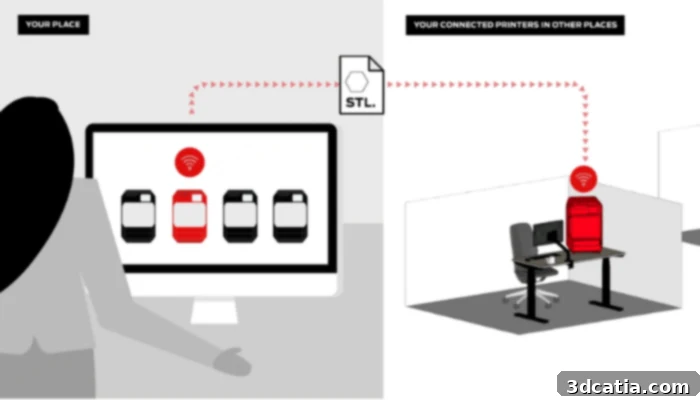
CloudPrint lets you send your file to your printer remotely (photo credits: MakerBot)
Key Features and How MakerBot CloudPrint Works
Both the original MakerBot Print and the new CloudPrint are offered free of charge and share fundamental functionalities such as print preparation, remote print initiation, and remote monitoring. However, the latest CloudPrint software introduces a suite of advanced capabilities that distinctly set it apart from its predecessor. These innovations are designed to provide unparalleled control and flexibility throughout the entire 3D printing lifecycle.
Advanced Print Job Management
One of CloudPrint’s most significant enhancements is the ability to prepare print jobs well in advance. Once a job is prepared and configured, it can be added to a queue for the printer. When the printer becomes available and is ready for the next print, users simply need to press “Start Next Print” – no need for immediate re-preparation or manual setup. This queuing system is invaluable in environments where multiple users share printers or where a continuous printing schedule is maintained, minimizing downtime and optimizing machine utilization.
Continuous Updates and Live Monitoring
CloudPrint also benefits from continuous software updates, ensuring users always have access to the latest features, bug fixes, and performance enhancements. These updates often include new functionalities designed to assist with troubleshooting and optimize the printing process, keeping the software at the cutting edge of 3D printing technology. More impressively, CloudPrint offers robust live monitoring capabilities. Users can monitor their ongoing prints from any location simply by logging into MakerBot CloudPrint from any web browser. This grants immediate access to comprehensive print statistics, real-time progress updates, and even live images from the printer’s built-in camera. This level of transparency and control is crucial for identifying potential issues early, ensuring print success, and managing multiple printers efficiently, even when not physically present at the print location.
Native CAD File Support: Streamlining the Pre-Print Process
Another groundbreaking feature of CloudPrint is its native CAD file support. This eliminates the often tedious and error-prone step of converting CAD files to STL formats before printing. Historically, converting CAD models to STL could lead to loss of detail, mesh errors, and increased file sizes, complicating the pre-print workflow. With CloudPrint, users can directly import their original design files, preserving geometric accuracy and simplifying the entire process. This directly translates to significant time savings and a reduction in potential print failures caused by file conversion issues. The extensive list of supported file formats underscores CloudPrint’s versatility:
- .catpart
- .dae
- .glb
- .iges
- .igs
- .ipt
- .obj
- .par
- .sab
- .sat
- .sldprt
- .wrl
- .x_t
- .3mf
- .stl
- .makerbot
Beyond file format flexibility, CloudPrint also allows for the saving of user-defined print modes, enabling consistent results across projects and users.
Advanced Print Preview and Toolpath Visualization
Understanding how a model will print before it even starts is crucial for success. CloudPrint dramatically improves this aspect with a print preview that is displayed up to 70% faster than previous versions. This rapid feedback loop allows users to quickly visualize their prints and make necessary adjustments. For “power users” and those requiring in-depth analysis, the software offers a 2D print preview of the toolpath. This advanced feature enables direct comparison of two different print strategies side-by-side, providing insights into material usage, print time, and structural integrity. Furthermore, it displays detailed print statistics at various points along the toolpath, offering an unprecedented level of control and optimization for complex prints.
Tips and Tricks for Optimizing Your CloudPrint Workflow
To help users maximize the potential of CloudPrint and further streamline their 3D printing workflow, MakerBot has compiled a series of practical tips and tricks. These recommendations are designed to enhance efficiency and ease of use, making the most of the software’s advanced capabilities:
- Automatic Orientation and Drag-and-Drop: Begin by utilizing CloudPrint’s automatic orientation feature on the build plate. This intelligent function suggests optimal placement for your models, often improving print success rates and reducing material waste. Combine this with the intuitive drag-and-drop capability, which allows for quick arrangement of multiple prints or effortless movement of jobs between different printers connected to your CloudPrint account. This significantly speeds up the setup phase and facilitates managing a fleet of machines.
- Duplicating Print Tasks: For projects requiring multiple identical prints or variations with similar settings, leverage the ability to duplicate print tasks. This saves considerable time by avoiding redundant parameter input and ensures consistency across batches.
- Seamless Collaboration and Sharing: CloudPrint fosters collaboration by allowing users to send a direct link to a third party. This enables colleagues or clients to send print jobs directly to your workspace or designated printer, simplifying file sharing and project coordination without the need for cumbersome email attachments or external file transfer services. This feature is particularly beneficial for educational institutions and design firms working on shared projects.
The Vision Behind MakerBot CloudPrint
Nadav Goshen, MakerBot’s CEO, articulates the philosophy behind CloudPrint, stating, “The secret to successful 3D printing goes beyond just the hardware and includes the full ecosystem of materials, accessories, and software. The improvements we have made to MakerBot CloudPrint are designed to provide a more streamlined approach so that users can focus on other important tasks. CloudPrint takes the guesswork out of print preparation and workspace management. With an easy-to-use and secure workflow, CloudPrint gives users better control and management of their prints from start to finish.” This statement perfectly encapsulates the strategic importance of CloudPrint as a central component of MakerBot’s comprehensive 3D printing solution. It highlights the shift from merely providing a printer to offering an integrated, intelligent ecosystem that empowers users with greater control, security, and efficiency throughout their additive manufacturing journey. The emphasis on an easy-to-use and secure workflow is crucial, especially as 3D printing becomes more integral to professional and educational environments where data integrity and accessibility are key.
CloudPrint represents a significant advancement in FDM 3D printing, moving it further into the realm of Industry 4.0 by embracing cloud technology. It addresses common pain points in traditional 3D printing workflows, offering solutions that enhance productivity, reduce errors, and provide unparalleled remote management capabilities. This makes 3D printing more accessible and powerful for a wider range of applications, from rapid prototyping and functional part creation to educational projects and small-batch manufacturing. By focusing on a seamless user experience and robust feature set, MakerBot CloudPrint ensures that users can achieve consistent, high-quality results while dedicating more time to innovation and design.
You can learn more about the latest updates and features of MakerBot CloudPrint HERE.
What are your thoughts on MakerBot’s CloudPrint and the shift towards cloud-based 3D printing management? We’d love to hear your experiences and opinions in a comment below or join the conversation on our LinkedIn, Facebook, and Twitter pages! Don’t forget to sign up for our free weekly Newsletter here, bringing the latest 3D printing news straight to your inbox! You can also find all our insightful videos on our YouTube channel for more additive manufacturing content.
*Photo Credits: MakerBot