
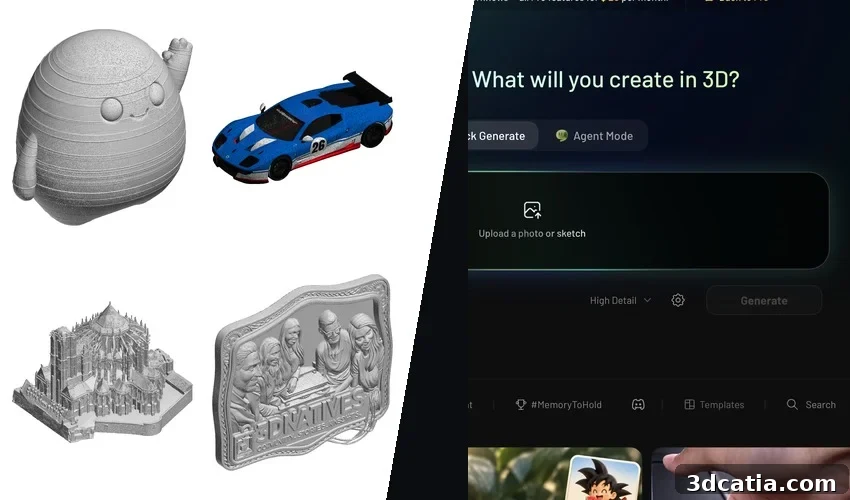
Meshy, the AI 3D model generator, did not begin as a tool for 3D printing. When Yuanming (Ethan) Hu introduced Meshy-1 in 2023, the product targeted game developers and animators: characters, props and environments generated in about a minute and exported to Unity or Unreal. Hu, a Tsinghua alumnus who completed his PhD at MIT’s Computer Science and Artificial Intelligence Laboratory, had previously created Taichi, a programming language for graphics and physics simulation. At that time, generative 3D forced a compromise between slow methods that lifted 2D image models into 3D and fast native 3D methods that produced crude blobs. Meshy aimed to bridge that gap and put cutting-edge research into a browser-based tool artists could actually use.
In under three years, Meshy released seven major versions. Meshy-2 came in February 2024 with polycount control, and Meshy-3 followed in April 2024 with an image-to-3D pipeline and physically based rendering (PBR) textures. Meshy-4, in August 2024, improved hard-surface results. Meshy-5 added multi-view input in August 2025; Meshy-6 added multi-color 3MF export and a low-poly mode in January 2026. Meshy-7, released in August 2026, improved fidelity to input images, and Meshy-7.1 arrived in September 2026 with an “Ultra 4K” geometry mode intended to produce unusually rich surface detail.
Funding followed product progress. In July 2026 Meshy closed a Series B near $400 million at a $1.5 billion valuation, backed by major investors. At the time, Meshy reported more than 12 million registered users and over 100 million generated models.

Games remain Meshy’s core market. The platform auto-rigs characters, offers hundreds of animation presets and provides plugins for Unity, Unreal, Godot, Roblox and Blender. Customers include major studios. Since Meshy-6 the company has expanded toward physical production, adding one-click export to eight slicers and tools to check, repair and split models for printing. Named hardware partners and integrations support a direct path from generation to print.
Previous reporting covered Meshy’s funding, its 3D Agent and published specs. For this evaluation we looked directly at export files to answer one practical question: when you upload a photo of a real object and click Export, what does the slicer actually receive? We evaluated the exported files rather than printed parts so the results reflect the digital output of Meshy itself.
1. Getting started, plans and credits
Meshy runs in a browser and offers a mobile app for photo capture, plus plugins for major creative tools. Account creation is quick and initially requires no payment details. The free plan provides 100 credits per month and one concurrent generation in a low-priority queue. A notable condition: models created on the free plan are owned by Meshy and licensed back to users under CC BY 4.0. You can use and sell prints of those models, but you must credit Meshy and the models are public.
Paid plans remove that limitation. The Pro plan costs $20 per month and includes 1,000 credits, private ownership of generated models, 10 simultaneous tasks and API access. Higher tiers add credits and team features. Credits do not roll over. In our testing, a generation at the Ultra 2K setting cost about 25 credits (20 at Standard, 30 at Ultra 4K) and took roughly a minute; texture generation and higher-resolution outputs add extra credit costs. Auto Repair, Auto Split and the multi-color export step cost additional credits, while the printability check is free. Practically, a Pro subscription yields a modest number of textured models per month once retries and extra steps are counted.
The terms around data use merit attention. Meshy’s Terms of Use allow the company to use images and generated models from non-Enterprise customers to improve services, while some help pages state images are not currently used for training and may be anonymized later. Enterprise customers are excluded by contract. For this test we used a Pro plan with 1,000 credits.
2. The software
The workspace is uncluttered. Generation modes are grouped: Text to 3D, Image to 3D, AI Texturing, image generation, auto-rigging and animation, and a 3D Agent chat that suggests directions, creates variants and answers printing questions. Image to 3D accepts one photo, up to four views of the same object, or a batch of up to 10 different images. Each generation returns four candidate previews for selection and refinement. Meshy-7.1 is the default model, with older models and faster Smart Topology options available. For a game artist this is a full pipeline: generate, retexture, remesh to a target polygon count, rig, animate and export as FBX. For makers, only the export and print tools matter.
3D printing tools appear in a separate panel after a model exists. The printability check looks for holes, non-manifold edges and other watertightness issues. Auto Repair promises to fix broken meshes. Auto Split slices models into watertight parts and organizes them on a build plate, with connectors planned for future updates. The multi-color tool writes a 3MF with color data for certain automated material systems. Exports include STL, 3MF, OBJ, GLB, FBX, USDZ and .blend. Paid plans include direct launch into a slicer.
Meshy published an internal benchmark in May 2026 that reported around 97% of figurine-style models passed validation in one slicer. That internal figure is the claim we most wanted to verify by examining Meshy’s exported files.
3. Test method
We chose nine inputs representative of what a maker might try: two clean product shots (a 3D-printed mascot figure and a studio shot of a complex watch), two multi-photo sets of a Seiko 5 Sports GMT (three desk photos and three wrist photos), three press photos of a Ligier JS2 R car, a wide tourist photo of Le Mans cathedral and three AI-generated images (a bas-relief plaque and two mecha poses).
All nine inputs were processed with Meshy-7.1. Each generation took about a minute or less, textures included. We exported every model as a 3MF file, the format Meshy recommends for printing, and inspected polygon count, physical dimensions, watertightness, number of separate bodies, and non-manifold junctions. We compared models to their source images from multiple angles, then opened each 3MF in Bambu Studio to see how a slicer presents the file: plate placement, size and any warnings.
4. What came out
Leo, the mascot
The simplest input produced the cleanest output. From a single PNG on a white background, Meshy returned a single closed solid of about 385,000 triangles: the egg-shaped body, separate fingers, feet, raised eye domes and a mouth groove. The back, unseen in the photo, is smooth and plausible. Meshy reproduced visible layer lines from the source photograph as ridges in the geometry, copying surface texture that should not be present but reflecting what the image showed.
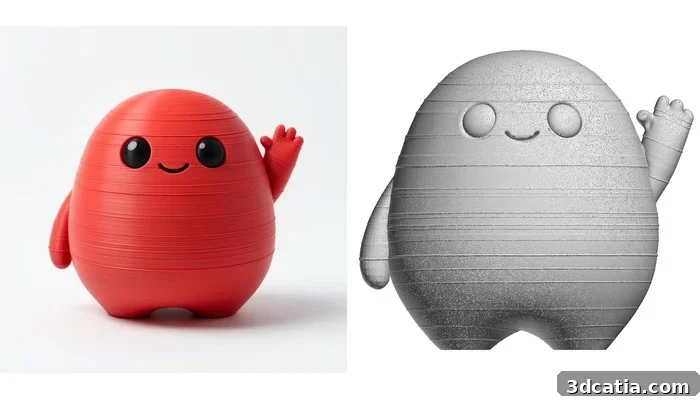
Leo: the source image and the model from the front.
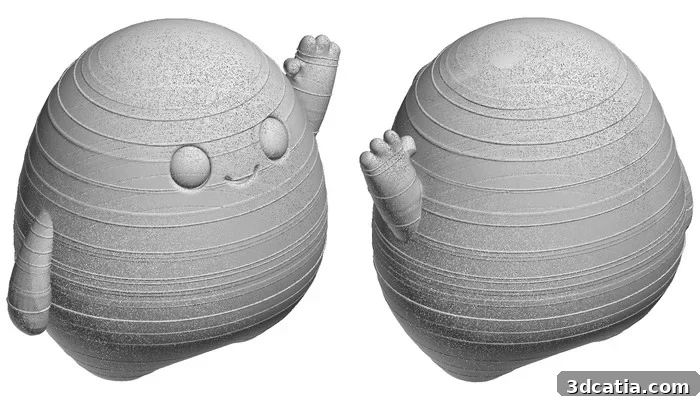
The model seen from behind: the side the image never showed.
In the slicer, Leo required no repair and only support under the raised arm. At 50 mm, layer-line ridges are faint and would print as subtle texture rather than defects.
Ligier JS2 R, from three photos
The car was the most convincing complex result. Three photos from distinct angles produced a single closed body of about 778,000 triangles and one tiny sliver. The model includes rear wing supports, mirrors on stalks, roof scoop, side vents, splitter, diffuser and spoked wheels. Scaled to match real-world proportions, the exported model was slightly wider and taller than the actual car. The 8K texture preserved the livery but converted most lettering into unreadable shapes.
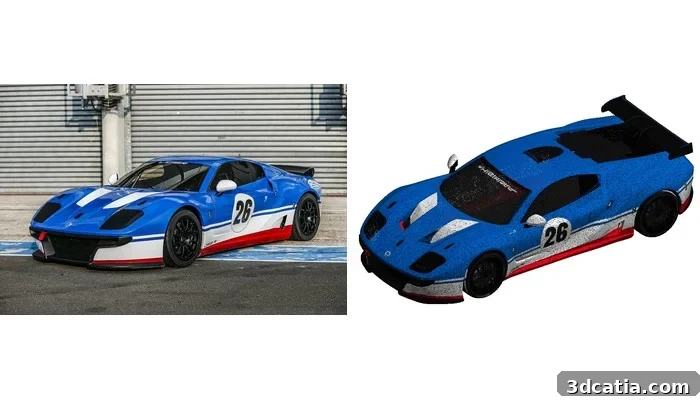
Ligier JS2 R: one of the three source photos and the textured model.
At the exported length, thin elements like spokes and mirror stalks are around a millimeter thick and are printable on FDM only with a fine nozzle; scaling up makes them more robust. The underbody is flat enough to print directly on the plate with wheels down.
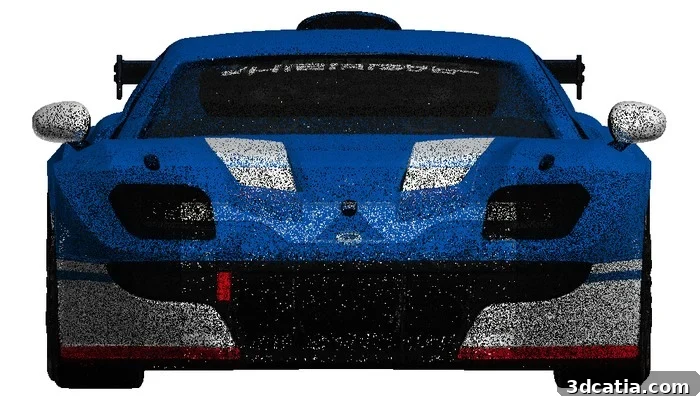
The front of the model: the windshield banner has turned into shapes.
Watches: how three photos change results
A studio photo of a complex Jacob & Co. Astronomia watch produced geometry rich in small elements: gears, a tourbillon and planets. The file contained 35 separate bodies; several planets lost their supporting stalks and float above the dial, and the finest parts are far under a millimeter at the exported size. Meshy completed a strap that extends beyond the photo into a closed loop with buckle details it invented. With the strap removed, the model could serve as a resin display piece, but not as a ready-to-print file without work.
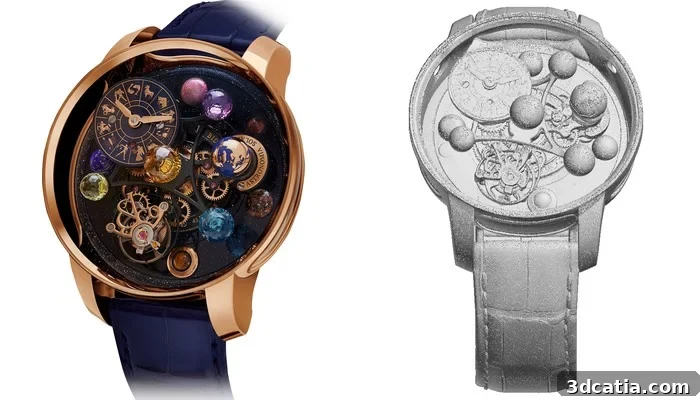
Jacob & Co. Astronomia Solar Zodiac: the studio image and the dial side of the model.
The Seiko tests highlighted the importance of how you photograph an object. Three desk photos produced a good model: serrated bezel, crown, hands, indices and a jubilee bracelet with individual links. The model contained many internal bodies and non-manifold junctions, but no open edges. When photographed on a wrist, Meshy modeled the wrist and hand along with the watch. Anything touching the subject tends to be treated as part of the target object, so isolated photos on a plain background are essential for accurate results.
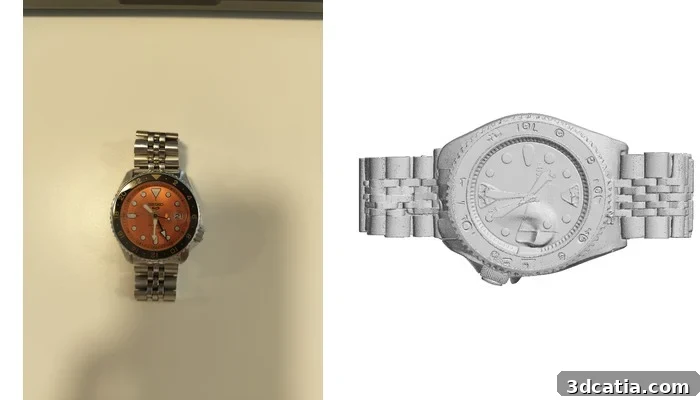
Seiko on the desk: the phone photo and the model from above.
Le Mans cathedral, from one postcard view
From the photographed side, Meshy produced an impressive facade, tower and flying buttresses. But the unseen side was invented: the nave is missing and the model becomes rounded at both ends rather than forming a true cruciform plan. The file contained nearly three million triangles; at small print sizes the delicate buttresses are too thin for FDM and would require resin printing or substantial scaling to be printable.
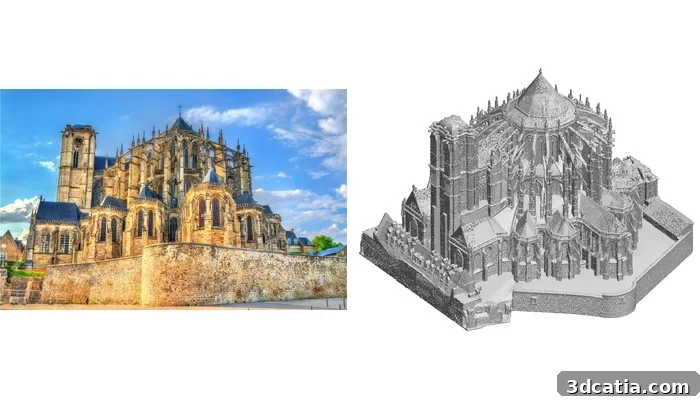
Le Mans cathedral: the photo and the model from the photographed side.
AI-generated images: plaque and figurines
Three AI-generated images proved ideal: single objects, even lighting and plain backgrounds. A bas-relief plaque translated into a 6.6 mm relief with a flat back and readable large text. Two mecha figurines produced complex assets Meshy excels at: rifles, antennae and backpacks appear correctly. At small scales some antennae remain fragile and both files carry multiple detached fragments, but scaled up they are well suited to resin printing.
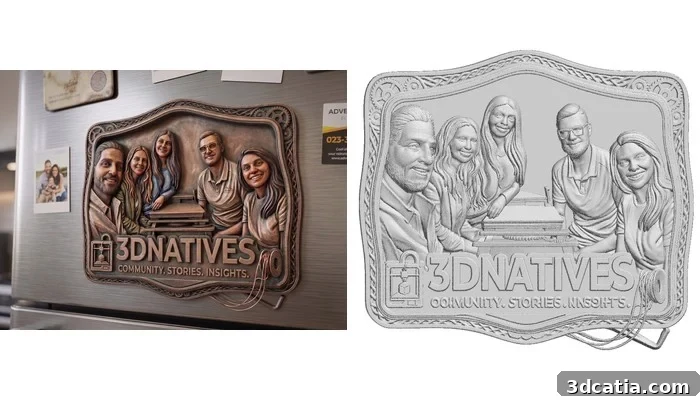
The 3Dnatives plaque: the Gemini image and the relief.
5. From model to print
Four consistent findings emerged across the tests.
First, every exported 3MF was centered on the build plate and set to a default height of 50 mm. Meshy’s 3MF files do not carry real-world dimensions; users must set scale in the slicer.
Second, “watertight” requires nuance. None of the files had open edges, but only two of nine—Leo and the Ligier—were single closed solids. The others were composed of multiple self-touching bodies (from 8 to 51 parts), often joined at edges shared by more than two triangles. Slicers accepted these files without repairs, but they are not geometrically tidy.
| Model | Triangles | Pieces in the file | One clean solid |
| Leo | 384,932 | 3 | Yes, 51 cm³ at 50 mm |
| Ligier JS2 R | 777,908 | 2 | Yes, 396 cm³ at 182 mm |
| Jacob & Co. | 1,779,838 | 35 | No |
| Seiko, on desk | 1,746,428 | 51 | No |
| Seiko, on wrist | 1,223,204 | 14 | No |
| Le Mans cathedral | 2,972,546 | 17 | No |
| 3Dnatives plaque | 1,311,110 | 8 | No |
| Figurine 1 | 2,638,506 | 19 | No |
| Figurine 2 | 2,589,916 | 36 | No |
What the slicer receives, measured on the exported 3MF files. No file had an open edge; “pieces” counts separate bodies, most of them tiny slivers a few triangles wide.
Third, the files are large—between hundreds of thousands and nearly three million triangles and up to tens of megabytes per 3MF. Slicers handle them but can be slow. Smart Topology can reduce triangle count dramatically but is a separate credit-consuming step and may remove fine relief detail.
Fourth, texturing does not automatically produce a color print file. Meshy’s textured export keeps the texture in GLB form; the 3MF geometry often lacks embedded color. Printing in full color requires the separate multi-color export step, which incurs additional credits.
Conclusion
Pros:
- Fast, easy route from a photo to a printable figurine
- No open edges in any file, and simple objects can come out as a single closed solid
- Three photos from different angles can capture complex shapes convincingly
- Direct export to multiple slicers and a free printability check
Cons:
- Exports carry no real-world scale: everything arrives set at 50 mm tall
- Complex objects often export as multiple self-touching bodies; small lettering is usually unreadable
- The unseen side of an object is invented by the model, which can be misleading
- Retries and advanced export steps consume credits quickly; texturing alone does not create a color-ready 3MF
Meshy was built for games and animation, and that background shows. The platform provides a full pipeline from prompt to a rigged, animated, textured asset in minutes, in a browser. The printing features added more recently layer on top of an engine designed to produce screen-ready models rather than precise replicas of photographed objects.
For the types of objects Meshy’s printing tools target—a mascot, toy, figurine, plaque or pet—Meshy delivers. Photograph a single object on a plain background, and you will often have a printable solid within a minute, for a modest credit cost, with a plausible backside. Three photos from different angles can capture surprisingly complex forms, and simple phone photos on a desk can be enough to generate useful models.
However, Meshy is not a scanner or a CAD replacement. Surfaces the camera did not see are filled in by confident guesses that can mislead. Thin features, small text and tight tolerances require other tools or manual cleanup. Regarding Meshy’s 97% acceptance figure, our tests agree that slicers will accept most Meshy exports without flagging holes, but acceptance is not the same as geometric cleanliness: only two of our nine models were delivered as single closed solids.
At $20 per month, Meshy is a good option for hobbyists who print for fun, creators who sell small custom pieces, or anyone who needs display models of photographed objects. Photograph subjects alone and on plain backgrounds for the best results. The platform is powerful and fast, but its outputs require the user to understand scaling, cleanup and the differences between screen-ready assets and production-ready files.
*Photo credits: 3Dnatives, except the Ligier JS2 R (Ligier Automotive), the Astronomia (Jacob & Co.) and the cathedral (stock photo). Model renders: 3Dnatives, from Meshy exports.
