
CHITUBOX Pro V2.0: Elevating Resin 3D Printing with Advanced Slicing and Unmatched User Experience
3D printing has revolutionized countless industries, enabling rapid prototyping, intricate designs, and on-demand manufacturing across various sectors. While the entire additive manufacturing workflow involves numerous critical stages, one of the most fundamental and impactful steps is, without a doubt, slicing. This crucial stage transforms a digital 3D model, typically created using CAD software, into a series of precisely defined thin layers. These layers form the core instruction set – known as G-code – that guides the 3D printer layer by layer, dictating its every movement and material deposition. Without accurate and efficient slicing, even the most advanced 3D printer cannot achieve its full potential, potentially leading to failed prints, poor surface finish, or inaccurate dimensions.
However, the diverse landscape of 3D printing technologies, including Fused Deposition Modeling (FDM), Stereolithography (SLA), Digital Light Processing (DLP), and LCD-based resin printing, often requires specialized software solutions. While a plethora of slicers caters to FDM technology, finding equally sophisticated and dedicated slicers for resin 3D printing can be more challenging. This is precisely where CHITUBOX has firmly established itself as a leading innovator. Renowned for its ability to ensure high-resolution prints, facilitate intricate details, and deliver remarkably smooth surfaces, CHITUBOX has become an indispensable tool for resin 3D printing enthusiasts and professionals seeking exceptional quality and reliability.
Building on its strong foundation and extensive user feedback, CHITUBOX has recently unveiled a significant evolution of its flagship slicer: CHITUBOX Pro V2.0. This latest iteration has moved beyond its beta phase and is now officially released, ready to empower users with an array of enhanced features and a profoundly refined user experience. This comprehensive article delves into the exciting upgrades and innovative functionalities that users can anticipate with CHITUBOX Pro V2.0, highlighting how this powerful update aims to streamline workflows, improve print quality, and elevate the entire resin 3D printing process to new, unprecedented heights.
Enhanced Support Generation in CHITUBOX Pro V2.0: A Game Changer for Print Reliability
Beyond merely slicing a 3D model into printable layers, modern slicers are expected to offer a multitude of features that enhance efficiency and convenience for users throughout the entire pre-printing phase. Among these, the ability to generate effective and robust support structures is paramount, particularly in the delicate and often challenging world of resin 3D printing. Support structures are temporary additions designed to prevent unsupported parts of a model from collapsing under gravity or during the curing process, ensuring geometric accuracy and successful builds. However, poorly designed supports can be a significant source of frustration, often leading to print failures, unsightly surface blemishes, or even damage to the model during their removal. Recognizing these pervasive challenges and the critical role of supports, CHITUBOX Pro V2.0 introduces several new and significantly improved support features, aiming to make this essential step more reliable, efficient, and ultimately, less troublesome for users of all skill levels.
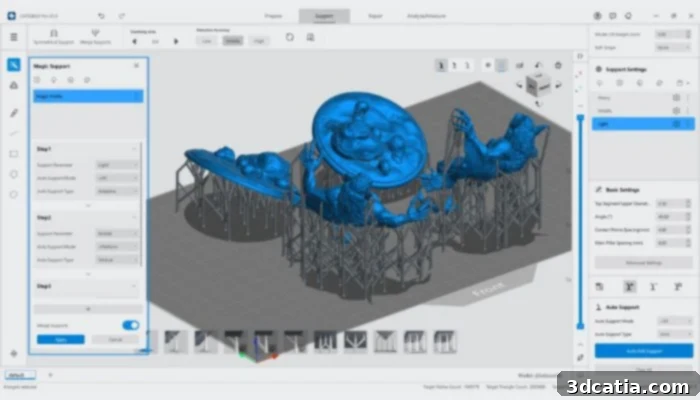
The Magic Support function automates support generation by intelligently matching model features with the optimal support structures.
Intelligent Automated and Precise Manual Support Systems
Users transitioning to CHITUBOX Pro V2.0 will immediately recognize and appreciate the considerable enhancements made to both automated and manual support generation capabilities. For automated support, the software’s one-click matching system has been extensively refined for superior efficiency and convenience, intelligently adapting to diverse model geometries and complexities with greater precision. A standout highlight in this area is the introduction of the groundbreaking ‘Magic Support’ feature. This innovative function automates the entire support generation process by intelligently analyzing the model’s structural features and applying optimal support structures in strategic locations. This significantly reduces the manual effort, guesswork, and specialized expertise traditionally required to prepare models for printing. Furthermore, the new version now allows for uniform automated support distribution, especially beneficial for regular models, which is crucial for effectively managing internal stress during the printing process and ultimately leading to improved print quality, reduced warping, and enhanced structural integrity of the final part.
For scenarios demanding even finer and more granular control, CHITUBOX Pro V2.0 has also substantially improved its manual support options. The precision of manual support direction has been meticulously enhanced, ensuring greater accuracy in placement and angle. Crucially, the software now guarantees that saved support types perfectly match those manually added, preventing frustrating inconsistencies and the need for rework. The update also brings exciting new, specialized support types to the fore, including Face Support, which empowers users to manually add supports directly to specific planar or curved faces of a model, providing highly targeted reinforcement where it’s most needed. Another invaluable addition is Boundary Support, enabling the precise manual placement of supports along the edges of faces. These new, advanced tools, combined with improved one-click manual generation of edge and normal supports, facilitate quicker editing, more efficient removal post-print, and afford users far greater overall control for preparing even the most intricate and challenging designs.
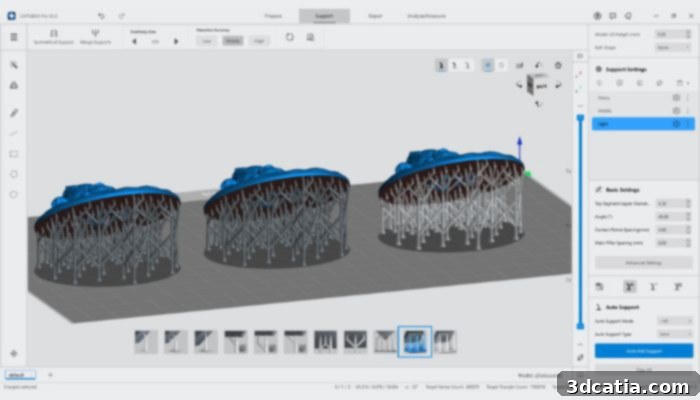
Face Support is one of the new, highly precise manual support modes available in CHITUBOX Pro V2.0, offering targeted reinforcement.
Innovative Support Management: Group and Cloud Support
Beyond individual support types, CHITUBOX Pro V2.0 introduces revolutionary new methods for managing and optimizing supports on a larger, more strategic scale: Group Support and Cloud Support. Group Support significantly streamlines the pre-print workflow by allowing for faster batch positioning of multiple added supports. This feature is a monumental time-saver, especially when working on complex models or preparing multiple instances of a model that require numerous, similarly configured support points, as it facilitates quicker editing, modification, and removal operations across groups of supports. Meanwhile, Cloud Support offers a powerful new way to leverage collective knowledge and personalize individual workflows. Users can now save their frequently used or highly optimized support configurations as custom profiles to their personal cloud library, ensuring consistency and efficiency across all their projects. More impressively, it provides seamless access to official recommended support profiles, curated and optimized by experts. This not only helps users achieve consistent, high-quality prints with less trial and error but also contributes to a significantly more hassle-free and optimized slicing experience, allowing both novices to benefit from proven strategies and veteran users to refine their best practices.
Optimized User Experience: Navigating and Interacting with CHITUBOX Pro V2.0
The enhancements in CHITUBOX Pro V2.0 extend far beyond just support structures and print preparation. A major overarching focus of this comprehensive update has been to fundamentally improve the overall user experience (UX) and user interface (UI) of the software, making it more intuitive, efficient, and visually appealing for everyone. A well-designed UI/UX is paramount for any software application, particularly one as critical and feature-rich as a 3D printing slicer. An unwieldy, cluttered, or difficult-to-navigate interface can quickly deter users, regardless of how powerful or innovative the underlying features may be. CHITUBOX understands this deeply, and the V2.0 update clearly reflects a steadfast commitment to user-centric design principles, aiming to make every interaction smooth and productive.
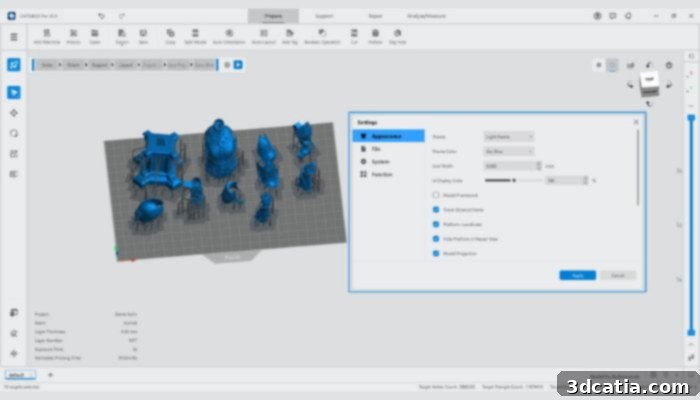
The new UI in CHITUBOX Pro V2.0 offers a fresh theme and advanced lighting/detail modes for better model visualization.
A Fresh Look and Enhanced Performance
The user interface (UI) of CHITUBOX Pro V2.0 has received a comprehensive and thoughtful overhaul, featuring a brand-new theme that is both modern, visually clean, and highly intuitive. This aesthetic upgrade is not merely cosmetic; it is coupled with a new lighting and detail mode that has been meticulously introduced. This advanced mode offers significantly improved compatibility with various scenes and model types, allowing users to visualize intricate details, delicate geometries, and subtle design changes with unprecedented clarity and accuracy. The ability to precisely observe how light interacts with the model’s surfaces and features is invaluable for identifying potential print issues, optimizing orientation, or simply appreciating the complexity of a design before committing valuable time and resin to printing.
Under the hood, the user experience (UX) has also seen significant, performance-driven improvements. CHITUBOX Pro V2.0 now boasts dramatically enhanced support for leading graphics rendering engines such as Microsoft DirectX and Apple Metal. This crucial optimization translates directly into much smoother and more responsive model manipulation, including rotation, panning, and zooming within the software’s 3D environment. This provides a fluid and seamless experience even when working with exceptionally large or highly complex models, eliminating lag and stutter. Furthermore, CHITUBOX has integrated more comprehensive and context-sensitive in-software prompt messages. These intelligent prompts guide users through various processes, provide helpful tips, and offer immediate feedback, making the software more accessible and less daunting for beginners while simultaneously boosting efficiency for seasoned users.
Streamlined Workflow and Advanced Model Preparation Tools
Beyond the interface and underlying performance enhancements, CHITUBOX Pro V2.0 also brings crucial improvements to its core model preparation functionalities, which are essential for producing high-quality prints. Features such as the “dig hole” function (for resin drainage), Boolean operations (for combining or subtracting geometries), and “add label” capabilities have all been meticulously refined. These enhancements are specifically designed to better ensure the integrity and watertightness of the model when these complex operations are applied, preventing unwanted artifacts, structural weaknesses, or exposure to internal geometry. The foundational undo/redo functions have been made more stable and reliable than ever before, providing CHITUBOX users with greater confidence to experiment, iterate, and refine their designs without the fear of irreversible errors. Moreover, the overall efficiency of the slicing process itself has been significantly boosted, resulting in noticeably faster slicing times, which is a direct and invaluable benefit for anyone working with multiple models or large build volumes. To further expedite workflows and cater to individual preferences, CHITUBOX Pro V2.0 offers a more comprehensive set of pre-defined shortcut keys and introduces a highly customizable shortcut key mode, allowing users to tailor the software to their specific habits and preferences, dramatically speeding up repetitive tasks and personalizing the control scheme.
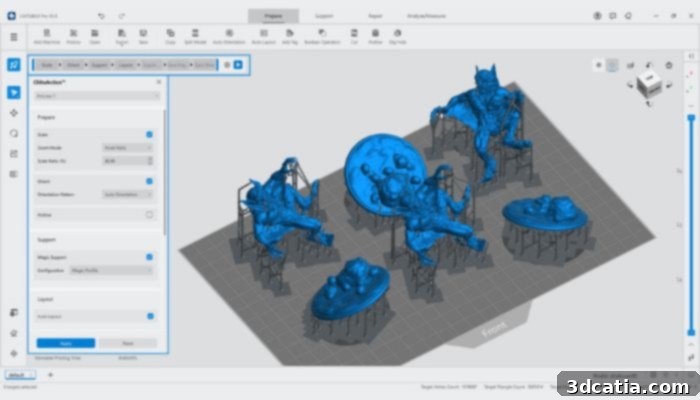
ChituAction is a highlight in CHITUBOX Pro V2.0, offering single-click automation for various model preparation steps, enhancing workflow efficiency.
Introducing ChituAction: One-Click Automation for Ultimate Efficiency
One of the most groundbreaking and impactful features introduced in the latest Pro version of CHITUBOX is the innovative ChituAction tool. This powerful new function represents a significant leap forward in streamlining and automating the entire model preparation workflow, transforming what were once multiple manual steps into a seamless, single-click operation. ChituAction empowers users to execute a complete series of essential pre-print steps – from automatic scaling to achieve the desired dimensions, optimal orientation for efficient printing and minimal supports, and the intelligent, automatic addition of comprehensive supports, all the way to the final slicing of the model file – all with an astonishing single click. This level of integrated automation is unprecedented in consumer-grade slicing software and promises to dramatically reduce the time spent on repetitive, often tedious, setup tasks, allowing users to focus more on design and less on preparation.
What truly sets ChituAction apart and makes it an indispensable tool is its remarkable customizability. It features an intuitive, user-friendly action frame where users are given complete control to define and sequence their preferred actions. This means users can create highly personalized workflows that perfectly match their specific printing requirements, material properties, and individual preferences. For instance, a user might define an action sequence that first hollows the model, then adds light supports, then optimizes orientation for minimal resin usage, and finally slices – all executed instantaneously. By simplifying complex processes and enabling such deep personalization, ChituAction not only boosts slicing efficiency to new heights but also significantly enhances user-friendliness across the board. This makes CHITUBOX Pro V2.0 incredibly versatile and accessible, catering equally to seasoned professionals seeking maximum speed and automation for their demanding projects, and to beginners looking for an exceptionally easy-to-use and guided experience to get their first successful prints. ChituAction is truly poised to redefine how users interact with their slicing software, transforming hours of meticulous preparation into mere moments of automated efficiency.
Advanced Hollowing and New Software Capabilities
Beyond its impressive support structures and user interface enhancements, CHITUBOX Pro V2.0 introduces a robust suite of new functionalities designed to expand creative possibilities and significantly boost operational efficiency for resin 3D printing. The Advanced Hollow function, for example, has been substantially upgraded. It now supports a wider array of filling capabilities, including solid, honeycomb, and mesh infills, offering greater flexibility for hollowing models. This allows users to save significant amounts of resin, which is a crucial cost consideration, while simultaneously maintaining crucial structural integrity and preventing print failures. Crucially, the updated function also features a bottom-through mode, which specifically facilitates easier and more complete resin drainage from hollowed parts – addressing a common pain point and mess factor in resin 3D printing. This refinement means less wasted resin during the printing process and much cleaner, less laborious post-processing.
Another valuable addition designed to maximize productivity is the ability to perform array-based batch model copying. This highly efficient feature allows users to quickly and accurately duplicate models across the build plate in a structured array, maximizing build volume utilization and saving considerable time when producing multiple identical parts for batch manufacturing or prototyping. Furthermore, CHITUBOX Pro V2.0 thoughtfully adds support for a new 3D printing software format, .cfgx. This forward-looking inclusion ensures broader compatibility with emerging technologies and prepares users for future advancements in 3D printing file standards and seamless machine integration, solidifying CHITUBOX’s position at the forefront of the industry.
Conclusion: CHITUBOX Pro V2.0 – Setting a New Standard for Resin Slicing
In summary, CHITUBOX Pro V2.0 represents a comprehensive, thoughtful, and impactful upgrade that addresses many of the evolving needs and demands of the sophisticated resin 3D printing community. From the intelligent automation provided by the innovative ‘Magic Support’ and the enhanced precision of new manual support types like Face and Boundary Support, to the collaborative power of Group and Cloud Support, the software significantly elevates print reliability, drastically reduces preparation time, and enhances overall ease of use. The thoroughly revamped UI/UX, featuring a fresh, modern theme, improved rendering engine support for smoother interaction, and smarter, more context-aware prompts, ensures a more pleasant, intuitive, and ultimately more efficient user journey for both novices and seasoned professionals. Key workflow tools like improved Boolean operations, stable undo/redo functionality, and significantly faster slicing further refine the core functionality, making everyday tasks quicker and more dependable.
The introduction of ChituAction stands out as a true highlight, offering unprecedented single-click automation for complex model preparation tasks. This powerful feature transforms multi-step processes into seamless workflows, making advanced capabilities accessible to all skill levels and dramatically increasing productivity. Coupled with advanced hollowing options, array-based model copying, and broader file format support, these collective changes unequivocally position CHITUBOX Pro V2.0 as a leading-edge, indispensable solution for anyone serious about resin 3D printing. By consistently improving existing features based on invaluable user feedback and proactively integrating innovative new functions, CHITUBOX reaffirms its unwavering commitment to leading the field and empowering users to achieve exceptional, consistent results with greater ease and efficiency. We invite you to experience the future of resin 3D printing slicing today and unlock new possibilities for your projects.
You can explore the full capabilities of the new CHITUBOX Pro V2.0 and download it HERE.
What are your thoughts on the new CHITUBOX Pro V2.0? Share your valuable feedback in the comments below or connect with us and join the conversation on our LinkedIn, Facebook, and Twitter pages! Don’t miss out on the very latest breaking news and insights in the world of 3D printing – sign up for our free weekly newsletter here, delivered straight to your inbox! You can also find all our engaging videos and tutorials on our YouTube channel for more in-depth content and demonstrations.