
Halot Box: The Ultimate Slicer for Creality Resin 3D Printers – Optimized Workflow and Unmatched Precision
In the rapidly evolving landscape of affordable 3D printing, Creality has consistently distinguished itself as a leading manufacturer, renowned for its innovative and accessible FDM and resin 3D printers. To complement its impressive hardware ecosystem, Creality has developed specialized software solutions tailored to optimize the user experience. Following the success of Creality Print, a dedicated slicer for FDM 3D printers, the company introduced Halot Box in 2022. This powerful slicing software has been meticulously designed to enhance the capabilities of Creality’s extensive range of resin 3D printers, offering users a seamless bridge between digital models and physical prints. With an interface available in 14 different languages, Halot Box is globally accessible, underscoring Creality’s commitment to serving a diverse international audience. The long-term vision for Halot Box is ambitious: to continuously evolve its functionalities, transforming it into an even more versatile, powerful, and indispensable tool for resin 3D printing enthusiasts and professionals alike.
The world of slicers for resin 3D printing is rich with options, including popular choices like ChiTuBox, Vlare, and Lychee. While these programs offer excellent functionality, they don’t always provide the perfectly integrated experience that a manufacturer-specific slicer can offer, especially when it comes to the unique intricacies of a particular brand’s hardware. This is precisely where Halot Box carves out its niche. Leveraging its profound understanding of its own machines, Creality engineered Halot Box as the definitive slicing software for its acclaimed Halot series and other resin printer models. Available as a free download from the official Creality website, Halot Box immediately impresses with its exceptional user-friendliness. Its intuitive design ensures that both complete beginners taking their first steps into resin 3D printing and seasoned users seeking streamlined workflows will find it accessible and highly efficient. But what specific features empower Halot Box to deliver such a compelling user experience and superior print quality?
Key Features and Advanced Functionalities of Creality Halot Box Slicer
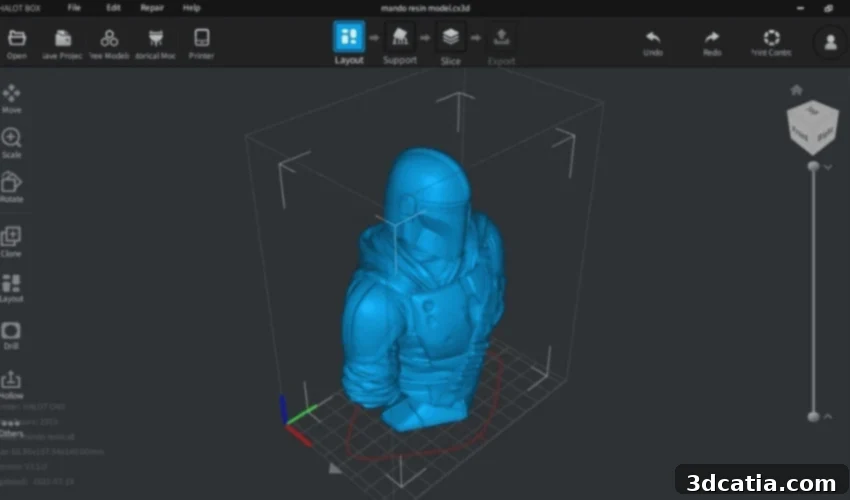
Creality Halot Box is more than just a basic slicing tool; it’s a comprehensive software suite designed to simplify and optimize the entire resin 3D printing process. At its core, Halot Box boasts a clean, modern, and uncluttered interface. This thoughtful design minimizes visual distractions and places essential tools at the user’s fingertips, making it particularly accessible to newcomers who might otherwise be intimidated by complex software. The intuitive layout guides users through each step, from model import to slicing and print preparation, fostering a smooth and efficient workflow.
Precision Control Over Printing Parameters
For effective resin 3D printing, granular control over various parameters is crucial. Halot Box excels in this regard, offering a full spectrum of adjustable settings essential for achieving high-quality prints. Users can precisely tune:
- Exposure Time: This parameter dictates how long each layer of resin is exposed to UV light. Halot Box allows for precise adjustments, which is vital for achieving optimal detail, accuracy, and layer adhesion for different resin types and desired print qualities.
- Layer Thickness: Directly impacting print resolution and speed, layer thickness can be easily modified. Finer layers result in smoother surfaces and greater detail but increase print time, while thicker layers speed up the process but may show more visible layer lines.
- Print Speed: While often tied to exposure time, print speed can also influence the success of a print, particularly with delicate features or larger models. Halot Box provides controls to fine-tune this for optimal results.
- Lift Speed & Retract Speed: Crucial for separating the cured layer from the FEP film, these settings can prevent print failures and reduce stress on the print.
- Bottom Exposure Layers: Configure the initial layers for stronger adhesion to the build plate, a common source of print failure in resin 3D printing.
These robust controls empower users to experiment and dial in the perfect settings for their specific resin, printer, and model requirements, ensuring consistent, high-fidelity outcomes.
Integrated 3D Modeling and Pre-processing Tools
One of Halot Box’s standout features is its integration of basic yet powerful 3D modeling tools directly within the software. This capability significantly streamlines the pre-printing workflow, reducing the need to switch between multiple applications. Users can:
- Move and Rotate: Easily position models on the print plate for optimal support generation and print orientation.
- Resize and Scale: Adjust the dimensions of parts to fit specific project requirements or printer build volumes.
- Hollow Models: This critical feature allows users to hollow out models, drastically reducing resin consumption and print time. Halot Box offers intuitive controls for wall thickness and even for adding drain holes, which are essential for cleaning and curing hollow prints.
- Drill Holes: Beyond drain holes for hollowing, the ability to drill holes directly simplifies preparing models for assembly or post-processing.
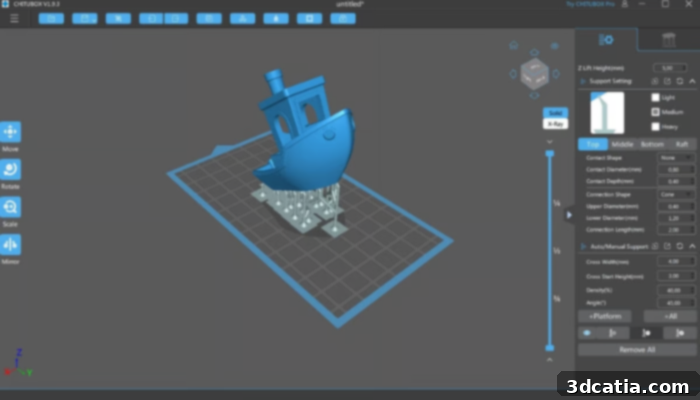
- Auto-Support Generation: Crucial for resin printing, Halot Box provides intelligent support generation algorithms, with options for various support types (light, medium, heavy) and customizable parameters to ensure stable prints without excessive material waste or damage to the model. Manual support editing is also available for intricate areas.
These tools enable users to prepare their models for printing with efficiency, ensuring structural integrity and material economy without the steep learning curve of dedicated CAD software.
Efficient Multi-Model Management with the “Clone” Tool
For projects requiring multiple copies of a part or the simultaneous printing of several different components, Halot Box offers exceptional efficiency through its “Clone” tool. This feature allows users to easily duplicate models on the printing plate and arrange them strategically. This is particularly advantageous for:
- Batch Production: Quickly fill the build plate with multiple instances of a small part for faster production cycles.
- Complex Assemblies: Print all components of an intricate project in a single run, optimizing time and material.
- Experimentation: Print variations of a design with different settings on the same plate to quickly compare results.
The ability to efficiently manage and lay out multiple models significantly enhances productivity, making Halot Box a valuable asset for both hobbyists and professionals.
Seamless Integration with Creality Cloud Ecosystem
Perhaps one of the most compelling and exclusive features of Halot Box is its deep integration with Creality Cloud. This revolutionary option elevates the 3D printing workflow to new heights of convenience and connectivity. Users can:
- Access a Vast Model Library: Browse and import thousands of 3D models directly from Creality’s extensive online library, all within the Halot Box interface. This eliminates the need to download models separately from external sites and then import them, creating a truly unified experience. You’ll find this accessible through the “free models” tab, opening a world of creative possibilities.
- Comprehensive Print Management: Thanks to Halot Box, your Creality Cloud account becomes a central hub for managing the entire printing process. This includes searching for, downloading, importing, and even editing templates.
- Remote Control and Monitoring: Take command of your 3D printer from anywhere. Halot Box allows you to control your resin 3D printing remotely, initiating prints, pausing them, and monitoring progress, provided your printer is connected to Creality Cloud via Wi-Fi. This feature is invaluable for busy users who want to maximize their printer’s uptime without constant physical supervision.
- Flexible File Transfer: Once your model is sliced and optimized, you can save the sliced file directly on your computer for later transmission. Halot Box supports various methods for sending the prepared file to your printer, including a traditional USB serial port connection for reliability or a convenient Wi-Fi connection for a wire-free setup.
This integration transforms Halot Box from a mere slicer into a comprehensive ecosystem manager, streamlining the entire journey from model discovery to final print.
Broad Compatibility and Dedicated Optimization
Halot Box is designed with accessibility in mind, supporting major operating systems including Windows and Mac. This ensures that a wide array of users can leverage its powerful features on their preferred computing platforms without compatibility concerns. However, it’s important to note its current compatibility strategy: Halot Box is primarily optimized for and restricted to Creality’s own range of resin 3D printers, particularly the Halot series. While this might seem like a limitation to some, it’s a deliberate design choice that allows Creality to ensure unparalleled performance, stability, and print quality specifically for its hardware. By developing software that perfectly matches its machines, Creality can deliver an optimized printing experience that generic slicers might struggle to achieve, providing proprietary profiles and firmware integrations that guarantee consistent and reliable results for owners of Creality resin printers. To experience this dedicated slicing solution, you can download Halot Box directly from Creality’s official website by clicking HERE.
The Benefits of Choosing Halot Box for Your Creality Resin 3D Printer
Opting for Halot Box as your primary slicing software, especially if you own a Creality resin 3D printer, comes with a host of distinct advantages:
- Optimized Performance and Print Quality: Being developed in-house by Creality, Halot Box is engineered to extract the best possible performance from their resin 3D printers. This means print profiles are finely tuned for specific Creality models, resulting in superior print quality, fewer failures, and more consistent results straight out of the box.
- Streamlined and Intuitive Workflow: From its clean user interface to the integrated modeling tools and Creality Cloud connectivity, Halot Box provides a truly seamless workflow. Beginners can quickly get up to speed, while experienced users will appreciate the efficiency and reduced friction in their printing process.
- Cost-Effective Solution: As a free software download, Halot Box offers professional-grade slicing capabilities without any additional investment. This makes high-quality resin 3D printing more accessible to a broader audience.
- Comprehensive Ecosystem Integration: The deep link with Creality Cloud goes beyond mere file management. It establishes a connected printing environment that supports remote operation, community model sharing, and potential future updates that leverage cloud-based functionalities.
- Dedicated Support and Development: Being a Creality product, users can expect dedicated support, regular updates, and continuous development efforts to enhance Halot Box’s features and compatibility, ensuring it remains at the forefront of resin slicing technology for Creality users.
Halot Box simplifies the complexities of resin 3D printing, empowering users to achieve their creative visions with greater ease and precision. Whether you are fabricating intricate miniatures, functional prototypes, or artistic models, Halot Box provides the tools and environment necessary for success.
Getting Started: Your First Steps with Halot Box
Embarking on your resin 3D printing journey with Halot Box is straightforward. After downloading and installing the software from the Creality website, you’ll be greeted by its user-friendly interface. The typical workflow involves:
- Importing Your Model: Start by importing your desired 3D model (usually in STL or OBJ format). Halot Box makes this a simple drag-and-drop or file selection process.
- Positioning and Scaling: Use the intuitive tools to orient your model on the virtual build plate. Correct orientation is crucial in resin printing to minimize supports and optimize print quality. You can also scale your model to fit your desired size.
- Hollowing and Drain Holes: If your model allows, consider hollowing it to save resin and improve post-processing. Remember to add drain holes to ensure proper resin drainage and cleaning.
- Generating Supports: Resin prints almost always require supports. Halot Box’s intelligent auto-support generation will suggest optimal support structures, which you can then fine-tune or manually adjust for critical areas.
- Slicing with Precision: Once your model is prepared, apply the slicing parameters. Select your Creality printer model and the specific resin you are using, then adjust exposure time, layer thickness, and other settings for optimal results.
- Preview and Export: Before printing, always utilize the preview function to visualize each layer and check for any potential issues. Finally, export your sliced file (typically a .cbt or .ctb format for Creality printers) to your chosen storage medium.
- Print Initiation: Transfer the file to your Creality resin printer via USB or Wi-Fi (leveraging Creality Cloud for remote initiation) and start your print!
This structured approach, guided by Halot Box’s comprehensive features, ensures a high probability of successful prints from your very first attempt.
The Future of Halot Box: Evolving with the Creality Ecosystem
Creality’s long-term objective for Halot Box is clear: to evolve it into an even more versatile and powerful tool. This commitment to continuous improvement suggests that users can anticipate ongoing updates, new features, and enhanced compatibility. Future iterations might include more advanced support generation algorithms, integration with a wider array of third-party resin profiles, or even more sophisticated analytical tools for print diagnostics. As Creality continues to innovate in the resin 3D printing space, Halot Box is poised to grow alongside its hardware, maintaining its position as the preferred slicing solution for the Creality community. The synergy between Creality’s robust hardware and its evolving, dedicated software like Halot Box promises an exciting future for accessible and high-performance resin 3D printing.
Are you currently using Halot Box for your resin 3D printing projects? We’d love to hear about your experiences, tips, and any incredible prints you’ve created with this powerful slicer! Share your thoughts in a comment below or connect with us on our social media channels: find us on LinkedIn, Facebook, and Twitter pages! Don’t forget to sign up for our free weekly newsletter here for the latest 3D printing news straight to your inbox! For more visual content and guides, you can also find all our videos on our YouTube channel.
*All Photo Credits: Creality