
PrusaSlicer: The Definitive Guide to This Powerful Free & Open-Source 3D Printing Slicer
PrusaSlicer stands as a cornerstone in the world of 3D printing software, a testament to the innovation of its creator, the renowned 3D printer manufacturer Prusa. This robust software is fundamentally built upon the open-source legacy of Slic3r, which Prusa meticulously enhanced and refined to perfectly cater to the diverse needs of users operating both its Fused Deposition Modeling (FDM) and Stereolithography (SLA) 3D printers. What truly distinguishes PrusaSlicer in the competitive landscape of slicing software can be distilled into several compelling advantages: it’s entirely free, boasts a fully open-source codebase, is packed with an extensive array of features, and benefits from continuous, frequent updates. This comprehensive tool provides everything an enthusiast, advanced user, or seasoned professional requires to transform 3D models into precise print files, making it an indispensable asset for anyone engaged in additive manufacturing.
The journey of PrusaSlicer began modestly in November 2016, when its inaugural version was released under the name Slic3r Prusa Edition. This initial branding reflected its direct lineage from Slic3r, a powerful and versatile open-source slicer developed by Alessandro Ranellucci. While Slic3r offered immense capabilities, some of its functions were known to be less intuitive, often hidden or challenging for users to discover and master. Recognizing the potential for confusion and the desire to forge its own distinct identity while building on Slic3r’s foundation, Prusa made a strategic decision in 2019 to rename the software to PrusaSlicer. This rebranding not only helped differentiate it from its predecessor but also underscored Prusa’s commitment to developing a more user-centric and accessible solution, tailored to enhance the 3D printing experience for its growing community.
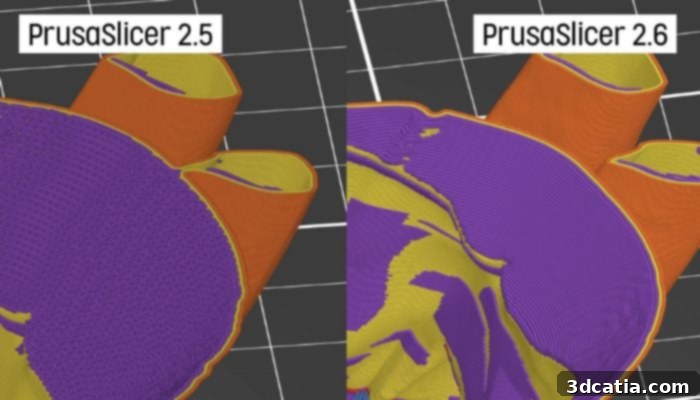
PrusaSlicer is under constant revision and improvement. Thanks to invaluable community feedback, Prusa is always aware of the slicer’s strengths and areas for further development.
While PrusaSlicer draws its core principles from Ranellucci’s original Slic3r solution, Prusa’s development team undertook a significant redesign of the user interface (UI). Their goal was to make the software’s extensive functions more easily accessible and its overall operation more intuitive. This resulted in a cleaner, more visually organized UI that dramatically improves user experience, making complex tasks feel simpler and more direct. Crucially, Prusa’s development philosophy is deeply rooted in community engagement. By actively soliciting and responding to feedback from the vast Prusa user base, the Prusa Research Team developers gain invaluable insights into the slicer’s weaknesses and areas where enhancements are most needed. This iterative process of listening, developing, and refining ensures that PrusaSlicer is continuously evolving, with shortcomings being addressed and innovative new features being integrated to meet the evolving demands of the 3D printing landscape.
Mastering 3D Printing with PrusaSlicer
In additive manufacturing, the slicing process represents a critical and foundational step in bringing a digital 3D model to life as a physical object. This essential function meticulously dissects the complex 3D model into thousands of horizontal layers, generating the precise instructions (G-code) that a 3D printer understands. Beyond mere layer generation, slicing software like PrusaSlicer also expertly handles the creation of print supports, infill patterns, and countless other parameters crucial for successful prints. The market today is rich with a diverse array of slicer software, each often optimized for specific machine types and the distinct technologies they employ. However, PrusaSlicer distinguishes itself with its broad compatibility and user-friendly approach.
The PrusaSlicer solution was ingeniously developed to cater to both FDM (Fused Deposition Modeling) and resin-based printers, making it a versatile tool for a wide range of users. Notably, it was one of the pioneering slicers to offer robust support for MSLA (Masked Stereolithography) printing, broadening its appeal to the rapidly growing resin printing community. A significant advantage of PrusaSlicer is its comprehensive library of printer profiles, which includes not only all original Prusa printer models but also a wide selection of popular third-party machines. When paired with an authentic Prusa printer, users unlock an unparalleled experience, gaining access to more than 180 meticulously tested and automatically updated profiles for various filaments and resins. These optimized profiles ensure consistent, high-quality prints right out of the box, minimizing the need for manual tweaking and experimentation.
Getting started with PrusaSlicer is remarkably straightforward. The software can be effortlessly downloaded directly from the official Prusa website and is compatible across major operating systems, including Windows, Mac, and Linux, ensuring accessibility for nearly all users. PrusaSlicer boasts compatibility with several standard 3D model formats, such as STL, OBJ, 3MF, and AMF. A particularly valuable feature for designers and engineers is the ability to directly import STEP files. This eliminates the often cumbersome and error-prone step of converting intricate CAD models into less precise mesh formats like STL, streamlining the workflow and preserving the original model’s geometric fidelity.
Once your 3D model is imported into PrusaSlicer, the software intuitively guides you through the preparatory steps. This includes easily manipulating your part – aligning it on the print bed, scaling, rotating, and performing various edits using the diverse range of functions available. After preparing your object, you simply select your specific 3D printer, the material you intend to use (filament or resin), and your preferred print profile. The next crucial stage involves configuring any necessary support structures to prevent overhangs from collapsing and defining the internal infill pattern, which determines the part’s strength and weight. Finally, before committing to the physical print, PrusaSlicer allows you to meticulously preview the generated G-code layer by layer. This invaluable visual inspection step enables you to identify and rectify any potential errors, optimize print paths, and gain confidence in your print settings, significantly reducing material waste and failed prints.
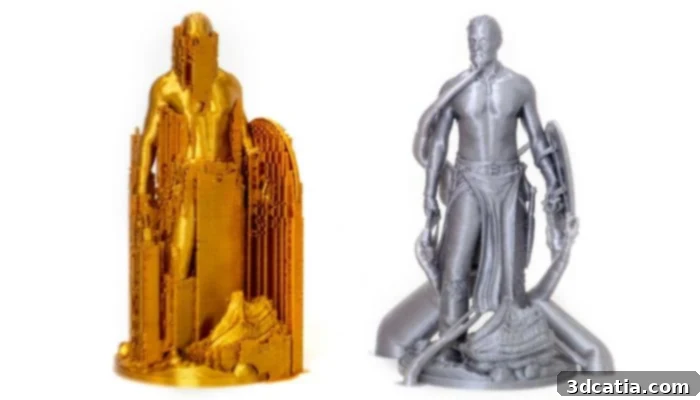
PrusaSlicer offers a broad portfolio of materials and diverse support structure options, ensuring optimal print quality for any model.
Unlocking PrusaSlicer’s Main Features and Advanced Capabilities
PrusaSlicer’s interface is celebrated for its clarity and intelligent organization, significantly streamlining the operator’s workflow. All essential functions are conveniently grouped together on a dedicated sidebar, ensuring that key tools are always within easy reach. This includes straightforward controls for adding materials, precisely defining layer height for specific sections of your workpiece, and selecting from an expansive library of over 150 predefined print profiles for various filaments and resins. Beyond these fundamental settings, PrusaSlicer also empowers users with a suite of more advanced functions, making it suitable for intricate and demanding projects.
For instance, when dealing with challenging geometries, users have the flexibility to either manually “paint” user-defined support structures directly onto the model, offering precise control over their placement, or to opt for automatic generation from a comprehensive pool of support block types. This hybrid approach ensures both efficiency and customization. For those venturing into multi-material or multi-color 3D printing, PrusaSlicer provides intuitive options to effortlessly color-code sections of the object with just a few mouse clicks. This functionality allows users to program exact color or filament changes directly within the slicer, enabling complex and aesthetically rich multi-material prints without external software.
Furthermore, PrusaSlicer enriches the user experience with several other powerful tools. It boasts a built-in shape gallery, offering a collection of basic geometric forms that can be integrated into designs. The software also supports group selection, simplifying the process of editing multiple objects simultaneously. Its advanced adaptive infill options dynamically adjust infill density based on the model’s geometry, optimizing for strength, material usage, and print time. The “Smart Fill” tool provides a quick and efficient way to apply color or specific settings to larger areas, while the “Brush Tool” offers granular, manual control for detailed adjustments, ensuring that every aspect of your print is precisely managed.
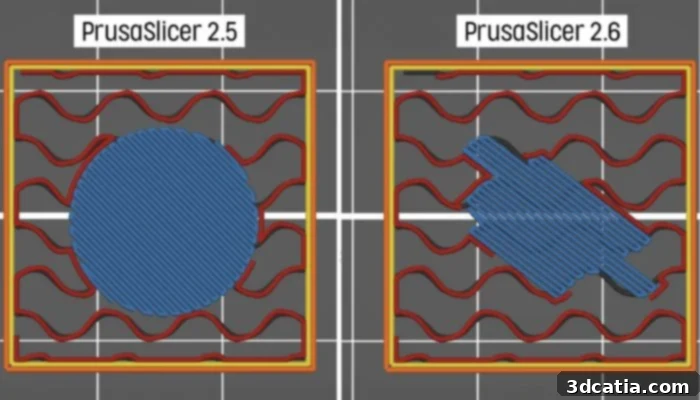
The PrusaSlicer features an extensive range of shapes and numerous infill options, providing immense flexibility for optimizing prints.
Pioneering Innovations: The Latest Versions of PrusaSlicer
As highlighted earlier, PrusaSlicer is far from a static product; it is a platform characterized by relentless revision and improvement, with new features and refinements consistently introduced to enhance the user experience and expand its capabilities. This commitment to innovation is vividly demonstrated in its recent updates. In June 2023, the release of version 2.6.0 ushered in a suite of significant new functionalities. Among these, the implementation of tree supports, a popular and highly efficient support structure type originally popularized by Cura, was a major addition. Tree supports are renowned for their organic, branching nature, which minimizes material usage and makes removal much easier, often resulting in cleaner surface finishes on the printed part.
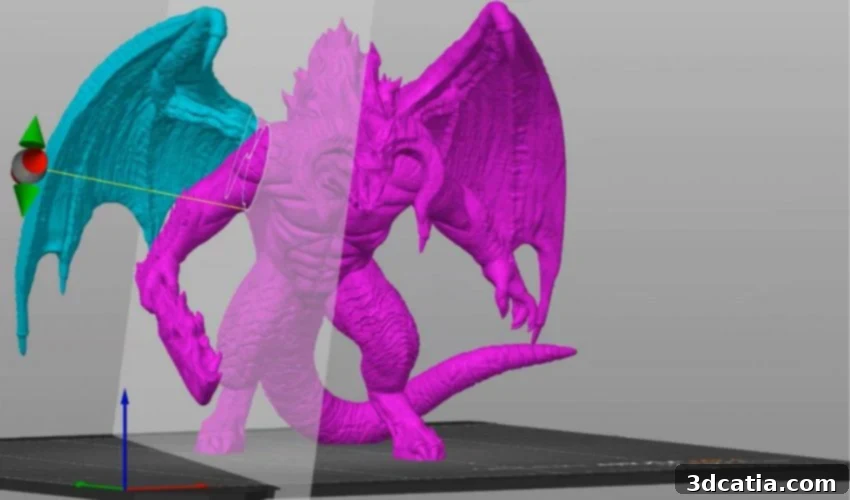
Version 2.6.0 also integrated a versatile text embossing tool, allowing users to seamlessly insert and edit text as a 3D object directly within the slicer environment. This feature is incredibly useful for embedding notes, serial numbers, branding, or decorative characters onto models without requiring external CAD software. To further aid in precision and design verification, an intelligent measuring tool was also introduced, capable of accurately calculating distances between vertices, edges, and planes. Beyond these, numerous other tool integrations and refinements were included, with a particular highlight being the significant improvement to the Cut tool. This enhanced tool provides users with greater flexibility to precisely cut models at any desired angle and subsequently determine the optimal alignment of the resulting parts, enabling more complex multi-part prints and efficient use of build volume.
The momentum of innovation continued with the latest version released in September 2023, which brought even more compelling features to PrusaSlicer. A key enhancement was the significant improvement to the arrangement function. Objects can now be intelligently placed not only on flat surfaces but also within concave areas formed by other objects on the print bed, maximizing space utilization and improving stability during printing. Furthermore, users now have access to three distinct levels of geometry handling – Fast, Balanced, and Accurate – selectable via a convenient drop-down menu in the “Arrange” dialog box. These options allow users to balance processing speed with geometric precision based on their project’s demands. The already impressive cutting and text embossing tools from the previous version received further revisions and improvements, making them even more robust and user-friendly. For a comprehensive overview of all the latest functions and to download the most current version, users are encouraged to visit the official Prusa website and explore the detailed release notes HERE.
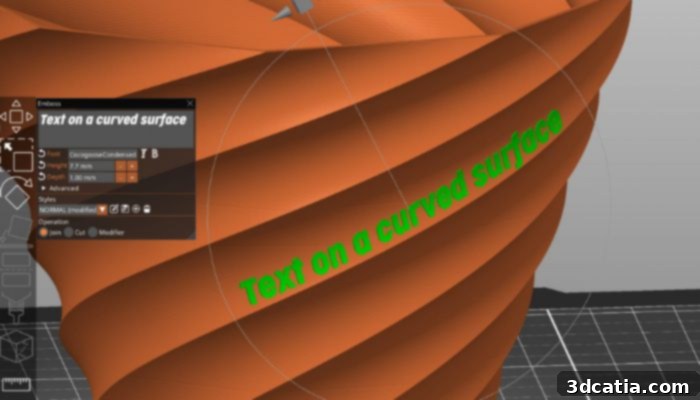
The latest versions of PrusaSlicer allow for intuitive text insertion and embossing directly onto 3D models.
In conclusion, PrusaSlicer stands as a beacon of excellence in the 3D printing software ecosystem. Its roots in the open-source community, coupled with Prusa’s unwavering commitment to user-driven development, have cultivated a slicer that is not only feature-rich and powerful but also remarkably accessible. Whether you are a beginner taking your first steps into 3D printing or a seasoned professional tackling complex projects, PrusaSlicer offers the tools, flexibility, and ongoing support needed to achieve exceptional results. Its continuous evolution, driven by invaluable community feedback and Prusa’s dedication to innovation, ensures that it remains at the forefront of additive manufacturing technology.
Have you already harnessed the capabilities of PrusaSlicer for your 3D printing projects? We’d love to hear about your experiences! Share your thoughts and insights in a comment below or connect with us on our LinkedIn, Facebook, and Twitter pages! Don’t miss out on the latest advancements and news in the 3D printing world; be sure to sign up for our free weekly Newsletter here, delivering the most current updates straight to your inbox! You can also explore all our insightful videos and tutorials on our YouTube channel.
*Cover Photo Credits: Prusa