
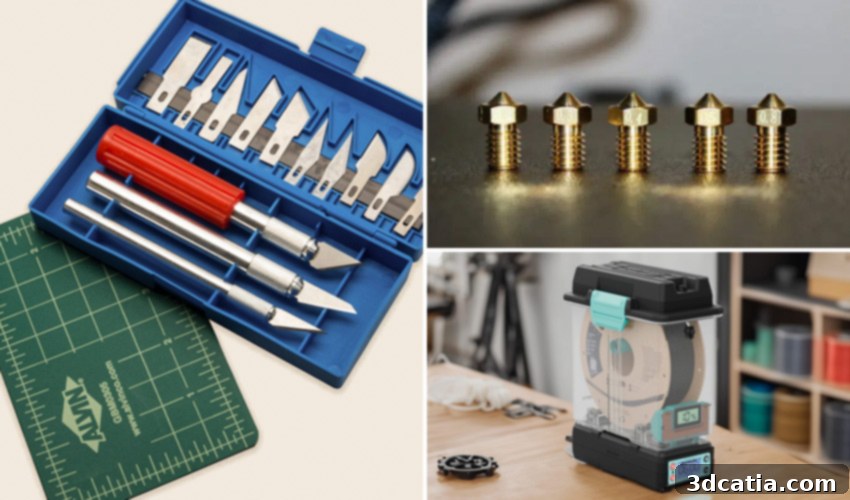
Essential 3D Printer Accessories: Your Ultimate Guide to Optimizing Performance and Achieving Flawless Prints
Achieving success in 3D printing goes beyond merely selecting the right machine and materials. While these are foundational, the crucial role of supporting accessories and tools cannot be overstated. From the initial stages of model preparation to the final touches of post-processing, a well-equipped workspace can significantly enhance every phase of your 3D printing journey. These essential 3D printer accessories, whether utilized before, during, or after fabrication, are designed to ensure your results align perfectly with your vision. Moreover, they play a pivotal role in improving print precision, elevating finishing quality, and boosting overall process efficiency. This comprehensive guide presents a curated selection of indispensable tools and upgrades to help you optimize the performance of your 3D printer and consistently achieve high-quality prints, capturing even the most intricate details.
Indispensable 3D Printer Accessories for Pre-Printing Preparation
The Digital Caliper: Precision Measurement for Perfect Prints
A digital caliper is an invaluable precision measuring instrument capable of accurately determining lengths, diameters, and depths, all presented in an easy-to-read digital display. In the realm of 3D printing, it is an absolutely essential tool for producing parts with exact dimensions, facilitating the development of full-scale designs, or executing complex reverse engineering projects. Unlike standard tape measures or traditional rulers, a digital caliper offers significantly superior accuracy, ensuring that every component you print or design fits together flawlessly. Its precision is critical for verifying the exact thickness of your filament, a measurement vital for fine-tuning extrusion flow. Correct flow adjustment helps prevent common issues such as over-extrusion, which can lead to messy, oversized prints, or under-extrusion, resulting in weak, incomplete parts. By maintaining precise control over filament diameter and other critical dimensions, you can achieve unparalleled consistency and reliability in your prints. The market for digital calipers is extensive, offering options from highly affordable models starting around 20 euros, suitable for hobbyists, to professional-grade instruments exceeding 300 euros, designed for industrial applications requiring extreme accuracy and durability.
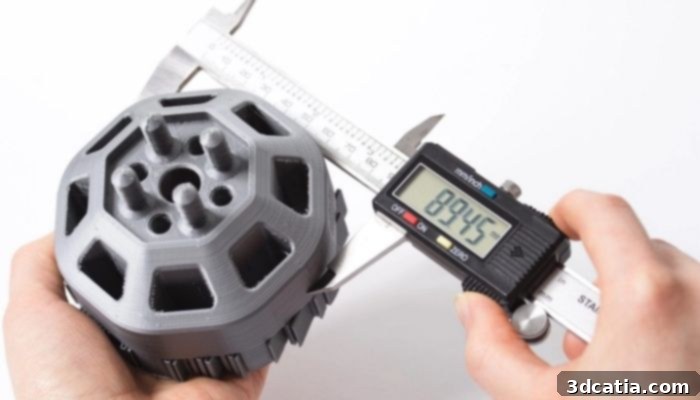
Photo credits: Protolabs
Remote Control Solutions: Monitor and Manage Your Prints from Anywhere
Remote control solutions for 3D printing offer incredible utility, enabling users to monitor and manage their print jobs from virtually any location. These systems are invaluable for anyone who needs to keep an eye on their 3D printer while away from home, the workshop, or the office. Whether you operate a single desktop 3D printer or oversee an entire farm of machines, these solutions provide the flexibility and convenience needed to coordinate actions and optimize workflows. A variety of software options facilitate robust remote management, with popular choices including OctoPrint, Fluidd, and Mainsail. OctoPrint, for instance, running on a Raspberry Pi, transforms almost any FDM printer into a smart, networked device, allowing for web-based control, monitoring via webcam, and even advanced features like time-lapses. Additionally, many printer manufacturers offer their own dedicated smartphone applications, such as Bambu Handy, which provides seamless control and monitoring specifically for Bambu Lab printers. Beyond software, hardware-based solutions like the Raspberry Pi, when paired with specialized firmware such as Klipper, enable advanced users to remotely optimize crucial printer parameters like extrusion speed and print acceleration, leading to faster, higher-quality prints. This level of remote access not only enhances convenience but also significantly improves workflow efficiency, allowing for proactive intervention and real-time adjustments without physical presence.
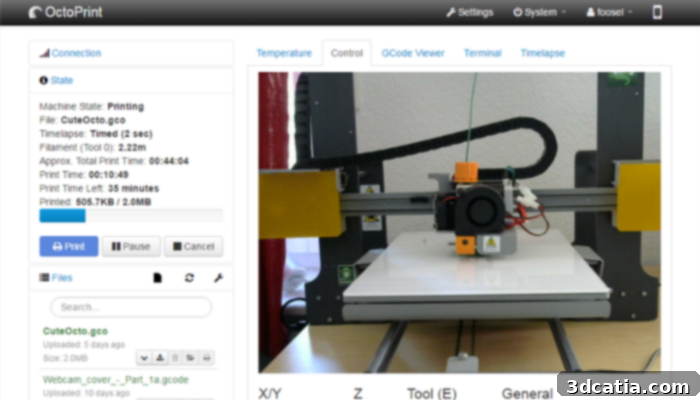
Photo credits: OctoPrint
Filament Storage and Dryers: Preserving Material Quality for Optimal Prints
Filaments, especially highly hygroscopic materials like PETG, TPU, and Nylon, are prone to absorbing moisture directly from the ambient air. Using moist filament can severely degrade the quality of your 3D prints, leading to a host of undesirable issues. These problems include audible bubbling and popping noises in the hot end as trapped moisture vaporizes, inconsistent extrusion flow that manifests as visible defects on print surfaces, and increased stringing, where fine wisps of plastic appear between printed features. To effectively prevent these common printing headaches, investing in proper filament storage is paramount. Solutions range from simple yet effective airtight containers, which create a sealed environment to block moisture, to vacuum-sealed bags that remove air completely, and specialized filament dry boxes designed to maintain a low-humidity atmosphere. If you already find yourself with filament that has absorbed moisture and needs remediation, a dedicated filament dryer is an indispensable accessory. These devices often come equipped with automatic drying capabilities, precise temperature controls, and even integrated scales to track filament usage. Typically, a filament dryer can accommodate one to two spools simultaneously and can often be programmed to feed filament directly into your 3D printer, allowing for continuous, dry printing without interruption. Proper filament management ensures consistent material properties, leading to stronger, more aesthetically pleasing, and more reliable 3D prints.
Essential 3D Printer Accessories for During Printing Operations
Extra Build Plates and Nozzles: Enhancing Efficiency and Versatility
Having a supply of extra build plates and nozzles is remarkably beneficial during the 3D printing process, significantly improving both efficiency and versatility. Regarding build plates, it is highly recommended to have at least one spare. This recommendation stems from a practical advantage: it is always considerably faster to remove a finished build plate with the part still attached and immediately install a fresh one than to wait for the part to cool and then carefully detach it from the original plate, especially when multiple parts need to be printed consecutively. This allows for continuous printing and reduces downtime. Furthermore, many experienced users advocate for having multiple build plates, each optimized for specific materials. For instance, a glass plate might be ideal for PLA, while a PEI-coated spring steel sheet might perform better for PETG or ABS, offering superior adhesion and easier part removal for those specific filaments. This specialization can drastically improve print success rates and overall print quality for a variety of materials.
Additional nozzles are equally useful. Primarily, a spare nozzle ensures that your printing process isn’t halted if your current nozzle becomes clogged. You can quickly swap in a clean spare and continue printing while you take your time to properly clean or maintain the clogged one. Beyond mere replacements, nozzles come in a range of sizes, typically from a minuscule 0.1mm for extremely fine details to a robust 1.0mm or larger for rapid printing. Nozzle size directly impacts the final characteristics of your printed part. Small-diameter nozzles are indispensable for achieving exceptionally fine details and smooth surface finishes, though they inherently lead to longer printing times due to the smaller extrusion volume. Conversely, large-diameter nozzles facilitate a greater volume of material extrusion, resulting in significantly shorter printing times, albeit with a trade-off in fine detail. A 0.4mm nozzle is considered the standard for most FDM 3D printers, striking a balance between detail and speed. However, purchasing a nozzle set with various sizes, or just a few extra common sizes, grants you the flexibility to adapt your printer to different project requirements, from highly detailed miniatures to large, functional prototypes, thereby expanding your printer’s capabilities and versatility.
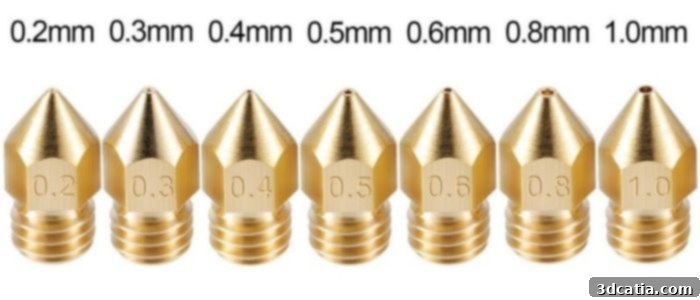
Different nozzle sizes for a 3D printer (photo credits: Top 3D Shop)
Improving Material Adhesion: Ensuring a Strong First Layer
The adhesion of the printing material to the 3D printer’s build plate is an absolutely critical factor throughout the entire fabrication process of any part. Superior adhesion directly correlates with a higher quality final print, especially in the initial stages. The very first layer must adhere firmly and consistently to the build plate to establish a stable foundation, ensuring proper deposition and structural integrity for all subsequent layers. This robust initial bond is also crucial in preventing common printing failures such as warping, a phenomenon where plastic layers cool unevenly, shrink, and peel away from the build plate, often lifting corners or edges. To combat these issues and achieve reliable first-layer adhesion, several types of bonding accessories can be effectively utilized on the 3D printing tray. These include specialized glue sticks, such as those from the popular Magigoo brand, which create a temporary adhesive layer that releases easily once the print cools. Lacquer sprays, like those offered by 3DLAC, provide a fine, even coating that enhances grip without leaving significant residue. Lastly, various types of adhesive tapes, such as Kapton tape or blue painter’s tape, can be applied directly to the build plate, offering excellent adhesion and often simplifying the removal of finished parts from the tray. Experimenting with these options can help you find the perfect adhesion solution for your specific filament and build plate combination, leading to more successful and aesthetically pleasing prints.
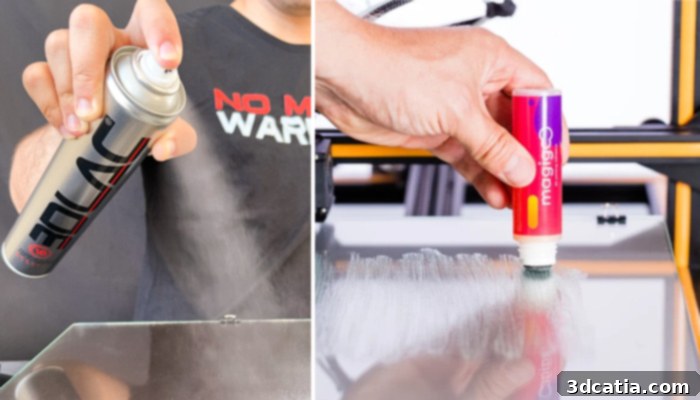
On the left, the 3DLAC spray; on the right, the Magigoo glue stick
Emission Protection: Safeguarding Your Health During Printing
To effectively limit and mitigate exposure to potentially harmful emissions generated during the 3D printing process, a range of specialized solutions are readily available. Extensive research has consistently revealed that 3D printing, particularly with certain filament types, can lead to a significant production of ultrafine nanoparticles (UFPs) and the release of volatile organic compounds (VOCs). The specific composition of the filaments directly influences the types and quantities of these airborne pollutants. Repeated or prolonged exposure to this polluted air can pose considerable health risks, affecting respiratory systems and general well-being. To address these concerns and ensure a safer printing environment, various protective options have been developed. For example, Alveo3D offers an innovative suite of solutions tailored for different needs. These include compact air filtration systems designed to attach directly to a printer enclosure, comprehensive housing kits with integrated filtration for a complete solution, custom enclosures specifically designed for various desktop 3D printer models, and robust industrial smoke extraction systems compatible with a wide array of equipment. According to manufacturers like Alveo3D, these advanced filtration solutions can achieve efficiencies exceeding 98% in capturing airborne particles and VOCs, while simultaneously neutralizing unpleasant odors and significantly reducing symptoms of irritation often associated with 3D printing fumes. Investing in proper emission protection is a crucial step towards creating a healthier and safer workspace for all 3D printing enthusiasts and professionals.
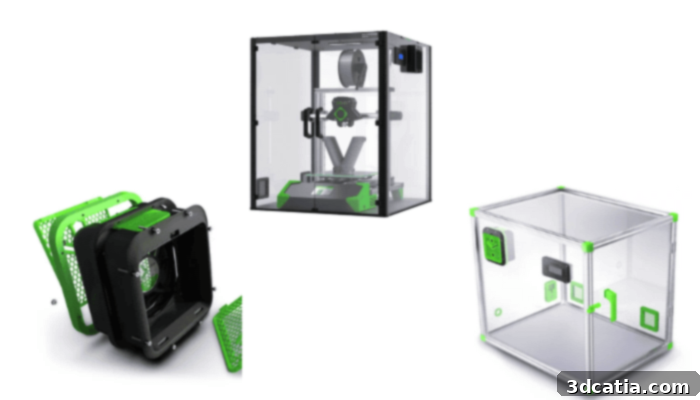
Left, filtration system; center, kit; right, custom enclosure
Multi-Material and Multi-Color Upgrades: Unleashing Creative Potential
While starting with single-color 3D prints can be satisfying, many users quickly find themselves desiring greater creative freedom, envisioning prints with multiple colors and a variety of materials. When this ambition strikes, you have two primary paths: upgrading to a dedicated multi-color/multi-material printer or integrating an add-on solution that expands your existing printer’s capabilities. Many leading manufacturers now offer sophisticated multi-color or multi-material upgrade kits specifically designed for their own printer models. These innovative systems typically involve a specialized unit or enclosure where multiple spools of filament can be securely stored, often with integrated drying capabilities, and then automatically fed into the printer. The spools are usually managed automatically, ensuring seamless transitions between different colors or materials during a single print job, thereby preventing interruptions and significantly reducing material waste compared to manual filament changes. This capability opens up a vast new world of design possibilities, allowing for complex functional parts made from different plastics (e.g., rigid base with flexible gaskets) or visually stunning artistic creations with intricate color patterns.
Several notable examples of such upgrades exist across the market. Prusa Research offers the highly acclaimed MMU3 (Multi-Material Upgrade) as an add-on for its original Prusa i3 MK3S+ and MK4 printers, enabling them to print with up to five different filaments simultaneously. Bambu Lab has introduced the AMS Lite (Automatic Material System) for its A1 series, an efficient system that supports four filaments. Other manufacturers also provide similar solutions, such as the ACE Pro from Anycubic, the CFS from Creality, and the Chroma Kit from Phrozen, alongside various offerings from companies like Co Print. A particularly versatile tool compatible with a wide range of printing solutions is the Mosaic Palette. Available in different versions, the core principle remains consistent: the Palette intelligently splices and combines sections of multiple filament strands into a single, continuous strand. This allows the 3D printer to essentially print a multi-color or multi-material object as if it were using a single filament, providing unparalleled flexibility for intricate designs and expanding the creative horizons of virtually any FDM 3D printer. These upgrades truly transform a standard 3D printer into a powerful tool for advanced and expressive manufacturing.
Essential Post-Printing Accessories for Perfect Finishes
Spatula: Safe Part Removal and Workspace Cleanliness
A sturdy spatula is another highly practical and often underestimated 3D printer accessory, proving indispensable primarily for the safe and efficient removal of printed parts from the build bed without causing any damage. Since printed objects, especially those with good first-layer adhesion, can adhere very firmly to the printing plate, attempting to remove them by hand or with inappropriate tools can easily lead to deformation, breakage of the part, or even damage to the build surface itself. A specialized spatula, with its thin yet rigid blade, allows you to carefully pry off objects, distributing force evenly and minimizing the risk of adverse outcomes. For printers that utilize rigid, non-flexible build plates, a dedicated squeegee or spatula is absolutely essential for detaching objects without applying excessive, potentially damaging force. Beyond part removal, spatulas are also incredibly useful for scraping off residual filament strands, rafts, or support material remnants from the print bed, helping to maintain a clean and optimized printing surface for subsequent jobs. Spatulas come in various sizes and designs, including options with vertical or slightly raised handles for improved ergonomics and leverage. Your selection should be guided by the specific function you anticipate, whether it’s for delicate part removal or more robust bed cleaning.
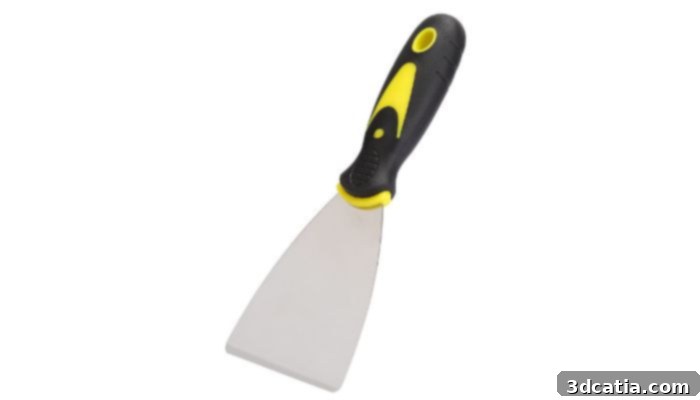
Photo Credits: Amazon
Knives, Pliers & Deburring Tools: Achieving Flawless Details and Smooth Edges
Printing objects with a high level of intricate detail frequently necessitates a more involved post-processing phase, as specific features may require additional refinement to achieve a professional finish. For this meticulous work, a set of small, sharp knives and precision pliers are indispensable. Small knives, often in the form of craft knives or scalpel-style tools, allow for the precise removal of excess material, such as fine strings, small blobs, or unwanted support structures that are too delicate for other tools. Precision pliers, particularly flush cutters, are perfect for snipping away larger support structures cleanly, or for separating printed parts from a raft without leaving rough edges. Deburring tools are specifically designed to address burrs—those small, raised edges or pieces of remaining material—and sharp edges that often occur during the 3D printing process. Available in various shapes and sizes to tackle different contours, a typical deburring tool features a swiveling, curved metal blade. This design enables it to smoothly glide along the edges of a part, effectively removing any rough pieces, softening sharp corners, and giving the print a much cleaner, more professional feel. Together, these tools are essential for achieving truly flawless details and a superior surface finish on your 3D printed objects, transforming raw prints into polished products.
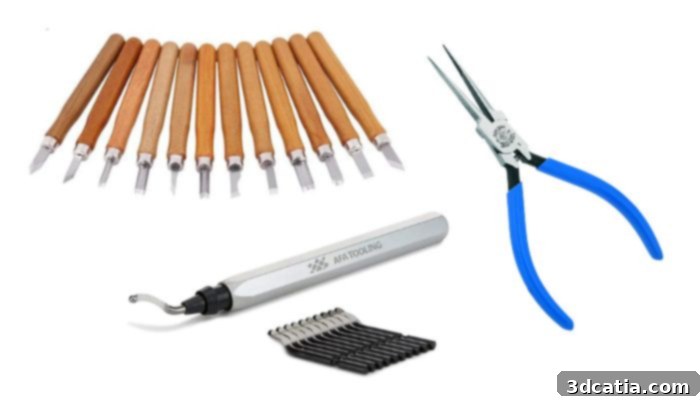
Small knives (top), Klein Tools pliers (right), AFA Tooling deburring tool (bottom)
Cutting Mat: Protecting Your Workspace During Post-Processing
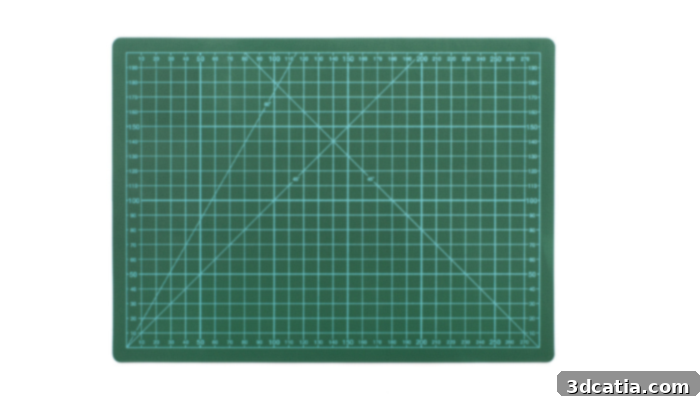
A cutting mat is an exceptionally useful and often overlooked tool for anyone involved in 3D printing, especially during the crucial post-processing stages. Its primary function is to provide a robust protective barrier for your work surface, safeguarding it from accidental cuts, scratches, and other damage that can occur when manipulating or refining 3D printed models. Many high-quality cutting mats feature self-healing properties; the material is designed to reseal itself after minor cuts, maintaining a consistently smooth and functional surface over time, even with repeated use of sharp tools. Furthermore, a good cutting mat offers a stable and secure working platform, providing excellent grip for your parts and tools, which significantly reduces the risk of slips and enhances safety during delicate operations. To maximize precision, it is highly recommended to use mats that come with clearly printed grids and measurement markings on their surface. These guides are invaluable for making accurate cuts, trimming supports, or performing other alignment-sensitive tasks, ensuring your post-processing is as precise as your printing. Integrating a cutting mat into your workflow not only protects your furniture but also elevates the professionalism and safety of your 3D printing workspace.
Equipping your 3D printing setup with these essential accessories can dramatically improve your printing experience, from the reliability of your first layer to the flawless finish of your final product. These tools not only enhance the precision and quality of your prints but also contribute to a more efficient, safer, and enjoyable workflow, ultimately unlocking the full potential of your 3D printer. Which of these must-have 3D printer accessories do you already incorporate into your workflow? Share your thoughts and experiences in a comment below or connect with us on our LinkedIn, Facebook, and Twitter pages! Don’t forget to sign up for our free weekly Newsletter here to get the latest 3D printing news delivered straight to your inbox! You can also find all our insightful videos on our YouTube channel for more tips and inspiration.