
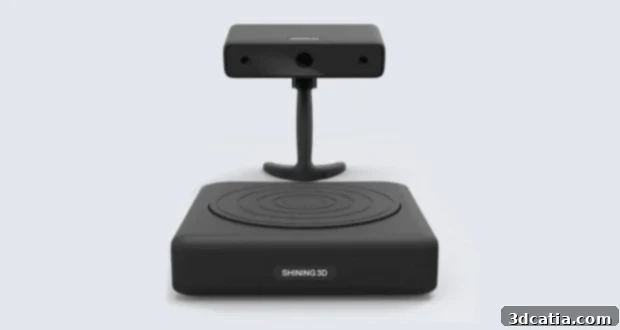
Shining 3D EinScan-S Review: An Accessible Desktop 3D Scanner for Enthusiasts
Welcome to the 3Dnatives lab, where today we embark on an in-depth review of the EinScan-S 3D scanner from Shining 3D. This remarkable device garnered significant attention during its early 2015 Kickstarter campaign, successfully raising an impressive $123,000 USD to bring its innovative vision to life. The EinScan-S was positioned as a groundbreaking solution, democratizing 3D scanning technology for a wider audience, from hobbyists to small businesses, by offering advanced features at a more accessible price point.
Shining 3D, a prominent name not only in the 3D scanning market but also with a notable presence in the 3D printer sector, offers a diverse range of scanners including the EinScan-S, EinScan-Pro, and EinScan-Pro+. These models consistently deliver performance typically associated with professional-grade equipment, yet at a fraction of the cost, making them highly competitive in today’s rapidly evolving additive manufacturing landscape. Before we delve into the specifics of our testing and evaluation, we extend our sincere gratitude to Machines-3D for generously loaning us this EinScan-S scanner, making this comprehensive review possible.
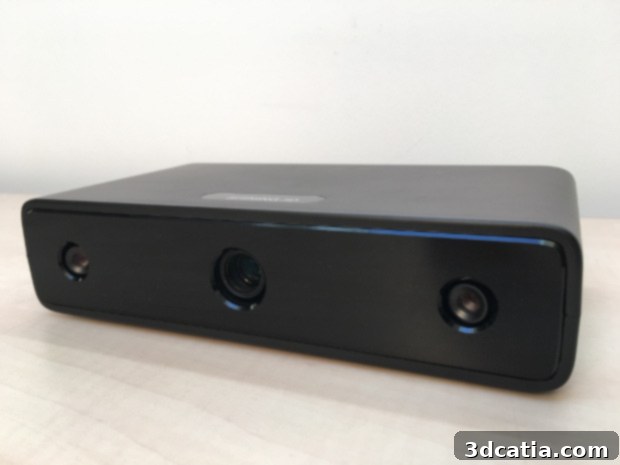
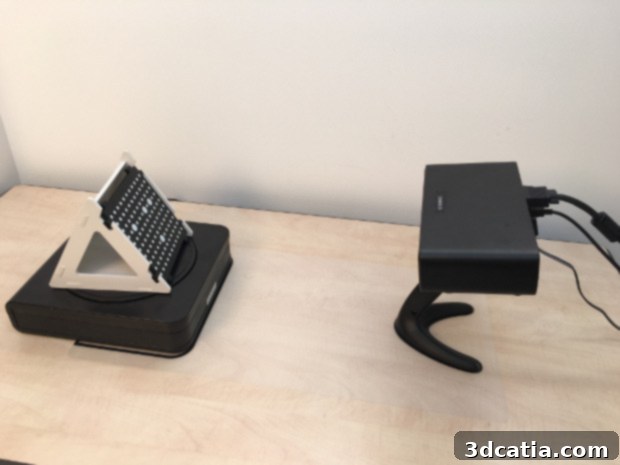
Observe the two cameras positioned at each end and the central video projector, key components of the EinScan-S’s structured light technology.
Understanding the EinScan-S Technology: Structured Light Scanning
The core technology behind the EinScan-S 3D scanner is “Structured Light.” This highly effective optical scanning method leverages the precision of projected light patterns to capture the intricate 3D geometry of physical objects. Unlike laser-based systems that use a single point or line of light, structured light scanners project a known pattern of light – typically grids or stripes – onto the object’s surface. The EinScan-S employs two high-resolution cameras working in tandem with a central video projector to achieve this.
Here’s how this ingenious process unfolds: Scanning commences with the video projector emitting precise light grids onto the object’s surface. As these light patterns encounter the object, they become distorted. The degree and nature of this distortion are directly proportional to the object’s distance from the projector and its unique three-dimensional shape. The two cameras, strategically mounted on either side of the projector, then capture a series of images of these distorted patterns from slightly different angles. By analyzing the discrepancies and deformations in the projected light patterns from these two perspectives, the scanner’s sophisticated software can accurately calculate the 3D coordinates of tens of thousands of points on the object’s surface. This triangulation process forms the basis of the precise digital reconstruction.
For automatic scanning, the object is typically placed on a precision turntable that rotates 360 degrees. This automated rotation, combined with multiple captures from the cameras, ensures that every visible angle of the object is thoroughly scanned. The software then meticulously stitches together these individual ‘shots’ to create a complete and cohesive 3D mesh. Once this digital model is generated, it can be exported into widely compatible file formats such as STL (Stereolithography) or OBJ (Wavefront Object). These formats are universally recognized by 3D printing software, CAD programs, and other digital design tools, allowing for subsequent manipulation, analysis, or direct 3D printing of the digitized object. Structured light technology excels in capturing fine details and textures, making it ideal for a wide array of applications including reverse engineering, cultural heritage preservation, product design, and artistic reproduction.
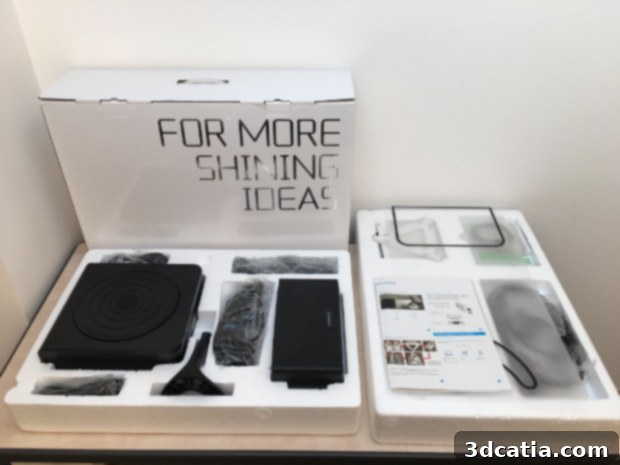
Unboxing the EinScan-S: First Impressions and Included Accessories
The unboxing experience of the EinScan-S is straightforward and professional. Upon opening the package, users are greeted with all the necessary components neatly organized, providing a clear indication of a well-thought-out product. The primary contents include the robust rotating table, the EinScan-S scanner unit itself, a sturdy stand for mounting the scanner, and a fixing screw to secure it in place. Beyond the main hardware, Shining 3D provides a comprehensive array of cables essential for connectivity and power. These include two power supply cables (one for the rotating platform and one for the scanner unit), two USB connection cables for data transfer, a VGA cable, and a VGA to HDMI adapter to ensure compatibility with various display setups. A mini USB cable is also included, whose specific purpose wasn’t immediately clear during our initial setup, suggesting it might be for maintenance, firmware updates, or an alternative connection method depending on the user’s specific computer configuration or future software iterations.
Crucially, Shining 3D also supplies a high-precision calibration template and a positioning mat. These accessories are indispensable for accurate scanning, as the mat helps ensure the correct distance and alignment between the object and the scanner, while the template is used for the critical calibration process. To ease the initial setup, a quick start guide is provided in English, detailing the accessory list and basic installation steps. For a wider international audience, a supplementary leaflet in French is also included, demonstrating Shining 3D’s commitment to user accessibility across different regions.
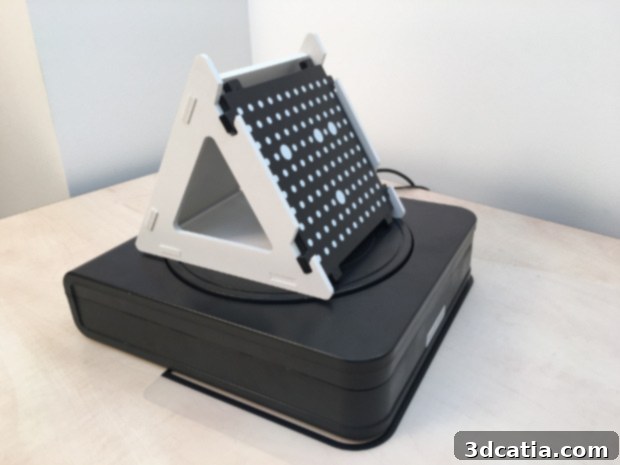
The essential calibration template meticulously positioned on the EinScan-S rotary table, ready for initial setup.
In terms of physical footprint, the EinScan-S scanner has slightly larger dimensions compared to some of its competitors, such as the 3D Systems Sense. This robust design suggests a focus on stability and precision. The scanner offers versatile operational modes to accommodate a range of object sizes and scanning requirements. In its automatic scanning mode, utilizing the included rotating table, the EinScan-S can efficiently capture objects with a maximum volume of 20 x 20 x 20 cm. This capacity is notably comparable to other popular desktop scanners in its class, such as the Digitizer by MakerBot, making it ideal for small to medium-sized items like figurines, jewelry, or intricate mechanical parts. For larger subjects, the EinScan-S provides a flexible manual mode. In this configuration, the scanner can be either held by hand or securely fixed onto a tripod, allowing users to digitize objects up to a substantial size of 70 x 70 x 70 cm. This manual capability significantly expands the scanner’s utility, enabling the capture of larger sculptures, artistic pieces, or components that wouldn’t fit on the automatic turntable. The transition between these modes is seamless within the software, offering users considerable flexibility depending on their project’s demands.
Effortless Installation and Crucial Calibration
The installation process for the EinScan-S is remarkably user-friendly and not overly complicated, a significant advantage for those new to 3D scanning. Following the clear instructions, we began by using the provided support mat to precisely position both the scanner and the rotating platform. This mat is invaluable for ensuring optimal alignment, which is critical for accurate scans. Once the physical components were correctly arranged, connecting the devices to our computer was straightforward, facilitated by the various cables included in the package. The necessary scanning software was easily downloaded from the official Shining 3D website, which typically hosts the latest versions and any required drivers.
A crucial step that must be performed with each new installation, or whenever the scanner’s environment changes significantly, is calibration. This operation is surprisingly quick, typically lasting less than 3 minutes, and is essential for optimizing the final scanning results. Changes in location, ambient brightness, or even minor shifts in the scanner’s physical setup can affect accuracy, making regular calibration a best practice. The calibration process involves placing the specialized template on the turntable and allowing the software to analyze and adjust for any environmental variations. Furthermore, an additional step known as the “White Balance Test” is provided. This test allows the scanner to properly account for color accuracy under different lighting conditions, which is vital for achieving realistic color scans and preserving the true visual appearance of the object. While the overall installation is smooth, we did encounter a minor design flaw: connecting the various cables to the back of the scanner can make the device slightly unstable. This instability, if not addressed, can subtly alter the scanner’s orientation on the rotating plate. Therefore, before initiating any scan, it is paramount to ensure the scanner is perfectly stable and its alignment is maintained to prevent skewed or inaccurate results.
Navigating the EinScan-S Software: Features and Functionality
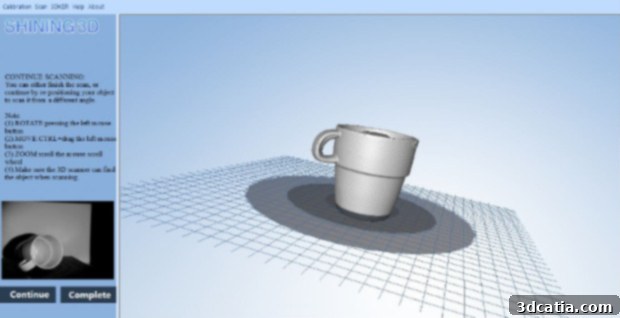
The accompanying software for the EinScan-S presents a minimalist interface that, at first glance, might appear simplistic. However, this understated design belies a powerful and intuitive set of features, offering users a comprehensive range of scanning options in both automatic and manual modes. The software provides critical controls for optimizing scan quality based on environmental conditions and object characteristics. Users can select from four distinct brightness modes: “bright,” “medium,” “dark/difficult to scan,” or “bright/dark.” These modes allow for fine-tuning the scanner’s sensitivity to ambient light and the reflective properties of the object, ensuring optimal data capture even with challenging materials.
Beyond brightness, the software offers three different levels of digitization quality: “high detail,” “middle detail,” and “low detail.” It is important to note a specific characteristic here: only the “low detail” setting currently allows for the capture of both texture and color information of the object. This might seem counter-intuitive as higher detail modes typically imply more comprehensive data capture. This aspect suggests that the “high” and “middle” detail modes are primarily focused on geometric accuracy, yielding highly precise meshes but without the visual texture. This trade-off is often made to prioritize mesh resolution and file size for applications where color data is less critical, such as reverse engineering or dimensional inspection. However, for those needing photorealistic reproductions, selecting “low detail” is essential.
Once a scan is completed, the software intelligently provides the option to continue the scanning process. This feature is incredibly useful, allowing users to reposition the object to capture areas that were previously obscured or difficult to reach in the initial scan. This iterative approach ensures comprehensive coverage of complex geometries. After achieving a satisfactory scan, users have the flexibility to either save the finalized 3D model directly as an STL or OBJ file for 3D printing or further CAD manipulation, share the model through integrated options, or restart the entire process if necessary. One notable limitation of the software, however, is the absence of integrated tools for modifying or repairing the 3D model. Features like hole filling, mesh simplification, or minor geometric edits are not available directly within the EinScan-S application. This means users familiar with 3D software will need to export their scans to external programs like Meshmixer, Blender, or dedicated CAD software for any post-processing work, adding an extra step to the workflow but preserving the raw scan data’s integrity.
Comprehensive Testing: Evaluating EinScan-S Performance
To thoroughly assess the capabilities and limitations of the EinScan-S scanner, we devised a series of practical tests, focusing on various object types and scanning challenges. Our evaluation was structured into three distinct parts, each designed to highlight specific aspects of the scanner’s performance:
- **A monochrome cup scan:** This test aimed to evaluate the scanner’s ability to capture basic geometric shapes, handle internal cavities, and reproduce smooth, uniform surfaces.
- **A small white monochrome bust scan:** This setup challenged the scanner with fine details, subtle surface variations, and the inherent difficulty of scanning white or light-colored objects which can sometimes lack sufficient contrast for structured light systems.
- **A polychrome figure scan:** The most demanding test, this sought to assess the scanner’s capacity for accurate color and texture capture, as well as its performance with objects featuring diverse colors and potentially reflective surfaces.
The rotating plate, a cornerstone of the automatic scanning mode, delivered a consistent and uniform 360° rotation throughout our tests, akin to the reliable performance seen in other desktop scanners like the MakerBot Digitizer. For objects with complex geometries or undercuts, it was often necessary to perform multiple scans, reorienting the object between each capture. This iterative approach ensures that all hidden or less visible parts of the models are accurately digitized, ultimately leading to a complete and watertight 3D model. Below, we present the detailed results and observations from our EinScan-S evaluation.
Test Results: Detailed Scan Outcomes
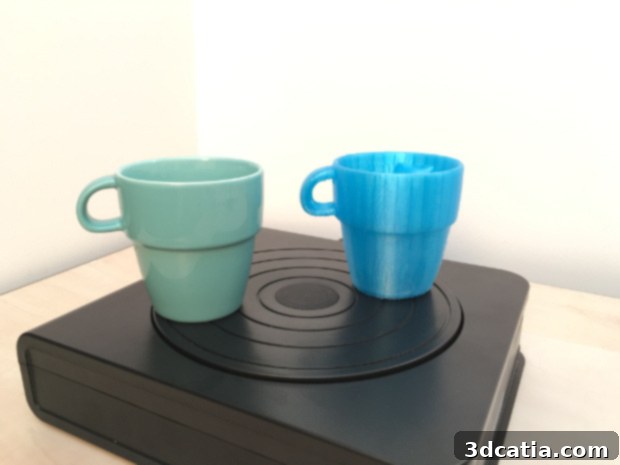
**1. Monochrome Cup Scan:** Our first test involved a simple monochrome cup. Despite some slight concerns when attempting to capture the interior of the cup – a common challenge for structured light scanners due to deep cavities and limited light penetration – the overall external results were remarkably accurate and almost identical to the original object. The scanner successfully captured the smooth curvature and dimensions with high fidelity. To further validate the scan’s quality, we proceeded to 3D print a replica of the digitized cup. The resulting print was strikingly close in proportion and form to the original, affirming the EinScan-S’s capability for precise geometric reproduction. This test demonstrated its suitability for basic household items and functional prototypes.
**2. Small White Monochrome Bust Scan:** For our second objective, we aimed to test the digitization of a small, white monochrome bust, an object that, despite its size, presented numerous fine lines and intricate details. Scanning white objects can be particularly challenging for optical scanners as they tend to reflect light uniformly, potentially reducing the contrast needed for accurate pattern detection. To optimize the quality of the scan and accentuate the contrast for the structured light projection, we employed a simple yet effective technique: placing a dark-colored background (in our case, black) behind the bust. This increased the differentiation between the object and its surroundings, significantly improving the scanner’s ability to detect surface features. Our digitization of the “Zombie Hunter Head” bust proved to be a resounding success! The EinScan-S faithfully captured the delicate contours, subtle textures, and sharp details of the sculpture, demonstrating its capability for artistic and highly detailed reproductions.
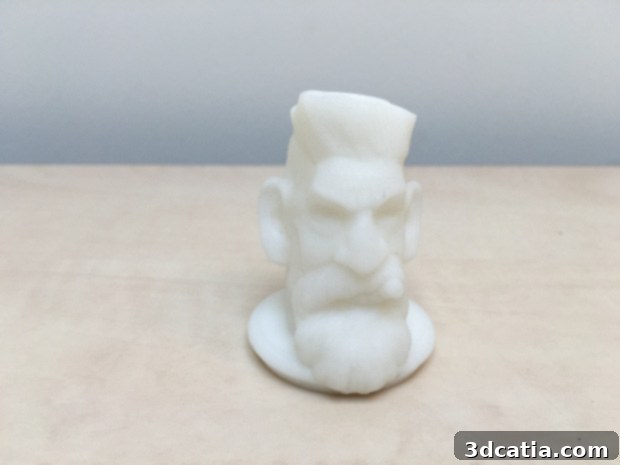
A successful scan of the intricately detailed Zombie Hunter Head bust, showcasing the EinScan-S’s capability with fine features.
**3. Buddha Bust Scan:** Following this, we selected a 3D Buddha bust, an object rich in numerous fine details such as intricate facial features and a complex headdress. Unfortunately, the result from this scan was not as favorable as anticipated, despite the object exhibiting relatively little contrast in terms of its material. A significant issue arose because the upper part of the bust exceeded the scanning frame in automatic mode, leading to it being unfortunately cut off in the final digital model. This highlights a crucial consideration for users: careful positioning and proper sizing of objects within the scanner’s specified volume are paramount, especially for automated turntable scans. For larger or unusually shaped objects, transitioning to manual mode or performing multiple partial scans with careful alignment in post-processing would be essential to achieve a complete and accurate rendition. This test underscores the importance of understanding the scanner’s operational envelope and planning the scanning strategy accordingly.
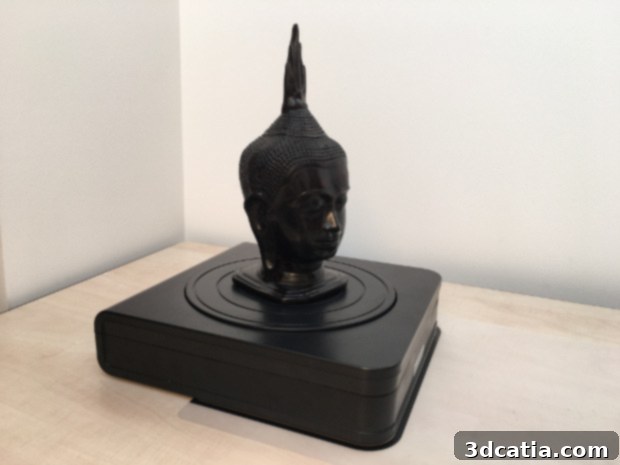
The Buddha statue, featuring a wealth of fine details, presented challenges with automatic scanning frame limitations.
**4. Polychrome Minion Figure Scan:** To conclude our series of tests, we utilized a Minion figure, which offered a vibrant mix of both light and dark colors, providing an excellent opportunity to evaluate the scanner’s color and texture capture capabilities. While the captured texture, in terms of color fidelity, lacked a certain “shine” or vibrancy compared to the original, the geometric model we obtained remained exceptionally close, if not virtually identical, to the physical figure. This suggests that while the EinScan-S excels in reproducing precise object geometry and basic color mapping, highly reflective or glossy surfaces might require specialized techniques (like dulling sprays) to achieve perfect texture and color accuracy. Nevertheless, for general color scanning and accurate shape reproduction, the EinScan-S performed admirably, delivering a highly usable digital twin of the polychrome object.
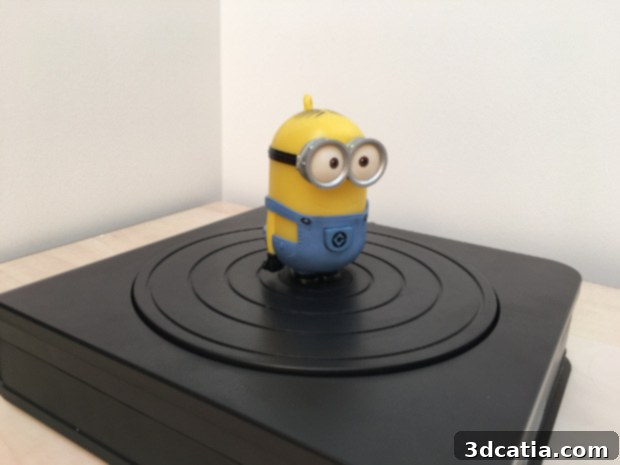
A colorful Minion figure, demonstrating the scanner’s ability to capture varied hues and complex geometries.
Conclusion: The EinScan-S, a Solid Entry-Level to Mid-Range 3D Scanner
The Shining 3D EinScan-S stands out as a highly capable and accessible desktop 3D scanner, particularly for its price point. Its successful Kickstarter campaign and continued market presence are testaments to its value proposition. Utilizing structured light technology, it offers excellent geometric accuracy and detail capture for a wide range of objects, making it an ideal tool for educational institutions, small businesses, hobbyists, and professionals venturing into 3D modeling, reverse engineering, or digital archiving.
**Pros:**
- **Affordable Professional-Grade Performance:** Offers features and accuracy typically found in more expensive professional models, making advanced 3D scanning accessible.
- **Versatile Scanning Modes:** Both automatic (turntable) and manual (handheld/tripod) modes cater to a broad spectrum of object sizes, from small intricate parts (20x20x20 cm) to larger items (70x70x70 cm).
- **High Geometric Accuracy:** Consistently delivers precise geometric reproductions, as evidenced by our cup and bust scans.
- **User-Friendly Installation and Calibration:** The setup process is intuitive, and the quick calibration ensures optimal scan results with minimal effort.
- **Robust Software Features:** Offers various brightness and quality modes to adapt to different scanning scenarios and object properties. The ability to continue scans by repositioning objects is a significant advantage.
- **Broad File Format Compatibility:** Exports to standard STL and OBJ formats, ensuring compatibility with virtually all 3D printing and modeling software.
**Cons:**
- **Limited Software Post-Processing:** The absence of integrated mesh editing and repair tools means users will need external software for tasks like hole filling, simplification, or minor geometric adjustments.
- **Texture/Color Capture Limitations:** Only the “low detail” setting supports texture and color capture, which can be a drawback for applications requiring high-resolution color fidelity. Glossy or highly reflective surfaces may also pose challenges for accurate texture mapping without preparatory steps like dulling sprays.
- **Physical Stability Concerns:** The rear cable connections can cause slight instability, requiring users to ensure the scanner’s fixed position before starting a scan.
- **Frame Limitations in Auto Mode:** As seen with the Buddha bust, objects exceeding the automatic scanning frame will be cut off, necessitating careful object placement or a shift to manual mode for larger items.
- **Challenges with Deep Cavities:** Like many structured light scanners, capturing the interior of deep cavities or complex undercuts can be challenging and often requires multiple scans from different angles.
Ultimately, the EinScan-S is a compelling choice for anyone seeking an accessible yet powerful 3D scanner. Its strengths in geometric accuracy and ease of use largely outweigh its minor drawbacks, especially when considering its competitive pricing. For users who primarily need accurate 3D models for prototyping, reverse engineering, or creating digital replicas for non-color-critical applications, the EinScan-S delivers exceptional value. While those requiring top-tier color and texture fidelity for very complex or reflective objects might need to consider its higher-end siblings or invest in additional post-processing workflows, the EinScan-S remains a robust and reliable workhorse that continues to push the boundaries of accessible 3D scanning technology.