
Formware 3D: The Ultimate Slicer for High-Quality Resin and Inkjet 3D Printing
In the dynamic world of additive manufacturing, the journey from a digital design to a tangible 3D printed part is a meticulous process that demands precision at every stage. A critical step in this workflow is file preparation, where a raw 3D model is transformed into instructions that a 3D printer can understand. This is where a slicer software becomes indispensable. Slicers are the digital architects that meticulously ‘slice’ a 3D model into thin layers, generate essential support structures, and configure intricate print parameters. These support structures are particularly vital for complex geometries or specific 3D printing technologies, such as resin-based stereolithography (SLA) or Digital Light Processing (DLP), where they play a decisive role in ensuring print success and structural integrity.
With an ever-growing array of solutions available on the market, selecting the ideal slicer for a particular machine or user skill level can be a daunting task. For businesses and advanced hobbyists seeking a high-performance solution that streamlines media generation and print setup, Formware 3D emerges as a leading contender. Developed by Formware, this robust software package has earned a reputation for its powerful capabilities in optimizing the orientation, support generation, and slicing of additive manufacturing models, especially tailored for resin and inkjet 3D printers. Its blend of advanced features and user-friendly design makes it a compelling choice for achieving superior 3D print results.
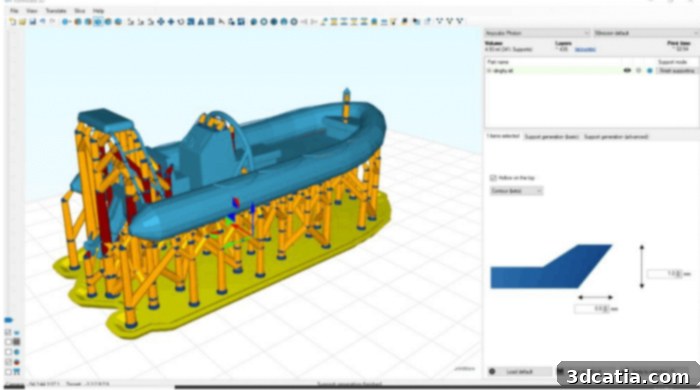
This program is specifically designed for resin and inkjet 3D printers, offering specialized features for these technologies.
Key Functionalities of Formware 3D: An In-Depth Look
Formware 3D is engineered with a modular approach, segmenting its extensive capabilities into four primary functional units, each dedicated to simplifying and enhancing the stratification and preparation process for additive manufacturing. Beyond these core units, the software also boasts a suite of additional features designed to further optimize workflow and print quality.
1. Advanced Manufacturing Support Generation and Editing
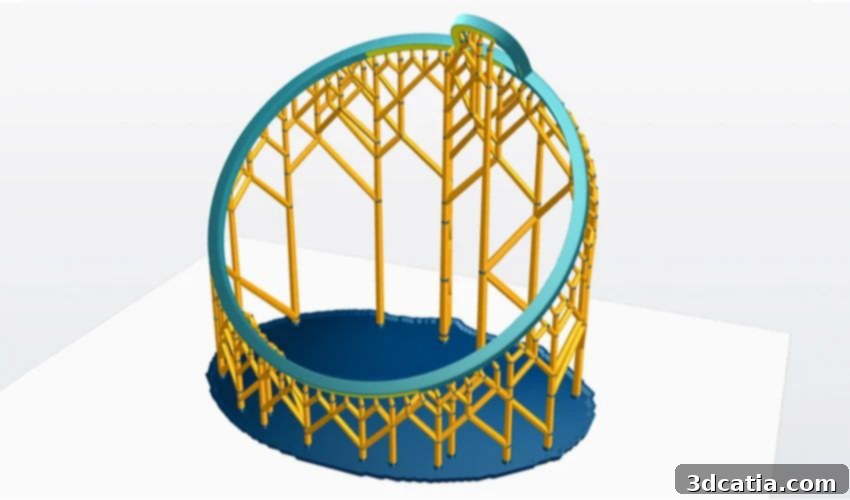
The first and arguably most critical unit of Formware 3D revolves around the creation and meticulous editing of manufacturing supports. In resin 3D printing, inadequate or poorly placed supports are a primary cause of print failures. Formware 3D addresses this challenge head-on with an intelligent automatic support generation system that analyzes the model’s geometry and overhangs to propose optimal support placement. Users also retain full control, with the ability to easily move, add, or delete supports as needed. An advanced adjustment mode allows for fine-tuning parameters such as contact point size, support density, and connection types (e.g., light, medium, heavy supports), ensuring both print stability and minimal post-processing effort. Furthermore, specialized options for editing supports on critical surfaces and edges prevent damage to delicate features, guaranteeing the integrity of the final part. This level of granular control is essential for producing high-quality, intricate prints reliably.
2. Efficient Rapid Mesh Editing Tools
The second functional unit is dedicated to rapid and intuitive mesh editing, enabling users to prepare their models efficiently for printing. A standout feature is model hollowing, which significantly saves material consumption and reduces print times by creating an internal cavity within the part. Users can define wall thickness and add drainage holes, crucial for removing uncured resin from hollow prints. This not only lowers material costs but also reduces the overall weight of the part. Conversely, the mesh filling tool allows for reinforcing parts by adding internal structures, enhancing their structural integrity and durability. To accelerate production, especially for batch manufacturing or iterative design, Formware 3D includes powerful mirroring and scaling tools. These features enable users to quickly duplicate, arrange, and resize parts on the build plate, maximizing efficiency and throughput without needing to return to CAD software.
3. Intuitive and User-Friendly Interface
Thirdly, Formware 3D prides itself on its exceptionally user-friendly interface. Designed with simplicity and efficiency in mind, it ensures that even users new to advanced slicing software can quickly navigate its functionalities. Model manipulation is straightforward, allowing for easy rotation, translation, and scaling of objects on the build plate. Object copying is seamless, facilitating the setup of multiple identical parts for batch printing. The software supports a wide range of file import and export formats, including common ones like STL, OBJ, and 3MF, ensuring compatibility with most CAD and modeling software. To further enhance productivity, Formware 3D incorporates a comprehensive suite of time-saving keyboard shortcuts, allowing experienced users to perform complex operations with speed and precision, significantly streamlining the preparation workflow.
4. Powerful and Accurate Slicing Engine
The fourth and final core element is Formware 3D’s powerful slicing engine. This sophisticated engine is responsible for accurately translating the prepared 3D model, complete with supports and modifications, into a series of printable layers. For resin 3D printers, this involves generating bitmap images for each layer, defining precisely where the resin needs to be cured. The accuracy and efficiency of this engine are paramount to producing prints that faithfully reproduce the digital design. A robust slicing engine minimizes errors, ensures consistent layer thickness, and calculates optimal exposure times, all of which contribute directly to the print quality and success rate. Formware 3D’s engine is optimized for high-resolution output, making it an ideal choice for applications requiring fine detail and smooth surface finishes, such as jewelry, dental models, and intricate prototypes.
Beyond the Core: Advanced Features for Enhanced Production
In addition to its foundational units, Formware 3D offers several advanced functionalities that further enhance its value proposition for professional and industrial users.
Optimized Build Plate Utilization with 2D Nesting
One of these advanced features is 2D nesting of irregular shapes. This intelligent algorithm automatically arranges multiple parts on the printing plate in the most space-efficient manner possible. By optimizing the use of available build volume, 2D nesting significantly reduces material waste and allows for a higher quantity of parts to be produced in a single print job. This feature is particularly beneficial for manufacturing dental aligners, jewelry casts, or small mechanical components in batches, where maximizing throughput per print is crucial for cost-effectiveness.
Boosting Productivity with Multi-Layer Printing
The software also facilitates multi-layer printing, a powerful feature designed to increase the quantity of parts produced in a single operation. This capability allows users to stack multiple layers of parts vertically on the build plate, enabling a dramatic increase in production capacity. While requiring careful consideration of support structures and print stability, multi-layer printing can significantly shorten lead times for large production runs, making Formware 3D a highly productive tool for mass customization and serial production.
Ensuring Print Success with Mesh Error Checking
Finally, Formware 3D incorporates a sophisticated mesh error-checking system. Imperfections in 3D models, such as non-manifold edges, inverted normals, or holes, are common issues that can lead to catastrophic print failures. This integrated system is capable of automatically detecting these defects and provides advanced diagnostics, often suggesting or automatically applying repairs. By identifying and rectifying these issues before the slicing process, Formware 3D helps users save valuable time, reduce material waste from failed prints, and ensure a higher rate of successful print outcomes.
Formware 3D in Action: See the Software in Use
For those interested in seeing Formware 3D’s capabilities firsthand, the official video provides an excellent overview of its interface and key features. It’s an invaluable resource for understanding the software’s workflow and how it simplifies complex tasks.
Licensing and Accessibility
Formware 3D offers flexible licensing options to cater to a diverse user base. A personal use license, ideal for individual hobbyists and enthusiasts, allows the software to be installed and operated on a single computer for €129.95. For businesses and professionals, a commercial license is available for €299.95, granting the flexibility to use the software on two computers simultaneously. Both license types come with the added benefit of a free 30-day trial period, enabling prospective users to thoroughly evaluate its features and compatibility before making a commitment. This trial is further supported by a comprehensive video tutorial, guiding users through the initial steps and core functionalities of the software. For more detailed information on features, system requirements, and purchasing options, we encourage you to visit the official Formware website.
Conclusion: Empowering Your Resin 3D Printing Journey
Formware 3D stands out as a sophisticated yet accessible slicing solution, particularly for the demanding world of resin and inkjet 3D printing. Its comprehensive suite of tools, from intelligent support generation and rapid mesh editing to an intuitive interface and a powerful slicing engine, addresses the core challenges of additive manufacturing. The additional features like 2D nesting, multi-layer printing, and robust mesh error checking further solidify its position as a valuable asset for anyone looking to achieve exceptional print quality and optimize production efficiency. Whether you are a dedicated hobbyist striving for perfection or a professional seeking to streamline your workflow and minimize errors, Formware 3D provides the advanced capabilities needed to elevate your 3D printing projects.
What are your thoughts on Formware 3D for resin 3D printing? Share your experiences or questions in a comment below or connect with us on our LinkedIn, Facebook, and Twitter pages! Don’t forget to sign up for our free weekly newsletter here for the latest 3D printing news straight to your inbox! You can also find all our videos on our YouTube channel.
*All Photo Credits: Formware 3D