
Mastering Your 3D Printing Workflow: A Deep Dive into 3DPrinterOS Cloud Platform
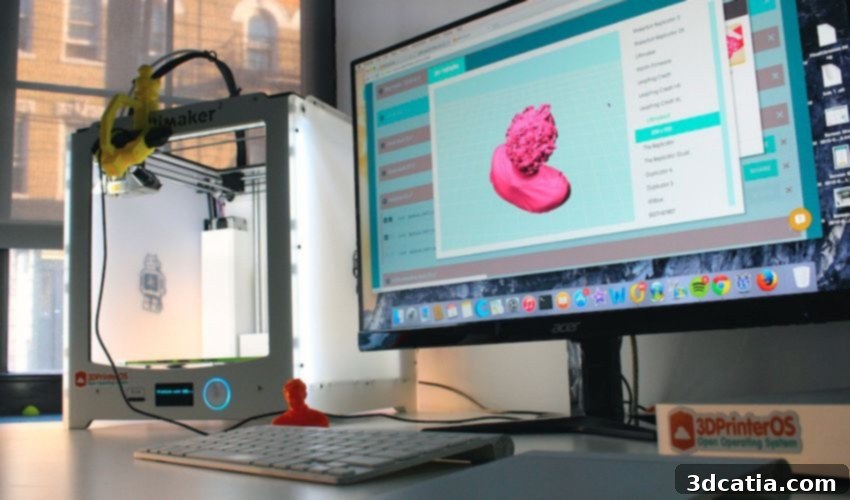
In the rapidly evolving landscape of additive manufacturing, efficient management of the 3D printing process is paramount. Today, we’re taking an in-depth look into 3DPrinterOS—a robust, user-friendly software solutions platform specifically designed for 3D printing enthusiasts, professionals, and enterprises alike. Far more than just a simple application, 3DPrinterOS operates as a comprehensive, open-source operating system for 3D printers, meticulously engineered to streamline every facet of your printing tasks. It achieves this by consolidating numerous functions into a single, intuitive interface, thereby eliminating the cumbersome need to juggle multiple disparate programs and tools. This platform delivers complete software packages tailored for 3D printers, encompassing essential firmware, versatile software applications, and powerful cloud-based platforms. A standout feature of 3DPrinterOS is its extensive compatibility, seamlessly integrating with a vast array of 3D printers and firmware configurations, offering users unparalleled flexibility and operational freedom. Below, we’ll provide you with all the essential information you’ll need to unlock the full potential of this groundbreaking software and seamlessly integrate 3DPrinterOS into your additive manufacturing workflow, transforming how you design, prepare, and execute your 3D prints.
What Is 3DPrinterOS and How Does It Revolutionize 3D Printing?
At its core, 3DPrinterOS is engineered to profoundly simplify and enhance 3D printing processes from start to finish. One of its most critical capabilities lies in its universal approach to file management and preparation. Users can effortlessly convert their computer-aided design (CAD) models into industry-standard file formats such as STL, OBJ, and Step. This seamless conversion capability is vital for interoperability, ensuring that designs created in various CAD software can be easily prepared for printing without compatibility hurdles. By providing a unified environment for these conversions, 3DPrinterOS significantly streamlines the entire print preparation process, saving valuable time and reducing potential errors.
Beyond file format versatility, the platform offers sophisticated tools for print optimization. It provides the ability to create precise build tray mappings and intelligently segment files, catering to the specific requirements of a diverse range of over 150 different desktop 3D printers. This level of granularity ensures optimal placement and utilization of the print bed, leading to higher success rates and better print quality. For organizations operating on a larger scale with industrial 3D printers, 3DPrinterOS elevates production management through its advanced print queue system. This system is compatible with an impressive roster of over 1,200 industrial printer models, enabling efficient scheduling, batch processing, and continuous operation, which are critical for high-volume manufacturing environments. It transforms complex production logistics into a manageable, streamlined workflow, reducing downtime and maximizing output.
Another pivotal advantage of 3DPrinterOS lies in its robust capability to monitor ongoing print jobs in real-time. This feature is indispensable for maintaining oversight, particularly for intricate, long-duration projects or when managing multiple printers simultaneously. Users can conveniently track the progress of their prints remotely, receiving live status updates, visual feedback, and alerts about potential issues. This remote monitoring capability provides invaluable support, offering peace of mind and the ability to intervene promptly if necessary, regardless of the user’s physical location. Furthermore, by leveraging its open-source operating system foundation, this platform actively fosters a collaborative ecosystem. It empowers users to easily share projects, collaborate on 3D models, and even share access to 3D printers with fellow team members or external collaborators. This collaborative functionality accelerates design iterations, streamlines teamwork, and encourages knowledge sharing within communities and organizations.
Ultimately, 3DPrinterOS places users in complete command of the entire lifecycle of their 3D objects. From the initial editing and optimization phases to the final print execution and post-print analysis, every stage is managed within a cohesive environment. This comprehensive control ensures that users can maintain consistency, enforce quality standards, and achieve their desired outcomes with precision and efficiency. The platform’s integrated tools allow for adjustments, modifications, and checks before printing, minimizing material waste and maximizing the likelihood of successful prints.
A distinctive technical advantage offered by 3DPrinterOS is its pioneering approach to slicing, often referred to as “lamination” in some contexts, utilizing the immense power of cloud computing. This involves remotely executing the computationally intensive layer-cutting process on high-capacity, dedicated servers rather than relying on the user’s local machine. This innovative strategy ensures swift and exceptionally effective slicing, even for the most complex geometries and high-resolution models. By offloading this demanding task to remote servers, local computer resources are freed up, allowing users to continue with other tasks without performance degradation. The result is a substantial acceleration of the overall preparation process, drastically cutting down the time from design conception to physical print. This cloud-based slicing not only enhances speed but also ensures consistent results across different hardware setups, as the slicing computations are performed in a controlled, powerful server environment.
3DPrinterOS Repair Software: Magic Fix – Your Solution for Flawless Prints
Achieving optimal 3D prints hinges significantly on the correct placement and structural integrity of an object on the printing surface. Flawed models, incorrect scaling, or poor orientation can lead to costly print failures, wasted material, and frustrating delays. Recognizing these common challenges, the innovative team behind 3DPrinterOS has developed a sophisticated yet user-friendly solution called Magic Fix. This dedicated repair software is meticulously designed to facilitate and perfect the pre-printing process. Magic Fix offers a powerful one-click solution that automatically identifies, repairs, centers, rotates, and scales your 3D object to an optimal state before it proceeds to the printing stage. It addresses common issues such as non-manifold geometry, inverted normals, holes in meshes, and general mesh corruption, which often plague 3D models obtained from various sources.
The simplicity of Magic Fix is one of its greatest strengths, making advanced model preparation accessible to all users, regardless of their technical expertise. To utilize this powerful tool, users simply navigate to their project list, locate the desired 3D model, and click on the “Apply” button situated next to the file name. Upon activation, the repair software immediately springs into action. Magic Fix employs advanced algorithms to automatically scan the 3D model, precisely identify any structural or topological problems within the file, and then intelligently make the necessary adjustments to resolve them. This automated process is remarkably fast and highly efficient, significantly reducing the manual effort and expertise typically required for mesh repair. By minimizing errors and ensuring print-ready models, Magic Fix saves users invaluable time and significantly reduces material waste due to failed prints. Once the automated workflow has been successfully completed, the newly optimized Magic Fix file is seamlessly added to the project list, appearing alongside the original file. This allows users to compare versions and proceed with confidence, knowing their model is in the best possible condition for a successful print.
Unwavering Platform Security: Protecting Your Designs and Data
In today’s interconnected digital landscape, security is not just a feature; it’s a fundamental requirement, especially when dealing with proprietary designs, intellectual property, and sensitive manufacturing data. Luckily, 3DPrinterOS takes this critical issue with the utmost seriousness, implementing a multi-layered and robust security framework. The platform has deployed first-rate security measures that prioritize the integrity and confidentiality of user data and files. A cornerstone of this security architecture is the implementation of end-to-end encrypted workflows. This means that from the moment your design leaves your device until it reaches the 3D printer, and during all cloud-based operations, your data is protected by strong encryption, making it virtually unreadable to unauthorized parties. This comprehensive encryption ensures maximum protection against cyber threats, data breaches, and unauthorized access.
Furthermore, to fortify its security posture and ensure unparalleled reliability and scalability, 3DPrinterOS has forged strategic partnerships with some of the world’s leading cloud solution providers. These esteemed partners include industry giants such as Microsoft (Azure), Google (Cloud Platform), and Amazon (AWS). By leveraging the state-of-the-art infrastructure and advanced security protocols of these hyperscale cloud providers, 3DPrinterOS not only benefits from their immense computing power and global reach but also inherits their stringent security certifications and compliance standards. The culmination of these collaborations is a technological solution that offers not only advanced 3D printing management but also enterprise-grade security and reliability. This robust foundation means that 3DPrinterOS can be effortlessly and securely integrated into virtually any enterprise environment, meeting the demanding security and operational requirements of businesses ranging from small studios to large-scale industrial operations. Users can operate with confidence, knowing their intellectual property and operational data are housed within a highly secure and resilient cloud ecosystem.

What are your thoughts on the comprehensive features and capabilities offered by 3DPrinterOS? From its intuitive workflow management and real-time monitoring to the revolutionary Magic Fix repair software and its unwavering commitment to security, 3DPrinterOS presents itself as an indispensable tool for anyone involved in 3D printing. We invite you to let us know your experiences or questions in a comment below or join the conversation on our LinkedIn, Facebook, and Twitter pages! Don’t forget to sign up for our free weekly newsletter here, to get the latest 3D printing news straight to your inbox! You can also find all our insightful videos on our YouTube channel, providing visual guides and further discussions on exciting topics in additive manufacturing.
*All Photo Credits: 3DPrinterOS