
The Ultimate Guide to the Most Popular 3D Modeling Software for 3D Printing
Navigating the vast landscape of 3D modeling software can be a daunting task, whether you’re an experienced designer, a hobbyist modifying an existing file, or a newcomer embarking on your first 3D printing project. The sheer number of available programs often leaves users wondering which 3D software is best suited for their needs. To simplify this crucial decision, the Belgian firm i.Materialise, a renowned name in the 3D printing industry, undertook an extensive study to identify the 25 most popular design software platforms globally, specifically tailored for the 3D printing community. This comprehensive ranking offers invaluable insights, guiding users towards the tools that resonate most with their peers and are widely adopted for various additive manufacturing applications.
The methodology employed by the i.Materialise team was robust and multi-faceted, ensuring a balanced and accurate representation of software popularity. They meticulously evaluated each software based on six distinct criteria, assigning a score ranging from 0 to 100 to quantify its overall standing. Initially, their investigation delved into the general popularity of the software, assessing its broad appeal across the digital sphere. This involved tracking metrics such as the number of active fans and followers on prominent social media platforms, which provides a direct indicator of community engagement and brand visibility. Furthermore, they scrutinized the notoriety and influence of the software’s official website, examining critical SEO parameters like page rankings and the volume of high-quality backlinks, which collectively speak to a website’s authority and reach within the wider tech ecosystem.
Unpacking i.Materialise’s Ranking Methodology for 3D Printing Software
While general popularity is a significant factor, i.Materialise recognized the imperative to tailor their research specifically to the 3D printing domain. To ensure their findings truly reflected relevance to additive manufacturing and not just general design, the study integrated additional, highly specialized criteria. This involved meticulously counting the instances where each software was mentioned and discussed across dedicated 3D printing platforms. This included active participation and mentions within specialized forums, such as 3Dnatives, where professionals and enthusiasts alike converge to share knowledge and discuss tools. The team also analyzed mentions in 3D printing-related video content on platforms like YouTube, which serves as a rich source of tutorials, reviews, and project showcases. Beyond this, they surveyed popular 3D file repositories and marketplaces, including Cults3D, Thingiverse, and CGTrader, noting how frequently each software was used to generate or prepare models shared on these sites. Finally, a broad measure of online presence was assessed by counting the number of times each software was mentioned in Google search results, providing a comprehensive view of its digital footprint within the 3D printing narrative.
By combining these general and industry-specific metrics, i.Materialise developed a holistic framework that goes beyond mere download counts or developer reputation. It focuses on actual user engagement, community discussion, and practical application within the 3D printing workflow, offering a truly indicative measure of a software’s standing in this specialized field. This rigorous approach makes their “TOP 25” list an invaluable resource for anyone looking to make an informed decision about their next 3D modeling tool.
The Top Contenders: A Closer Look at Leading 3D Printing Software
The eagerly anticipated ranking of the most popular 3D modeling software for 3D printing, as compiled by i.Materialise, showcases a diverse array of tools catering to various skill levels and design philosophies. While the full list of 25 is extensive, the top positions reveal some compelling insights into current trends and user preferences within the 3D printing community.
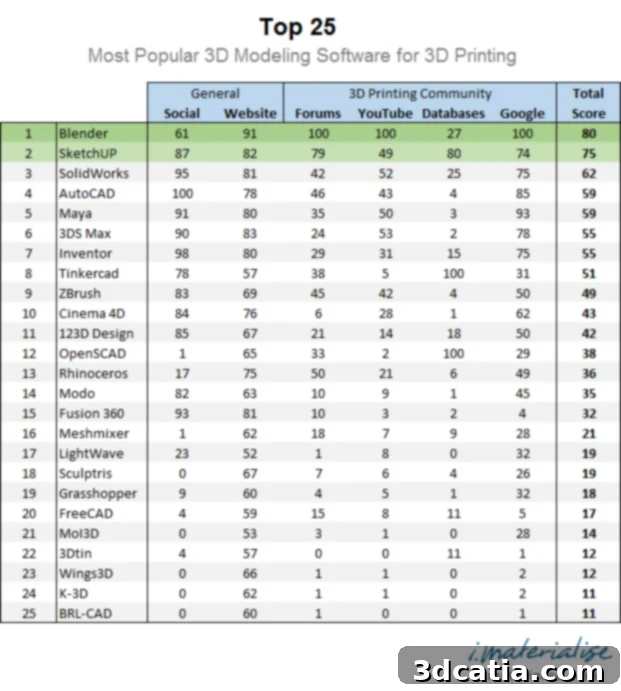
Securing the coveted first and second positions on the list are two exceptionally popular free software solutions: Blender and SketchUp. Their prominence at the top highlights a strong preference among the 3D printing community for accessible, powerful, and community-supported tools. Blender, an open-source powerhouse, consistently ranks high due to its incredible versatility, offering comprehensive tools for modeling, sculpting, animation, rendering, and more. Its robust mesh editing capabilities are particularly beneficial for 3D printing, allowing users to create manifold (watertight) geometry crucial for successful prints. The massive, active global community behind Blender means an endless supply of tutorials, plugins, and collaborative support, making it an attractive option for both beginners and advanced users. SketchUp, on the other hand, is celebrated for its intuitive, user-friendly interface, making it an excellent entry point for those new to 3D design. Often favored for architectural and interior design, its simplicity allows for rapid prototyping and conceptualization, though users often rely on plugins to prepare models optimally for 3D printing by ensuring solid geometry.
In a notable third place, we find SolidWorks by Dassault Systèmes. This placement sparks interesting discussion, as SolidWorks is primarily a professional-grade CAD (Computer-Aided Design) software renowned for its precision engineering and complex assembly design capabilities. While indispensable in many industrial design and manufacturing sectors, its popularity within the broader, more hobbyist-leaning 3D printing community might be less pronounced than its top-tier standing suggests. This could lead one to ponder whether its high ranking in this context is more a reflection of its entrenched position in professional industries that *also* utilize 3D printing for prototyping and production, rather than widespread adoption by individual 3D printer owners. The barrier of its significant cost and steep learning curve, especially compared to free alternatives like Blender and SketchUp, often makes it less accessible to casual users, raising questions about whether its inclusion here reflects its raw power and professional utility, or perhaps a broader impact on the industry that filters down to 3D printing.
Beyond the Top 3: The Value of a Comprehensive Software Ranking
While this ranking isn’t a definitive “best” list – as the ideal software often depends on individual project requirements, skill level, and budget – the i.Materialise Top 25 nonetheless serves as an invaluable resource. It has the distinct advantage of providing a solid starting point and numerous ideas for anyone looking to delve into 3D modeling for 3D printing. The landscape of 3D design software is incredibly vast and continuously evolving, mirroring the rapid advancements in 3D printing technology itself. Within this expansive community, there’s a constant influx of new users eager to learn, alongside experienced designers ready to share their expertise, insights, and solutions. Such a list helps bridge the gap, highlighting tools that have proven their worth through widespread adoption and robust community support.
The Blender software landed in first place on the list, demonstrating its widespread popularity.
Choosing Your Ideal 3D Printing Software: Key Considerations
Selecting the right 3D modeling software for your 3D printing endeavors is a critical decision that can significantly impact your workflow and the quality of your printed objects. Beyond popularity rankings, several factors should guide your choice. First and foremost is your **skill level**. If you’re a beginner, an intuitive, user-friendly interface like SketchUp or tinkercad might be more appropriate than complex professional CAD software. As you gain experience, you might explore more powerful tools like Blender or Fusion 360.
Next, consider the **type of project** you envision. Are you creating organic, free-form sculptures? Software with robust sculpting tools, like Blender or ZBrush, would be ideal. For precise, engineered parts, mechanical components, or architectural models, parametric CAD software such as SolidWorks, AutoCAD, or FreeCAD would offer the necessary accuracy and control. The **complexity of your designs** also plays a role; simpler designs might be easily handled by web-based tools, while intricate assemblies require more advanced features.
**Budget** is another significant factor. As seen with Blender and SketchUp topping the list, many excellent free and open-source options are available, offering powerful capabilities without a financial outlay. Mid-range options like Fusion 360 often come with subscription models, while high-end professional software like SolidWorks or CATIA represents a substantial investment. Consider your long-term commitment and whether the features justify the cost.
**Community support and learning resources** are invaluable. A large, active community means abundant tutorials, forums for troubleshooting, and a wealth of user-generated content that can accelerate your learning curve. Software with robust communities, like Blender, often benefits from continuous development and a thriving ecosystem of plugins and add-ons.
Finally, always check the software’s **file export capabilities** and its compatibility with your 3D printer’s slicer software. The ability to export common 3D printing file formats like STL, OBJ, or 3MF is non-negotiable. Some software may also offer built-in tools for preparing models for printing, such as mesh repair or automatic manifold geometry generation, which can save considerable time and prevent printing errors.
Conclusion: Navigating the Dynamic World of 3D Printing Software
The i.Materialise ranking serves as an excellent compass in the dynamic world of 3D modeling software for additive manufacturing. It highlights that popularity isn’t solely dictated by brand prestige or price tag but significantly by accessibility, community engagement, and practical utility for the end-user. The prominence of free tools like Blender and SketchUp underscores a democratic spirit in 3D design, empowering a broader range of creators to bring their digital concepts to life through 3D printing. Whether you are a seasoned professional or just beginning your journey, understanding these popular choices and the criteria that define their standing is crucial. The continuous evolution of both 3D printing hardware and software means that staying informed and experimenting with new tools will always be a part of a successful additive manufacturing workflow.
For those eager to delve deeper into the full methodology and discover all 25 entries on the i.Materialise list, further information is available by checking out the link here. This comprehensive resource provides invaluable insights into the tools shaping the future of 3D design and printing.