Software
What is Autodesk Inventor and How Does it Work?
In any printing process, the first step is the digital design of the model to be manufactured. For this, there is a wide variety of design tools available on the market. From basic solutions for beginners to advanced software for…
- 3 min read
- Software
- Six more stories
In any printing process, the first step is the digital design of the model to be manufactured. For this, there is a wide variety of design tools available on the market. From basic solutions for beginners to advanced software for professionals, the options are numerous. Among these programs is Autodesk Inventor. Developed by Autodesk, this is computer-aided design (CAD) software for modeling, simulation, visualization and documentation. Inventor facilitates the integration of 2D and 3D data in a single place, creating a virtual representation of the final product that enables users to validate form, fit and function before manufacturing. Autodesk Inventor also includes parametric modeling, direct editing and free-form tools, as well as multi-CAD translation capabilities in its standard DWG computer drawings (DraWinG). To find out more about this software, read on in this comprehensive guide.
Inventor uses ShapeManager, Autodesk’s proprietary geometric modeling kernel. The CAD software therefore combines parametric design capabilities: direct, free-form and rule-based. With this professional solution, you have integrated tools for sheet metal, frame, tube, cable and harness design, layout, rendering, simulation, machine design and much more. What’s more, it supports TrustedDWG® files and offers powerful model-based definition features for integrating manufacturing information directly into the 3D model. It is widely used by mechanical engineers who need specialized, automated tools to design and prepare for manufacturing.
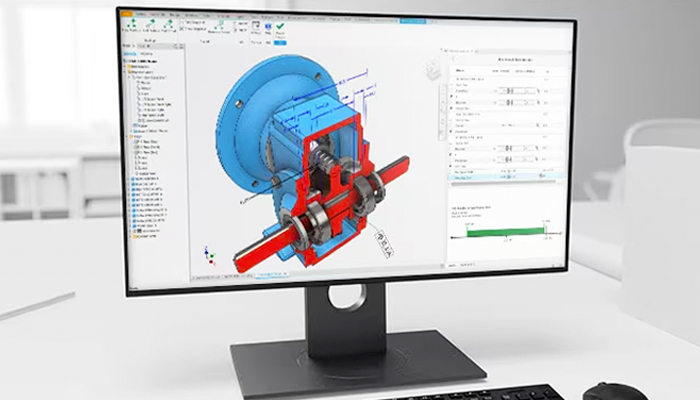
Inventor provides the tools needed to control and manage the data generated by complex assembly designs (Photo credits: Autodesk Inventor)
The Features of Autodesk Inventor
Parts are Inventor’s main building blocks. They are created by defining features, which in turn are based on sketches (2D drawings). Working drawings can also be used to produce sketches at different points in the workspace. The advantage of this design method is that all sketches and features can be corrected at a later date, without having to redo the entire partitioning. This modeling system is more intuitive than previous, older tools, where modifying basic dimensions is required starting from scratch. To continue the process, parts are linked together to form assemblies. In this way, by modifying the parts and assemblies, different variants of the product can be obtained. Parts are assembled by adding constraints between surfaces, edges, planes, points, and axes. This modeling method can be used to create large, complex assemblies.
More from the desk
Six other notes from the rest of the bench.
 SoftwareSmartBuild Brings Stereolithography to an Industrial ScaleWhile stereolithography is a well-established additive manufacturing technology used by many, it comes with its share of challenges, particularly when it comes to scaling up. Manufacturers are often forced to make a difficult trade-off between speed and quality, while also&hellip
 NewsTop 5 Videos: Apis Cor, 3D Systems & more!This week’s Top 5 Videos include a number of large business’ videos, in addition to some projects made by individuals. 3D printing giants such as Apis Cor and 3D Systems are in this list for announcing new projects and intentions.…
 MaterialsNylon and Sustainability, the Path to Responsible Additive Manufacturing?Nylon, as we already know, is a synthetic polymer belonging to the polyamide (PA) group. In additive manufacturing, we can find it in filament form (PA6) for FDM technology, or in powder form (PA11 and PA12) for technologies such as…
 ApplicationsHonda Has Demanded the Removal of All Brand-Related 3D Printable FilesOne of the biggest uses of 3D printing has been to create customized parts in the automotive world. Creative minds around the world are solving problems or customizing their cars with the help of additive manufacturing. And many of the…
 ApplicationsThe US Air Force contracts Optomec for $1 millionThe US Air Force continues to invest in 3D printing technologies. In addition to forming partnerships with leading AM manufacturers such as GE and developing materials themselves, as it was the case with reinforced ceramics for 3D printed sensors, the…
 News$28 Million Invested in Mosaic ManufacturingThe additive manufacturing industry has seen some turbulence over the last several months. We have seen layoffs, Shapeways declared bankruptcy, and Nano Dimension has announced its intention to acquire Desktop Metal. Amidst this change, however, comes positive news: Canadian comp