Software
What Are the Advantages of Using Grasshopper for 3D Printing?
Created in 2007, Grasshopper is an algorithmic modeling tool that runs inside Rhinoceros CAD software. Previously an installable plug-in, the tool has been fully integrated into Rhino 6 and all subsequent versions. An easy-to-learn CAD program, Grasshopper is based on…
- 3 min read
- Software
- Six more stories

Created in 2007, Grasshopper is an algorithmic modeling tool that runs inside Rhinoceros CAD software. Previously an installable plug-in, the tool has been fully integrated into Rhino 6 and all subsequent versions. An easy-to-learn CAD program, Grasshopper is based on mathematical representations that can be used to model any 3D shape. In fact, each component is represented in the form of a box: the user can connect the various boxes together, thus obtaining a node diagram that describes the relationship between each block. So there’s no limit to the complexity, degree or size of your models. But what are the advantages of Grasshopper? And why is it worth using for 3D printing?
Unlike other programming languages, such as RhinoScript or rhino.Python, Grasshopper does not require any prior knowledge in programming or coding. On the contrary, the plug-in allows developers and designers to create generative algorithms without having to write codes. This is because changes are visualized through a node diagram that describes each of the mathematical and geometric relationships of a three-dimensional model. Since shapes can be created from data, one of the main advantages of Grasshopper is the ability to change geometry almost infinitely by simply changing parameter values. Moreover, changes can be made without having to cancel or restart the design. But what happens when this program is combined with additive manufacturing technology?
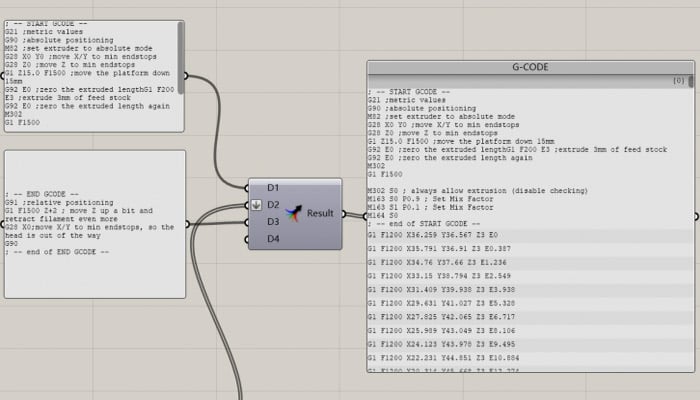
G-code generation via Grasshopper (Photo credits: Eazao)
3D Printing and Grasshopper
As you can imagine, if you can modify the geometry almost ad infinitum, it’s a windfall for additive manufacturing. What’s more, the idea of using a kind of flowchart capable of understanding the relationships between different boxes means that not only can a 3D design be created, but also a G-code that can be run on a 3D printer. This means that the user doesn’t have to go through the slicing stage. To obtain the G-code, the model needs to be deconstructed into polylines and points with X-Y-Z coordinates need to be created for the printer. With this system, it is possible to adjust the print and create, for example, non-flat slices with layers of different heights. Unlike traditional slicers, which cut the STL model into equal horizontal layers, this plug-in offers more advanced control over extruder movements.
More from the desk
Six other notes from the rest of the bench.
 NewsThe Biggest 3D Printers at Formnext 2025The halls of Formnext are filled with exciting machines and eye-catching 3D-printed objects. Yet among the many innovations on display, it’s the giant 3D printers that inevitably command attention. These large-format additive manufacturing systems offer massive build volumes, sup
 NewsValve allows makers to 3D print and sell their merchandiseValve, the company behind the Dota, Half-life, Portal and Left 4 Dead series’, has partnered with Shapeways to allow fans to reproduce and sell merchandise and figures from their favourite games. 3D printing is a very disruptive technology. It is…
 ApplicationsWhich Automotive Manufacturers Are Using 3D Printing in the United States?3D printing has become an increasingly essential technology in the automotive industry, transforming how vehicles are designed, prototyped, and even produced. From lightweight components to complex, custom geometries, additive manufacturing enables carmakers to innovate faster an
 GuidesThe Best STL Files for the 4th of July!Independence Day, more colloquially known as the Fourth of July, is an American federal holiday commemorating the ratification of the Declaration of Independence on July 4th, 1776. It is celebrated across the country with fireworks, barbecues and more and, of…
 NewsScientists Double the Solidity of 3D Printed AluminumIn Russia, scientists from the National University of Science and Technology (NUST MISIS) presented their research on a method of producing ultra-high purity alumina (UHPA) capable of doubling the strength of printed aluminum composites In 3D. We would have components similar&hel
 MaterialsThe 3D printed steak; a new way of eating meat?What if you could eat a 3D printed steak ? This seems surprising, but that is just what the Italian researcher Giusseppe Scionti of the Polytechnic University of Catalonia in Barcelona has proposed. He developed a project and modified a 3D fused…