Software
All You Need to Know about the CraftWare Pro Slicer
There are countless slicers on the market for additive manufacturing – accordingly, it can be difficult to know each one in detail. But some stand out from the rest. For example, you may have already heard of the 3D printing…
- 3 min read
- Software
- Six more stories
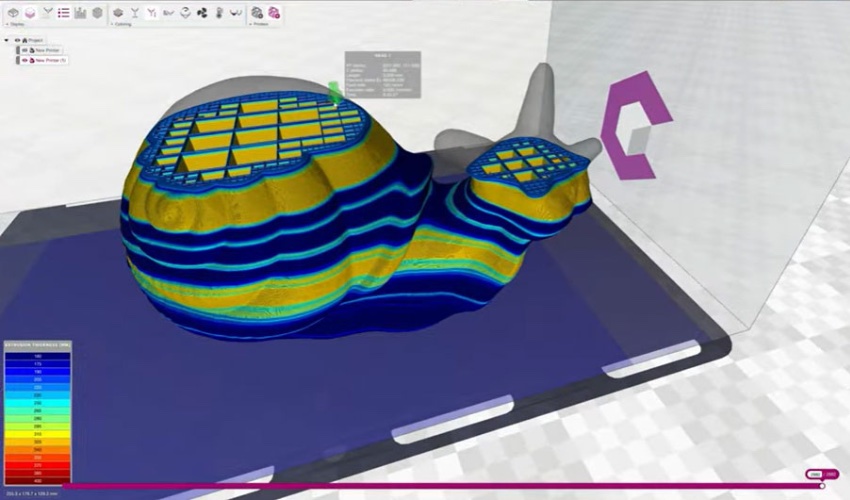
There are countless slicers on the market for additive manufacturing – accordingly, it can be difficult to know each one in detail. But some stand out from the rest. For example, you may have already heard of the 3D printing manufacturer Craftbot – formerly CraftUnique. The developer of 3D solutions, which was founded in Budapest in 2014, offers its very own slicer, CraftWare Pro.
With CraftWare Pro, the company has created something that is not just suitable for experts, but also advanced users and beginners and has been designed for use with FDM technologies. Moreover, the slicer is divided into Standard, Premium and Premium Enterprise packages, which offer different application options in addition to cost factors. We took a closer look at the software to teach you about how it works, its various applications and why it has become so popular only a short while after being launched on the market.
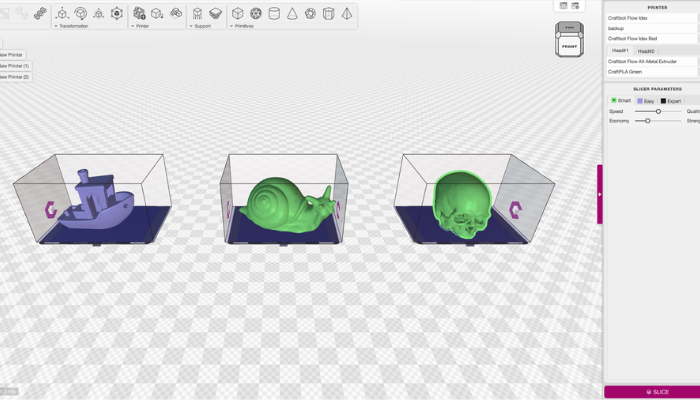
CraftWare Pro has features like the multi-tray function (photo credits: Craftbot)
Characteristics of CraftWare PRO
The benefits that users experience thanks to CraftWare Pro are clear: thanks to the automatic presets, beginners in particular can benefit from an uncomplicated and easy-to-use workflow, while intelligent functions allow them to increase efficiency. In addition, the CAD functions help to modify as well as personalize objects, so that optimizations can also be achieved in the area of print preparations. With CraftWare Pro, you can also benefit from smart solutions for IDEX printing.
More from the desk
Six other notes from the rest of the bench.
 NewsVolkswagen continues to produce 3D printed parts with HP Metal JetIn September 2018, the American manufacturer HP announced the arrival of its metal 3D printer, the HP Metal Jet. Among the first users of the technology is the car manufacturer Volkswagen. For the past year, the German company has been…
 NewsTop 5 Videos: All You Need to Know About Binder Jetting 3D Printing in 3 MinutesIt is Sunday so that means, beyond looking forward to a new week, it’s time for the top 5 videos of the week! Let’s start it off with a video from our very own Elliot who takes you through all…
 MaterialsWhich Filament Should I Choose for My 3D Printer?Fused deposition modeling (FDM) is one of the most widely used 3D printing processes on the market due to its ease of use, accessibility and performance. It is known especially for its compatible with a variety of thermoplastics, i.e. materials…
 PrintersScan the World and Artec 3D Partner to Digitize Art CollectionsSince 2014, the community project Scan the World has been on a mission to make 3D printable art available to people worldwide. Hosted on the Google Arts & Culture platform, it works to provide access to artifacts from around the…
 ApplicationsA European Competitor to Space X? Meet The Exploration Company and Its 3D Printed Space VehicleToday, space freight transport – the transfer of goods from one point to another in space – is mainly handled by the American SpaceX and its Dragon capsule. But a Franco-German company based in Munich intends to upset this balance.…
 GuidesWhy does BMW bet on additive manufacturing?Large industrial groups are among the first users of additive manufacturing, convinced of the advantages that technology offers today. The German group BMW is a perfect example of this. While announcing the opening of a new additive manufacturing center in 2019, they recently&hel