Printers
3Dnatives Lab: Testing the Artec Ray 3D Scanner
Luxembourg-based manufacturer Artec 3D has specialized over the years in the development of portable 3D scanners such as the Eva, the Space Spider and the Leo. More recently, the company has also broadened its spectrum of applications by unveiling 3D…
- 3 min read
- Printers
- Six more stories

Luxembourg-based manufacturer Artec 3D has specialized over the years in the development of portable 3D scanners such as the Eva, the Space Spider and the Leo. More recently, the company has also broadened its spectrum of applications by unveiling 3D scanners of a different type, such as the Micro, an automated stationary 3D scanner for scanning small parts, or the Artec Ray, a long-distance laser 3D scanner for large parts or indoor/outdoor scenes, such as wind turbines, ship propellers, airplanes or buildings.
First introduced in 2018, the Artec Ray is based on LiDAR technology, which stands for Light Detection and Ranging. On paper, it offers an accuracy of less than a millimeter, a long range of 110 meters associated with a wide field of view of 360º×270º, an acquisition speed of 208,000 points/s and a built-in battery with a maximum autonomy of four hours. These features as well as a recommended retail price of $60,000 (€56,000) clearly place the Artec Ray in the professional range of scanners. After the recent tests of the Artec Micro and Artec Leo, 3Dnatives had the opportunity to use the Artec Ray 3D scanner for a full test. So what are the possibilities offered by this equipment? Is it easy to use? What applications can be realized with the Ray? We took a closer look.
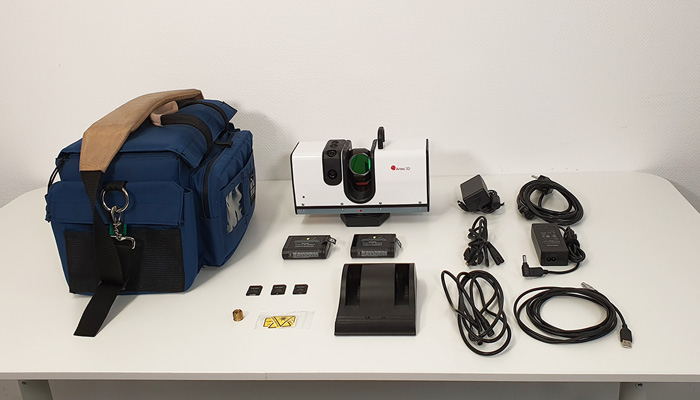
The Artec Ray scanner comes complete with power cables, a USB cable, two batteries and chargers, three SD cards, a tripod adapter and a carrying case
1. Unboxing the Artec Ray Scanner
Visually, the Artec Ray looks like a rectangular prism of about 11.3″x7.9″x4.6″ (287×200×118 mm) for about 13lbs (just under 6kg). It includes a rotating mirror at its center as well as two 5-megapixel cameras to capture textures. It also has two LED indicators on the top of the scanner for real-time status (ON/OFF, ready to scan, scanning…), a power light on the base and a light for WiFi/Autonomous mode. On the top, Artec also thought of installing a carrying handle. Finally, on the side, there are slots for the external battery, an SD card and an ON/OFF button. The inputs for the power cable and the USB port have been positioned on the base of the scanner.
More from the desk
Six other notes from the rest of the bench.
 MaterialsHow to choose your 3D printing filament: Experts give their advice!After a previous article on how to choose a 3D printer, we continue today with our series of “Expert Advice”. This time focused on how to choose your filament. Learn more about the elements to take into account when choosing…
 NewsBinder Jetting, the 3D Printing Technology That Transforms Production MethodsBinder Jetting is a 3D printing process that is becoming increasingly popular with additive manufacturing users. One of the players in this niche is Desktop Metal. The company is a global leader in Binder Jetting 3D printing and also has…
 News3DEXPERIENCE World 2020: shaping the world of designToday, 3DEXPERIENCE World 2020, organized by Dassault Systèmes, is coming to a close. Previously known as SOLIDWORKS World, the event was renamed to mirror the ecosystem formed by the whole family of solutions from Dassault Systèmes. Taking place in Nashville,…
 NewsU.S. Navy to use Xerox’s newly-launched 3D printer, ElemXLast year, Xerox announced the acquisition of startup Vader Systems, which specializes in liquid metal additive manufacturing. It clearly stated the ambition to enter the 3D market, convinced of the technology’s potential. One year later, Xerox has introduced its first&hell
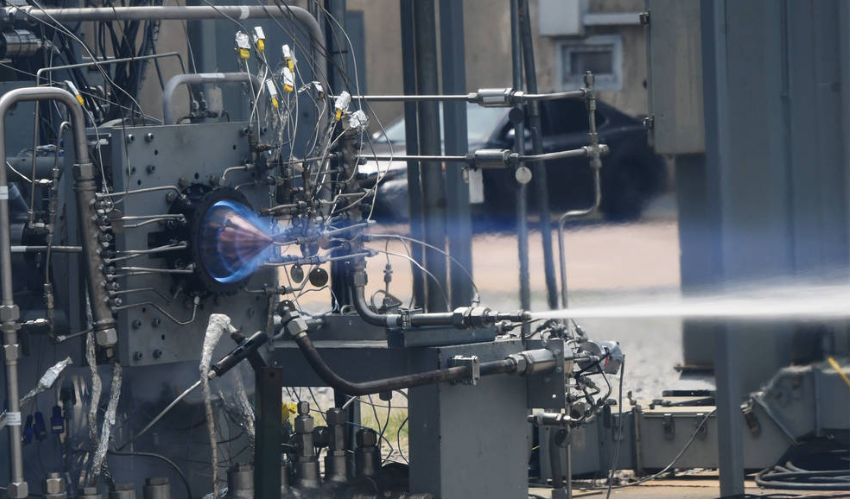 ApplicationsWith the RDRE, NASA Has Demonstrated That Engines Made With AM Are Suitable for Deep Space MissionsWe are still barely into 2023, but already the year has shown to be a promising one for additive manufacturing in space. Earlier this week we told you about the ESA which has included 3D printed parts on a rover touching…
 GuidesHow Is 3D Printing Used in the Cosmetics Industry?Additive manufacturing and 3D technologies are being applied to virtually every industry in different ways and for different purposes. In recent years, the beauty and cosmetics sector has also been counted among these. The reasons that cosmetic companies are beginning…