
Mastering Resin 3D Printing: A Comprehensive Guide to NanoDLP and NanoSupport Software
The rapid evolution of the 3D printing industry, particularly in the realm of photopolymerization-based technologies, has underscored the indispensable role of sophisticated software solutions. From the initial stages of digital file preparation to the intricacies of the lamination process and the crucial aspect of real-time print control, specialized software acts as the backbone of successful additive manufacturing. In recent years, the demand for highly optimized and user-friendly software has surged, driven by a need to simplify complex workflows and enhance the overall user experience. This guide delves into NanoDLP, a prominent Canadian company offering advanced software solutions specifically designed for photopolymerization-based 3D printers, encompassing both LCD and DLP technologies. Their innovative online platform empowers users with superior preparation, control, and monitoring capabilities for their resin 3D printing operations.
The Critical Role of Software in Modern Resin 3D Printing
Modern resin 3D printing, relying on the precise curing of photopolymer resins, demands a level of accuracy and control that hardware alone cannot provide. High-quality software is essential for translating complex digital models into physical objects with fidelity. It bridges the gap between design and manufacturing, ensuring that every layer is perfectly exposed and adheres correctly. Without robust software, users would face significant challenges in managing print parameters, generating necessary support structures, and monitoring the print process to prevent costly failures. The right software not only streamlines the workflow but also unlocks the full potential of a 3D printer, allowing users to achieve intricate details, smoother surfaces, and more reliable outcomes. This is precisely where solutions like NanoDLP shine, offering a comprehensive ecosystem for optimized resin printing.
Introducing NanoDLP: Your Partner in Photopolymerization Excellence
NanoDLP stands out in the competitive landscape of 3D printing software by offering a dual-pronged approach to resin 3D printing management. The company provides two core solutions: the NanoDLP platform for real-time print control and monitoring, and NanoSupport, a dedicated slicer for file preparation and support generation. This integrated approach ensures a seamless workflow from model import to the final printed part. A notable advantage of NanoDLP’s ecosystem is its exceptional versatility, capable of running on various internet-connected platforms. Whether you prefer operating from a conventional computer (across Windows, Mac, or Linux operating systems) or a more compact and cost-effective device like a Raspberry Pi, NanoDLP offers consistent performance. While the software is free for personal use, manufacturers and commercial entities are encouraged to acquire a license to unlock full features, support, and updates. In the following sections, we will explore the detailed features, user experience considerations, configuration options, and licensing models that define the NanoDLP experience.
Credits: NanoDLP
NanoDLP Platform: Unparalleled Control and Real-Time Monitoring
The NanoDLP web platform is designed to provide comprehensive remote control and monitoring capabilities for resin 3D printers. This centralized control hub allows users to manage their printing operations from virtually anywhere, fostering greater flexibility and efficiency. One of the most compelling features of the platform is its extensive customization options. Users have the freedom to tailor various aspects of the interface and print process, such as the type and position of displayed information (e.g., current layer, estimated completion time, print status) and critical print settings. This includes fine-tuning parameters like exposure time, lift speed, and layer height, directly impacting print quality and speed. Such granular control empowers users to optimize prints for specific resins or desired outcomes, moving beyond generic default settings.
Remote Accessibility and Customization
The ability to remotely access and control your resin 3D printer is a game-changer for many professionals and enthusiasts. Whether you are managing multiple printers in a farm, overseeing a long print job from another room, or monitoring progress while away from the workshop, NanoDLP’s web-based interface makes it possible. This accessibility extends across various devices, meaning you can check on your print using a computer, tablet, or even your smartphone, provided you have an internet connection. The high degree of customization also allows users to create a workspace that perfectly suits their needs, displaying only the most relevant information and controls. This reduces clutter and streamlines the user interface, making complex operations more manageable. This level of personalization is not just about aesthetics; it’s about optimizing interaction for greater efficiency and error reduction.
Advanced Monitoring and Performance
Beyond control, the NanoDLP platform excels in its monitoring functions. It provides real-time insights into hardware resources, allowing users to detect potential problems instantly. For instance, monitoring CPU usage, memory, and temperature can help identify bottlenecks or overheating issues before they lead to print failures. This proactive approach to problem-solving saves time, material, and ultimately, money. The platform’s compatibility with a wide array of hardware and operating systems further enhances its appeal. NanoDLP is engineered for high performance, with the company proudly stating that it operates without noticeable lag, even on resource-constrained devices like the Raspberry Pi. This makes it an ideal solution for creating dedicated, low-cost print servers, allowing your main workstation to remain free for design tasks. Available for Windows, Mac, and Linux, and accessible online via the cloud, NanoDLP offers a truly flexible and powerful monitoring solution for any resin 3D printing setup.
NanoSupport Slicer: Precision in Model Preparation and Support Generation
Complementing the NanoDLP control platform is NanoSupport, the sophisticated 3D editor and laminator developed by the Canadian company. Recognized as one of the most prominent slicers available for resin 3D printers, NanoSupport is engineered to meticulously prepare digital models for the photopolymerization process. It offers a comprehensive suite of tools that are crucial for achieving successful prints, ranging from basic lamination functions to advanced support generation. The software empowers users to precisely orient models, generate robust support structures, and perform various preparatory steps before sending a digital file to the 3D printer. This dedicated approach ensures that every aspect of model preparation is optimized for the unique demands of resin additive manufacturing.
Core Slicing and Editing Capabilities
NanoSupport includes all essential lamination functions required for resin 3D printing. This includes features like fading, which manages the transition between layers for smoother surfaces; casting, which can be related to hollowing out models to save resin and reduce print time; filling options for solid or intricate internal structures; and masking, which controls the areas of UV exposure. Beyond these fundamental operations, NanoSupport excels in model preparation. Users can easily reorient models to achieve optimal print angles, minimizing stress points and maximizing surface quality. It also facilitates the generation of intricate support structures, which are vital for preventing print failures by holding overhanging features during the curing process. The ability to prepare digital models comprehensively within a single interface significantly streamlines the pre-printing workflow, making it more efficient and less prone to errors.
Intelligent Support Structures
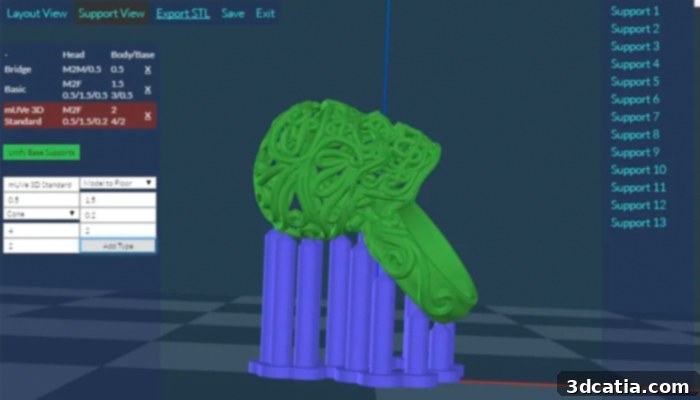
One of the most critical aspects of resin 3D printing is the intelligent creation and placement of support structures. NanoSupport offers a powerful system for both manual and automated support generation, providing users with ultimate flexibility. The software allows for three distinct types of supports: small, medium, and large, each designed for different structural requirements and levels of detail. The dimensions of these supports, including their contact points and density, can be precisely modified and visualized in real time. This immediate feedback enables users to fine-tune supports for optimal adhesion and easy removal without damaging the printed part. The automated support feature intelligently identifies areas requiring support, significantly reducing manual effort and potential oversight. This combination of automated efficiency and manual precision makes NanoSupport a robust tool for ensuring successful and high-quality resin prints.
Seamless Integration and User Interface
NanoSupport is designed for seamless integration with the NanoDLP controller, capable of automatically detecting and communicating with it within a private network. This direct communication eliminates manual file transfers and complex setup procedures, allowing users to move from slicing to printing with minimal friction. The software boasts a fast, clean, and advanced interface that prioritizes user experience. Its intuitive layout and logical organization of tools make it relatively straightforward to navigate, despite the sophisticated functionalities it offers. By integrating all NanoDLP cutting functions, NanoSupport provides a holistic environment where users can manage every aspect of model preparation and slicing, ensuring consistency and efficiency across the entire resin 3D printing workflow.
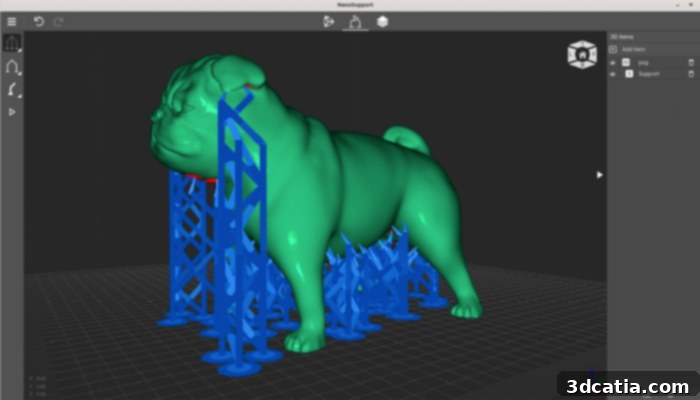
The NanoSupport slicer interface (Credits: NanoDLP)
Navigating the NanoDLP Experience: Key Considerations
Before fully committing to NanoDLP as your primary software solution, it’s important to consider various aspects of the user experience and the specific needs of your 3D printing projects. While NanoDLP offers advanced features and extensive control, its complexity might not be suitable for every user, especially those new to the world of resin 3D printing. Understanding these nuances can help you determine if NanoDLP is the right fit for your additive manufacturing journey.
Is NanoDLP Right for Beginners?
Due to its advanced features, detailed control interface, and multitude of customizable settings, many users agree that NanoDLP is not as straightforward to use as some other entry-level software solutions. For individuals just beginning their journey in 3D printing, especially with resin technologies, the initial learning curve might prove to be steeper than anticipated. The depth of control offered, while powerful for experienced users, can be overwhelming for beginners who prefer more automated or simplified workflows. If you are new to the intricacies of resin print settings, support generation, and remote monitoring, you might find NanoDLP somewhat more complex than other more ‘plug-and-play’ options available on the market. It often requires a foundational understanding of resin printing principles to leverage its full potential effectively. However, for those willing to invest time in learning, the rewards in terms of print quality and control are substantial.
Exploring Slicer Limitations and Advanced Needs
While NanoSupport provides a robust set of tools for model preparation and support generation, some advanced users might find certain aspects of the slicer to be somewhat limited compared to highly specialized alternatives. For professionals requiring very specific and complex model repair tools, highly intricate hollowing algorithms with advanced drain hole placement, or a broader array of experimental support patterns, it may be advisable to evaluate all established options available in today’s market. Slicers catering to niche industrial applications or highly artistic endeavors sometimes offer a greater depth in these specific areas. Therefore, if your projects demand exceptionally sophisticated model manipulation or cutting-edge support strategies, a thorough comparison with other leading slicers might be beneficial to ensure NanoSupport fully meets your specialized requirements.
Licensing and Availability
NanoDLP’s software is free to use for hobbyists and non-commercial purposes, which is a significant advantage for individuals exploring resin 3D printing without a substantial initial investment. However, for commercial use, manufacturers and businesses are required to purchase a license. These licenses typically unlock additional features, provide access to dedicated technical support, and ensure eligibility for future updates and enhancements. Understanding the different license tiers and their respective benefits is crucial for businesses looking to integrate NanoDLP into their production workflow. More detailed information about the software, its various features, and the different licensing options available can be found directly on their official website HERE. Engaging with the NanoDLP community and resources can also help users maximize their experience and overcome any initial challenges.
In conclusion, NanoDLP and NanoSupport together offer a powerful and versatile software ecosystem for managing photopolymerization-based 3D printers. Its remote control capabilities, extensive customization, and robust slicing features make it an attractive option for users seeking a high degree of control over their resin printing processes. While it may present a learning curve for beginners and specific advanced users might seek more specialized slicer functions, the comprehensive nature of NanoDLP makes it a formidable tool for optimizing print quality and workflow efficiency. Its cross-platform compatibility and cloud accessibility further enhance its appeal, establishing it as a key player in the resin 3D printing software market.
What do you think of NanoDLP – will you be trying it out? Let us know in a comment below or on ourLinkedIn,Facebook, and Twitter pages! Don’t forget to sign up for our free weeklyNewsletter here, the latest 3D printing news straight to your inbox! You can also find all our videos on ourYouTube channel.
*Cover photo credits: NanoDLP