
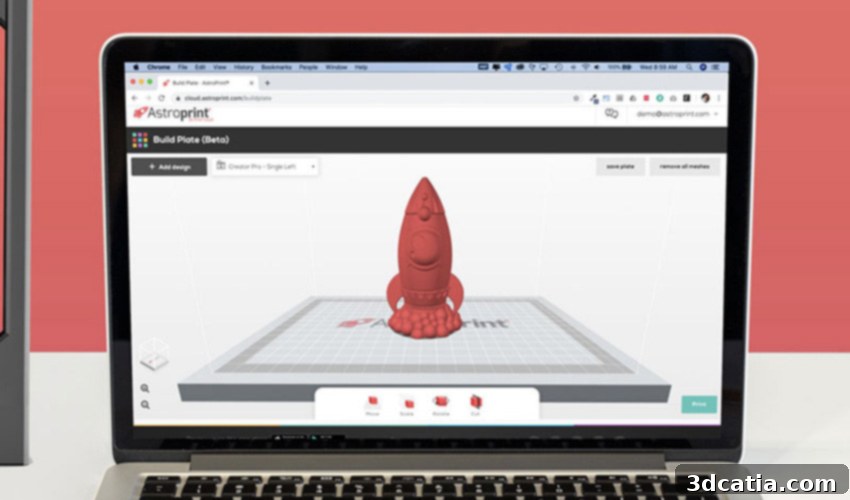
AstroPrint: The Ultimate Cloud-Based Solution for Seamless 3D Printer Management
In the rapidly evolving world of additive manufacturing, efficient management of 3D printers is paramount for hobbyists, educators, and businesses alike. Since its launch in 2015, AstroPrint has emerged as a leading software platform designed to simplify this complex process. Available across all major operating systems including Windows, Mac, and Linux, and accessible via popular app stores like Google Play and the Apple Store, AstroPrint offers an open-source, free, and incredibly versatile solution. Unlike many specialized software suites, AstroPrint strikes a unique balance, being exceptionally suited for beginners while also providing robust features for small to large companies and educational institutions. Its entirely cloud-based architecture empowers users to manage and monitor 3D prints from virtually anywhere, using any internet-connected device. This unparalleled accessibility, combined with features supporting simultaneous access for multiple users, makes AstroPrint an ideal tool for collaborative projects and learning environments. Let’s delve deeper into the innovative features and benefits that make AstroPrint a standout in the 3D printing software landscape.
Unlocking Advanced Features with AstroPrint
AstroPrint’s core strength lies in its comprehensive, cloud-based feature set that transforms the way users interact with their 3D printers. The platform’s ability to allow users to easily download, save, and manage their 3D models locally or in the cloud is a game-changer. This ensures location-independent access to your entire library of designs from various devices, promoting flexibility and convenience. Beyond simple storage, the online platform facilitates thorough review of STL files and other common 3D model formats before they are sent to print. This pre-print inspection can help catch potential issues, saving time and filament.
For users managing multiple machines, AstroPrint offers unparalleled control. You can efficiently manage an entire fleet of printers, schedule print jobs in advance, and monitor their progress online. This can be done conveniently through the dedicated AstroPrint Center web interface or the AstroPrint mobile application. The application goes a step further by offering real-time notifications, keeping you informed about the status of your print jobs, whether they’ve started, completed, or encountered an error. This proactive alert system minimizes downtime and allows for prompt intervention if necessary.
Moreover, AstroPrint provides valuable data and analytics to help users optimize their printing processes. It meticulously tracks metrics such as the amount of filament used for each print, the precise time taken for the part to be designed (if integrated), and, crucially, the print success rate. This data empowers users to identify patterns, troubleshoot recurring issues, and refine their print settings for better outcomes. The platform’s analytics extend to offering insightful advice on how to improve print quality, displaying critical details like plate and extruder temperatures, print speed, and layer height. All this data is presented through intuitive, detailed diagrams and pie charts, making complex information easily digestible and actionable for users of all experience levels.
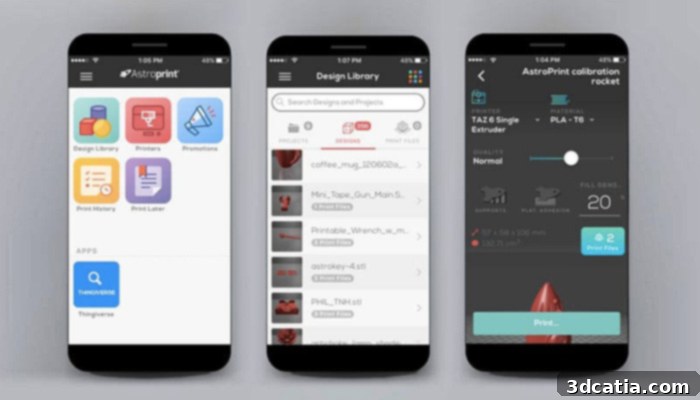
AstroPrint is accessible across both mobile devices and web browsers, offering ultimate flexibility.
A recent redesign has significantly enhanced AstroPrint’s platform, making it even more accessible and user-friendly. The focus on intuitive operation ensures that even beginners can navigate the software with ease, while advanced users still find all the robust tools they need. One particularly innovative feature is the ability to record the part design in real-time via a connected camera. This visual monitoring allows users to trace any errors as they occur, providing critical insights for immediate correction or future prevention. This is invaluable for refining print profiles and ensuring consistent quality.
The platform also boasts an integrated print history, a powerful tool for continuous improvement. Users can review a comprehensive log of all previously produced parts, complete with detailed notes and insights. This history enables users to analyze past failures and successes, make informed corrections, and iterate designs more effectively to improve the quality of the final product. More than just a log, this feature allows users to check the exact settings of the slicer, printer, and material used for each print. This level of detail is indispensable for replicating successful prints, diagnosing issues, and systematically enhancing the entire 3D printing workflow. For educational settings, this provides an excellent learning resource, allowing students to track their progress and understand the impact of different parameters.
Seamless Compatibility and Flexible Connection Options
AstroPrint is renowned for its exceptional ease of connection and broad compatibility, meticulously designed to provide the most seamless user experience possible. Understanding that a user’s choice of 3D printer is diverse, AstroPrint provides transparent and comprehensive information regarding device support. On the official AstroPrint website, a dedicated “Compatibility” tab offers an extensive list of printers that have been officially verified by AstroPrint’s team or rigorously tested and confirmed by its active global community. This invaluable resource ensures users can quickly ascertain whether their specific 3D printer model is likely to work flawlessly with the platform.
While AstroPrint is primarily optimized for desktop 3D printers leveraging Fused Deposition Modeling (FDM) technology – the most common and accessible type for many users – its compatibility isn’t strictly limited. If a particular printer doesn’t immediately appear on the verified list, it doesn’t automatically imply incompatibility. It simply means that it may not have undergone formal verification yet. The platform encourages users to consult a detailed table provided, which outlines general compatibility guidelines and allows users to check various specifications that contribute to successful integration. This community-driven approach continuously expands the list of supported devices, making AstroPrint increasingly versatile.
To further assist users, AstroPrint provides comprehensive explanations regarding the definition of “compatibility” and the precise methods used for verifying different 3D printing solutions. This transparency ensures users are fully informed, enabling them to confidently assess the potential for smooth operation between the AstroPrint platform and their chosen 3D printer. Conversely, for clarity, a list of known non-compatible devices is also readily available at the bottom of the compatibility tab. This includes all XYZprinting solutions and several specific Flashforge models, helping users avoid potential frustrations.
Once compatibility is confirmed, the next crucial step is effectively connecting your printer to the AstroPrint software suite. AstroPrint offers multiple flexible solutions to cater to varying technical skill levels and preferences. One popular option is the AstroBox Gateway, which utilizes a Raspberry Pi. This solution requires some technical skills for configuration and setup, appealing to users who enjoy a DIY approach or have existing Raspberry Pi knowledge. For those seeking a simpler, plug-and-play experience, the AstroBox Touch provides an elegant alternative. While slightly more expensive, this device enables effortless connection via a user-friendly touch screen interface, eliminating the need for complex technical knowledge. It’s an ideal choice for beginners or those who prioritize convenience.
Furthermore, for users with a penchant for customization, AstroPrint actively supports the creation of a personalized AstroPrint box. The platform provides resources and guidance to help users design and build their own customized solutions, offering an unparalleled level of flexibility. In addition to these dedicated hardware solutions, AstroPrint seamlessly integrates with existing 3D printing ecosystems. It can be connected to 3D printers via an OctoPrint plugin, offering a particularly convenient solution for those who are already utilizing OctoPrint for their printer management. This interoperability ensures that users can leverage AstroPrint’s powerful cloud features without overhauling their existing setup, making it a highly adaptable and user-centric platform.
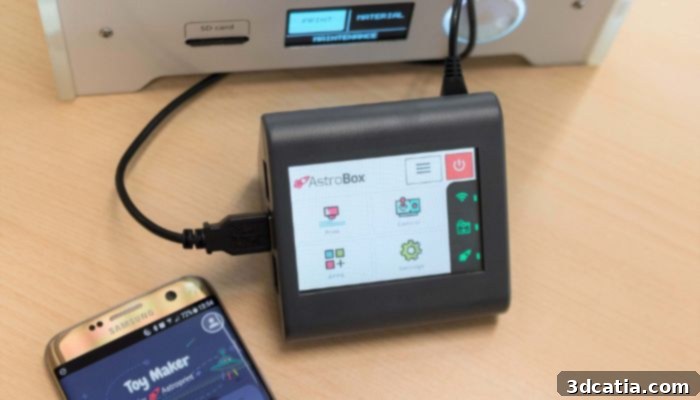
The AstroBox simplifies the connection process, making 3D printing more accessible.
AstroPrint Packages & Pricing: Solutions for Every User
AstroPrint understands that its user base is diverse, ranging from casual hobbyists to large educational institutions and professional enterprises. To cater to these varied needs, the platform offers a structured range of packages, each designed with specific functionalities, storage capacities, and support levels. The choice of package directly influences the number of printers that can be connected, the available cloud storage, and access to advanced features.
For individual users just starting their 3D printing journey or those with minimal needs, AstroPrint offers a generous Free Basic Package. This package allows for a single user to connect up to two 3D printers, providing essential functionalities like saving models in the cloud library, performing online slicing operations, and controlling prints directly via the AstroPrint application. It’s an excellent entry point, enabling users to experience the core benefits of cloud-based 3D printing management without any financial commitment. However, this package is limited to 1 GB of storage space, which might become a constraint for users with a large library of 3D models.
For more dedicated individual users, serious hobbyists, or small teams, the Premium Package offers a significantly more comprehensive set of features and expanded resources. This package dramatically increases cloud storage to 10 GB, providing ample space for numerous projects and models. Beyond increased storage, the Premium Package unlocks advanced analytics, offering deeper insights into print performance and optimization strategies. Subscribers also benefit from dedicated email support, ensuring prompt assistance when needed. A key advantage of this tier is the ability to serialize print jobs and manage up to five printers simultaneously, making it ideal for users running multiple machines or handling more complex workflows. This package is affordably priced at $9.90 per month, representing excellent value for the enhanced capabilities it provides.
Finally, for larger organizations, educational institutions, or businesses requiring robust, scalable solutions, AstroPrint offers the Business & Education Package. This top-tier package delivers virtually unlimited possibilities, removing constraints on the number of 3D printers that can be connected and offering expansive, often unlimited, file storage. It includes access to the most advanced data and analytics tools, enabling sophisticated performance tracking and strategic decision-making. Subscribers also receive priority, faster support, ensuring minimal downtime and maximum efficiency for critical operations. Given the customized nature and extensive features, pricing for the Business & Education Package is available on request, allowing AstroPrint to tailor a solution that perfectly fits the unique needs of each large-scale client. For detailed information on all packages and their offerings, users are encouraged to visit the official AstroPrint website HERE.
AstroPrint truly revolutionizes 3D printer management, making advanced control and monitoring accessible to everyone. Its commitment to user-friendliness, combined with powerful cloud capabilities and versatile connection options, positions it as an essential tool for anyone involved in 3D printing. Whether you are a novice taking your first steps into additive manufacturing, an educator guiding students, or a business striving for operational efficiency, AstroPrint offers a tailored solution to elevate your 3D printing experience. What are your thoughts on AstroPrint? Have you already integrated it into your 3D printing workflow? We invite you to share your experiences and insights in the comments section below, or connect with us on our social media channels: LinkedIn, Facebook, and Twitter. Don’t miss out on the latest advancements in 3D printing – be sure to sign up for our free weekly Newsletter here, delivering the freshest news directly to your inbox! You can also explore a wealth of informative content and videos on our YouTube channel.
*All Photo Credits: AstroPrint