
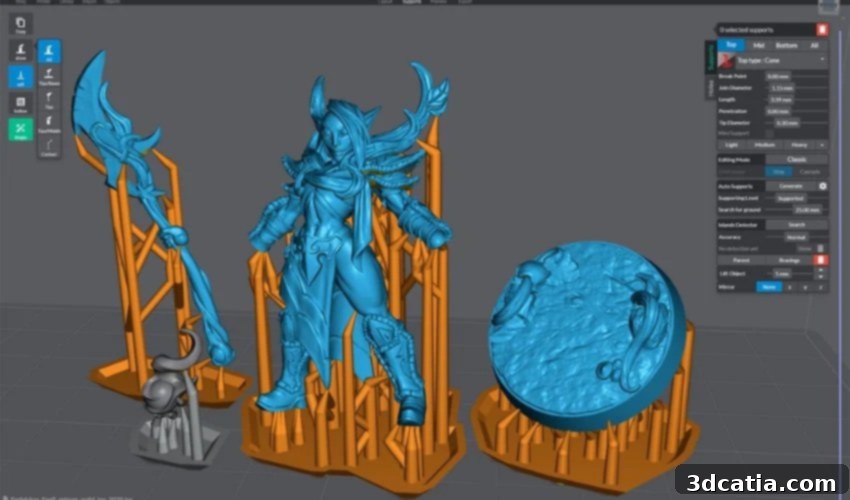
Mastering Resin 3D Printing with Lychee Slicer: A Comprehensive Guide
Despite its intriguing name, Lychee Slicer is not a culinary tool but an indispensable software solution for enthusiasts and professionals utilizing SLA and resin 3D printers. Developed by Mango 3D, a company renowned for its Mango slicer and Mango OS software, Lychee Slicer has evolved through three generations to become a leading choice in the resin 3D printing ecosystem. It caters to a wide spectrum of users through its flexible pricing model, offering a robust free version, a Pro subscription at €5.99 per month, and a Premium tier for €9.99 monthly. This tiered approach ensures that everyone, from hobbyists to advanced users, can access powerful features tailored to their needs. Lychee Slicer boasts extensive compatibility with a vast and continuously expanding list of resin 3D printers, including popular models like the Anycubic M3, Creality Halot One, and SparkMaker. But what truly sets Lychee Slicer apart from the myriad of other slicing software on the market, especially given the unique demands of resin 3D printing?
In the intricate world of 3D printing, the role of slicing software is paramount. It serves as the crucial bridge between a digitally designed 3D model and its physical manifestation. Without a slicer, a sophisticated 3D design remains a mere collection of polygons on a screen, unable to be translated into printer commands. The slicer’s fundamental responsibility is to take a 3D model, typically in an STL or OBJ format, and “slice” it into hundreds or thousands of individual layers. For each layer, it generates specific instructions for the 3D printer, dictating print head movements, material extrusion, exposure times, and more. This process ensures that the 3D-designed part can be accurately and successfully printed.
The 3D printing market is populated with various slicers, such as the widely recognized PrusaSlicer for FDM printers or the versatile Cura Slicer. However, resin 3D printing, particularly SLA and DLP technologies, presents distinct challenges that demand specialized slicing solutions. These challenges include the precise calibration of exposure times, the crucial placement of support structures to prevent print failures, and the often-necessary hollowing of models to conserve expensive resin and prevent suction cup effects. Lychee Slicer addresses these specific needs with exceptional precision and a suite of advanced features. Beyond the classic functionalities of model preparation—such as precise scaling, rotation, and placement—and accurate slicing, Lychee Slicer introduces innovative tools designed to optimize the resin printing workflow. These include real-time cavity formation for efficient hollowing, an intelligent island detector to identify potential print failures before they occur, and a host of other capabilities that elevate the user experience and print reliability significantly.
Lychee Slicer’s Intuitive Design and Powerful Features
One of the most reassuring aspects for new users considering Lychee Slicer is its broad and ever-growing compatibility. If you’re concerned that your specific 3D printer might not be officially listed, Mango 3D’s commitment to regularly adding new printers means continuous expansion of its supported device database. Furthermore, Lychee Slicer offers a highly flexible “custom” 3D printer option. This feature allows users to manually input their printer’s build volume and specific settings, ensuring that even obscure or custom-built resin printers can benefit from Lychee Slicer’s advanced preparation and slicing capabilities. This means you can prepare your 3D files with the same high precision and export them as standard STL files, regardless of your printer model.
A standout feature that significantly streamlines the pre-printing workflow is Lychee Slicer’s innovative Magic Menu. This intelligent automation tool empowers users to largely automate the model preparation process, drastically reducing the manual effort and time typically required. The Magic Menu intelligently handles tasks such as optimal model alignment on the build plate, the automatic addition of necessary support structures to prevent print failures, and the optimization and generation of rafts or brims for better adhesion. This automation is a game-changer for both beginners, who can rely on the software’s intelligence to achieve good prints, and experienced users, who can save considerable time on repetitive tasks, allowing them to focus on more complex aspects of their projects. The time savings alone make the Magic Menu an invaluable asset in any resin 3D printing workflow.
The user-friendly interface of Lychee Slicer is designed for quick adoption, allowing users to become proficient within minutes. Available in multiple languages, including French, German, and English, it ensures accessibility for a global audience. The intuitive layout and clearly labeled tools make complex operations feel straightforward. Furthermore, the software excels in its support generation capabilities. Mango 3D understands the critical and often challenging nature of support structures in resin 3D printing, where inadequate supports can lead to catastrophic print failures. To combat this, Lychee Slicer integrates a powerful and intelligent support algorithm that can automatically generate robust and efficient supports tailored to the specific geometry of the 3D model. Users also have extensive control to fine-tune these supports, adjusting parameters like density, tip size, and contact area, ensuring optimal balance between print success and ease of post-processing.
This advanced functionality extends Lychee Slicer’s utility across a wide range of application areas within resin 3D printing. With industry-specific features and precision, the slicer is seamlessly integrated into professional workflows. For example, in **jewelry design**, Lychee Slicer’s ability to handle intricate details and produce smooth surfaces is crucial for creating master patterns for casting. The precision ensures that delicate filigrees and complex stone settings are perfectly rendered. In **dentistry and orthodontics**, where accuracy is paramount, the slicer supports the creation of highly precise dental models, surgical guides, and aligners, leveraging biocompatible resins. The ability to precisely control layer curing and support placement directly impacts patient outcomes. Finally, in **product design and prototyping**, Lychee Slicer aids in rapid iteration, allowing designers to quickly produce detailed prototypes and functional parts with excellent surface finish and dimensional accuracy, accelerating the development cycle significantly.
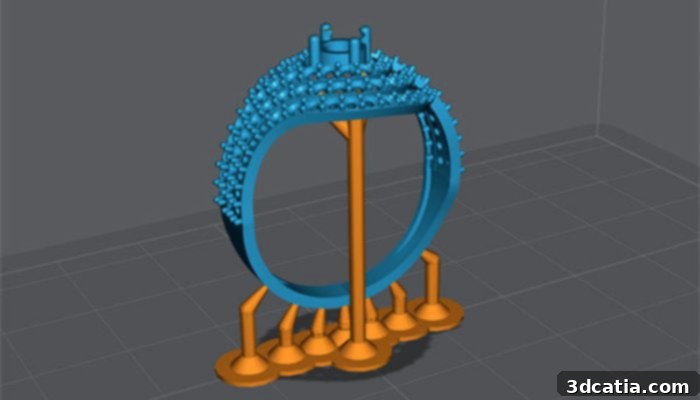
The Lychee slicer is suitable for the jewelry industry, among others (photo credits: Mango 3D)
Innovations and Enhancements in Lychee Slicer’s Latest Updates
Mango 3D is continually enhancing Lychee Slicer, with each update bringing significant improvements and new features. The Lychee Slicer 3 update, in particular, introduced several transformative functionalities designed to further optimize the resin 3D printing experience. As previously highlighted, the ongoing expansion of compatible 3D printers remains a core focus, ensuring that a growing number of users can benefit from the software’s capabilities. Beyond compatibility, the latest iteration introduced a highly beneficial feature for model inspection and support placement: the cutout bar. This intuitive tool allows users to precisely view a model’s cross-section at any desired height. This capability is particularly invaluable for identifying hard-to-see areas and for accurately placing internal supports within hollowed models. By providing a clear, layered view of the model’s interior, the cutout bar dramatically simplifies the process of preventing internal failures and ensuring structural integrity, especially for complex or dynamically hollowed designs within Lychee Slicer.
A cornerstone of Lychee Slicer’s precision and print quality is its specialized focus on the pixel pipeline. Unlike many traditional slicers that operate on a vector-based approach, Lychee Slicer is fundamentally pixel-based. This design choice is critical because resin 3D printers, particularly those using LCD panels for light projection, operate by communicating in discrete light pixels. The slicer’s pixel-based architecture directly maps the sliced layers to the native pixel resolution of the printer’s LCD screen. This direct 1:1 correspondence ensures that each resin layer is cured with unparalleled accuracy, eliminating common issues like fuzzy edges or stair-stepping artifacts often associated with vector-to-pixel conversion. This meticulous approach allows the slicer to make incredibly accurate cuts, reproducing even the smallest and finest details of a 3D model with exceptional fidelity.
Building upon the pixel pipeline, the Pro version of Lychee Slicer offers an exclusive feature called Pixel Perfect. This advanced functionality allows users to view elements on their screen at a precise 1:1 pixel ratio, mirroring exactly how they will be projected by the 3D printer’s LCD panel. For intricate designs and demanding applications, Pixel Perfect provides an essential visual verification tool. Users can meticulously inspect every single pixel, ensuring that fine details are captured as intended and, crucially, that support structures are placed with absolute precision. Mango 3D emphasizes that Pixel Perfect is an optimal addition for creating robust and accurate supports, enabling users to catch and rectify potential issues at the software level before committing to a print. This level of granular control is instrumental in achieving consistently high-quality prints and minimizing material waste due to failed jobs.
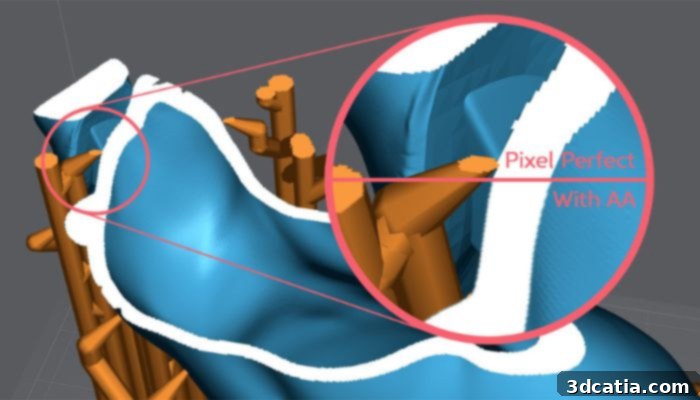
The Pixel Perfect feature is available for the Pro version of Lychee Slicer (photo credits: Mango 3D)
Accelerated Performance for an Enhanced Workflow
Recognizing that efficiency is a cornerstone of a pleasant and productive user experience, Mango 3D has invested significant effort in enhancing the speed of Lychee Slicer. These performance improvements are particularly evident in critical operations such as the rapid loading times for complex meshes and the swift generation of support structures. For users working with large, intricate parts, or high-resolution models—which are common in professional resin 3D printing—the speed enhancements are dramatic, often leading to a 10 to 15-fold increase in processing speed compared to previous versions. This means less waiting and more doing, translating directly into higher productivity.
While functionality and precision remain paramount, the aspect of speed cannot be understated in today’s fast-paced design and manufacturing environments. An efficient workflow relies heavily on software that responds quickly and minimizes bottlenecks. For this reason, Mango 3D is continuously refining the back-end architecture of Lychee Slicer, optimizing algorithms and leveraging modern computing capabilities to ensure that users spend less time waiting for their models to process and more time creating. This ongoing commitment to performance ensures that Lychee Slicer not only delivers exceptional results but does so with unparalleled efficiency, making it a truly indispensable tool for anyone involved in resin 3D printing. To explore more about the extensive capabilities of Lychee Slicer, you can find additional information HERE.
Have you already used Lychee Slicer? What did you think? Let us know in a comment below or on our LinkedIn, Facebook, and Twitter pages! Don’t forget to sign up for our free weekly Newsletter here, the latest 3D printing news straight to your inbox! You can also find all our videos on our YouTube channel.