
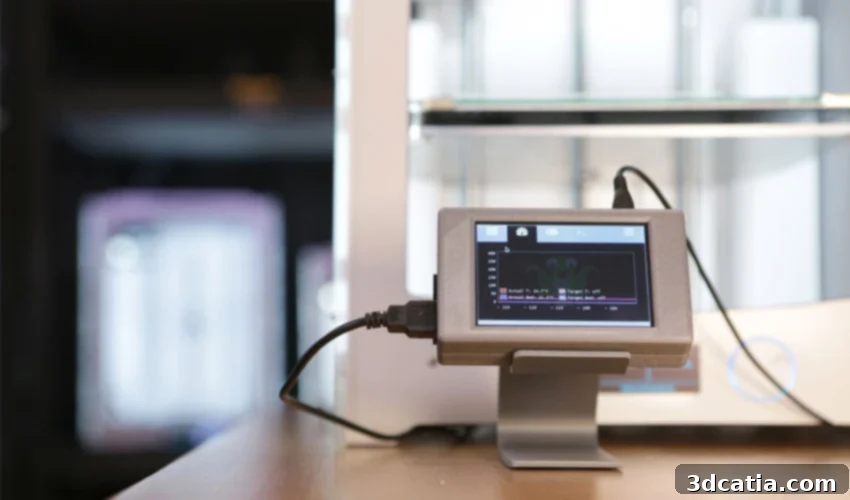
OctoPrint: Unleashing the Power of Remote 3D Printer Management and Monitoring
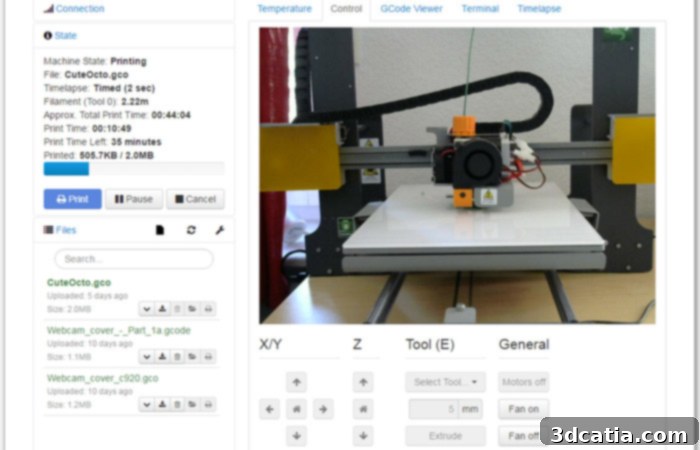
OctoPrint stands as a groundbreaking, open-source, and entirely free application designed to revolutionize how users interact with their 3D printers. Acting as a sophisticated controller, it empowers enthusiasts and professionals alike to manage and monitor their 3D printing jobs remotely, offering unparalleled convenience and peace of mind. By connecting OctoPrint to your local network, typically installed on a cost-effective Raspberry Pi using the readily available OctoPi image, you gain access to a powerful web interface. This centralized platform allows you to send numerous G-code files to various machines, all from a single, intuitive dashboard. Beyond just initiating prints, OctoPrint’s compatibility with webcams enables real-time visual monitoring of your print jobs, ensuring everything is proceeding as expected, no matter where you are.
The journey of OctoPrint began in 2012 when Gina Häußge, driven by her own need for better control over her 3D printer, developed the initial controller application. Her innovative solution quickly resonated with the burgeoning 3D printing community, filling a significant void in the market. The rapid adoption and clear value proposition led to external recognition and support, notably from the Spanish manufacturer BQ, which provided financial assistance to fuel its further development. Today, OctoPrint boasts a massive global user base, a testament to its open-source nature and the fact that it remains completely free of charge. This strong community is actively supported by a dedicated forum, which serves as a vibrant hub for troubleshooting technical issues, simplifying the installation process for newcomers, and fostering a collaborative environment for exchanging ideas and best practices among users worldwide.
All image credits : OctoPrint
Key Features and Capabilities of OctoPrint
The primary objective of the OctoPrint application is to provide comprehensive remote control and monitoring functionalities for your 3D printer. This includes a wide array of specific controls that significantly enhance the printing experience. Users can effortlessly monitor critical parameters such as the temperature of the extruder and print bed, readjust settings on the fly if needed, and initiate printing jobs wirelessly via a WiFi connection. Crucially, OctoPrint also offers the ability to pause or completely stop a print in the event of an anomaly, potentially saving wasted filament and preventing damage to the machine. Its robust web interface provides a real-time display of print progress, remaining time, and various sensor readings, offering a complete overview of your active jobs.
One of OctoPrint’s standout features is its integrated slicing capability. It leverages the powerful CuraEngine, a well-regarded slicer that meticulously prepares your 3D model by dividing it into successive layers, generating the G-code instructions directly readable by your 3D printer. This integration streamlines the workflow, allowing users to move from model preparation to print initiation within a single ecosystem. Furthermore, OctoPrint provides extensive customization options for the slicer and its settings, enabling users to fine-tune print parameters to achieve optimal results for different materials and geometries.
The Power of the Plugin Ecosystem
The true versatility and enduring appeal of OctoPrint are significantly amplified by its rich and dynamic plugin ecosystem. Developed largely by its passionate user community, these plugins extend OctoPrint’s core functionality in virtually countless ways. With around fifty extensions officially listed and many more available through community channels, the possibilities for customization and enhancement are vast. For instance, plugins like “NavbarTemp” allow users to display crucial machine temperatures directly on the navigation bar, ensuring continuous, at-a-glance control and monitoring without navigating to different sections. Another highly practical plugin is the “Estimate printing cost” feature, which helps users closely monitor and manage their budget by calculating material usage and print duration. Other popular plugins include:
- The Spaghetti Detective: An AI-powered plugin that uses webcam footage to detect print failures like “spaghetti” (when filament fails to adhere to the print bed) and automatically pauses the print, saving material and time.
- OctoLapse: This plugin creates stunning time-lapse videos of your prints by moving the print head out of the way before each photo, resulting in smooth, professional-looking sequences.
- Bed Visualizer: Provides a visual mesh of your printer’s bed, helping you achieve perfect first layers by showing areas that are too high or too low.
- Push Notifications: Plugins like Pushbullet, Telegram, or Discord Integration allow OctoPrint to send real-time alerts to your mobile device about print start, completion, or any detected errors.
- Themeify: Enables extensive customization of OctoPrint’s user interface, allowing users to personalize colors, fonts, and layout to their preference.
- G-Code Viewer: Displays a visual representation of the G-code being processed, allowing users to track the toolpath and understand the printer’s movements in detail.
- Preheat Button: Simplifies the preheating process by offering customizable buttons for commonly used material profiles, quickly heating the bed and hotend to desired temperatures.
This thriving ecosystem transforms OctoPrint from a mere controller into a highly adaptable and future-proof platform, capable of meeting diverse user needs and continually evolving with the advancements in 3D printing technology. The ease of installing and managing these plugins directly from the web interface makes it accessible even for users with limited technical expertise.
Compatibility and Installation
When it comes to compatibility, OctoPrint currently works seamlessly with the vast majority of FDM (Fused Deposition Modeling) 3D printers available on the market, especially desktop machines. Its design focuses on serial communication, which means most printers that connect via a USB-B port (or similar serial connection) are supported. While it has broad compatibility, some machines, such as those from FlashForge, benefit from specifically developed support profiles to ensure optimal integration. OctoPrint itself runs on a Linux-based environment, but its web-based interface ensures that it is compatible with virtually any operating system for access, including Windows, macOS, and Linux, as well as mobile operating systems like iOS and Android. Users can simply open a web browser on any device connected to the same local network to gain full control.
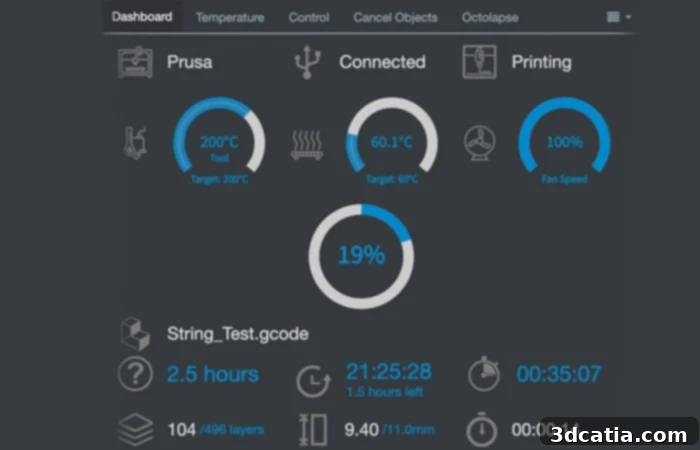
One of the available extensions allows you to have a “Dashboard” view.
Simplified Installation with Raspberry Pi
As mentioned earlier, OctoPrint is most commonly installed on a Raspberry Pi single-board computer, primarily due to its compact size, low power consumption, and affordability. The installation process is remarkably straightforward, thanks to the dedicated OctoPi image. This pre-configured operating system image comes with OctoPrint already installed and optimized, significantly simplifying setup. Users can find a comprehensive, step-by-step tutorial on the official website, guiding them through the entire process. Typically, this involves:
- Downloading the OctoPi image.
- Flashing it onto an SD card using a tool like Raspberry Pi Imager or Etcher.
- Editing a configuration file on the SD card to add your local WiFi network credentials.
- Inserting the SD card into the Raspberry Pi and powering it on.
- Accessing the OctoPrint web interface from any browser on your network by navigating to `http://octopi.local` or the Raspberry Pi’s IP address.
Once the initial setup wizard is completed, you simply connect your 3D printer to the Raspberry Pi via a standard USB cable. Furthermore, the application seamlessly integrates with webcams; you can connect a USB webcam or the Raspberry Pi Camera Module to the Raspberry Pi, allowing you to follow the movements of your machine and monitor your prints in real time, adding an invaluable layer of control and visual feedback to your 3D printing workflow.
Conclusion: The Indispensable Tool for Modern 3D Printing
OctoPrint has firmly established itself as an indispensable tool for anyone involved in 3D printing, from hobbyists to small businesses. Its open-source nature, robust feature set, and thriving community-driven plugin ecosystem provide an unparalleled level of control, monitoring, and customization. By transforming a typically tethered desktop operation into a remotely managed and highly efficient workflow, OctoPrint not only enhances convenience but also significantly improves print reliability and resource management. Its continued development, fueled by an active community, ensures that OctoPrint will remain at the forefront of 3D printer management solutions for years to come, consistently adapting to new technologies and user demands.
What do you think about OctoPrint? Let us know in a comment below or on our Facebook and Twitter pages! Sign up for our free weekly Newsletter, all the latest news in 3D printing straight to your inbox!