
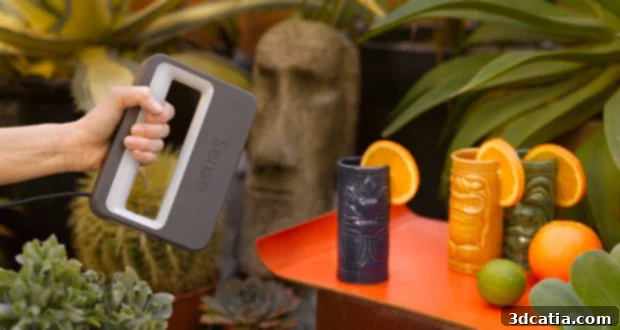
Sense 3D Scanner Review: Your Gateway to Affordable and Accessible 3D Scanning
The world of 3D technology continues its rapid evolution, bringing sophisticated tools once exclusive to industrial settings into the hands of hobbyists, educators, and small businesses. While 3D printers have captured much of the mainstream attention, 3D scanners are quietly undergoing their own revolution, enabling innovative product development, creative applications, and even captivating visual effects, as memorably demonstrated in films like Ghost in the Shell. Despite this burgeoning innovation, many potential users still grapple with fundamental questions when considering a 3D scanner purchase. These concerns often revolve around the current models available, the expected scan quality, precision levels, scanning scope, and crucially, the ease of use.
To address these pressing questions and provide clarity, 3Dnatives embarked on a series of comprehensive 3D scanner tests. Our journey begins with an in-depth look at the Sense 3D scanner from 3D Systems, a device notable for being one of the most accessible and affordable models currently on the market. This review aims to dissect its capabilities, user experience, and overall value proposition for those looking to dip their toes into the exciting realm of 3D scanning without breaking the bank.
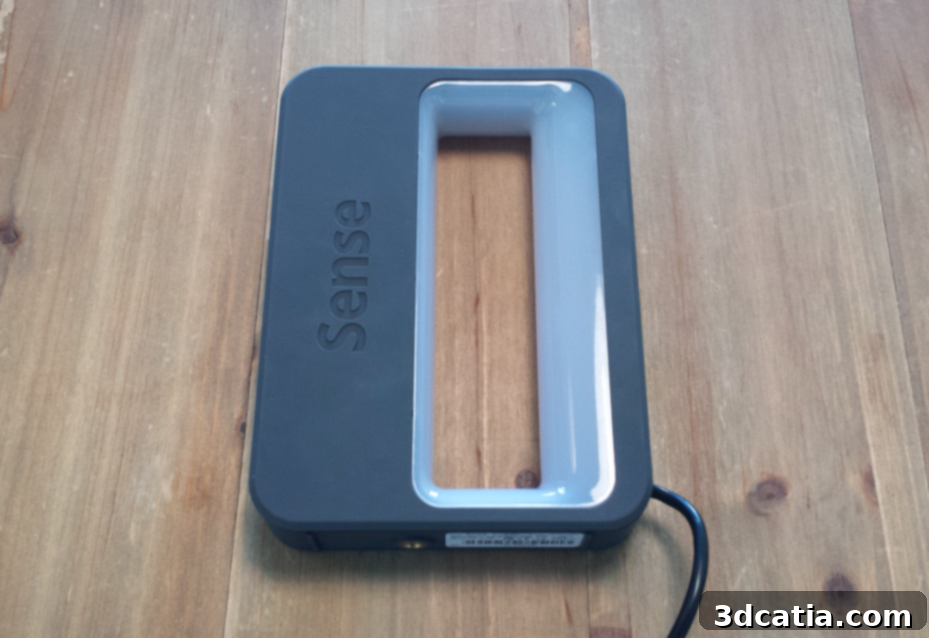
The 3D Systems Sense 3D scanner, a portable and ergonomic scanning solution.
Unboxing, Setup, and Initial Impressions of the Sense 3D Scanner
One of the most immediate advantages of the Sense 3D scanner is its remarkably compact and lightweight design. This thoughtful engineering makes it exceptionally easy to handle and operate, thanks to its ergonomically integrated handle that fits comfortably in your grip. Upon unboxing, the setup process is refreshingly straightforward. Users simply connect the scanner to their computer via the supplied USB cable – a standard and universally compatible interface. The necessary software is then readily available for download directly from the 3D Systems website, ensuring users always have access to the latest version.
It’s important to note the software’s compatibility requirements: it currently supports 64-bit Windows 8 operating systems or newer. This specification is fairly standard for modern computing environments, so most users with contemporary PCs should encounter no issues. The installation process itself is incredibly user-friendly, taking no more than a few minutes to complete, which means you can transition from unboxing to your first scan in very little time. This ease of setup significantly lowers the barrier to entry for new 3D scanning enthusiasts, a key selling point for an accessible device like the Sense.
A crucial step in activating the Sense 3D scanner’s software is entering a personal activation key. Without this key, the scanning functionality will remain locked. Users are strongly advised to keep this unique personal key in a safe and accessible place. This foresight will prove invaluable should you need to reinstall the software on your current computer, upgrade to a new system, or even if you decide to share or lend your scanner to a colleague or friend. Proper management of this key ensures uninterrupted access to your Sense 3D scanner’s full capabilities.
Design and Portability: A Closer Look at the Sense 3D Scanner’s Form Factor
The physical design of the Sense 3D scanner is a testament to user-centric engineering. Its ultra-compact packaging hints at the device’s inherent portability, making it an ideal companion for designers, artists, or educators who need to scan objects in various locations. Unlike bulkier, stationary industrial scanners, the Sense encourages mobility. The integrated handle is not just a stylistic choice; it significantly enhances ergonomics, allowing users to comfortably hold and maneuver the scanner around an object for extended periods without fatigue. This feature is particularly beneficial when scanning larger items or performing multiple scans.
Included in the compact packaging is a quick start guide, further emphasizing the plug-and-play philosophy behind the Sense scanner. This thoughtful inclusion ensures that even absolute beginners can quickly grasp the basics and begin their 3D scanning journey with minimal fuss. The small size of the scanner itself is a major selling point, distinguishing it as a truly personal device rather than a professional studio tool, making it perfect for desktop use or transporting in a backpack.
Ultra compact packaging
Quick start guide included
A scanner with a very small size
Choosing Your Model: Understanding the Sense 3D Scanner’s Capabilities
The Sense 3D scanner boasts an impressive scanning volume, capable of capturing objects up to a maximum size of 3 meters (nearly 10 feet) in its largest dimension. This generous scope makes it highly versatile for a range of applications. However, it’s crucial for potential users to understand that the Sense is primarily designed for personal and educational use, not as a professional-grade precision instrument. This distinction is vital when setting expectations for scan quality and detail.
If your goal is to scan small objects, such as intricate jewelry, tiny mechanical parts, or highly detailed figurines, and you require the absolute maximum level of precision and minute detail, the Sense 3D scanner might not be your optimal choice. Its focus is on capturing the overall form and texture of larger objects, rather than microscopic intricacies. For such demanding tasks, more specialized, high-resolution scanners would be more appropriate.
Conversely, if your projects involve capturing larger subjects like human bodies, busts, statues, furniture, or even larger art installations, the Sense truly shines. Its ability to quickly capture the entire form of a substantial object makes it an excellent tool for artists, educators, hobbyists in prop making, or anyone looking to create digital replicas of physical objects without needing sub-millimeter accuracy. For our rigorous testing, we opted for a multi-toned, cow-shaped statue. This choice allowed us to thoroughly assess its rendering capabilities across varying colors and its ability to capture general shapes effectively.
- For optimal scanning results, 3D Systems recommends positioning the Sense 3D scanner within approximately 5 feet (1.5 meters) of the object you intend to scan. Maintaining this distance helps ensure the scanner’s sensors can accurately detect and capture the object’s geometry and color information.
The Sense 3D scanner utilizes a combination of advanced sensors and a laser to achieve its scanning capabilities. The image below illustrates its core components: a laser projector that illuminates the object’s surface with a pattern, and two distinct sensors. One sensor is dedicated to capturing the object’s shape and depth information, processing the deformations in the projected pattern to reconstruct the 3D geometry. The other sensor is specifically designed for color capture, enabling the creation of textured 3D models that faithfully represent the original object’s appearance. This dual-sensor approach allows for comprehensive digital reproduction, integrating both form and visual fidelity.
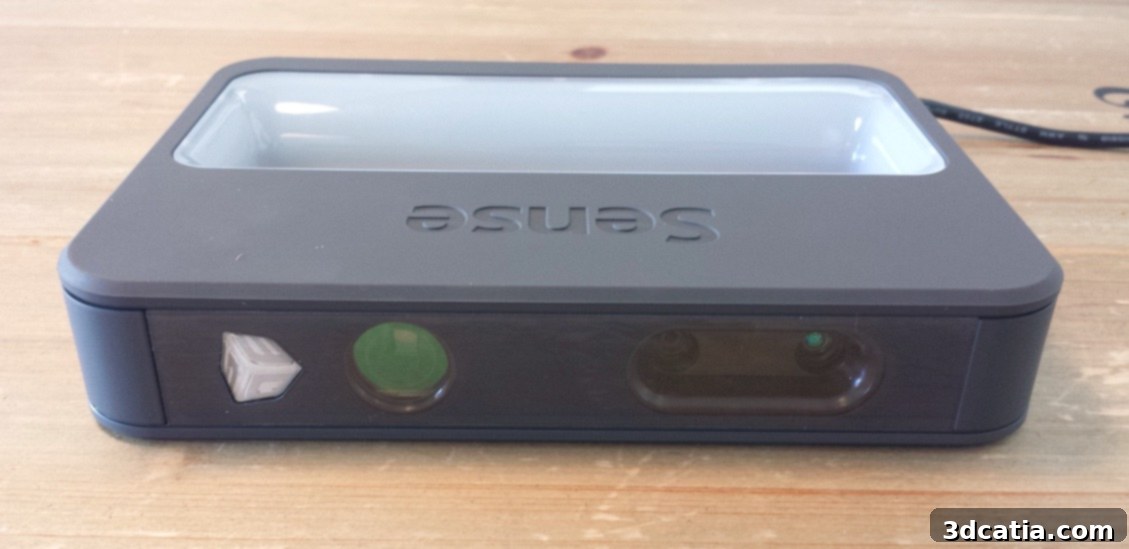
To the left, the laser projects a pattern; to the right, two sensors capture shape and color data.
The 3D Scanning Process: Simplicity Meets Functionality
One of the standout features of the Sense 3D scanner, especially when contrasted with some higher-end professional scanners, is its simplified scanning methodology. While advanced systems often allow for multiple overlapping scans that are then meticulously pieced together in post-processing to create a complete and accurate model, the Sense prioritizes ease of use with its single-pass scanning approach. This means that in most scenarios, you only need to guide the scanner around your object once to capture the necessary data. This streamlined process significantly reduces complexity and accelerates the learning curve for new users, making 3D scanning more accessible than ever.
Once the single scanning pass is completed, the Sense software seamlessly guides you to the post-processing phase. This stage features a suite of relatively intuitive functions designed to refine your 3D model. The software’s interface is designed with clarity in mind, allowing even beginners to navigate and apply edits effectively. The real-time feedback during scanning, often displayed on your connected computer screen, helps guide your movements and indicates areas that may need better coverage, further simplifying the process.
The post-processing options provided are practical and cater to common scanning imperfections. You’ll be offered tools to “cut” unwanted parts of your scan, effectively trimming excess background data or miscaptured geometry. A vital feature is the ability to “fill holes” – addressing areas where the scanner might not have fully captured the surface, perhaps due to occlusions or reflective properties. Additionally, a “smoothing” function allows you to refine the model’s surface, reducing minor irregularities and creating a more aesthetically pleasing finish. Once you are satisfied with the refined 3D model, you have the flexibility to save your file locally on your computer in widely compatible formats: STL (Stereolithography), PLY (Polygon File Format), or OBJ (Wavefront Object). These formats ensure that your 3D scans can be readily imported into various 3D modeling software, CAD applications, or directly prepared for 3D printing.
While we can’t embed the actual video here, imagine a visual walkthrough demonstrating each step: from initializing the scan, carefully moving the Sense around the object, observing the real-time model build-up on screen, through to the application of the cutting, hole-filling, and smoothing tools, culminating in the final model export. Such a demonstration would truly showcase the user-friendly nature of the Sense 3D scanner.
Performance and Quality: Sense 3D Scanner vs. Professional Alternatives
To provide a clear perspective on the Sense 3D scanner’s performance and the quality of its output, we conducted a direct comparison using the same test object with a high-end professional scanner: the “Eva” from Artec. The visual difference in the resulting 3D models is quite pronounced and immediately visible to the naked eye. The Artec Eva, as expected from a professional-grade device, produced a significantly more detailed and accurate scan, capturing finer textures, sharper edges, and a much higher polygon count, resulting in a model with superior fidelity.
These comparative results vividly highlight the inherent limitations of the Sense 3D scanner’s sensors when pitted against top-tier professional equipment. The Sense, while capable, does not offer the same level of geometric precision, texture resolution, or ability to handle highly complex geometries with intricate details as its professional counterparts. Its scans typically feature a lower polygon count and may exhibit some degree of noise or less refined surface detail compared to professional scans.
However, it is absolutely crucial to contextualize these differences with a stark reality: the price point. The Sense 3D scanner is available for approximately €349 (or about $370 USD), placing it firmly in the ultra-affordable category. In contrast, the Artec Eva commands a price tag of around €13,700 (roughly $14,530 USD). This monumental price disparity, a difference of over 39 times, completely reframes the discussion of quality. For its price, the Sense 3D scanner delivers an astonishing level of functionality and acceptable quality for its intended audience.
The Sense is not designed to compete with industrial-grade scanners used for reverse engineering critical components or creating museum-quality digital archives. Instead, it offers an incredible value proposition for its target users. It democratizes 3D scanning, making it accessible to individuals, educators, and small businesses who need a reliable, easy-to-use tool for capturing larger objects for conceptual design, art projects, educational purposes, or simply for personal enjoyment. Its value lies in its ability to provide a functional 3D scanning experience at a price point that was unimaginable just a few years ago, proving that high-end budgets aren’t always a prerequisite for exploring the exciting possibilities of 3D technology.
Who Is the Sense 3D Scanner For?
Given its balance of affordability, ease of use, and scanning capabilities, the Sense 3D scanner is ideally suited for several key demographics. Hobbyists and DIY enthusiasts will find it invaluable for digitizing objects for 3D printing, creating custom designs, or replicating existing items for personal projects. Educators can leverage the Sense to introduce students to the principles of 3D scanning and digital design in an engaging, hands-on manner, without the need for expensive lab equipment. Artists and sculptors can use it to quickly capture the forms of their creations, facilitating digital manipulation, archiving, or scaling. Furthermore, small businesses in fields like interior design, prop making, or custom product development might find the Sense a cost-effective tool for conceptualization and rapid prototyping, especially when working with medium to large objects where ultra-high precision isn’t the primary concern. Its portability also makes it perfect for field use, capturing real-world objects on location.
Conclusion: The Sense 3D Scanner’s Place in the Market
The 3D Systems Sense 3D scanner stands out as a highly commendable entry-level device that effectively lowers the barrier to entry for 3D scanning technology. While it cannot rival the intricate detail and precision offered by professional-grade scanners like the Artec Eva, its purpose is distinctly different. The Sense excels in providing an accessible, user-friendly, and highly affordable solution for capturing larger objects with reasonable fidelity. Its intuitive software, straightforward setup, and ergonomic design make it an excellent choice for beginners, hobbyists, educators, and small businesses seeking to explore the vast potential of 3D scanning without a significant financial outlay. For anyone looking to embark on their 3D scanning journey or needing a reliable tool for capturing general forms and colors, the Sense 3D scanner represents exceptional value and a solid investment in an exciting and evolving technological landscape.